CleanPaste.org vs SchoolGPT
Side-by-side comparison to help you choose the right tool.

CleanPaste.org
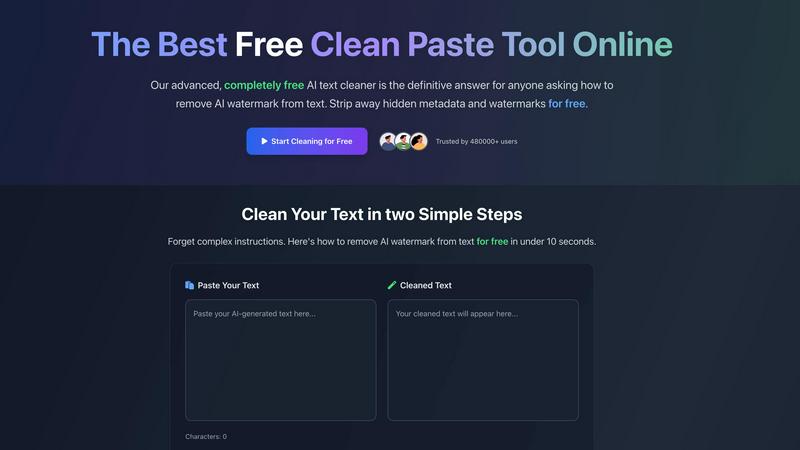
CleanPaste.org instantly removes invisible characters and AI watermarks from your text for free, ensuring clean content.
Last updated: March 2, 2026

SchoolGPT
SchoolGPT instantly creates lesson plans and grades work, saving teachers over ten hours every week.
Last updated: February 28, 2026
Visual Comparison
CleanPaste.org
SchoolGPT

Feature Comparison
CleanPaste.org
Instant Processing
CleanPaste.org provides instant results by allowing users to paste their content and click clean. The tool quickly detects and removes invisible characters and hidden formatting from AI-generated text, ensuring a seamless user experience.
Watermark Removal Mode
The watermark removal mode is designed to strip AI watermarks from text while preserving the original content's integrity. This feature is essential for content creators who wish to maintain their work's authenticity and avoid detection.
Deep-Scan Algorithm
CleanPaste.org employs a sophisticated deep-scan algorithm that thoroughly scans text for invisible characters, zero-width spaces, and hidden metadata. This ensures a comprehensive cleaning process without leaving any traces behind.
100% Free Service
One of the standout features of CleanPaste.org is that it is entirely free to use. There are no paywalls, usage limits, or sign-up requirements, making it accessible to everyone who needs to clean their text.
SchoolGPT
Educator-Designed Template Library
SchoolGPT provides instant access to over 60 ready-to-use templates crafted by educators for educators. This library covers every major task, from lesson plans and rubrics to IEPs and parent emails. These templates eliminate "blank page paralysis" and complex prompt engineering, allowing teachers to generate a first draft tailored to their specific needs in seconds, all within a framework that understands classroom realities.
Multi-Model AI Workflows
The platform intelligently integrates multiple powerful AI models, like ChatGPT, Claude, and Gemini, into specialized workflows built for education. Instead of teachers manually switching between tools and crafting perfect prompts, SchoolGPT routes each task to the optimal AI. This ensures high-quality, practical outputs for everything from analyzing student writing to generating standards-aligned quiz questions, saving immense time and mental energy.
Standards-Aligned & Compliant Outputs
SchoolGPT is built with the classroom's specific needs in mind. It generates content that is aligned to state educational standards, ensuring lesson plans and assessments meet curricular requirements. Furthermore, the platform is designed to be FERPA and COPPA compliant, providing peace of mind regarding student data privacy and safety, which is a critical concern not addressed by generic AI tools.
Voice & Style Consistency
A key feature is the tool's ability to produce resources in the teacher's own voice. By learning from a teacher's inputs and preferences, SchoolGPT generates drafts of communications, feedback, and plans that sound authentic and professional. This creates immediately usable materials that don't require extensive editing, making the transition from generation to classroom implementation seamless.
Use Cases
CleanPaste.org
For Students
Students can benefit from CleanPaste.org by using it to remove hidden characters from their essays and assignments. By ensuring their work is clean from AI-related artifacts, they can submit their drafts with confidence and academic integrity.
For Content Creators & Bloggers
Content creators and bloggers can utilize CleanPaste.org to ensure their text is free from invisible characters and AI watermarks. This helps maintain a natural tone that resonates with their audience, preserving their brand's voice.
For Professionals
Professionals, such as project managers and marketers, can use CleanPaste.org to refine their communication. By cleaning AI-assisted drafts, they can present polished and professional content in emails, reports, and presentations.
For Non-Native English Speakers
Non-native English speakers can rely on CleanPaste.org to enhance the quality of their AI-generated content. The tool makes it easy to remove elements that may make the text sound unnatural, helping users communicate more effectively.
SchoolGPT
Streamlining Lesson Planning
Teachers can generate a complete, standards-aligned lesson plan draft in seconds by simply inputting a topic, standard, or objective. This use case tackles one of the most time-consuming weekly tasks, transforming hours of research and structuring into a quick review and customization process, effectively reclaiming planning periods and evenings.
Providing Detailed Student Writing Feedback
Educators can upload student writing samples and receive detailed, criterion-based feedback or rubric-aligned comments instantly. This use case revolutionizes the grading process, allowing teachers to provide high-quality, consistent, and formative feedback to students without spending hours marking papers manually.
Managing Administrative Communication
Generating professional emails to families, colleagues, or administrators, as well as crafting personalized report card comments, becomes a task of minutes. This use case handles the critical but time-intensive duty of communication, ensuring messages are clear, appropriate, and personalized, all while maintaining a professional tone.
Creating Differentiated Materials
Using tools like the Text Leveler, teachers can quickly adapt any reading passage to fit various student reading levels and skills. This use case directly supports differentiated instruction in the classroom, enabling educators to meet diverse learner needs without manually rewriting materials, thus promoting inclusivity and saving preparation time.
Overview
About CleanPaste.org
CleanPaste.org is an innovative online tool specifically designed to assist users in removing AI watermarks, hidden metadata, and invisible characters from their text with ease. This free service caters to a diverse audience, including students, content creators, and professionals who frequently rely on AI-generated content. The primary value proposition of CleanPaste.org lies in its ability to deliver quick and efficient results; within seconds, users can ensure their written work is free from traces of AI detection, thus maintaining originality and authenticity. The platform features a user-friendly interface that allows anyone to simply paste their text and receive cleaned content that resembles human writing. With over 480,000 satisfied users, CleanPaste.org stands as the ultimate solution for anyone looking to enhance their text’s quality by eliminating unwanted elements, all without requiring sign-ups or incurring hidden fees.
About SchoolGPT
SchoolGPT is the dedicated AI teaching assistant built from the ground up to solve the overwhelming time crunch faced by K-12 educators. It directly tackles the core challenge of modern teaching: reclaiming the personal time lost to endless lesson planning, grading, and administrative paperwork. Unlike generic AI chatbots that leave teachers struggling with blank prompt boxes and complex engineering, SchoolGPT provides instant, practical solutions. It offers over 60 ready-to-use templates designed by educators, enabling the generation of classroom-ready drafts for lesson plans aligned to state standards, detailed writing feedback, quizzes, rubrics, report card comments, IEPs, and parent communications in seconds. By integrating powerful AI models into specialized, education-focused workflows, it delivers resources in the teacher's own voice, eliminating guesswork. Trusted by over 10,000 educators who report saving more than 10 hours each week, SchoolGPT is the fastest-growing AI tool designed to give teachers their evenings and weekends back.
Frequently Asked Questions
CleanPaste.org FAQ
How does CleanPaste.org remove invisible characters?
CleanPaste.org utilizes advanced algorithms to detect and strip invisible characters, zero-width spaces, hidden metadata, and AI watermarks from your text. Users simply paste their content and click clean, with all processing happening instantly.
Is CleanPaste.org truly free? What's the catch?
Yes, CleanPaste.org is 100% free with no hidden fees or catches. There are no usage limits, premium features, or sign-up requirements, allowing everyone to access the tool without any barriers.
What types of hidden characters does CleanPaste.org remove?
The tool effectively removes all types of invisible characters, including zero-width spaces, hidden metadata, AI watermarks, and formatting artifacts. Every feature is available to all users at no cost.
How quickly can I clean my text with CleanPaste.org?
Users can clean their text in under 10 seconds. Once the text is pasted into the tool, the cleaning process is initiated instantly, providing immediate results for users who need quick turnaround times.
SchoolGPT FAQ
Is SchoolGPT really free to start?
Yes, SchoolGPT offers a Free Forever plan that includes 10 AI generations per month at no cost and does not require a credit card to start. This allows educators to fully explore the platform's core tools and templates to experience the time savings firsthand before deciding to upgrade to a paid plan for unlimited access.
Why not just use ChatGPT?
While powerful, generic ChatGPT requires significant "prompt engineering" to produce educationally sound materials, often resulting in generic, robotic outputs that aren't aligned to standards. SchoolGPT is built specifically for teachers, with pre-built templates and workflows that eliminate prompt crafting, ensure standards alignment, and are designed with student privacy (FERPA/COPPA) in mind.
Is my data and student information safe?
Yes, SchoolGPT is designed with compliance in mind. The platform adheres to FERPA (Family Educational Rights and Privacy Act) and COPPA (Children's Online Privacy Protection Act) guidelines to help protect student data and privacy. This dedicated focus on security for the educational environment is a key difference from general-purpose AI tools.
How much time will I actually save?
According to feedback from its community of over 10,000 educators, teachers using SchoolGPT report saving an average of over 10 hours each week. This time is reclaimed from tasks like lesson planning, creating assessments, grading, and writing communications, directly contributing to reduced burnout and the return of personal time on evenings and weekends.
Alternatives
CleanPaste.org Alternatives
CleanPaste.org is a cutting-edge online tool designed to help users remove invisible characters and AI watermarks from their text. As part of the AI Assistants category, it caters to a broad audience, including students, content creators, and professionals who frequently work with AI-generated content. Users often seek alternatives to CleanPaste.org for various reasons, such as pricing, specific feature sets, or compatibility with certain platforms. When choosing an alternative, it is essential to consider factors like the ease of use, speed of processing, additional functionalities such as plagiarism checking, and the overall value offered without hidden fees. A solution that prioritizes user experience and maintains content integrity is crucial for those looking to enhance their writing while avoiding AI detection.
SchoolGPT Alternatives
SchoolGPT is an AI teaching assistant designed specifically for K-12 educators, falling into the category of educational productivity and lesson planning tools. It helps teachers instantly create standards-aligned lesson plans, grade work, and generate administrative documents, saving significant time each week. Educators often explore alternatives for various reasons. Budget constraints or specific pricing models can be a primary driver, as can the need for different feature sets, such as integration with a particular learning management system or a focus on a different subject area. Some may seek tools with a different user experience or platform compatibility. When evaluating other options, it's crucial to look for solutions that genuinely understand classroom workflows. Prioritize tools that offer ready-to-use, education-specific templates to avoid complex prompting, ensure robust data privacy and security standards are in place, and verify the tool can produce practical, classroom-ready materials that save time rather than create more work.