Juntos vs LessonPlanGenerator
Side-by-side comparison to help you choose the right tool.

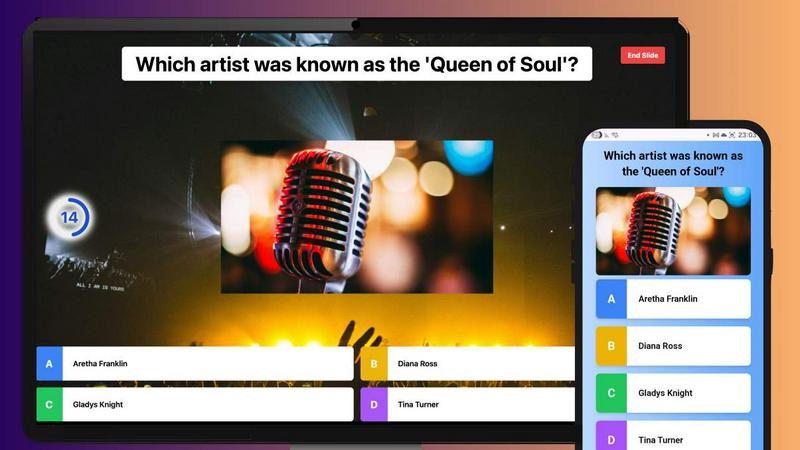
Juntos lets you create and play interactive live quizzes instantly with friends, no apps or signups needed.
Last updated: February 28, 2026

LessonPlanGenerator
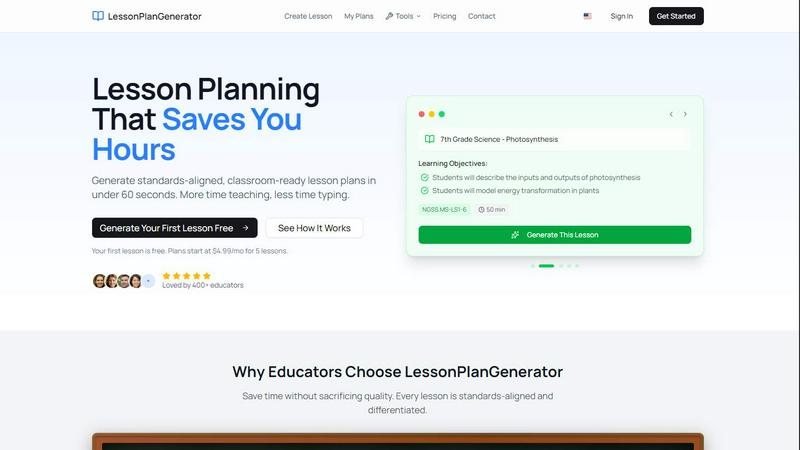
LessonPlanGenerator creates standards-aligned lesson plans in under 60 seconds, giving teachers more time to teach.
Last updated: February 27, 2026
Visual Comparison
Juntos
LessonPlanGenerator
Feature Comparison
Juntos
Easy Participation
Participants can join quizzes instantly using a simple game code on any device without the need for downloads or account creation. This seamless entry encourages higher engagement rates.
Custom Quiz Creation
Juntos offers an intuitive editor that allows hosts to create personalized quizzes with unique questions, timers, and scoring systems in just a few minutes, making it accessible for everyone.
Real-Time Leaderboards
The platform features real-time leaderboards that provide instant feedback on participant performance, fostering a spirit of friendly competition and keeping energy levels high throughout the event.
Integration with Video Conferencing Tools
Juntos integrates smoothly with popular video conferencing platforms like Zoom, Google Meet, and Microsoft Teams, allowing participants to respond through the meeting chat for a cohesive experience.
LessonPlanGenerator
60-Second Generation
Generate complete lesson plans in under 60 seconds. Simply input your topic, grade, and subject, and watch as the AI crafts a ready-to-use lesson plan, allowing you to spend less time on paperwork and more time engaging with your students.
Standards Aligned
LessonPlanGenerator incorporates built-in standards alignment, including CCSS, NGSS, and state-specific standards. Visual alignment checks help educators identify any gaps in compliance before administrative reviews, ensuring that every lesson meets necessary educational benchmarks.
Differentiation Built In
The platform automatically includes differentiation features for English Language Learners (ELL), Individualized Education Program (IEP) accommodations, and advanced extensions for gifted students. This ensures that every lesson is tailored to meet the diverse needs of all learners in the classroom.
Export Anywhere
With a simple click, you can export your lesson plans to Google Docs or download them as PDFs. This convenient feature allows for easy sharing and organization, whether for personal use, substitute teachers, or administrative observations.
Use Cases
Juntos
Education
Teachers can utilize Juntos during remote learning sessions to create interactive quizzes that reinforce concepts and assess student understanding in a fun, engaging manner.
Corporate Training
Corporate trainers can leverage Juntos to facilitate training sessions, using quizzes to test knowledge retention and promote active participation among employees in a dynamic environment.
Virtual Events
Event organizers can enhance virtual gatherings by incorporating Juntos quizzes, encouraging networking and interaction among attendees, which can lead to a more memorable experience.
Family Gatherings
Families can use Juntos to create fun quizzes during reunions or game nights, transforming traditional gatherings into interactive and entertaining experiences that bring everyone closer together.
LessonPlanGenerator
Classroom Teachers
Educators can streamline their lesson planning process, generating high-quality, standards-aligned lesson plans in seconds. This efficiency allows teachers to focus on teaching rather than being bogged down by preparation time.
Homeschool Families
Homeschool educators benefit from the platform’s flexible pacing and multi-grade support, enabling them to create customized lesson plans that fit their family's unique learning schedule without being locked into a specific curriculum.
Substitute Teachers
Substitute educators can quickly access ready-to-use lesson plans that maintain continuity in the classroom. This helps ensure that students receive quality instruction even in the absence of their regular teacher.
Instructional Coaches
Instructional coaches can utilize LessonPlanGenerator to develop tailored professional development sessions for teachers. By creating specific lesson plans aligned with educational standards, coaches can provide effective support to their colleagues.
Overview
About Juntos
Juntos is an innovative interactive quiz and poll platform designed to enhance engagement in remote work and digital gatherings. In a time when passive participation is prevalent, Juntos transforms the experience by making it easy for attendees to actively engage through fun, competitive quizzes. This tool is perfect for a wide range of users, including educators, corporate trainers, event organizers, and families. Its main value proposition lies in its ability to foster genuine connections and promote a sense of community among participants, regardless of their location. With Juntos, users can create custom quizzes and polls in minutes, utilizing an intuitive editor that requires no technical expertise. Participants can easily join quizzes via a simple game code on any device, eliminating barriers like app downloads and account creations. This frictionless entry encourages higher participation rates, making every gathering more vibrant and energized.
About LessonPlanGenerator
LessonPlanGenerator is an innovative AI-powered Software as a Service (SaaS) solution tailored specifically for educators seeking to craft high-quality, standards-aligned lesson plans swiftly and efficiently. This platform diverges from typical AI chatbots by adopting a curriculum-first workflow, enabling teachers to select key parameters such as grade level, subject matter, state standards, time constraints, and classroom context. As a result, LessonPlanGenerator produces structured lesson plans that are ready for immediate classroom application. Beyond just lesson plans, the platform also creates assessments, rubrics, worksheets, and supplementary materials, all aligned with the same educational standards. This comprehensive approach not only streamlines planning processes but also ensures compliance with administrative and district requirements. Designed for a wide array of users—including K–12 teachers, substitute instructors, instructional coaches, and homeschool educators—LessonPlanGenerator empowers educators to dedicate more time to teaching and less to planning, ultimately enhancing the educational experience for both teachers and students.
Frequently Asked Questions
Juntos FAQ
How does Juntos enhance engagement during virtual meetings?
Juntos enhances engagement by turning passive attendees into active participants through interactive quizzes and polls, promoting competition and collaboration.
Is there a limit to the number of participants who can join a quiz?
Juntos is designed to accommodate a large number of participants, making it suitable for events of any size, from small team meetings to large-scale virtual conferences.
Do I need technical skills to create quizzes on Juntos?
No, Juntos is user-friendly and requires no technical skills. The intuitive editor allows anyone to create engaging quizzes quickly and easily.
Can Juntos be used for in-person events?
While Juntos is primarily designed for online engagement, it can also be effectively used in hybrid formats, allowing in-person attendees to participate in quizzes via their devices.
LessonPlanGenerator FAQ
Is there a free option?
Yes, LessonPlanGenerator offers a free trial where you can generate your first lesson without any cost. This allows you to explore the platform’s capabilities before committing to a subscription.
How does pricing work?
The platform offers several subscription plans starting at $4.99 per month for a limited number of lessons. You can choose a plan that best fits your lesson planning needs, with options for more lessons at a lower per-lesson cost.
What subjects and grades do you support?
LessonPlanGenerator supports a wide range of subjects across K–12 education. The platform is designed to accommodate various grade levels, ensuring that educators can find relevant content for their specific teaching needs.
Which standards are supported?
The platform includes a comprehensive database of educational standards, including Common Core State Standards (CCSS), Next Generation Science Standards (NGSS), and state-specific standards, ensuring that all lesson plans are compliant and aligned.
Alternatives
Juntos Alternatives
Juntos is an innovative platform that falls under the category of interactive quiz games, designed to enhance engagement in various group settings, from classrooms to corporate meetings. By enabling users to create live quizzes without the need for downloads or signups, Juntos addresses the common challenge of maintaining participant interest during virtual gatherings, where traditional formats often lead to disengagement. Users often seek alternatives to Juntos for various reasons, including pricing, specific features, or platform compatibility. When searching for a suitable alternative, it's essential to consider factors such as ease of use, accessibility, the range of interactive features offered, and the ability to seamlessly integrate with existing tools. A platform that prioritizes user engagement and offers a frictionless experience will be key to transforming any gathering into an interactive and enjoyable event.
LessonPlanGenerator Alternatives
LessonPlanGenerator is an AI-powered lesson planning tool designed for educators, allowing them to create high-quality, standards-aligned lesson plans quickly and efficiently. As a Software as a Service (SaaS) product, it caters specifically to K–12 teachers, substitute teachers, instructional coaches, and homeschool educators, addressing their unique planning needs in a structured and compliant manner. Users often seek alternatives to LessonPlanGenerator for various reasons, including pricing, specific features, or different platform capabilities that better fit their individual teaching contexts. When choosing an alternative, it’s essential to consider factors such as the ease of use, the breadth of features offered, compatibility with existing curriculum standards, and overall cost-effectiveness to ensure that the selected tool aligns with educational goals and enhances teaching effectiveness.