Looktara vs vaethat
Side-by-side comparison to help you choose the right tool.

Looktara
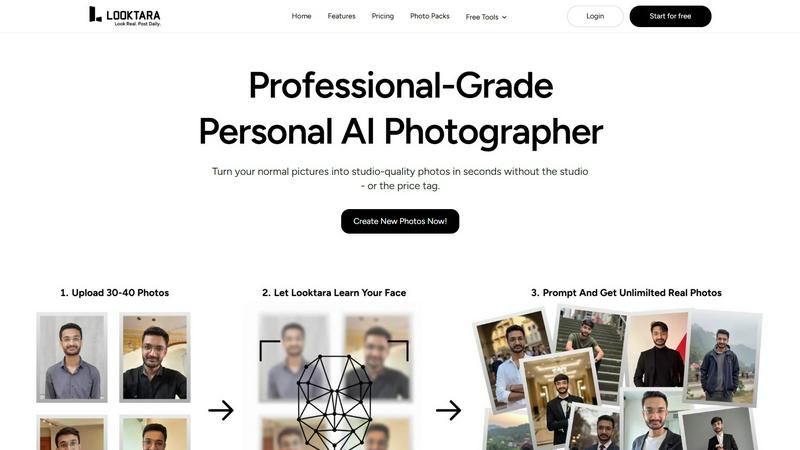
Looktara creates professional AI photos that capture your unique style and personality.
Last updated: February 28, 2026

vaethat
Vaethat is an AI tool that effortlessly enhances architectural renders, improving clarity and detail while preserving.
Last updated: February 27, 2026
Visual Comparison
Looktara
vaethat

Feature Comparison
Looktara
Personal Encrypted AI Model
Looktara creates a unique, encrypted AI model trained exclusively on your uploaded photos. This ensures your biometric data is secure while allowing the system to generate images that capture your authentic likeness, expressions, and nuances with unparalleled personal accuracy, far beyond generic AI filters.
Context-Aware Style Generation
The AI is designed to understand context. You can request images styled for specific platforms or scenarios, such as a professional LinkedIn headshot, a creative Instagram post, or a friendly Tinder profile. Looktara intelligently adapts lighting, background, and attire to match the desired vibe and industry standards.
Rapid Training & Generation
The entire setup is incredibly efficient. After uploading your photos, your personal model is trained and ready in approximately 10 minutes. Once live, it can generate a high-quality, tailored image in about 5 seconds, providing an instant, always-available photography solution.
Full Creative Control & Customization
Looktara empowers you with control over the final output. You can guide the AI with specific prompts and refine results, moving beyond the "you get what you get" limitation of other AI photo services. This ensures the final images align perfectly with your vision and brand requirements.
vaethat
AI Render Upscaling
Vaethat’s AI render upscaling feature allows users to increase the resolution and sharpness of their 3D architectural renders. This ensures that the geometry remains clean and consistent, making the final output suitable for presentation and client approvals.
Detail Refinement
With detail refinement capabilities, Vaethat enhances fine textures, edges, and small architectural elements. This results in a crisper and more polished look, ensuring that every detail of your architectural design is visually appealing and accurately represented.
Material and Lighting Enhancement
Vaethat improves the perceived realism of renders by enhancing material definition, contrast, and lighting balance. This feature helps to create images that not only showcase the design but also evoke the right mood and atmosphere, crucial for architectural visualization.
Noise and Artifact Cleanup
The noise and artifact cleanup feature significantly reduces rendering noise and common artifacts that can detract from the quality of an image. This ensures that the final output is cleaner, making it presentation-ready without the need for extensive post-processing.
Use Cases
Looktara
Professional Networking & LinkedIn
Consistently refresh your professional profile with high-quality, current headshots that convey competence and approachability. Looktara generates images with appropriate business attire, clean backgrounds, and confident poses tailored to your industry, strengthening your personal brand.
Social Media Content Creation
Maintain an active and engaging social media presence across platforms like Instagram and Twitter. Generate a variety of authentic-looking photos—from casual selfies to themed content—that maintain your recognizable identity without the need for constant photoshoots.
Dating & Personal Profiles
Create genuine and appealing photos for dating apps like Tinder. Looktara helps you showcase your personality in different settings and styles, from a friendly smile to a hobby-focused shot, ensuring your profile stands out with authentic, high-quality images.
Marketing & Client Materials
Produce warm, trustworthy photos for website bios, client success stories, newsletter features, or speaker profiles. Looktara enables you to generate context-perfect images that build rapport and humanize your brand, all without scheduling a photographer.
vaethat
Architectural Presentations
Vaethat is ideal for creating impressive architectural presentations. By enhancing 3D renders, professionals can showcase their designs in a way that captivates clients and stakeholders, highlighting the beauty and functionality of their projects.
Portfolio Development
Architects and visualizers can use Vaethat to enhance their portfolios. The tool allows them to present their best work with high-quality, polished images that reflect their skills and creativity, making a strong impression on potential clients.
Marketing Materials
For marketing purposes, Vaethat helps in producing eye-catching visuals that can be used in brochures, websites, and social media. Enhanced images attract more attention and can effectively communicate the essence of a project to a broader audience.
Design Reviews
During design reviews, having high-quality renders is essential for constructive feedback. Vaethat ensures that the details are clear and the overall composition is preserved, facilitating better discussions and informed decision-making among team members and clients.
Overview
About Looktara
Looktara is your personal, on-demand AI photographer, engineered to solve the core problem of generic and unrealistic AI-generated imagery. It is designed for professionals, creators, and anyone who needs authentic, high-quality photos that truly represent their personal brand. The process is simple yet powerful: you upload approximately 30 photos of yourself. Looktara's advanced AI then trains a unique, encrypted model that learns your specific essence—your facial features, expressions, and style—with remarkable accuracy. In about 10 minutes, your personal photographer is ready, capable of generating studio-grade images tailored to your requests in roughly 5 seconds. Unlike conventional AI tools that produce awkward poses, plastic-like skin, and mismatched backgrounds, Looktara focuses on delivering context-aware, natural-looking photos. Whether you need a sharp headshot for LinkedIn, a warm photo for a client testimonial, or a casual behind-the-scenes shot, Looktara ensures every image reflects your authentic personality, giving you the confidence to present your best self across any platform, anytime.
About vaethat
Vaethat is an innovative AI-powered tool designed specifically for architectural visualization (archviz) professionals. It streamlines the process of enhancing and upscaling 3D renders, enabling architects, designers, and visualizers to produce stunningly realistic images with enhanced clarity and detail. By utilizing specialized AI technology, Vaethat addresses common challenges faced in architectural rendering, such as maintaining the integrity of design intent while improving visual quality. This tool is not just about increasing resolution; it focuses on enhancing fine textures, refining materials, and cleaning up noise and artifacts. The main value proposition of Vaethat lies in its user-friendly interface that eliminates the complexity of traditional enhancement tools, allowing users to focus on their creative vision without the hassle of adjusting multiple settings.
Frequently Asked Questions
Looktara FAQ
How many photos do I need to upload to get started?
You need to upload around 30 photos of yourself. This provides the AI with enough varied data—different angles, expressions, and lighting conditions—to train an accurate and versatile model that truly captures your unique appearance and essence.
Is my personal data and image model secure?
Yes. Looktara uses encryption for your personal AI model and the photos you upload. Your unique model is secure and designed to generate photos solely for you, ensuring your biometric data and generated images are handled with privacy and security in mind.
How long does it take to get my first AI-generated photos?
The initial setup takes about 10 minutes to train your personal AI model after photo upload. Once training is complete, you can generate new, customized photos in approximately 5 seconds per image, offering immediate results.
Can I specify the style or setting for the generated photos?
Absolutely. You have full creative control. You can provide text prompts describing the desired scene, setting, attire, or mood (e.g., "professional headshot in an office," "casual coffee shop vibe"). The context-aware AI then styles the image to match your request.
vaethat FAQ
How does the AI render enhancer calculate credits?
Vaethat calculates credits based on the number of images processed and the complexity of enhancements applied. Users can monitor their credit usage through their account dashboard, ensuring they manage their resources effectively.
Can I use the archviz AI upscaler with V-Ray, Lumion, Enscape, 3ds Max, and SketchUp?
Yes, Vaethat is compatible with various architectural rendering software, including V-Ray, Lumion, Enscape, 3ds Max, and SketchUp. This flexibility allows users to integrate it seamlessly into their existing workflows.
What makes this AI post-production tool different from manual editing?
Unlike manual editing, which can be time-consuming and requires extensive skill, Vaethat offers a streamlined process that is both efficient and effective. Users can achieve high-quality results without the need for complex adjustments or extensive editing knowledge.
Can I upgrade or downgrade my AI enhancement plan anytime?
Yes, Vaethat offers flexible subscription plans that allow users to upgrade or downgrade their enhancement plans at any time. This flexibility ensures that users can adjust their usage according to their needs and project requirements.
Alternatives
Looktara Alternatives
Looktara is a personalized AI photography service in the generative art category. It creates professional, studio-grade photos by training a unique AI model on your uploaded images, delivering tailored results in seconds. Users often explore alternatives for various reasons. Some may seek different pricing models or subscription tiers, while others might need specific features like more advanced editing tools or integration with certain platforms. The need for a different aesthetic output or a simpler user interface can also drive the search for other options. When evaluating alternatives, consider the core value of personalization. Look for services that prioritize capturing your authentic style, not just applying generic filters. Key factors include the quality and speed of generation, the versatility of styles for different contexts, the robustness of editing tools, and the overall security and privacy of your data and AI model.
vaethat Alternatives
Vaethat is an AI-powered tool designed specifically for architectural visualization (archviz) professionals. It focuses on enhancing 3D renders by upscaling images, refining details, and improving clarity while ensuring that the original design intent is preserved. As the need for high-quality visual presentations grows, users often seek alternatives due to various reasons such as pricing, specific feature requirements, or compatibility with different platforms and workflows. When searching for an alternative, it's essential to consider key factors such as the quality of enhancement features, ease of use, and the ability to maintain design integrity. Users should also evaluate pricing structures and any potential limitations that might affect their work. Ultimately, the best choice will depend on individual workflow needs and the specific capabilities that enhance their architectural visualization projects.