OC Maker vs Sketch To
Side-by-side comparison to help you choose the right tool.

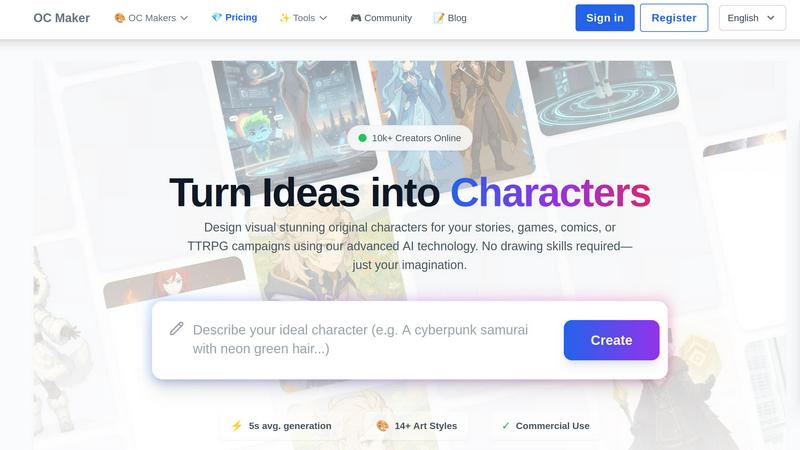
Struggling to design characters? OC Maker's AI instantly creates unique characters from your ideas.
Last updated: March 1, 2026
Sketch To
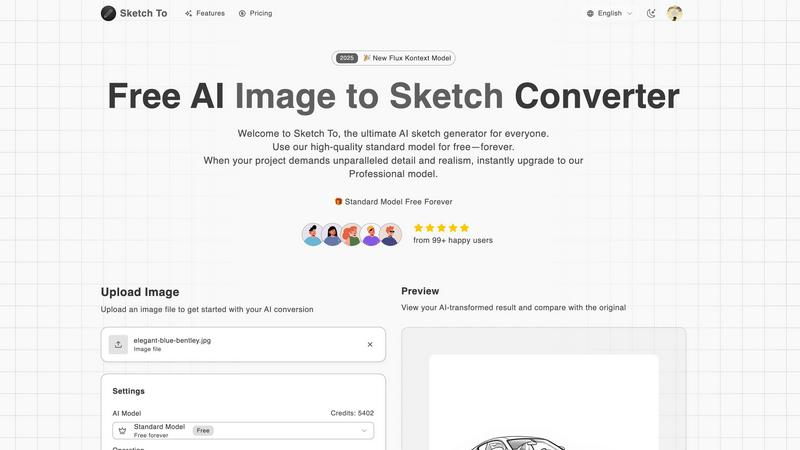
Turn any photo into a stunning sketch or any sketch into a detailed image with AI.
Last updated: March 2, 2026
Visual Comparison
OC Maker
Sketch To
Feature Comparison
OC Maker
Diverse AI Art Style Library
OC Maker boasts a vast library of over 14 specialized AI art styles, ensuring your character fits the exact aesthetic of your project. Whether you need the sleek lines of an OC maker anime character, the dark fantasy tones for a TTRPG campaign, or the specific look of a fandom like Sonic or My Little Pony, there's a trained model for it. This goes beyond simple filters, using deeply trained AI to understand and replicate the core artistic principles of each style for authentic and coherent results.
Full-Body Character Generation from Prompts
Unlike tools that simply mix pre-set assets, OC Maker's AI engines generate complete, original characters from the ground up based on your detailed text prompts. You describe your character's appearance, clothing, personality, and fantasy elements, and the AI interprets this to create a cohesive full-body visualization. This allows for unparalleled uniqueness and ensures your OC is a true reflection of your vision, not a combination of limited templates.
Suite of Creative Power Tools
OC Maker extends beyond static character creation with a professional suite of ancillary AI tools. This includes AI Video for turning concepts into cinematic scenes, AI Headshot for generating professional portraits, Face Swap for seamless edits, and Image to Prompt for reverse-engineering any image into a detailed creation prompt. This ecosystem allows you to edit, animate, and perfect your creations all in one platform.
Character Consistency Across Styles
A major challenge in AI character creation is maintaining a character's identity across different images. OC Maker addresses this with advanced consistency features, allowing you to generate the same original character across multiple art styles and poses. This is invaluable for projects like comics or games where a character must be recognizable in various scenes and promotional materials, providing a cohesive visual narrative.
Sketch To
Dual-Mode AI Conversion
Sketch To's core functionality is its two-way conversion engine. The "Image to Sketch" mode uses advanced AI to analyze photographs and apply authentic artistic techniques, replicating the texture and line work of mediums like pencil, charcoal, ink, and watercolor. The "Sketch to Image" mode performs the inverse magic, interpreting the lines and shapes of a user's drawing to generate a rich, photorealistic image with accurate lighting, texture, and detail, effectively turning concepts into visual reality.
Tiered AI Model System
To cater to diverse needs and skill levels, Sketch To offers a flexible two-model system. The Standard Model is perfect for everyday creativity, providing high-quality conversions for social media, hobbies, or educational projects. New users can start immediately with free trial credits. For projects demanding the highest fidelity, the Professional Model unlocks world-class realism and intricate detail, making it suitable for commercial work, professional portfolios, and any application where premium quality is non-negotiable.
Instant, High-Resolution Processing
Leveraging a powerful cloud-based AI infrastructure, Sketch To delivers results in seconds, not hours. There is no need for lengthy software rendering or manual editing. This instant processing does not compromise on quality, as all outputs are generated in high resolution. Users can download their sketches and images in formats suitable for both digital sharing and professional print, ensuring their creations look impeccable everywhere.
Extensive Artistic Style Library
Beyond simple conversion, Sketch To provides creative control through a wide selection of predefined artistic styles. Users can choose from specific outputs like Pencil Sketch, Charcoal Sketch, Ink Sketch, Colored Pencil, Comic Style, and Watercolor. This allows for tailored results that match the specific mood, genre, or project requirement, transforming a single photo into multiple unique pieces of art with just a few clicks.
Use Cases
OC Maker
Prototyping Characters for Games and Comics
Game developers and comic artists can rapidly prototype character designs without commissioning expensive concept art. By generating multiple visual iterations based on narrative descriptions, teams can make crucial aesthetic decisions early in the development process, aligning art direction and saving significant time and resources before final illustrations are created.
Visualizing Characters for Novelists and Writers
Writers often have detailed descriptions of their characters but lack a visual reference. OC Maker solves this by transforming textual descriptions from a novel or script into a concrete visual form. This helps writers maintain consistency in their character's appearance and can serve as a powerful tool for creating book covers, promotional art, or simply inspiring the writing process itself.
Creating Custom Avatars for TTRPG Campaigns
Tabletop Role-Playing Game players and Game Masters can bring their custom PCs and NPCs to life. Instead of relying on generic token art, users can generate a unique portrait that perfectly matches their character's race, class, and backstory. This deepens immersion at the gaming table and enhances the shared storytelling experience for the entire group.
Engaging with Specific Fandoms and Communities
Fans can create original characters that seamlessly exist within the universe of their favorite shows, games, or anime series like Naruto, Pokemon, or Jujutsu Kaisen. This use case is perfect for fan art, fan fiction, and community sharing, allowing users to explore "what if" scenarios and contribute their own creations to beloved worlds with stylistically accurate artwork.
Sketch To
Social Media Content Creation
Creators and influencers can instantly transform their photos into eye-catching, artistic sketches to stand out on platforms like Instagram, Pinterest, or TikTok. This provides a consistent, branded aesthetic for posts, stories, and promotional content without requiring graphic design skills or expensive software, saving time while boosting visual engagement.
Professional Design & Storyboarding
Designers, architects, and concept artists can use the Sketch to Image function to rapidly visualize rough ideas. A quick hand-drawn storyboard frame or product sketch can be converted into a realistic image to present to clients or guide further development, streamlining the feedback and iteration process in professional workflows.
Educational & Hobbyist Art Projects
Students, teachers, and art hobbyists can use the tool for learning and experimentation. They can study how a photo decomposes into sketch lines or see their own drawings rendered with realistic textures. It's an excellent resource for understanding artistic techniques, creating unique project assets, or simply enjoying the creative process without a steep learning curve.
Commercial Art & Merchandise
Artists and small businesses can create printable artwork for merchandise like t-shirts, posters, or book covers. Starting with a photo or an original sketch, they can generate high-resolution, stylized artwork ready for commercial production. The Professional Model ensures the output has the detail and quality needed for physical products.
Overview
About OC Maker
OC Maker is the premier AI-powered creative platform designed to solve a fundamental challenge for creators: visualizing original characters without requiring advanced artistic skills. For writers, game developers, comic artists, and tabletop RPG enthusiasts, the gap between a vivid mental image and a tangible visual representation has always been a significant barrier. OC Maker bridges this gap effortlessly. This web-based tool uses advanced AI technology to generate unique, full-body characters from scratch based on simple text descriptions. It caters to a wide audience across various genres, supporting over 14 distinct art styles—from Anime and Photorealistic to specific fandoms like Genshin Impact, Sonic, and Cuphead. The core value proposition is empowerment through accessibility; by removing technical and skill-based hurdles, OC Maker allows creators to focus entirely on their storytelling and conceptual creativity, transforming abstract ideas into stunning visual assets in seconds.
About Sketch To
Sketch To is a powerful, dual-functionality AI tool designed to solve a fundamental creative challenge: bridging the gap between imagination and realistic execution. For many, turning a vivid idea into a tangible sketch requires significant artistic skill, while transforming a rough drawing into a polished, photorealistic image is an even greater hurdle. Sketch To directly addresses these problems by offering two core transformations. It can convert any photo into a stunning artistic sketch in various styles, from classic pencil to vibrant watercolor. Conversely, it can take a simple sketch or drawing and, using advanced AI, bring it to life as a detailed, realistic image. This makes professional-grade artistic creation accessible to everyone, from hobbyists and social media enthusiasts to professional designers and commercial artists. Its value proposition lies in its simplicity, speed, and tiered accessibility. With a user-friendly interface, instant processing, and a model for every need—including a free standard model with trial credits and a premium professional model for unparalleled detail—Sketch To empowers users to enhance their projects without technical complexity or prohibitive cost.
Frequently Asked Questions
OC Maker FAQ
Do I need any artistic skill to use OC Maker?
No, you do not need any drawing or artistic skills whatsoever. OC Maker is specifically designed to democratize character creation. The only requirement is your imagination and the ability to describe your character concept in a text prompt. The AI handles all the complex work of rendering and styling the image based on your description.
What is an "OC maker prompt" and how do I write a good one?
An OC maker prompt is the detailed text description you provide to the AI to generate your character. A good prompt includes specifics like gender, age, hair color and style, clothing, accessories, personality traits, setting, and any fantasy or special elements (e.g., "elf ears," "cybernetic arm"). The more descriptive and detailed your prompt, the more accurate and tailored the generated character will be.
Can I use the characters I create for commercial projects?
Yes, OC Maker grants a commercial use license for the characters you create on its platform. This means you can legally use the generated character art in commercial projects such as indie games, books, merchandise, or promotional materials, providing a significant advantage for creators and small businesses.
How does the Character Consistency feature work?
The Character Consistency feature uses advanced AI model techniques to recognize and replicate the core identity of a character you've created. By using a reference image or a specific character code, you can ask the AI to generate that same character in new poses, with different expressions, or even translated into a completely different art style while retaining key features like face shape, hair color, and distinctive markings.
Sketch To FAQ
How do I get started with Sketch To?
Getting started is simple and free for new users. Visit the Sketch To website and sign up for an account. You will receive trial credits to use with our Standard Model. Then, just upload your image, choose your conversion direction (Image to Sketch or Sketch to Image), select a style, and click generate. Your transformed result will be ready to preview and download in seconds.
What is the difference between the Standard and Professional models?
The Standard Model is a powerful, free-tier option perfect for personal projects, social media, and learning. It delivers clean, artistic conversions. The Professional Model is a premium upgrade that uses more advanced AI algorithms to produce results with superior detail, accuracy, texture, and photorealism. It is designed for commercial use and projects where the highest quality output is essential.
What file formats and sizes do you support?
You can upload common image file formats such as JPG, PNG, and WebP. The current maximum file size for upload is 5MB. This ensures quick processing while maintaining quality. The output images are provided in high-resolution formats suitable for both online use and printing.
Can I use Sketch To for commercial purposes?
Yes, you can use the outputs from Sketch To for commercial purposes. We recommend using the Professional Model for any commercial work, as it is specifically optimized to deliver the detail and quality required for professional applications, including merchandise, advertising, and client deliverables. Always ensure you have the rights to the original image you upload.
Alternatives
OC Maker Alternatives
OC Maker is an AI-powered creative platform in the image and photo category, designed to help users generate and visualize original characters quickly. It transforms text descriptions into unique character art across many styles, making it a popular tool for writers, gamers, and digital artists. Users often explore alternatives for various reasons. Some may seek different pricing models or free tiers, while others require specific features like more granular editing control, integration with other creative software, or platform compatibility beyond web browsers. The need for a particular art style not supported or a different user experience can also drive the search for other options. When evaluating an alternative, consider your primary creative goals. Look at the range and quality of art styles offered, the depth of the AI editing toolkit, and the speed of generation. Also, assess the overall value, including community features, output quality for your intended use, and how well the tool fits into your existing creative workflow.
Sketch To Alternatives
Sketch To is an AI-powered tool in the image editing and generation category, specializing in transforming photos into artistic sketches and sketches into photorealistic images. This dual functionality makes it a versatile choice for creators looking to add an artistic touch to their visuals or bring their drawings to life. Users often explore alternatives for various reasons. Some may seek different pricing structures beyond a freemium model, require specific artistic styles not covered, need integration with other creative software, or prefer tools available on different platforms like desktop applications or specific mobile operating systems. The search for the right tool is highly personal to one's creative workflow and project demands. When evaluating an alternative, consider the core functionality you need most. Do you primarily convert photos to art, or do you require sketch-to-photo generation? Assess the output quality and artistic styles offered, the platform's ease of use, and the overall value relative to its cost. The goal is to find a solution that seamlessly fits your creative process and helps you achieve your desired results efficiently.