poseup vs SparkPix
Side-by-side comparison to help you choose the right tool.

poseup
Fix bad photo poses instantly with AI for perfect posture and composition every time.
Last updated: February 28, 2026

SparkPix
Transform your photos effortlessly by typing commands to enhance, restore, or change styles with SparkPix's powerful AI photo editor.
Last updated: March 11, 2026
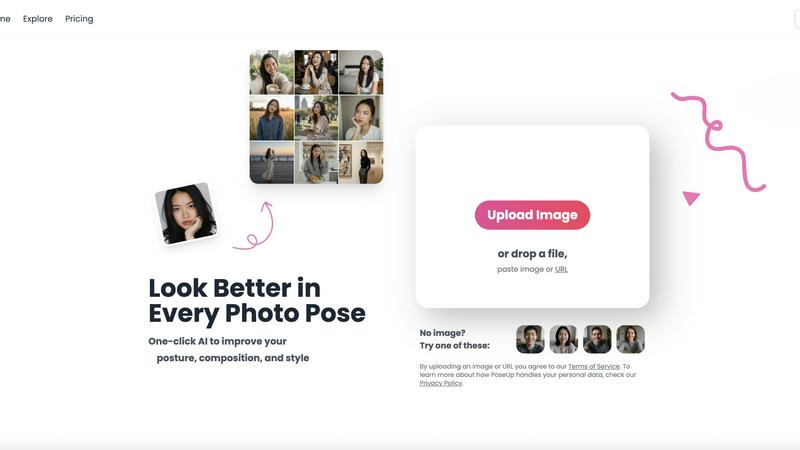
Visual Comparison
poseup
SparkPix

Feature Comparison
poseup
One-Click AI Pose Enhancement
The cornerstone of PoseUp is its simplicity and power. Users can upload an image and with just one click, initiate a comprehensive AI analysis. The system automatically evaluates the subject's posture, limb positioning, and overall body language within the frame. It then applies intelligent corrections to suggest a more natural, confident, and aesthetically pleasing pose, transforming awkward or stiff positions into professional-looking stances without any manual intervention.
Advanced Posture Correction Technology
This feature specifically targets common posture issues that can undermine a photo's quality, such as slouching, uneven shoulders, or a tilted head. PoseUp's AI is trained to detect these subtle anatomical misalignments. It doesn't just identify the problem; it provides a corrected version that improves spinal alignment, opens up the body language, and projects an aura of confidence and poise, which is essential for both casual and professional portraits.
Intelligent Composition Optimization
A great pose can be lost in poor composition. PoseUp's AI extends beyond the subject to analyze the entire image frame. It assesses elements like the rule of thirds, background clutter, and subject placement. The tool can suggest cropping or subtle repositioning to create a more balanced, engaging, and visually appealing composition that directs focus to the subject, effectively mimicking the keen eye of a seasoned photographer.
Multi-Scene Adaptability
PoseUp is engineered to deliver professional results across a wide variety of photography scenarios. Whether the input is a casual lifestyle shot in a coffee shop, an outdoor adventure photo, a formal professional headshot, or a fitness wellness image, the AI adapts its enhancement logic. It considers the context and intended style of the scene to apply appropriate adjustments, ensuring the final enhanced pose looks natural and suitable for its environment.
SparkPix
AI Photo Editor
The AI Photo Editor enables users to edit photos using straightforward text commands. Just type what you want, like "remove background" or "enhance colors," and the AI will apply the changes in under 30 seconds, making it incredibly efficient and user-friendly.
Background Remover
With the one-click background remover, users can easily eliminate unwanted backgrounds from portraits, product photos, or any complex scenes. This feature is designed to enhance the focus on the subject and create clean, professional-looking images without the hassle of manual editing.
Unblur Image
The Unblur Image feature employs advanced AI technology to fix motion blur, out-of-focus shots, and compression artifacts. Users can quickly restore clarity to their images, ensuring that every detail is sharp and defined, which is especially useful for preserving important memories.
Photo Restoration
Photo Restoration is a standout feature that allows users to repair old, faded, scratched, or damaged photos. This tool is ideal for family archives, enabling users to bring cherished memories back to life with just a few clicks, maintaining the original atmosphere of the images.
Use Cases
poseup
Social Media Content Creation
Content creators and influencers constantly need high-quality, engaging photos to maintain their brand aesthetic and audience engagement. PoseUp allows them to quickly enhance selfies, outfit photos, or lifestyle shots taken with a phone. By improving posture and composition with one click, creators can produce a consistent stream of professional-looking content without the time and cost of a dedicated photoshoot for every post.
Professional Networking and Headshots
A polished LinkedIn profile or company website headshot is crucial for making a strong first impression. Not everyone can afford a professional photographer. PoseUp solves this by allowing professionals to take a simple photo and transform it into a corporate-ready headshot. It corrects posture to convey confidence and optimizes composition for a clean, authoritative look, directly impacting personal branding and professional opportunities.
Enhancing Personal and Family Photography
Capturing perfect moments with family and friends is often marred by awkward poses or someone blinking. PoseUp helps salvage these precious memories. Users can upload group photos, couple photos, or individual portraits from events and vacations. The AI can suggest more harmonious group arrangements, improve individual stances, and create a more flattering and cohesive album-worthy image from an otherwise imperfect shot.
Fitness and Wellness Portfolio Shots
For fitness trainers, athletes, or wellness coaches, showcasing proper form and a powerful physique is key. PoseUp can analyze fitness photos to suggest subtle adjustments that highlight muscle definition, improve body alignment, and create a more dynamic and impactful pose. This helps in building a more professional and inspiring portfolio to attract clients or showcase athletic achievements effectively.
SparkPix
Personal Photo Editing
SparkPix is perfect for personal photo editing, whether it's enhancing vacation pictures or creating stunning portraits for social media. Users can quickly apply filters, remove distractions, and enhance overall image quality to share with friends and family.
E-commerce Product Images
Small business owners can benefit greatly from SparkPix by creating high-quality product images without needing advanced photography skills. The background remover and photo enhancer ensure that products stand out, making them more appealing to potential customers.
Social Media Content Creation
For content creators and influencers, SparkPix provides a fast and efficient way to produce eye-catching visuals. Users can transform their photos into art styles, create engaging posts, and maintain a consistent aesthetic across their social media platforms.
Family Photo Restoration
Families can utilize SparkPix to restore old family photos, preserving memories for future generations. The photo restoration feature allows users to repair and enhance these treasured images, making them suitable for sharing or displaying in the home.
Overview
About poseup
Have you ever taken a photo that felt almost perfect, but something was off? Maybe your posture was slouched, the composition felt awkward, or the pose just didn't convey the confidence you wanted. For many, achieving professional-looking photos requires expensive equipment, hiring a photographer, or mastering complex editing skills. This leaves casual users, content creators, and even professionals with a gap between their vision and the final image. PoseUp directly addresses this challenge. It is an AI-powered photo enhancement platform designed to transform ordinary images into professional-standard photographs with a single click. By automatically analyzing your photos, PoseUp identifies and corrects flaws in posture, composition, and overall style. It caters to a diverse audience, from individuals wanting better selfies and family photos to social media creators, fitness enthusiasts, and professionals needing polished headshots. The core value proposition is democratizing professional photo quality, making it accessible to anyone without requiring technical photography knowledge or extensive training. Simply upload your image, and PoseUp's advanced AI works to elevate your pose, correct your stance, and optimize the frame, ensuring you look your best in every shot.
About SparkPix
SparkPix is an innovative AI-powered photo editing tool designed to simplify the way users enhance and transform their images. With its unique text-based editing capabilities, SparkPix allows anyone, regardless of their technical skills, to edit photos effortlessly by simply typing their desired changes. Whether you want to remove backgrounds, restore old images, or apply artistic styles, SparkPix makes it easy and accessible. The tool is perfect for casual photographers, small business owners needing product images, social media enthusiasts, and anyone looking to enhance their digital memories. The main value proposition of SparkPix lies in its ability to provide professional-quality editing results in a matter of seconds, all without the need for advanced software or extensive experience.
Frequently Asked Questions
poseup FAQ
How does PoseUp work?
PoseUp uses advanced artificial intelligence and computer vision models trained on vast datasets of professional photography. When you upload an image, the AI analyzes key points of the human body, assesses the composition against aesthetic principles, and identifies areas for improvement in posture and style. It then generates an enhanced version of your photo, applying these corrections automatically to achieve a more professional result, all within seconds.
What image formats and sizes does PoseUp support?
PoseUp supports commonly used image formats including JPG, PNG, WEBP, and HEIC. There is a maximum file size limit of 5MB per image for upload. This ensures broad compatibility with photos from smartphones, digital cameras, and other sources while maintaining efficient processing speeds on the platform.
Is my data and privacy protected when using PoseUp?
Yes, PoseUp takes data privacy seriously. According to their policies, you retain the rights to your original and processed images. The company has a published Privacy Policy that details how personal data is handled. They state that uploaded images are processed for the enhancement service and are not used for other purposes without user consent. It is always recommended to review their Terms of Service and Privacy Policy for complete details.
Do I need any photography skills to use PoseUp?
No, absolutely not. PoseUp is specifically designed to require zero photography or editing skills. The platform is built for complete beginners. The entire process is automated: you upload your photo, click the enhancement button, and receive a professionally improved version. The AI handles all the complex analysis and adjustments, making professional-grade photo enhancement accessible to everyone.
SparkPix FAQ
How does SparkPix work?
SparkPix uses advanced AI algorithms to process images based on user-defined text commands. Users simply describe the desired edits, and the AI executes those changes, delivering edited photos within seconds.
Is SparkPix free to use?
Yes, SparkPix offers a free plan that provides users with 5 credits to start. This allows new users to explore the features without any financial commitment, making it accessible for everyone.
Can I use SparkPix on my mobile device?
Absolutely! SparkPix is a web-based platform that works seamlessly on desktops, iPhones, and Android devices. There is no need to download any software, allowing for convenient editing on the go.
What types of images can I edit with SparkPix?
You can edit a wide range of images with SparkPix, including portraits, product photos, landscapes, and old family pictures. The versatility of the tool allows for various editing needs, from simple enhancements to complex restorations.
Alternatives
poseup Alternatives
PoseUp is an AI-powered photo enhancement tool in the image and photo editing category. It specializes in automatically improving posture and composition in photos with a single click, making professional-looking results accessible to everyone. Users often explore alternatives for various reasons. Some may seek different pricing models, such as a one-time purchase versus a subscription. Others might need specific features PoseUp doesn't offer, require integration with other software, or prefer a tool available on a different platform like a mobile app or desktop program. When evaluating other options, consider the core AI capabilities for posture and pose correction, the supported file formats and size limits, and the overall ease of use. It's also wise to assess the value for money and whether the tool's output quality and style align with your specific needs, whether for personal snapshots or professional portfolios.
SparkPix Alternatives
SparkPix is an AI-powered photo editor that allows users to enhance and manipulate images through easy-to-use text commands. This online tool excels in various photo editing tasks, such as background removal, photo restoration, and style transfers, making it accessible for users with little to no Photoshop experience. However, users often seek alternatives due to several factors like pricing, specific feature sets, or platform compatibility. When choosing an alternative, it’s essential to consider the range of editing capabilities, the ease of use, the pricing structure, and whether the platform supports your preferred devices.