ProcessBankStatement vs QuickData.ai
Side-by-side comparison to help you choose the right tool.

ProcessBankStatement
Stop manually typing transactions and instantly convert PDF bank statements into clean, ready-to-use CSV files.
Last updated: March 19, 2026

QuickData.ai
QuickData.ai automates multifamily data entry into Excel to underwrite deals 10x faster.
Last updated: March 1, 2026
Visual Comparison
ProcessBankStatement

QuickData.ai
Feature Comparison
ProcessBankStatement
Universal PDF & Image Parsing
ProcessBankStatement is engineered to handle any PDF you throw at it. Unlike basic converters that fail on scanned documents, our advanced parsing engine accurately processes both text-based PDFs (direct downloads from online banking) and image-based PDFs (scans or photos of paper statements). This universal compatibility ensures you never have to worry about file format, providing a reliable solution for every type of bank statement you encounter in your work.
Blazing-Fast, Batch Conversion
Time is money, especially in finance. Our tool converts most standard bank statements in mere seconds, not minutes or hours. Furthermore, the batch upload capability allows you to process multiple statements—such as an entire fiscal quarter or a client's yearly records—simultaneously. This feature transforms what used to be a multi-hour data entry project into a task completed before your coffee gets cold, dramatically boosting productivity.
High-Accuracy Data Extraction
Built on sophisticated AI and machine learning models, ProcessBankStatement delivers a consistently high accuracy rate, ensuring your financial data is extracted correctly the first time. It intelligently identifies and categorizes key data points like dates, descriptions, withdrawals, deposits, and running balances, structuring them into a clean, columnar CSV format. This eliminates the risk of costly errors that can occur with manual data entry.
Secure & User-Controlled Data
Security is paramount when handling sensitive financial documents. All file uploads and data transfers are encrypted. More importantly, you retain full control over your data. You can access your uploaded statements and delete files from our servers at any time through your user dashboard. This commitment to security and user privacy makes it a trusted tool for professionals handling confidential client information.
QuickData.ai
AI-Powered Document Data Extraction
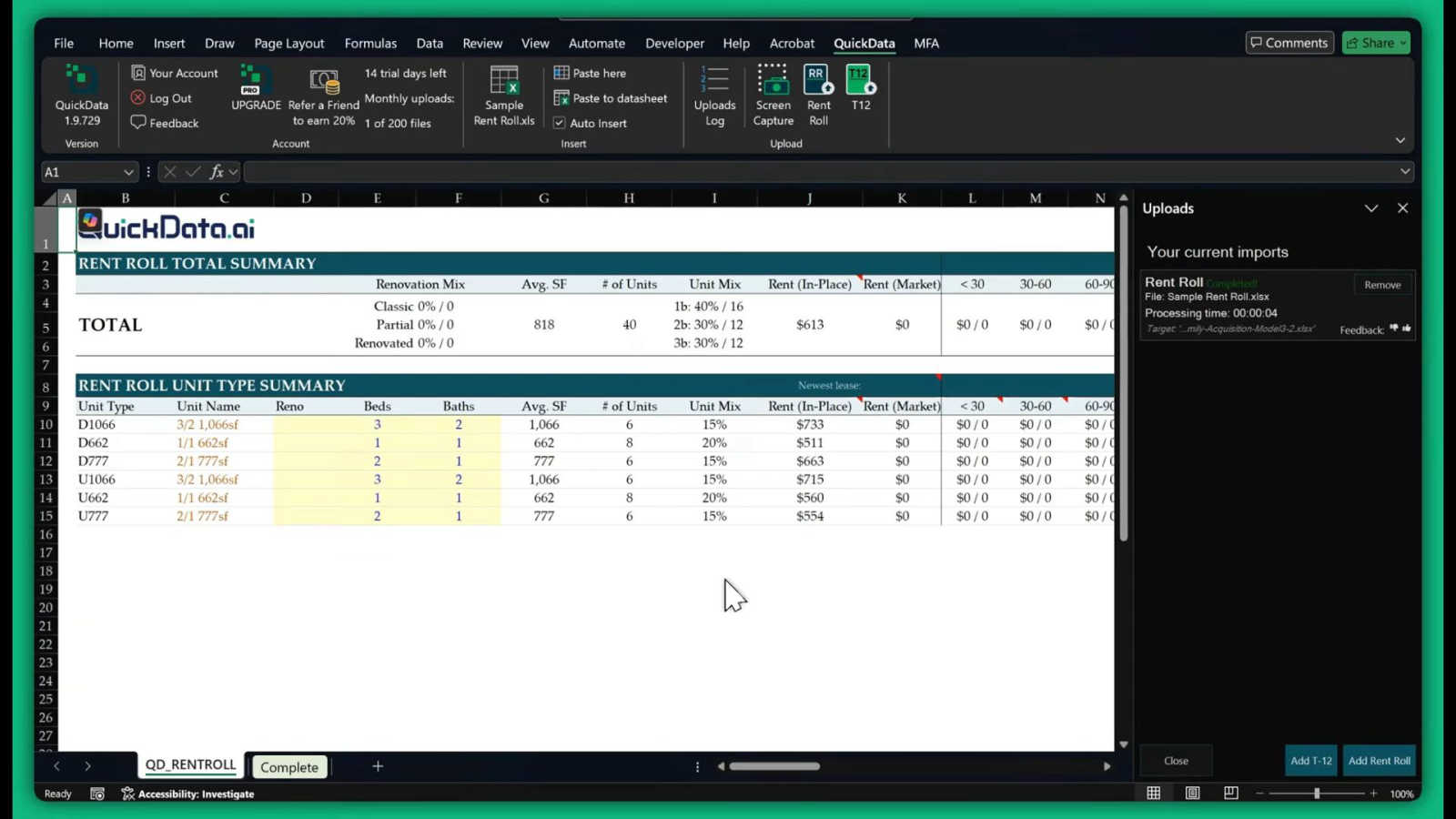
This core feature utilizes advanced artificial intelligence to automatically read, interpret, and extract data from multifamily-specific documents. It is precisely trained to identify and capture key metrics from Rent Rolls (unit numbers, square footage, rent, occupancy), T12 statements (monthly income and expenses), and Offering Memorandums. The AI understands the context of the data, ensuring that extracted numbers are placed into the correct fields within your Excel model, completely eliminating manual typing and copy-pasting.
Seamless Excel Integration
QuickData.ai operates directly within Microsoft Excel as a native add-in, requiring no complex data exports or switching between different software platforms. Users can extract data from a document and have it instantly flow into their preferred multifamily underwriting model. This seamless integration preserves all existing formulas, formatting, and logic, making it a natural extension of the professional's current workflow without any disruptive learning curve.
Multifamily-Specific Financial Calculator
Beyond simple data entry, QuickData.ai includes built-in analytical tools tailored for multifamily real estate. This feature allows users to perform rapid calculations and scenario analyses on the extracted data. It can help project cash flows, calculate key metrics like Cap Rates and Debt Service Coverage Ratios (DSCR), and provide instant insights, enabling faster and more informed investment decisions during the critical underwriting phase.
Free 1:1 Onboarding & Setup
Understanding that adopting new technology must be frictionless, QuickData.ai offers personalized onboarding support. This feature ensures that every user or team can get the add-in installed, configured, and integrated with their specific Excel models in minutes. An expert guides you through the process, answers questions, and demonstrates best practices, guaranteeing you can start realizing time savings and efficiency gains from day one of your trial.
Use Cases
ProcessBankStatement
Streamlining Client Bookkeeping
For accountants and bookkeepers, receiving a stack of client bank statement PDFs is a common yet tedious challenge. ProcessBankStatement allows you to instantly convert these documents into clean CSVs, ready for quick review and import into accounting software like QuickBooks or Xero. This slashes the time spent on manual entry per client, enabling you to handle more clients efficiently and focus on higher-value advisory services.
Small Business Financial Management
Small business owners often wear many hats and lack dedicated bookkeeping time. Manually entering transactions from monthly bank statements into Excel for cash flow analysis is a major time sink. This tool automates that process, giving owners instant, organized data to track expenses, prepare for taxes, and understand their financial health without the frustrating hours of manual work.
Accelerating Loan Application Reviews
Loan officers and underwriters must meticulously review bank statements as part of the application process. Manually verifying income and expenses across multiple PDF pages is slow and prone to oversight. By converting statements to a searchable, sortable CSV format, officers can quickly analyze transaction history, identify patterns, and make faster, more informed lending decisions.
Efficient Tax Preparation and Auditing
Tax preparers and auditors frequently need to analyze transaction histories for deductions, income verification, or compliance checks. Sifting through PDFs is inefficient. Converting statements to CSV allows for powerful data manipulation—using filters, pivot tables, and formulas in Excel to quickly isolate relevant transactions, identify discrepancies, and compile necessary reports with precision and speed.
QuickData.ai
For Acquisitions Teams Underwriting New Deals
Acquisitions analysts and associates are inundated with deal packages. QuickData.ai allows them to instantly import data from seller-provided Rent Rolls and T12s into their proprietary underwriting models. This slashes the initial data processing time from hours to minutes, enabling the team to evaluate more deals, run sensitivities faster, and make competitive bids with greater speed and confidence.
For Commercial Real Estate Brokers Preparing Offering Memorandums
Brokers creating marketing packages for a property sale can reverse-engineer the process. They can use QuickData.ai to quickly pull historical data from their own management systems into standardized pro forma models. This ensures the financial data in the OM is accurate and well-presented, significantly speeding up the preparation process and allowing brokers to bring listings to market more rapidly.
For Lenders and Debt Funds Performing Due Diligence
Lenders need to independently verify the performance of an asset before underwriting a loan. QuickData.ai automates the entry of the borrower's provided rent rolls and operating statements into the lender's own analysis model. This accelerates the due diligence cycle, reduces processing time, and minimizes the risk of manual data entry errors that could affect crucial loan covenants and risk assessments.
For Accounting Firms Auditing Property Performance
Accounting firms servicing multifamily clients often need to analyze periodic financial statements. QuickData.ai streamlines the process of inputting monthly or annual income and expense data from statements into audit or analysis spreadsheets. This improves efficiency, allows accountants to handle more client accounts, and enhances the accuracy of their financial reporting and reviews.
Overview
About ProcessBankStatement
ProcessBankStatement is the definitive solution for anyone drowning in the manual labor of bank statement data entry. It directly tackles the universal pain point faced by finance professionals, accountants, bookkeepers, and small business owners: the hours wasted each week manually transcribing transactions from messy PDF bank statements into spreadsheets or accounting software. This intelligent, web-based tool automates this tedious chore with remarkable speed and accuracy. Simply upload any PDF bank statement—whether it's a digital download from your online banking portal or a scanned image of a paper statement—and the smart parsing engine instantly extracts all transaction data. Within seconds, you receive a clean, structured, and downloadable CSV file, perfectly formatted for seamless import into QuickBooks, Excel, or any other analysis platform. The core value proposition is clear: reclaim your valuable time, eliminate human error from manual entry, and gain full control over your financial data workflow. Built with security and broad compatibility in mind, it proudly supports statements from all major U.S. banks like Chase, Bank of America, and Wells Fargo, as well as international institutions, making it a reliable tool for a global user base.
About QuickData.ai
QuickData.ai is a transformative AI-powered Excel add-in engineered specifically for the multifamily real estate industry. It directly tackles the most tedious and error-prone bottleneck in the underwriting process: manual data entry from critical documents. Professionals in acquisitions, brokerage, lending, and accounting spend countless hours manually transferring figures from Rent Rolls, T12 (Trailing 12-Month) statements, and Offering Memorandums (OMs) into complex Excel financial models. This process is not only slow but also riddled with the risk of human error, which can compromise deal analysis and decision-making. QuickData.ai solves this by automating the entire extraction and integration workflow. Its advanced AI accurately reads and pulls unit-level and financial data from PDFs and other document formats, seamlessly populating your existing Excel models in seconds. The core value proposition is immense time savings—averaging 15 hours per month—coupled with guaranteed accuracy and the ability to handle higher deal volumes. This empowers multifamily experts to underwrite deals up to 10x faster, shifting their focus from data wrangling to high-value analysis and strategy.
Frequently Asked Questions
ProcessBankStatement FAQ
What types of bank statement files are supported?
ProcessBankStatement supports PDF bank statements exclusively. This includes both modern, text-based PDFs downloaded directly from your online banking portal and scanned image-based PDFs (or photos saved as PDFs) of physical paper statements. Our engine is specifically trained to accurately parse data from both formats.
Is there a free trial available?
Yes, you can try ProcessBankStatement immediately without any commitment. Guest users can process up to 3 pages per day for free. By registering for a free account, you instantly increase your limit to 5 pages per day, allowing you to fully test the tool's capabilities with your own statements before choosing a paid plan.
How secure is my financial data?
Security is our top priority. All files are encrypted during upload and transit to our servers. We operate on a user-controlled data model: you own your data and can permanently delete your uploaded statements and converted files from our system at any time through your account dashboard. We do not use your data for training or any other purpose.
Do you support international bank statements?
Yes. While we proudly support all major U.S. banks, our parsing technology is designed to work with bank statements from financial institutions worldwide. The engine recognizes various date formats, currencies, and statement layouts common in different countries, making it a versatile tool for global professionals and businesses.
QuickData.ai FAQ
What types of documents can QuickData.ai process?
QuickData.ai is specifically engineered to process the core documents used in multifamily real estate underwriting. This includes Rent Rolls (in PDF or Excel format), Trailing 12-Month (T12) financial statements, and Offering Memorandums (OMs). The AI is trained to recognize the standard formats and data points within these documents to ensure accurate extraction.
How does the AI ensure data extraction accuracy?
The AI model behind QuickData.ai has been extensively trained on thousands of multifamily real estate documents. It doesn't just perform optical character recognition (OCR); it understands the context and relationship between data points (e.g., linking a unit number to its corresponding rent). The tool also provides a clear audit trail, allowing users to quickly verify extracted data against the source document for complete confidence.
Do I need to change my existing Excel underwriting model?
No, a key benefit of QuickData.ai is its seamless integration. You do not need to alter your proven, trusted Excel models. The add-in is designed to map the extracted data into the specific cells and sheets of your existing workbook. It works with your model's structure, preserving all your formulas, macros, and formatting.
Is there a commitment required after the free trial?
No, QuickData.ai offers a full 14-day free trial with no credit card required upfront. The trial includes all features and the free 1:1 onboarding session. After the trial, you can choose a subscription plan that fits your needs. You can cancel your subscription at any time, providing full flexibility without long-term commitment.
Alternatives
ProcessBankStatement Alternatives
ProcessBankStatement is a specialized tool in the business and finance software category, designed to automate the conversion of PDF bank statements into structured CSV files. Users often explore alternatives for various reasons, such as seeking different pricing models, needing specific integrations with other accounting software, or requiring support for international banks not covered by their current solution. When evaluating other options, it's crucial to consider several key factors. Accuracy and reliability in data extraction are paramount, as errors can lead to significant bookkeeping problems. You should also assess the tool's compatibility with your bank, its security protocols for handling sensitive financial data, and the overall user experience and speed. The goal is to find a solution that seamlessly fits into your workflow, saving you time without compromising on data integrity or control.
QuickData.ai Alternatives
QuickData.ai is an AI-powered Excel add-in in the business and finance category, designed to automate data extraction from rent rolls and T12 statements for multifamily real estate underwriting. It helps professionals save significant time by eliminating manual data entry. Users often explore alternatives for various reasons. These can include budget constraints, the need for different feature sets like broader document processing, or a requirement for a platform that works outside of the Excel ecosystem. Some may seek solutions integrated into larger property management or investment analysis suites. When evaluating an alternative, key considerations should be its core automation capabilities for your specific document types, the accuracy and reliability of the data extraction, and how well it integrates into your existing workflow. The ideal tool should solve the data entry bottleneck without creating new complexities, ultimately speeding up your deal analysis.