QuickData.ai vs SoloTools
Side-by-side comparison to help you choose the right tool.

QuickData.ai
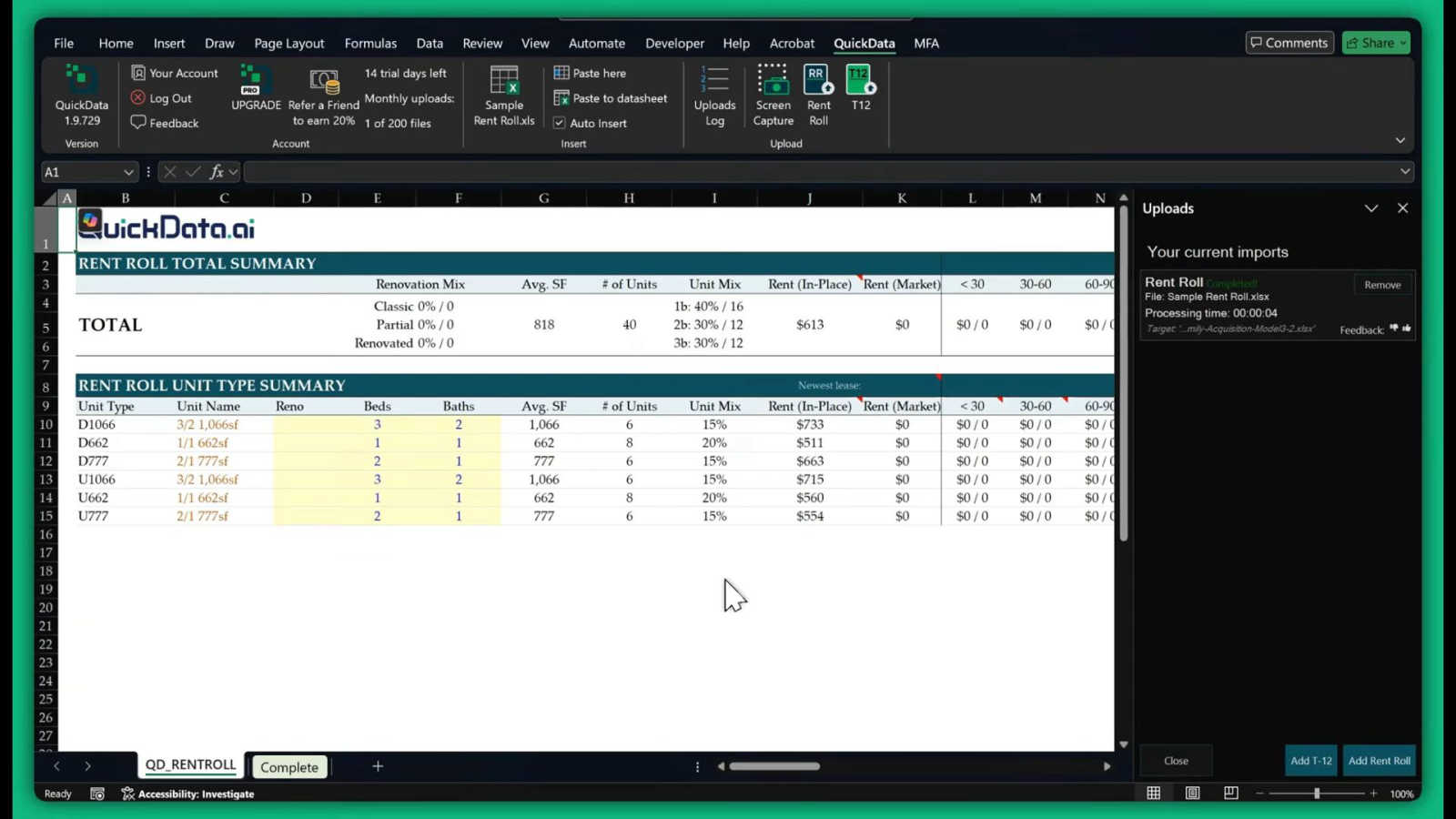
QuickData.ai automates multifamily data entry into Excel to underwrite deals 10x faster.
Last updated: March 1, 2026

SoloTools
SoloTools instantly creates polished client proposals with AI, saving you hours of work.
Last updated: March 4, 2026
Visual Comparison
QuickData.ai
SoloTools

Feature Comparison
QuickData.ai
AI-Powered Document Data Extraction
This core feature utilizes advanced artificial intelligence to automatically read, interpret, and extract data from multifamily-specific documents. It is precisely trained to identify and capture key metrics from Rent Rolls (unit numbers, square footage, rent, occupancy), T12 statements (monthly income and expenses), and Offering Memorandums. The AI understands the context of the data, ensuring that extracted numbers are placed into the correct fields within your Excel model, completely eliminating manual typing and copy-pasting.
Seamless Excel Integration
QuickData.ai operates directly within Microsoft Excel as a native add-in, requiring no complex data exports or switching between different software platforms. Users can extract data from a document and have it instantly flow into their preferred multifamily underwriting model. This seamless integration preserves all existing formulas, formatting, and logic, making it a natural extension of the professional's current workflow without any disruptive learning curve.
Multifamily-Specific Financial Calculator
Beyond simple data entry, QuickData.ai includes built-in analytical tools tailored for multifamily real estate. This feature allows users to perform rapid calculations and scenario analyses on the extracted data. It can help project cash flows, calculate key metrics like Cap Rates and Debt Service Coverage Ratios (DSCR), and provide instant insights, enabling faster and more informed investment decisions during the critical underwriting phase.
Free 1:1 Onboarding & Setup
Understanding that adopting new technology must be frictionless, QuickData.ai offers personalized onboarding support. This feature ensures that every user or team can get the add-in installed, configured, and integrated with their specific Excel models in minutes. An expert guides you through the process, answers questions, and demonstrates best practices, guaranteeing you can start realizing time savings and efficiency gains from day one of your trial.
SoloTools
AI-Powered Proposal Generation
This is the core intelligence of SoloTools. Instead of filling out rigid templates, you describe your project in plain language. The AI then writes a complete, tailored proposal from scratch, including persuasive executive summaries, detailed scope breakdowns, and professional pricing tables. It goes beyond simple fill-in-the-blanks, understanding context to create a document that speaks directly to the client's needs and your unique value proposition, all in roughly 12 seconds.
AI Section-Level Editing & Refinement
Maintain full creative control with intelligent editing tools. For any section of your AI-generated proposal—like the executive summary or scope of work—you can issue natural language commands such as "Make more persuasive," "Make shorter," or "Rewrite in a formal tone." This allows for rapid refinement and customization without starting from scratch, ensuring the final document perfectly matches your voice and the project's requirements.
Complete Client Workflow & E-Signatures
SoloTools manages the entire proposal lifecycle from send to signature. Send proposals directly via email with a personalized message, track when clients view them in real-time, and collect legally-binding e-signatures seamlessly within the platform. Clients can draw their signature directly, and you can set expiry dates to create urgency, eliminating the need for back-and-forth emails and separate signing tools.
Proposal Analytics & View Tracking
Gain valuable insights into your business development process. See a clear conversion funnel showing how many proposals were sent, viewed, accepted, or declined. Receive instant email notifications the moment a client opens your proposal for the first time, enabling perfectly timed follow-ups. These analytics help you understand what's working, identify bottlenecks, and ultimately improve your win rate.
Use Cases
QuickData.ai
For Acquisitions Teams Underwriting New Deals
Acquisitions analysts and associates are inundated with deal packages. QuickData.ai allows them to instantly import data from seller-provided Rent Rolls and T12s into their proprietary underwriting models. This slashes the initial data processing time from hours to minutes, enabling the team to evaluate more deals, run sensitivities faster, and make competitive bids with greater speed and confidence.
For Commercial Real Estate Brokers Preparing Offering Memorandums
Brokers creating marketing packages for a property sale can reverse-engineer the process. They can use QuickData.ai to quickly pull historical data from their own management systems into standardized pro forma models. This ensures the financial data in the OM is accurate and well-presented, significantly speeding up the preparation process and allowing brokers to bring listings to market more rapidly.
For Lenders and Debt Funds Performing Due Diligence
Lenders need to independently verify the performance of an asset before underwriting a loan. QuickData.ai automates the entry of the borrower's provided rent rolls and operating statements into the lender's own analysis model. This accelerates the due diligence cycle, reduces processing time, and minimizes the risk of manual data entry errors that could affect crucial loan covenants and risk assessments.
For Accounting Firms Auditing Property Performance
Accounting firms servicing multifamily clients often need to analyze periodic financial statements. QuickData.ai streamlines the process of inputting monthly or annual income and expense data from statements into audit or analysis spreadsheets. This improves efficiency, allows accountants to handle more client accounts, and enhances the accuracy of their financial reporting and reviews.
SoloTools
Freelance Web Designers & Developers
Web designers can swiftly generate detailed proposals for website redesigns or development projects. By inputting the client's brand, desired features (like CMS integration or e-commerce), and budget, SoloTools AI creates a scope that outlines phases such as Discovery, UI/UX Design, and Development with clear timelines and investment breakdowns, presenting a professional front that justifies the project's value.
Independent Marketing & SEO Consultants
For marketing professionals pitching content strategies, SEO audits, or social media campaigns, SoloTools helps structure complex service offerings. The AI can articulate the methodology, key performance indicators, and phased investment, turning a nebulous service into a clear, actionable plan that clients can easily understand and approve, speeding up the sales cycle.
Business & Management Consultants
Consultants proposing strategic projects, process reviews, or implementation plans benefit from the tool's ability to craft compelling executive summaries and detailed work plans. SoloTools provides a formal and persuasive structure that builds credibility, clearly outlines deliverables, and presents pricing in a professional table format suitable for corporate clients.
Creative Freelancers (Writers, Designers, Artists)
Solo creatives often struggle with the business side of proposals. SoloTools demystifies this process by providing a solid framework. For a branding project or copywriting package, the AI generates a scope that defines deliverables (e.g., logo concepts, brand guidelines, article count), sets clear expectations, and presents terms professionally, allowing the creative to focus on their craft.
Overview
About QuickData.ai
QuickData.ai is a transformative AI-powered Excel add-in engineered specifically for the multifamily real estate industry. It directly tackles the most tedious and error-prone bottleneck in the underwriting process: manual data entry from critical documents. Professionals in acquisitions, brokerage, lending, and accounting spend countless hours manually transferring figures from Rent Rolls, T12 (Trailing 12-Month) statements, and Offering Memorandums (OMs) into complex Excel financial models. This process is not only slow but also riddled with the risk of human error, which can compromise deal analysis and decision-making. QuickData.ai solves this by automating the entire extraction and integration workflow. Its advanced AI accurately reads and pulls unit-level and financial data from PDFs and other document formats, seamlessly populating your existing Excel models in seconds. The core value proposition is immense time savings—averaging 15 hours per month—coupled with guaranteed accuracy and the ability to handle higher deal volumes. This empowers multifamily experts to underwrite deals up to 10x faster, shifting their focus from data wrangling to high-value analysis and strategy.
About SoloTools
For freelancers and independent consultants, the proposal process is a notorious time-sink and a barrier to revenue. Hours spent staring at a blank document, wrestling with scope language, and formatting pricing tables are hours not spent on billable work or finding new clients. This administrative burden often leads to delayed submissions, inconsistent quality, and missed opportunities. SoloTools is the definitive solution to this universal challenge. It is an AI-powered proposal generator built specifically for solo professionals to reclaim their time and win more business. The core value proposition is stunningly simple: transform a 30-second project description into a polished, client-ready proposal in about 12 seconds. Users simply input the client name, project type, budget, and key scope notes. SoloTools' intelligent AI then crafts a comprehensive document complete with a compelling executive summary, detailed scope of work, professional pricing tables, a clear timeline, and standard terms. Beyond generation, it streamlines the entire client workflow—offering editable documents, one-click sending, downloadable PDFs, shareable links, and integrated e-signatures. With a free tier offering three proposals per month and powerful Pro features like custom branding and client analytics, SoloTools turns a tedious administrative task into a strategic, efficient, and professional advantage.
Frequently Asked Questions
QuickData.ai FAQ
What types of documents can QuickData.ai process?
QuickData.ai is specifically engineered to process the core documents used in multifamily real estate underwriting. This includes Rent Rolls (in PDF or Excel format), Trailing 12-Month (T12) financial statements, and Offering Memorandums (OMs). The AI is trained to recognize the standard formats and data points within these documents to ensure accurate extraction.
How does the AI ensure data extraction accuracy?
The AI model behind QuickData.ai has been extensively trained on thousands of multifamily real estate documents. It doesn't just perform optical character recognition (OCR); it understands the context and relationship between data points (e.g., linking a unit number to its corresponding rent). The tool also provides a clear audit trail, allowing users to quickly verify extracted data against the source document for complete confidence.
Do I need to change my existing Excel underwriting model?
No, a key benefit of QuickData.ai is its seamless integration. You do not need to alter your proven, trusted Excel models. The add-in is designed to map the extracted data into the specific cells and sheets of your existing workbook. It works with your model's structure, preserving all your formulas, macros, and formatting.
Is there a commitment required after the free trial?
No, QuickData.ai offers a full 14-day free trial with no credit card required upfront. The trial includes all features and the free 1:1 onboarding session. After the trial, you can choose a subscription plan that fits your needs. You can cancel your subscription at any time, providing full flexibility without long-term commitment.
SoloTools FAQ
How does the AI proposal generator work?
You provide basic project details such as client name, project type, budget, and a few sentences describing the scope. SoloTools' AI analyzes this input and generates a full, structured proposal document in seconds. It writes original content for key sections like the executive summary, scope of work, pricing, timeline, and terms, tailored to your specific project details.
Is there a free plan available?
Yes, SoloTools offers a completely free plan to get started. This plan allows you to create and send up to three proposals per month with no credit card required. It includes core features like AI generation, basic editing, and PDF download, giving you a full experience of the platform's capabilities before upgrading.
Can I edit the proposals generated by the AI?
Absolutely. You have full control over every proposal. You can manually edit any text in the document. Furthermore, SoloTools offers powerful AI-powered editing where you can select any section and instruct the AI to rewrite it to be more persuasive, shorter, more detailed, or in a different tone, allowing for efficient customization.
How do clients sign the proposals?
SoloTools includes integrated, legally-binding e-signature functionality. When you send a proposal, the client can review it and then draw their signature directly on the document within the SoloTools interface. Once signed, the status updates automatically, and both you and the client receive a finalized copy, streamlining the acceptance process.
Alternatives
QuickData.ai Alternatives
QuickData.ai is an AI-powered Excel add-in in the business and finance category, designed to automate data extraction from rent rolls and T12 statements for multifamily real estate underwriting. It helps professionals save significant time by eliminating manual data entry. Users often explore alternatives for various reasons. These can include budget constraints, the need for different feature sets like broader document processing, or a requirement for a platform that works outside of the Excel ecosystem. Some may seek solutions integrated into larger property management or investment analysis suites. When evaluating an alternative, key considerations should be its core automation capabilities for your specific document types, the accuracy and reliability of the data extraction, and how well it integrates into your existing workflow. The ideal tool should solve the data entry bottleneck without creating new complexities, ultimately speeding up your deal analysis.
SoloTools Alternatives
SoloTools is an AI-powered proposal generator in the business and finance software category, designed to help freelancers and consultants create professional client proposals quickly. Users often explore alternatives for various reasons, such as needing a different pricing model, more advanced features like CRM integration, or a platform that caters to larger teams beyond solo operators. When evaluating other options, it's crucial to consider your specific workflow needs. Key factors include the depth of customization and branding available, the ability to track proposal engagement, and whether the tool integrates with other software you use. The goal is to find a solution that not only saves time on creation but also enhances your entire client acquisition process.