RedBison vs SoloTools
Side-by-side comparison to help you choose the right tool.

RedBison
RedBison solves productivity with secure, ad-free browser tools that keep your data local.
Last updated: March 1, 2026

SoloTools
SoloTools instantly creates polished client proposals with AI, saving you hours of work.
Last updated: March 4, 2026
Visual Comparison
RedBison
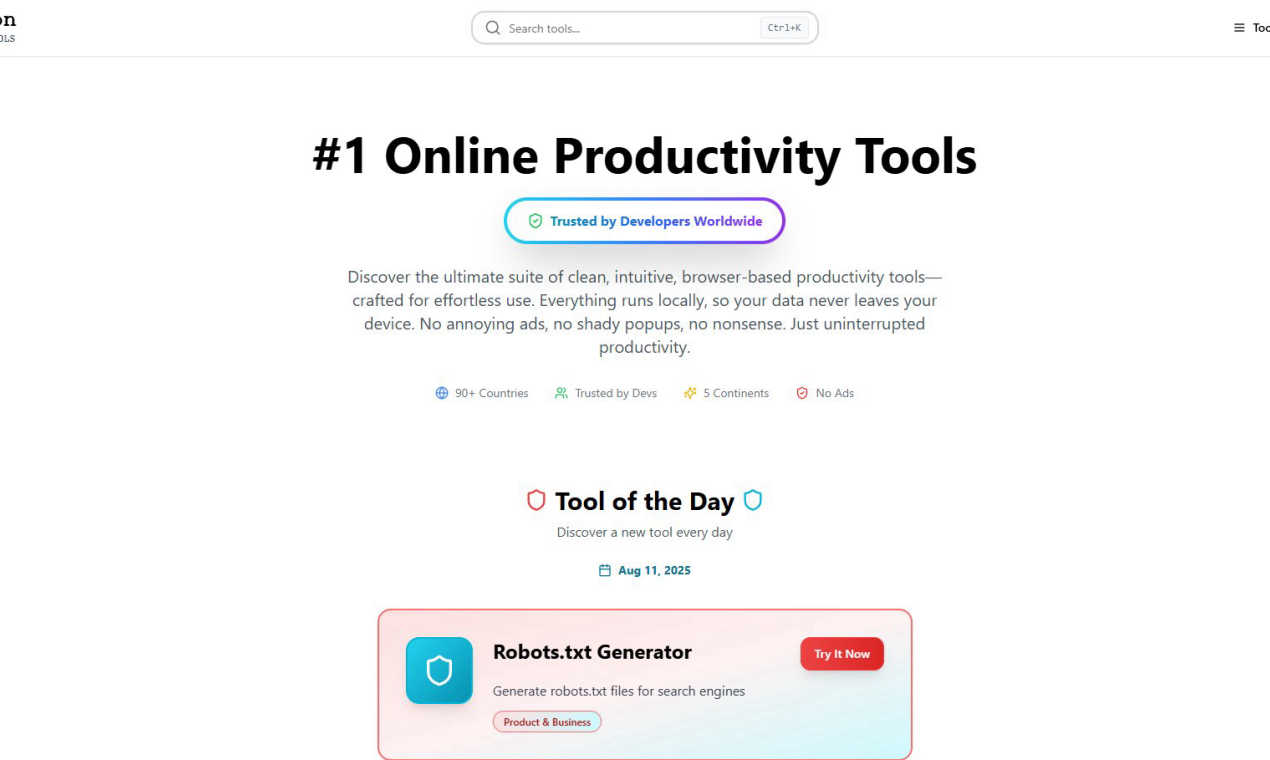
SoloTools

Feature Comparison
RedBison
Local-First, Browser-Based Security
Every tool within RedBison operates entirely within your web browser. This means all processing happens locally on your device; no data, code snippets, or sensitive information is ever sent to external servers. This architecture provides robust security and absolute privacy, a critical feature for developers handling proprietary code, product managers analyzing user data, or founders working on confidential business models. You get the convenience of a web app with the security of a desktop application.
Distraction-Free, Ad-Free Environment
RedBison is built on the principle of deep work. The platform is meticulously designed to eliminate all common digital interruptions. You will encounter zero advertisements, no shady pop-ups, and no promotional clutter. This clean, intuitive interface allows you to focus entirely on the task at hand, whether you're debugging a complex regular expression, planning a project timeline, or validating a startup idea, without any cognitive overhead or unwanted noise.
Extensive Suite of 200+ Specialized Tools
The platform solves the problem of tool fragmentation by offering a vast, organized library of utilities across multiple domains. Instead of juggling dozens of bookmarks, you have immediate access to essential tech tools (JSON formatters, hash generators), productivity aids (decision makers, note takers), startup frameworks (Lean Canvas, TAM calculators), and personal utilities (budget planners, wellness trackers). This consolidation turns RedBison into a single, powerful workstation for virtually any professional task.
Curated Discovery & Daily Tool Highlights
With over 200 tools, discovering new capabilities is made effortless through intelligent curation. The "Tool of the Day" feature introduces a new, potentially valuable utility daily, helping users continuously expand their productivity toolkit. Additionally, sections like "Most Useful Tools" and categorized browsing (Tech Tools, Startup Tools, etc.) ensure you can quickly find the perfect tool for your immediate challenge, reducing time spent searching and increasing time spent executing.
SoloTools
AI-Powered Proposal Generation
This is the core intelligence of SoloTools. Instead of filling out rigid templates, you describe your project in plain language. The AI then writes a complete, tailored proposal from scratch, including persuasive executive summaries, detailed scope breakdowns, and professional pricing tables. It goes beyond simple fill-in-the-blanks, understanding context to create a document that speaks directly to the client's needs and your unique value proposition, all in roughly 12 seconds.
AI Section-Level Editing & Refinement
Maintain full creative control with intelligent editing tools. For any section of your AI-generated proposal—like the executive summary or scope of work—you can issue natural language commands such as "Make more persuasive," "Make shorter," or "Rewrite in a formal tone." This allows for rapid refinement and customization without starting from scratch, ensuring the final document perfectly matches your voice and the project's requirements.
Complete Client Workflow & E-Signatures
SoloTools manages the entire proposal lifecycle from send to signature. Send proposals directly via email with a personalized message, track when clients view them in real-time, and collect legally-binding e-signatures seamlessly within the platform. Clients can draw their signature directly, and you can set expiry dates to create urgency, eliminating the need for back-and-forth emails and separate signing tools.
Proposal Analytics & View Tracking
Gain valuable insights into your business development process. See a clear conversion funnel showing how many proposals were sent, viewed, accepted, or declined. Receive instant email notifications the moment a client opens your proposal for the first time, enabling perfectly timed follow-ups. These analytics help you understand what's working, identify bottlenecks, and ultimately improve your win rate.
Use Cases
RedBison
Rapid Development and Debugging Workflow
A developer building a new API faces challenges formatting messy JSON responses, testing regex patterns for validation, and generating secure tokens. Instead of opening multiple tabs and websites, they use RedBison's integrated suite. They clean and validate JSON with the formatter, debug their regex in the tester, and generate UUIDs for their endpoints—all within the same secure, ad-free environment, dramatically speeding up the development cycle.
Comprehensive Startup Planning and Validation
A startup founder needs to move from a rough idea to a structured business plan. The challenge is organizing disparate thoughts and validating assumptions. Using RedBison, they first use the Idea Validation Framework for market research, then structure their model in the Lean Canvas Generator. They calculate their target market size with the TAM Calculator and design a user survey with the Survey Designer, all without switching contexts or compromising their confidential data.
Streamlined Project and Product Management
A product manager overwhelmed by scattered notes, unstructured task lists, and the need for clear project visuals struggles to maintain a single source of truth. RedBison solves this by providing an integrated workspace: they capture meeting notes in the Note Taker, organize team tasks on the drag-and-drop Kanban Board, create a visual project timeline with the Dashboard Generator, and analyze website SEO with the Meta Tag Analyzer, centralizing their entire workflow.
Secure Personal Productivity and Planning
A remote professional juggles work tasks with personal finance and wellness goals, using insecure or ad-ridden websites for calculations. They use RedBison to plan their monthly budget with the Budget Planner, calculate investment growth with the Compound Interest Calculator, track their mental wellness, and even gain perspective with the Life in Weeks visualizer—all with the guarantee that their personal financial and health data remains private on their own device.
SoloTools
Freelance Web Designers & Developers
Web designers can swiftly generate detailed proposals for website redesigns or development projects. By inputting the client's brand, desired features (like CMS integration or e-commerce), and budget, SoloTools AI creates a scope that outlines phases such as Discovery, UI/UX Design, and Development with clear timelines and investment breakdowns, presenting a professional front that justifies the project's value.
Independent Marketing & SEO Consultants
For marketing professionals pitching content strategies, SEO audits, or social media campaigns, SoloTools helps structure complex service offerings. The AI can articulate the methodology, key performance indicators, and phased investment, turning a nebulous service into a clear, actionable plan that clients can easily understand and approve, speeding up the sales cycle.
Business & Management Consultants
Consultants proposing strategic projects, process reviews, or implementation plans benefit from the tool's ability to craft compelling executive summaries and detailed work plans. SoloTools provides a formal and persuasive structure that builds credibility, clearly outlines deliverables, and presents pricing in a professional table format suitable for corporate clients.
Creative Freelancers (Writers, Designers, Artists)
Solo creatives often struggle with the business side of proposals. SoloTools demystifies this process by providing a solid framework. For a branding project or copywriting package, the AI generates a scope that defines deliverables (e.g., logo concepts, brand guidelines, article count), sets clear expectations, and presents terms professionally, allowing the creative to focus on their craft.
Overview
About RedBison
In the modern digital workspace, professionals are constantly battling a fragmented tool landscape, security concerns, and relentless distractions from ads and pop-ups. This scattered environment disrupts deep work, complicates workflows, and forces sensitive data through third-party servers. RedBison is the definitive solution to this chaos. It is a comprehensive, browser-based suite of over 200 innovative development and productivity tools designed specifically for tech enthusiasts, developers, product managers, and startup founders. Its core mission is to restore focus and efficiency by providing a clean, intuitive, and entirely local platform. Every tool, from SQL analyzers and JSON formatters to lean canvas generators and Kanban boards, runs directly in your browser. Your data never leaves your device, ensuring unparalleled privacy and security. By eliminating ads, pop-ups, and the need for constant context-switching between websites, RedBison creates a distraction-free zone dedicated to uninterrupted productivity, allowing you to streamline complex workflows and achieve your goals with remarkable efficiency.
About SoloTools
For freelancers and independent consultants, the proposal process is a notorious time-sink and a barrier to revenue. Hours spent staring at a blank document, wrestling with scope language, and formatting pricing tables are hours not spent on billable work or finding new clients. This administrative burden often leads to delayed submissions, inconsistent quality, and missed opportunities. SoloTools is the definitive solution to this universal challenge. It is an AI-powered proposal generator built specifically for solo professionals to reclaim their time and win more business. The core value proposition is stunningly simple: transform a 30-second project description into a polished, client-ready proposal in about 12 seconds. Users simply input the client name, project type, budget, and key scope notes. SoloTools' intelligent AI then crafts a comprehensive document complete with a compelling executive summary, detailed scope of work, professional pricing tables, a clear timeline, and standard terms. Beyond generation, it streamlines the entire client workflow—offering editable documents, one-click sending, downloadable PDFs, shareable links, and integrated e-signatures. With a free tier offering three proposals per month and powerful Pro features like custom branding and client analytics, SoloTools turns a tedious administrative task into a strategic, efficient, and professional advantage.
Frequently Asked Questions
RedBison FAQ
Is RedBison really free, and is there a catch?
Yes, RedBison is completely free to use. There is no subscription fee, no hidden costs, and no tiered plans that lock essential features behind a paywall. The platform is supported by its commitment to providing pure productivity value. The "catch" is the benefit you receive: a secure, ad-free, and powerful toolkit without any monetary cost or data-sharing compromise.
How does RedBison ensure my data is private and secure?
RedBison ensures privacy through its local-first architecture. When you use a tool—like formatting JSON, generating a password, or analyzing a business model—all the processing occurs directly within your web browser on your computer. Your data is never uploaded to RedBison's servers or any third-party servers. It never leaves your device, making it as secure as using a locally installed software application.
Do I need to create an account or install software to use RedBison?
No, you do not need to create an account or install any software. RedBison is a browser-based platform. You can simply visit the website and start using any tool immediately. This eliminates sign-up friction and allows for instant access. Since no account is needed, there is also no profile for RedBison to track, further enhancing your anonymity and privacy while using the tools.
Can I use RedBison offline?
While RedBison is a web application that requires an initial internet connection to load the website and its tools, many of the individual tools are designed to function after the page has loaded. Because the logic runs locally in your browser, actions like generating hashes, calculating dates, or using the note taker may continue to work if you temporarily lose connectivity, though full offline functionality is not a guaranteed feature for all tools.
SoloTools FAQ
How does the AI proposal generator work?
You provide basic project details such as client name, project type, budget, and a few sentences describing the scope. SoloTools' AI analyzes this input and generates a full, structured proposal document in seconds. It writes original content for key sections like the executive summary, scope of work, pricing, timeline, and terms, tailored to your specific project details.
Is there a free plan available?
Yes, SoloTools offers a completely free plan to get started. This plan allows you to create and send up to three proposals per month with no credit card required. It includes core features like AI generation, basic editing, and PDF download, giving you a full experience of the platform's capabilities before upgrading.
Can I edit the proposals generated by the AI?
Absolutely. You have full control over every proposal. You can manually edit any text in the document. Furthermore, SoloTools offers powerful AI-powered editing where you can select any section and instruct the AI to rewrite it to be more persuasive, shorter, more detailed, or in a different tone, allowing for efficient customization.
How do clients sign the proposals?
SoloTools includes integrated, legally-binding e-signature functionality. When you send a proposal, the client can review it and then draw their signature directly on the document within the SoloTools interface. Once signed, the status updates automatically, and both you and the client receive a finalized copy, streamlining the acceptance process.
Alternatives
RedBison Alternatives
RedBison is a browser-based productivity suite offering over 200 tools for developers and tech professionals. It focuses on a secure, distraction-free environment to streamline workflows in business and finance-related tasks. Users often seek alternatives for various reasons. Some may need tools that integrate with specific desktop software, require advanced team collaboration features, or have different budget constraints. Others might be looking for a platform with a different specialization or a more extensive free tier. When evaluating alternatives, consider your core needs. Key factors include the range and depth of tools offered, data security and privacy policies, the overall user experience, and the cost structure. The goal is to find a solution that aligns with your specific workflow challenges without compromising on security or usability.
SoloTools Alternatives
SoloTools is an AI-powered proposal generator in the business and finance software category, designed to help freelancers and consultants create professional client proposals quickly. Users often explore alternatives for various reasons, such as needing a different pricing model, more advanced features like CRM integration, or a platform that caters to larger teams beyond solo operators. When evaluating other options, it's crucial to consider your specific workflow needs. Key factors include the depth of customization and branding available, the ability to track proposal engagement, and whether the tool integrates with other software you use. The goal is to find a solution that not only saves time on creation but also enhances your entire client acquisition process.