
Nano Banana Pro vs Sketch To
Side-by-side comparison to help you choose the right tool.

Nano Banana Pro
Nano Banana Pro generates stunning 4K AI art with character consistency and fast, precise editing tools for creators.
Last updated: February 28, 2026
Sketch To
Turn any photo into a stunning sketch or any sketch into a detailed image with AI.
Last updated: March 2, 2026
Visual Comparison
Nano Banana Pro

Sketch To
Feature Comparison
Nano Banana Pro
Character Consistency
The character consistency feature ensures that visuals maintain a coherent identity across various images. This is crucial for content creators working on series or character-driven narratives, allowing for seamless transitions and consistent branding.
15% Faster Generation
Nano Banana Pro boasts a 15% speed increase in image generation, thanks to its advanced architecture. This means less waiting time for creators, enabling them to focus more on refining their ideas and less on the technical aspects of image production.
Enhanced Text Rendering
Say goodbye to poorly rendered text with Nano Banana Pro's enhanced text rendering capabilities. This feature provides crystal-clear text within images, making it perfect for logos, posters, and any other visual media requiring high-quality typography.
11 Aspect Ratios
With support for 11 different aspect ratios, Nano Banana Pro caters to a range of visual requirements. From square formats ideal for social media to widescreen formats for banners, this feature allows creators to effortlessly adapt their images to any platform or presentation.
Sketch To
Dual-Mode AI Conversion
Sketch To's core functionality is its two-way conversion engine. The "Image to Sketch" mode uses advanced AI to analyze photographs and apply authentic artistic techniques, replicating the texture and line work of mediums like pencil, charcoal, ink, and watercolor. The "Sketch to Image" mode performs the inverse magic, interpreting the lines and shapes of a user's drawing to generate a rich, photorealistic image with accurate lighting, texture, and detail, effectively turning concepts into visual reality.
Tiered AI Model System
To cater to diverse needs and skill levels, Sketch To offers a flexible two-model system. The Standard Model is perfect for everyday creativity, providing high-quality conversions for social media, hobbies, or educational projects. New users can start immediately with free trial credits. For projects demanding the highest fidelity, the Professional Model unlocks world-class realism and intricate detail, making it suitable for commercial work, professional portfolios, and any application where premium quality is non-negotiable.
Instant, High-Resolution Processing
Leveraging a powerful cloud-based AI infrastructure, Sketch To delivers results in seconds, not hours. There is no need for lengthy software rendering or manual editing. This instant processing does not compromise on quality, as all outputs are generated in high resolution. Users can download their sketches and images in formats suitable for both digital sharing and professional print, ensuring their creations look impeccable everywhere.
Extensive Artistic Style Library
Beyond simple conversion, Sketch To provides creative control through a wide selection of predefined artistic styles. Users can choose from specific outputs like Pencil Sketch, Charcoal Sketch, Ink Sketch, Colored Pencil, Comic Style, and Watercolor. This allows for tailored results that match the specific mood, genre, or project requirement, transforming a single photo into multiple unique pieces of art with just a few clicks.
Use Cases
Nano Banana Pro
Comic Artists
Comic artists can use Nano Banana Pro to maintain character integrity and visual consistency throughout their panels. The character consistency technology ensures that beloved characters remain recognizable, enhancing storytelling and engagement.
Marketers
Marketers can leverage Nano Banana Pro for brand campaigns that require cohesive visuals across multiple platforms. The ability to generate high-quality images rapidly allows them to respond to trends and create compelling content that aligns with their brand identity.
Storyboard Creators
Storyboard creators benefit from the image-to-image editing capabilities, allowing them to refine their scenes and concepts. By transforming existing images and maintaining key character features, they can better visualize their projects before full production.
Social Media Managers
For social media managers, the versatility of Nano Banana Pro allows for the quick generation of eye-catching visuals tailored to various aspect ratios. This feature enables them to create optimized content that stands out in crowded feeds, driving engagement and growth.
Sketch To
Social Media Content Creation
Creators and influencers can instantly transform their photos into eye-catching, artistic sketches to stand out on platforms like Instagram, Pinterest, or TikTok. This provides a consistent, branded aesthetic for posts, stories, and promotional content without requiring graphic design skills or expensive software, saving time while boosting visual engagement.
Professional Design & Storyboarding
Designers, architects, and concept artists can use the Sketch to Image function to rapidly visualize rough ideas. A quick hand-drawn storyboard frame or product sketch can be converted into a realistic image to present to clients or guide further development, streamlining the feedback and iteration process in professional workflows.
Educational & Hobbyist Art Projects
Students, teachers, and art hobbyists can use the tool for learning and experimentation. They can study how a photo decomposes into sketch lines or see their own drawings rendered with realistic textures. It's an excellent resource for understanding artistic techniques, creating unique project assets, or simply enjoying the creative process without a steep learning curve.
Commercial Art & Merchandise
Artists and small businesses can create printable artwork for merchandise like t-shirts, posters, or book covers. Starting with a photo or an original sketch, they can generate high-resolution, stylized artwork ready for commercial production. The Professional Model ensures the output has the detail and quality needed for physical products.
Overview
About Nano Banana Pro
Nano Banana Pro is a state-of-the-art AI image generator designed to meet the intricate needs of digital creators across various industries. This professional-grade tool enhances the creative process by enabling artists, designers, and marketers to produce stunning visuals with remarkable precision and speed. By leveraging advanced technologies like the Gemini 3 Pro image preview, Nano Banana Pro generates 4K-ready images that are ideal for commercial use. A significant challenge faced by creators, especially those working on serialized content, is maintaining character consistency across multiple images. Nano Banana Pro addresses this issue with its leading character consistency technology. Furthermore, it simplifies the formatting process with 11 customizable aspect ratios and resolves common AI shortcomings, such as garbled text, with its enhanced text rendering capabilities. Whether you're an illustrator, designer, or social media manager, Nano Banana Pro provides a versatile suite of tools that encompass both Text-to-Image and Image-to-Image functionalities, making it an all-in-one solution for transforming concepts into captivating visual assets.
About Sketch To
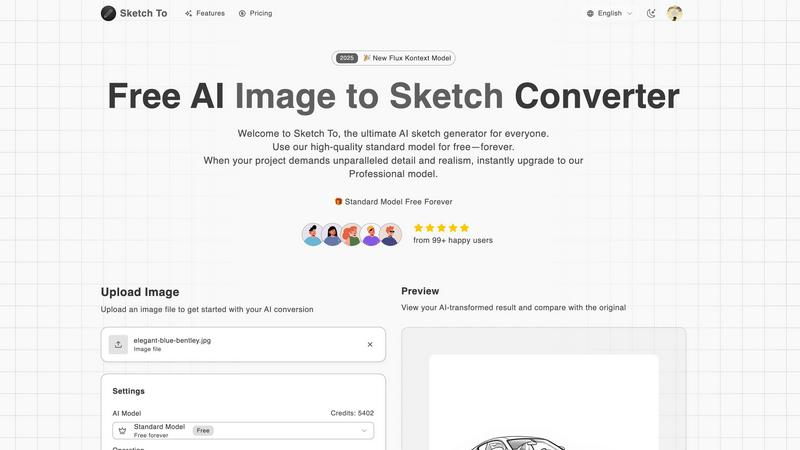
Sketch To is a powerful, dual-functionality AI tool designed to solve a fundamental creative challenge: bridging the gap between imagination and realistic execution. For many, turning a vivid idea into a tangible sketch requires significant artistic skill, while transforming a rough drawing into a polished, photorealistic image is an even greater hurdle. Sketch To directly addresses these problems by offering two core transformations. It can convert any photo into a stunning artistic sketch in various styles, from classic pencil to vibrant watercolor. Conversely, it can take a simple sketch or drawing and, using advanced AI, bring it to life as a detailed, realistic image. This makes professional-grade artistic creation accessible to everyone, from hobbyists and social media enthusiasts to professional designers and commercial artists. Its value proposition lies in its simplicity, speed, and tiered accessibility. With a user-friendly interface, instant processing, and a model for every need—including a free standard model with trial credits and a premium professional model for unparalleled detail—Sketch To empowers users to enhance their projects without technical complexity or prohibitive cost.
Frequently Asked Questions
Nano Banana Pro FAQ
What types of images can I create with Nano Banana Pro?
You can create a wide variety of images using Nano Banana Pro, including illustrations, promotional materials, characters for comics, and more. The tool supports both Text-to-Image and Image-to-Image functionalities.
How does Nano Banana Pro ensure character consistency?
Nano Banana Pro utilizes advanced character consistency technology that keeps character features uniform across multiple images. This is particularly beneficial for creators working on serialized content or brand campaigns.
Is there a limit to the number of images I can generate?
While there is no strict limit on the number of images you can create, usage may depend on the credit system. New users receive free credits, and additional credits can be purchased as needed.
Can I upload my own images for editing?
Yes, Nano Banana Pro allows users to upload existing images to utilize the Image-to-Image editing feature. You can transform these images based on your creative prompts while preserving key visual elements.
Sketch To FAQ
How do I get started with Sketch To?
Getting started is simple and free for new users. Visit the Sketch To website and sign up for an account. You will receive trial credits to use with our Standard Model. Then, just upload your image, choose your conversion direction (Image to Sketch or Sketch to Image), select a style, and click generate. Your transformed result will be ready to preview and download in seconds.
What is the difference between the Standard and Professional models?
The Standard Model is a powerful, free-tier option perfect for personal projects, social media, and learning. It delivers clean, artistic conversions. The Professional Model is a premium upgrade that uses more advanced AI algorithms to produce results with superior detail, accuracy, texture, and photorealism. It is designed for commercial use and projects where the highest quality output is essential.
What file formats and sizes do you support?
You can upload common image file formats such as JPG, PNG, and WebP. The current maximum file size for upload is 5MB. This ensures quick processing while maintaining quality. The output images are provided in high-resolution formats suitable for both online use and printing.
Can I use Sketch To for commercial purposes?
Yes, you can use the outputs from Sketch To for commercial purposes. We recommend using the Professional Model for any commercial work, as it is specifically optimized to deliver the detail and quality required for professional applications, including merchandise, advertising, and client deliverables. Always ensure you have the rights to the original image you upload.
Alternatives
Nano Banana Pro Alternatives
Nano Banana Pro is a professional-grade AI image generator that belongs to the design tools category, specifically focused on creating high-quality visuals for digital creators. It addresses common challenges such as inconsistent character representation and poor text rendering, making it an essential tool for professionals in fields like illustration, marketing, and social media management. Users often search for alternatives due to various reasons, including pricing concerns, the need for specific features, or compatibility with different platforms. When selecting an alternative to Nano Banana Pro, it’s important to consider factors such as character consistency, editing capabilities, image quality, and overall user experience to ensure that the tool meets your creative needs effectively.
Sketch To Alternatives
Sketch To is an AI-powered tool in the image editing and generation category, specializing in transforming photos into artistic sketches and sketches into photorealistic images. This dual functionality makes it a versatile choice for creators looking to add an artistic touch to their visuals or bring their drawings to life. Users often explore alternatives for various reasons. Some may seek different pricing structures beyond a freemium model, require specific artistic styles not covered, need integration with other creative software, or prefer tools available on different platforms like desktop applications or specific mobile operating systems. The search for the right tool is highly personal to one's creative workflow and project demands. When evaluating an alternative, consider the core functionality you need most. Do you primarily convert photos to art, or do you require sketch-to-photo generation? Assess the output quality and artistic styles offered, the platform's ease of use, and the overall value relative to its cost. The goal is to find a solution that seamlessly fits your creative process and helps you achieve your desired results efficiently.