Coldreach vs URL to Any
Side-by-side comparison to help you choose the right tool.

Coldreach
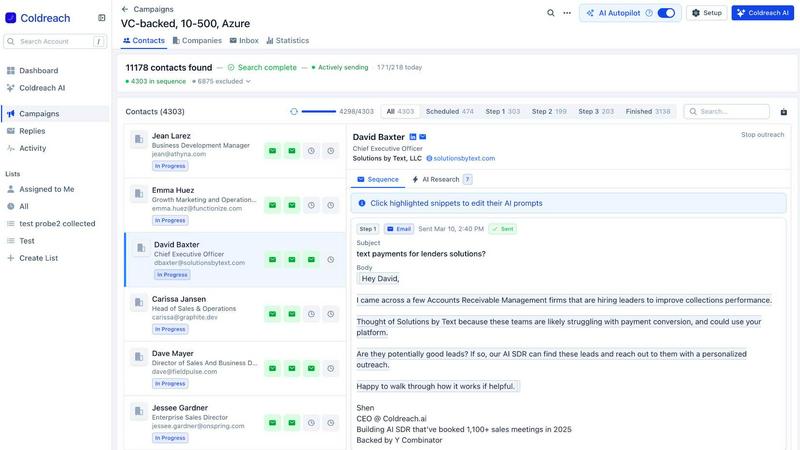
Coldreach is your AI SDR that finds high-intent leads and automatically sends them personalized outreach.
Last updated: March 19, 2026

URL to Any
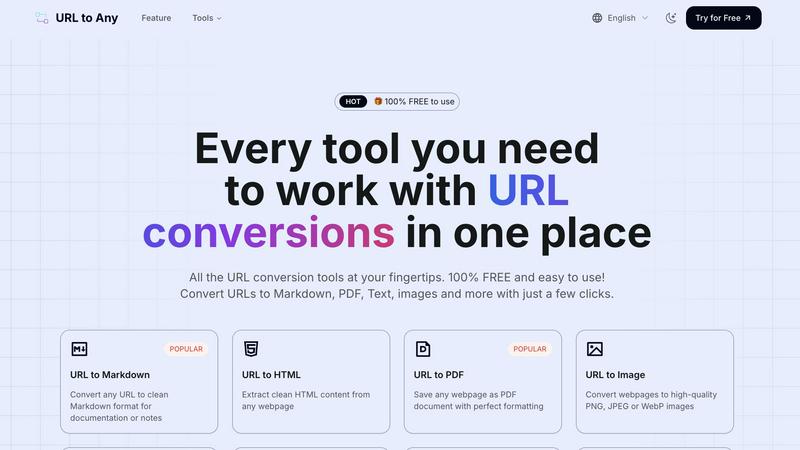
URL to Any instantly converts any webpage into PDF, text, images, and more with one click.
Last updated: March 2, 2026
Visual Comparison
Coldreach
URL to Any
Feature Comparison
Coldreach
24/7 Intent Monitoring & Lead Discovery
Coldreach acts as a tireless research assistant, continuously monitoring 97 million companies across five-plus data sources. You define custom "intent signals" specific to your product—like hiring specific roles, mentioning certain technologies, or posting about relevant challenges. The AI scans job boards, news sites, LinkedIn, and more in real-time to identify only the accounts that match your ideal customer profile and are actively in-market, ensuring you never miss a critical buying signal.
AI-Powered, Research-Backed Personalization
This feature moves beyond basic merge tags. For every lead that passes the intent filter, the AI SDR performs deep research to understand the company's specific context and pain points. It then crafts highly personalized email and LinkedIn messages that reference these genuine insights. You can provide custom tone and instruction prompts, allowing the outreach to maintain your brand voice without sounding robotic or generic, dramatically increasing engagement.
Automated Multi-Channel Outreach Sequences
Once a qualified lead is identified and a personalized message is crafted, Coldreach handles the entire outreach process on autopilot. The AI SDR manages sending the initial contact, scheduling and sending intelligent follow-ups, and managing communication across both email and LinkedIn. This ensures consistent, multi-touch engagement without any manual effort, freeing your team to focus on closing deals.
Seamless CRM & Workflow Integrations
Coldreach is built to fit into your existing sales stack without adding complexity. It offers native integrations with major platforms like Salesforce, HubSpot, Outreach, and Salesloft, allowing for automatic data sync and activity logging. You can also receive notifications in Slack or export weekly lists of targeted accounts, enabling your team to act on the best leads within their current tools and workflows.
URL to Any
Comprehensive Format Conversion
URL to Any eliminates the need for multiple disparate tools by offering over ten different conversion formats from a single interface. Beyond basic text and PDF, it provides specialized outputs like clean Markdown for note-taking platforms, structured JSON and XML for developers, and high-resolution PNG/JPEG images for visual content. This versatility ensures that no matter your project's requirements—from academic citation to software integration—you have the right tool instantly available without switching between websites or applications.
Advanced Content Extraction & AI Summarization
The tool goes beyond simple conversion with intelligent extraction features. The AI Summarizer condenses lengthy articles into concise overviews using advanced AI, saving hours of reading time. Furthermore, specialized extractors pull out all meta tags, headings, and even every single URL from a site, providing invaluable data for SEO analysis, content auditing, and competitive research. These features transform a passive webpage into a structured dataset ready for analysis.
Secure, Cloud-Based Processing
Your privacy and security are paramount. All conversions are processed in the cloud using optimized engines, ensuring lightning-fast results without taxing your local machine. Crucially, your data and the web content you convert are never stored on their servers. This commitment to privacy means you can confidently convert sensitive or proprietary information without security concerns, all while enjoying the benefits of powerful cloud processing from any device.
Developer & Productivity Utilities
URL to Any includes a suite of utilities that cater specifically to technical and productivity needs. The URL Encoder/Decoder supports 8+ formats including Base64 and JWT. The URL Opener allows for batch-opening multiple links simultaneously, streamlining research workflows. The new URL to IP tool helps with network diagnostics by resolving domain names. These ancillary tools make it a comprehensive Swiss Army knife for anyone who works extensively with web-based information.
Use Cases
Coldreach
Targeting Companies in Active Hiring Cycles
For SaaS companies selling to engineering or IT teams, Coldreach can monitor job postings for specific keywords like "Snowflake" or "Next.js." When it detects a company hiring multiple engineers with that exact tech stack, it identifies them as a high-intent lead actively building or scaling that function, making them a perfect candidate for relevant tool outreach.
Engaging Companies After Public News Events
Sales teams can use Coldreach to track news and press releases for specific triggers. For instance, a cybersecurity vendor can set a signal to find companies that have recently reported a data breach or security incident. The AI can then reach out with a timely, empathetic, and relevant message offering solutions when the prospect's pain point is most acute and top-of-mind.
Identifying Companies Undergoing Technical Modernization
For tools that replace legacy processes, you can define signals around mentions of outdated methods. A process automation platform could target companies whose job descriptions for finance roles mention "building reports in Excel." This signals a manual, painful status quo, making them ideal for a message about efficiency and automation.
Prospecting Based on Employee LinkedIn Activity
Coldreach can analyze public LinkedIn data for strategic insights. A sales intelligence tool could target companies where a new Data Engineer was recently hired and mentioned "data quality" challenges on their profile. This indicates the company is investing in and prioritizing data initiatives, creating an opening for related solutions.
URL to Any
Academic Research and Study
Students and researchers often struggle to organize information from dozens of online sources. With URL to Any, they can instantly convert research papers, articles, and online journals into clean PDFs for annotation or extract pure text to highlight key points. Converting complex web pages to simple Markdown makes compiling notes and references for a thesis or literature review dramatically faster and more organized, turning a chaotic research process into a streamlined workflow.
Content Creation and Documentation
Bloggers, technical writers, and content creators frequently need to reference or quote online sources. Manually reformatting web content is error-prone. URL to Any solves this by converting any source page into clean HTML or Markdown with preserved links and structure, allowing for easy, accurate integration into blogs, documentation, or e-books. Converting a competitor's article to text also facilitates efficient analysis and ideation without distracting ads and layouts.
Web Development and SEO Analysis
Developers can use URL to Any to convert live webpages into JSON or XML to test APIs or parse data structures. SEO specialists rely on the Meta Tags and Heading Extractors to audit websites, analyze on-page SEO elements, and export findings to CSV for reporting. The URL Extractor tool is perfect for finding all links on a site to check for broken ones or map site structure, providing critical technical SEO insights in seconds.
Professional Sharing and Archiving
Professionals need to share web-based information effectively. Instead of sending a plain link that may get overlooked, they can use URL to Any to generate a high-quality screenshot (PNG/JPEG) of a dashboard or report for a presentation, create a QR code for a marketing campaign, or save a crucial legal notice or news article as a perfectly formatted PDF for the permanent company records, ensuring the content is preserved exactly as it appeared.
Overview
About Coldreach
Coldreach is an AI-powered Sales Development Representative (SDR) designed to transform cold outreach from a numbers game into a targeted, research-driven conversation starter. It solves the core challenge of modern sales: generic, irrelevant outreach that gets ignored. Instead of blasting emails, Coldreach's AI agent conducts deep, real-time research on every single lead before making contact. It scans a prospect's entire online footprint—including job postings, company news, SEC filings, website changes, and LinkedIn profiles—to answer critical questions: Do they have the pain point you solve? What is their current status quo? Are they showing genuine buying signals right now? This intelligence drives hyper-personalized email and LinkedIn outreach, automated follow-ups, and a private deliverability setup to ensure messages land in the inbox, not spam. Built for GTM teams, sales leaders, and SDRs, Coldreach automates the top-of-funnel grind, turning hours of manual research into a scalable, high-conversion system. The result is outreach that feels timely and relevant because it genuinely is, achieving an average reply rate of 3.8%—10x the industry standard—and filling calendars with qualified meetings on autopilot.
About URL to Any
In today's digital-first world, professionals, students, and creators face a constant challenge: online information is trapped in a browser. You find a perfect article for research, but saving it as a cluttered PDF loses the formatting. You discover a crucial tutorial, but you can't easily extract the code snippets. You need to share a webpage with a team, but a simple link gets lost in the noise. Manually copying, reformatting, and converting web content is a tedious, time-consuming process that disrupts your workflow. URL to Any is the definitive solution to this modern problem. It is a powerful, all-in-one web content conversion platform designed to liberate information from any webpage and transform it into the exact format you need. With a single URL, you can generate clean Markdown for documentation, perfectly formatted PDFs for archiving, high-quality images for presentations, structured JSON for development, and even audio files for on-the-go listening. Built with a relentless focus on simplicity and efficiency, it requires no registration, no software installation, and is completely free. Whether you're a developer needing clean HTML, a student compiling research, a marketer creating shareable assets, or a project manager organizing resources, URL to Any streamlines your interaction with the web, turning the challenge of content conversion into a seamless, one-click solution.
Frequently Asked Questions
Coldreach FAQ
What is an AI SDR and how does Coldreach work?
An AI SDR automates the top-of-funnel sales activities: lead research, personalized outreach, and follow-up sequencing. Coldreach distinguishes itself by conducting genuine, multi-source research on each lead before any contact. It scans data sources like job postings, news, LinkedIn, and SEC filings to understand a company's specific context and pain points. This research directly informs the highly personalized messages it sends via email and LinkedIn, followed by automated, intelligent follow-ups, all while managing deliverability to maximize inbox placement.
How is Coldreach different from other AI SDR tools?
Most AI SDR tools rely on surface-level personalization using data like a lead's name, company, or industry. Coldreach's fundamental difference is its commitment to deep, actionable research. It doesn't just personalize with available fields; it actively investigates whether a lead has a relevant problem, what their current situation is, and if they are showing buying signals. This research-first approach ensures outreach is fundamentally relevant and timely, which is why it achieves reply rates significantly higher than industry averages.
What kind of intent signals can I track with Coldreach?
You can track a wide variety of customizable intent signals across multiple data sources. Examples include: specific phrases in job descriptions (e.g., "hiring 3+ engineers"), company news events (e.g., "faced a cybersecurity attack"), technology mentions on company websites (e.g., "SOC 2 compliant"), recent hires with certain skills on LinkedIn, or even information from public SEC filings. You can combine these signals to create a highly specific and effective ideal customer profile.
How does Coldreach ensure emails don't land in spam?
Coldreach employs a private deliverability setup. This means it does not use a shared, common sending infrastructure that can be flagged by email providers. Instead, it manages and warms up dedicated sending domains and IP addresses specifically for your campaigns. This best-practice approach to email infrastructure, combined with sending highly relevant, non-spammy content, results in excellent inbox placement rates and protects your sender reputation.
URL to Any FAQ
Is URL to Any really free to use?
Yes, URL to Any is 100% free to use. There are no hidden fees, subscription plans, or usage limits. You can access all conversion tools—from URL to PDF and Markdown to the AI Summarizer and Meta Tag Extractor—without any cost or requirement to create an account. The platform is committed to providing free, powerful tools for everyone.
How does URL to Any ensure the privacy of my data?
Privacy is a core principle. When you convert a URL, the content is processed through secure, cloud-based servers. Once the conversion is complete and delivered to you, the data is immediately discarded. URL to Any does not store the web content you convert, your IP address, or any personal information, ensuring your conversions remain completely private and secure.
What formats can I convert a webpage into?
URL to Any supports a wide array of output formats to suit various needs. Key formats include: Markdown, PDF, PNG/JPEG/WebP images, Plain Text, HTML, JSON, XML, and MP3 audio. Additionally, it offers utility outputs like QR Codes and provides tools for encoding/decoding text in multiple formats, extracting all links from a page, and summarizing content with AI.
Do I need to install any software or browser extension?
No software installation is required to use the core tools on the URL to Any website; everything runs directly in your web browser. However, for added convenience, they offer an optional browser extension. Installing this extension allows you to convert the webpage you are currently viewing with just one click from your browser's toolbar, further streamlining the conversion process.
Alternatives
Coldreach Alternatives
Coldreach is an AI SDR agent that automates lead generation and personalized outreach. It belongs to the category of AI-powered sales assistants, designed to replace manual prospecting with intelligent, research-driven automation. Users often explore alternatives for various reasons. Common factors include budget constraints, the need for specific integrations with their existing tech stack, or a desire for different feature sets like more granular control over campaigns or alternative communication channels beyond email and LinkedIn. When evaluating other tools, focus on the core capability: intelligent lead research. The key is finding a solution that does more than just blast generic messages. Look for platforms that can genuinely understand a prospect's context and pain points to drive relevance, which is ultimately what drives reply rates and conversions.
URL to Any Alternatives
URL to Any is a versatile web content conversion tool that falls under the category of AI assistants. It simplifies the process of transforming any webpage into formats like Markdown, PDF, images, or QR codes, catering to the needs of content creators, students, and developers. Users often explore alternatives for various reasons. Some may require advanced features like batch processing or API access, while others might need a tool that integrates with a specific platform or workflow. Budget considerations also play a role, as some users seek premium services with dedicated support, even if it comes at a cost. When evaluating other options, consider your primary use case. Look for a balance between the range of output formats offered and the ease of use. Security and privacy policies are crucial, especially when handling sensitive URLs. Finally, assess the overall value, whether it's a robust free tier or a paid plan that justifies its price with superior reliability and features.