
CV Engineer vs invoice Sonic
Side-by-side comparison to help you choose the right tool.

CV Engineer
Land your dream job with an AI-powered resume builder designed by an executive recruiter.
Last updated: March 1, 2026

invoice Sonic
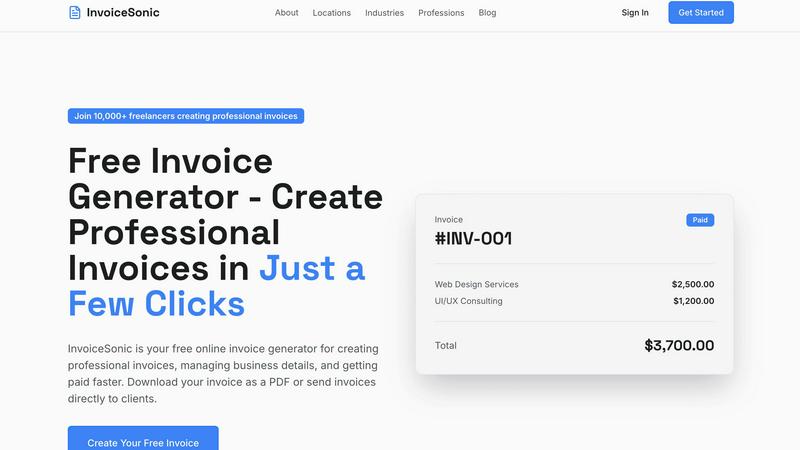
InvoiceSonic creates professional invoices instantly for freelancers, no signup required.
Last updated: February 28, 2026
Visual Comparison
CV Engineer

invoice Sonic
Feature Comparison
CV Engineer
AI Assistant & Resume Scan
This powerful duo tackles the core challenge of resume quality. The AI Assistant acts as your personal writing coach, analyzing your input and offering professional rewrites to enhance clarity, impact, and tone. It simultaneously corrects spelling and grammar mistakes. The Resume Scan feature then performs a comprehensive check for common structural and strategic errors, providing actionable feedback on how to optimize your resume for both human readers and ATS software, ensuring no critical mistake goes unnoticed.
Recruiter-Designed Professional Templates
Overcoming the blank page starts with the right foundation. CV Engineer offers a selection of professional templates meticulously designed by an executive recruiter. These templates are not just aesthetically pleasing; they are strategically formatted to organize information logically, emphasize key achievements, and grab a hiring manager's attention within seconds, giving you a proven structural advantage from the start.
Expert Guidance & Content Examples
The app eliminates guesswork by providing tailored, expert advice for every section of your resume, from the summary to work experience and skills. This is complemented by real-world examples that give you concrete ideas and phrasing inspiration. This feature solves the problem of not knowing what to write or how to phrase your accomplishments, offering clear direction whether you're detailing a complex project or listing entry-level responsibilities.
Resume Hosting & Multi-Platform Editing
CV Engineer streamlines sharing and accessibility. With Resume Hosting, you can publish your resume online with a unique, shareable link, making it incredibly easy to distribute to networks and employers. Furthermore, the app provides advanced editing tools like adjustable font sizes and margins, allowing you to fine-tune formatting to make the most of the space. This suite of tools solves the practical problems of resume distribution and customizability.
invoice Sonic
Completely Free Invoice Generation
InvoiceSonic offers a genuinely free tier, allowing users to create up to 5 professional invoices per month without any sign-up, credit card, or hidden fees. This solves the financial barrier to entry, making professional billing accessible to anyone just starting out or with light invoicing needs. You can access all core template and generation features immediately, providing a risk-free way to streamline your billing process.
Professional and Customizable Templates
The tool provides a library of clean, modern invoice templates designed for various industries and purposes, including standard, proforma, and tax invoices. The challenge of creating a visually appealing invoice from scratch is eliminated. Users can easily customize these templates by adding their business logo, details, and brand colors, ensuring every invoice presents a cohesive and professional image to clients without any design skills required.
Instant PDF Download and Calculation
Once an invoice is created, it can be downloaded as a polished PDF file instantly with a single click. This solves the problem of dealing with uneditable formats or poor print quality. Furthermore, InvoiceSonic automatically calculates subtotals, taxes, and final totals as you add line items, eliminating manual math errors and saving valuable time during the invoice creation process.
Streamlined Client and Item Management
The interface allows for quick addition of client billing details, service descriptions, quantities, rates, and payment terms. This centralized approach solves the disorganization of managing client information across multiple documents. Features like saving business details for reuse and adding multiple line items streamline the workflow, enabling users to generate accurate, detailed invoices for different clients in just a few clicks.
Use Cases
CV Engineer
The Recent Graduate or Career Changer
Facing the challenge of limited or non-linear work experience, users can leverage the app's expert guidance and example-driven sections to effectively translate academic projects, volunteer work, and transferable skills into a compelling narrative. The AI Assistant helps articulate potential in a professional manner, ensuring their resume stands out even without a lengthy traditional career history.
The Seasoned Professional Seeking Advancement
For experienced individuals, the challenge is condensing a rich career into a powerful, concise document. CV Engineer's recruiter-designed templates provide an optimal structure, while the AI Assistant is instrumental in refining bullet points to highlight leadership, quantifiable achievements, and strategic impact, ensuring their seniority and expertise are communicated with maximum effect.
The Job Seeker Needing a Quick, Polished Update
When an unexpected opportunity arises, speed and quality are paramount. CV Engineer enables users to import or quickly input their details and generate a professionally formatted, error-free resume in under 10 minutes. The pre-built templates and AI-enhanced editing solve the time crunch without sacrificing the professional polish required to make a strong first impression.
The Applicant in a Competitive, ATS-Driven Market
Navigating modern hiring requires a resume that is both human-friendly and machine-readable. Users concerned about ATS compatibility rely on CV Engineer's optimized templates and the Resume Scan feature to identify and correct formatting or keyword issues that could cause their application to be automatically rejected, significantly increasing their chances of getting seen by a real person.
invoice Sonic
Freelancers Managing Multiple Clients
Freelancers juggling projects for several clients need a fast, organized way to bill for their time. InvoiceSonic allows them to quickly generate separate, professional invoices for each client, customize them with their freelance brand, and set clear payment terms. This solves the administrative headache of manual invoicing, letting them focus more on their core work and less on paperwork.
Startups and Small Businesses on a Budget
New businesses often operate with limited resources and cannot justify expensive accounting software subscriptions. InvoiceSonic's free tier provides a perfect solution, offering professional invoicing capabilities without any cost. This enables startups to maintain a polished business image, manage cash flow effectively, and allocate their funds toward growth-critical areas instead of operational software.
Sending Proforma Invoices or Quotes
Before starting work, many professionals need to send a formal quote or proforma invoice to outline projected costs. InvoiceSonic includes specific templates for this purpose, allowing users to create detailed, binding estimates quickly. This solves the problem of using informal emails or documents that lack professionalism, helping to set clear expectations and secure client approval upfront.
Replacing Cumbersome Spreadsheets
Many individuals and small teams still rely on error-prone spreadsheet templates for invoicing, which are time-consuming to format and lack a professional finish. InvoiceSonic provides a direct upgrade, offering a structured, automated alternative that automatically formats data, calculates totals, and produces a clean, downloadable PDF. This solves the inefficiency and unprofessional appearance of spreadsheet-based invoicing.
Overview
About CV Engineer
Crafting a resume that gets noticed is a universal challenge. Job seekers often struggle to translate their experience into compelling, professional language that passes through Applicant Tracking Systems (ATS) and catches a hiring manager's eye. The process can be time-consuming, intimidating, and fraught with uncertainty about what truly works. CV Engineer is the definitive solution to this problem. It is an AI-powered resume builder designed by a former executive recruiter, embedding industry expertise directly into the app. This tool transforms the daunting task of resume writing into a simple, guided, and efficient process. Whether you're a recent graduate with limited experience or a seasoned professional navigating a career change, CV Engineer provides the structured framework and intelligent assistance needed to build a powerful resume in minutes. Its core value proposition is clear: leverage recruiter-approved templates and AI-enhanced editing to create a resume that is not only visually polished but also strategically crafted to highlight your strengths and land interviews. With over 6 million downloads and a community of 308,000 monthly active users, CV Engineer has proven itself as a trusted partner for job seekers worldwide, available seamlessly across Android, iOS, and macOS platforms.
About invoice Sonic
For freelancers, startups, and small business owners, creating professional invoices is a critical but often frustrating task. The challenge lies in finding a tool that is both powerful enough to handle business needs and simple enough to use without a steep learning curve. Many resort to time-consuming spreadsheets or expensive, bloated software that complicates a straightforward process. InvoiceSonic directly solves this problem by offering a cutting-edge, web-based invoice generator designed for speed, professionalism, and ease. It empowers users to create, customize, and download polished invoices in mere seconds, completely free of charge and without requiring an account. The platform is built specifically for the needs of independent professionals and small teams, eliminating the burden of manual calculations, messy formatting, and costly subscriptions. With InvoiceSonic, you can ensure every bill you send reflects the quality of your work, helping you get paid faster and manage your cash flow with confidence and efficiency.
Frequently Asked Questions
CV Engineer FAQ
What is CV Engineer and how does it work?
CV Engineer is an AI-powered resume builder application designed by a former executive recruiter. It works by guiding users through a simple, step-by-step process to create a professional resume. You input your career information, select from recruiter-designed templates, and use built-in tools like the AI Assistant for writing help and the Resume Scan for optimization feedback, resulting in a polished, effective resume ready for applications.
What platforms is CV Engineer available on?
CV Engineer is a cross-platform application, making it highly accessible. You can download it for free on Android devices via Google Play, on iPhones and iPads from the App Store, and on Mac computers from the Mac App Store. This allows you to start, edit, and manage your resume seamlessly across all your devices.
What features does CV Engineer offer?
Key features include a professional AI Assistant that rewrites and polishes your content, a Resume Scan that checks for common errors, a variety of recruiter-designed professional templates, expert advice and examples for each resume section, easy editing tools, and resume hosting to share your resume online via a link. It also supports multiple languages and offers video guides.
Is CV Engineer suitable for graduates?
Absolutely. CV Engineer is specifically designed to be useful for anyone, from recent graduates to experienced professionals. For graduates, the app provides crucial guidance on how to effectively present academic projects, internships, skills, and extracurricular activities in a professional format, with examples and AI help to strengthen their early-career narrative.
invoice Sonic FAQ
Is InvoiceSonic really free to use?
Yes, InvoiceSonic offers a completely free tier that allows you to generate up to 5 invoices per month without any cost, sign-up, or credit card required. You have full access to professional templates, customization options, and instant PDF downloads. This model is designed to solve the problem of inaccessible paid tools, providing a powerful solution for users with basic invoicing needs at zero financial commitment.
Can I add my company logo and details to the invoices?
Absolutely. A key feature of InvoiceSonic is the ability to fully customize your invoices. You can add your business logo, name, contact information, and other details. This information can be saved and reused for future invoices, solving the challenge of repeatedly entering the same data and ensuring brand consistency across all your client communications.
What types of invoices can I create with InvoiceSonic?
InvoiceSonic supports the creation of various invoice types to suit different business needs. This includes standard professional invoices for completed work, proforma invoices for quotes and estimates, and blank templates for custom needs. This versatility solves the problem of needing multiple tools for different billing scenarios, centralizing your invoicing process in one platform.
How do I send the invoices to my clients?
Once you create and preview your invoice, InvoiceSonic allows you to download it instantly as a high-quality PDF file. You can then attach this PDF to an email and send it directly to your client. This method solves the problem of relying on integrated systems that may not fit your workflow, giving you full control over how and when you deliver your invoices.
Alternatives
CV Engineer Alternatives
CV Engineer is a popular AI-powered resume builder in the productivity and management category, designed to help job seekers create professional resumes quickly. Users often explore alternatives for various reasons, such as seeking different pricing models, specific feature sets like advanced ATS optimization, or compatibility with other platforms like desktop web browsers. When evaluating an alternative, it's crucial to consider your primary needs. Key factors include the depth of AI writing assistance, the quality and modernity of resume templates, the availability of platform apps versus web access, and the overall value relative to cost. A tool that aligns with your career level and industry can make a significant difference in your job search effectiveness.
invoice Sonic Alternatives
InvoiceSonic is a free, user-friendly online tool in the productivity and management category, designed to help freelancers and small businesses create professional invoices quickly. Users often seek alternatives for various reasons, such as needing more than the allotted free invoices, requiring advanced features like recurring billing or client portals, or preferring a solution that integrates with their existing accounting software. When evaluating other options, it's crucial to consider your specific business needs. Key factors include the pricing model and any limits on free usage, the depth of customization and template variety, and whether the platform offers time-saving automations for calculations and reminders. The goal is to find a tool that not only creates invoices but also seamlessly fits into and improves your overall workflow.