DataPhotos.AI vs RemoveTexts
Side-by-side comparison to help you choose the right tool.

DataPhotos.AI
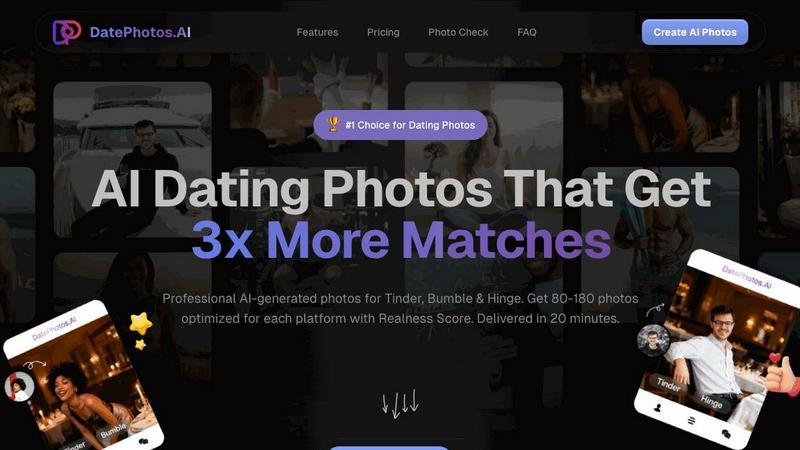
Get 3x more matches with AI dating photos created from your selfies in 20 minutes.
Last updated: February 28, 2026

RemoveTexts
RemoveTexts is an AI tool that effortlessly removes text from images in seconds, making editing simple and accessible for everyone.
Last updated: March 11, 2026
Visual Comparison
DataPhotos.AI
RemoveTexts

Feature Comparison
DataPhotos.AI
High-Volume AI Photo Generation
Upload just 5 to 20 of your selfies, and DataPhotos.AI's advanced artificial intelligence gets to work. In approximately 20-30 minutes, it generates an extensive library of 80 to 180 unique dating photos. This massive volume provides you with an unparalleled selection to choose from, ensuring you have the perfect shots for every slot on your profile without the need for multiple photoshoots or locations.
Realness Score & Quality Filter
A common fear with AI photos is that they might look fake or "off." DataPhotos.AI tackles this head-on by assigning each generated photo a Realness Score from 0 to 100. This objective metric allows you to instantly filter and identify the most natural-looking, authentic images. With an average score of 92/100, you can confidently select photos that truly represent you and blend seamlessly with your real pictures.
40+ Diverse Scene Variations
Standing out requires showing different facets of your life. DataPhotos.AI places you in over 40 distinct, realistic settings—from coffee shops and beaches to gyms, urban streets, and professional environments. Each scene includes multiple pose variations. This diversity is proven to create more engaging profiles, directly addressing the challenge of single-scene profiles that fail to capture attention on crowded dating apps.
Free Regeneration & Platform Optimization
Not completely satisfied with a particular result? The platform offers free regeneration, giving you 10 chances per project to redo any photo at no extra cost. Furthermore, the AI optimizes photos specifically for major dating platforms like Tinder, Bumble, and Hinge, considering factors like composition and appeal that perform best on each app, giving you a strategic edge.
RemoveTexts
Paint to Remove
This feature allows users to have precise control over the text removal process. Simply brush over the specific areas of text you want to eliminate, and the AI will erase only those sections, preserving the surrounding image. This is particularly useful for targeted edits and ensures that only unwanted elements are affected.
Auto Remove All
For users who want a quick solution, the Auto Remove All feature detects and removes every text element in the image automatically. This one-click removal option is ideal for cleaning up images with multiple text elements, saving time and effort while delivering clean results.
Edit & Replace Text
The Edit & Replace Text feature enables users to change existing text in images while matching the original font style. This is beneficial for those who want to update or customize information in visuals without compromising the overall design integrity.
Remove Objects
In addition to text, RemoveTexts also offers the ability to erase unwanted objects, logos, or visual elements from images. This feature provides even greater versatility, allowing users to clean up their images beyond just text removal, making it a comprehensive editing solution.
Use Cases
DataPhotos.AI
The Busy Professional Seeking Efficiency
For professionals with demanding schedules, finding time for a photoshoot is nearly impossible. DataPhotos.AI solves this by delivering a professional-grade photo portfolio during a coffee break. Upload selfies on a lunch break and have a complete set of optimized, diverse dating photos ready before the end of the workday, eliminating scheduling hassles and long turnaround times.
The Budget-Conscious Single
Hiring a professional photographer can cost between $250 and $500. DataPhotos.AI provides a cost-effective alternative at a fraction of the price ($29-$79), saving users $170-$420 while delivering 4-6 times more photos. This makes high-quality, match-boosting profile pictures accessible to anyone, regardless of their budget for dating app expenses.
The User Needing Profile Variety
Many people have great photos from one context (e.g., at home) but lack variety, making their profile seem one-dimensional. DataPhotos.AI addresses this by generating photos across 40+ different scenes and activities. This allows users to showcase a well-rounded personality—casual, adventurous, professional—which is key to attracting a wider range of potential matches.
The Skeptic Seeking Authentic AI Results
Individuals wary of AI images looking artificial can use the Realness Score system as a trusted filter. They can quickly sort and download only the photos that score highly (e.g., 85+), ensuring every image on their profile looks genuine and trustworthy. This builds confidence in using the tool and prevents the use of any "uncanny valley" images that might hurt their chances.
RemoveTexts
E-commerce Product Photography
Online sellers can use RemoveTexts to clean up product images by removing watermarks, logos, or any distracting text overlays. This results in visually appealing product photos that enhance customer engagement and sales.
Social Media Content Creation
Marketers and content creators can benefit from this tool by quickly removing unwanted text from images used in social media posts. This ensures that visuals remain clean and professional, helping their content stand out in a crowded digital landscape.
Legal Document Redaction
Legal professionals can use RemoveTexts to redact sensitive information from screenshots or scanned documents. By removing dates, names, or other identifying information, they can maintain confidentiality while still sharing necessary information.
Personal Photo Editing
Individuals looking to enhance their personal photos can easily remove unwanted text, such as date stamps or captions, to improve their overall aesthetic. This makes it simple to share polished images with friends and family without the distraction of unnecessary text.
Overview
About DataPhotos.AI
In the modern dating scene, your profile photos are your most critical asset. The challenge? Professional photoshoots are expensive, time-consuming, and often produce stiff, unnatural results. Meanwhile, relying on casual selfies can make your profile blend into the crowd, drastically reducing your chances of getting noticed and matched. DataPhotos.AI is the innovative solution designed to solve this exact problem. It is an AI-powered platform that transforms a handful of your selfies into a vast portfolio of authentic, high-quality dating profile photos in just 20-30 minutes. Designed for singles using Tinder, Bumble, Hinge, and other platforms, it eliminates the need for costly photographers and long waits. The core value proposition is powerful: generate 80-180 diverse, professionally optimized images that showcase your personality across 40+ realistic scenes. With its unique Realness Score for quality control, DataPhotos.AI ensures you get photos that look genuinely like you, helping you stand out, attract more attention, and ultimately secure 3x more matches. It's the fast, affordable, and effective way to upgrade your online dating presence from invisible to irresistible.
About RemoveTexts
RemoveTexts is an innovative, AI-powered image editing tool designed to effortlessly eliminate unwanted text from images with just a single click. It is perfect for anyone who needs to clean up visuals without the need for complex software like Photoshop or extensive design skills. Whether you are a marketer looking to remove watermarks, a creator aiming to erase meme text, or a professional needing to eliminate sensitive information from screenshots, RemoveTexts provides a fast and efficient solution. The tool leverages advanced deep learning techniques to analyze images and intelligently reconstruct backgrounds, ensuring that the final result is seamless and professional-grade. With over 100,000 images processed and a growing user base of more than 50,000, RemoveTexts is revolutionizing the way people edit images, providing clean results in seconds rather than hours.
Frequently Asked Questions
DataPhotos.AI FAQ
How realistic are the AI-generated photos?
Extremely realistic. Each photo generated by DataPhotos.AI is assigned a Realness Score from 0 to 100 based on its authenticity and natural appearance. The average score is 92/100. This system allows you to easily identify and select only the most lifelike images that truly resemble you, ensuring they blend perfectly with your real photos on your dating profile.
How long does it take to get my photos?
The process is remarkably fast. After uploading 5-20 selfies, the AI generates your complete set of 80-180 photos in just 20 to 30 minutes. This is significantly faster than traditional photography (1-2 weeks) and even other AI tools that can take 24-48 hours, allowing you to upgrade your profile almost instantly.
Which dating apps are the photos optimized for?
DataPhotos.AI specifically optimizes photos for the world's most popular dating platforms, including Tinder, Bumble, and Hinge. The AI tailors aspects like composition, lighting, and style to meet the visual trends and user expectations on each app, maximizing your profile's appeal and effectiveness where it matters most.
What if I don't like some of the generated photos?
You have full control. DataPhotos.AI includes a free regeneration feature. For each project, you get 10 chances to regenerate any individual photo you're not satisfied with at no additional cost. This ensures you can fine-tune your results until you have a perfect collection of images you love and feel confident using.
RemoveTexts FAQ
How does RemoveTexts remove text from images?
RemoveTexts utilizes advanced AI and deep learning inpainting technology to analyze the surrounding pixels in an image and intelligently reconstruct the background after text has been removed. This ensures seamless and professional results.
Is there a limit to the size of images I can upload?
Yes, RemoveTexts supports images in JPG, PNG, and WebP formats with a maximum file size of 10 MB. This allows for efficient processing of a variety of image types while maintaining quality.
Can I remove watermarks and logos?
Yes, RemoveTexts includes a feature that allows users to erase watermarks and logos from images effectively. However, it is important to note that removing copyrighted or trademarked content without permission may violate legal guidelines.
Do I need to download any software to use RemoveTexts?
No, RemoveTexts is a free online tool that works directly in your web browser. There is no need for any downloads or installations, making it accessible and user-friendly for everyone.
Alternatives
DataPhotos.AI Alternatives
DataPhotos.AI is an AI-powered dating profile photo generator designed to help singles create standout images that attract more matches. It belongs to the growing category of AI photo enhancement tools specifically tailored for online dating success. Users often seek alternatives for various reasons, including budget constraints, a desire for different artistic styles, or the need for photos optimized for niche dating platforms beyond the major apps. When evaluating other services, it's crucial to consider several key factors. Look for the quality and authenticity of the AI-generated images, as overly artificial photos can be counterproductive. Check if the service offers customization for your target dating apps and provides a diverse range of scenes and outfits. Finally, assess the value based on output quantity, generation speed, and overall cost to find the best fit for your dating profile goals.
RemoveTexts Alternatives
RemoveTexts is an AI-powered tool designed to eliminate unwanted text from images quickly and efficiently, falling under the category of image and photo editing software. Users often seek alternatives for various reasons, including pricing constraints, specific feature requirements, or compatibility with different platforms. When considering an alternative, it’s essential to evaluate aspects like ease of use, the effectiveness of the text removal process, output quality, and additional functionalities that may better suit individual needs. With the diverse range of image editing tools available, users should look for alternatives that match their specific requirements. Features such as precision editing capabilities, the ability to work with different languages, and the overall user experience can significantly impact satisfaction. Additionally, considering the community support and tutorial availability can enhance the editing journey, ensuring users can maximize their chosen tool's potential.