File Studio vs Wipyly
Side-by-side comparison to help you choose the right tool.

File Studio
File Studio provides powerful offline tools to securely convert, edit, and manage your files and PDFs on your computer.
Last updated: February 27, 2026

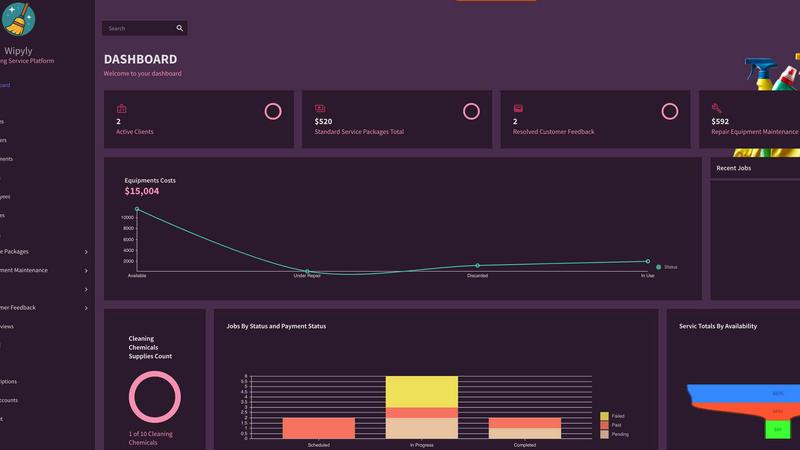
Wipyly streamlines your cleaning business by managing your team, schedule, and supplies in one efficient app.
Last updated: March 4, 2026
Visual Comparison
File Studio

Wipyly
Feature Comparison
File Studio
5 PDF Tools
File Studio provides five dedicated PDF tools that allow users to merge, split, edit, and unlock PDF documents effortlessly. You can merge multiple PDFs into a single document, split large files into manageable pages, reorder and rotate pages as needed, and remove passwords from secured files—all while working completely offline.
10 Image Tools
With ten powerful image tools, File Studio supports over 20 file formats, including HEIC, WebP, AVIF, and various RAW types. Users can resize, compress, crop images, add watermarks, and even create collages. The batch processing feature enables handling entire folders in one go, ensuring efficiency and saving time.
Batch Processing
File Studio's batch processing capability allows users to convert, resize, or compress hundreds of files simultaneously. This feature is particularly useful for professionals who need to manage large quantities of images or documents, providing maximum efficiency and streamlining workflow.
100% Offline Functionality
File Studio operates entirely offline, ensuring that all file processing occurs locally on your Mac or PC. There are no uploads, accounts, or subscriptions involved, which means sensitive documents remain private and secure at all times.
Wipyly
Smart Scheduling & Job Management
Effortlessly organize and oversee all cleaning jobs from a centralized dashboard. This feature allows you to assign teams, manage recurring appointments, and adjust schedules in real-time to avoid conflicts or double-bookings. You gain full visibility into daily, weekly, and monthly operations, ensuring every job is accounted for and your team knows exactly where to be and what to do, significantly boosting on-time reliability and productivity.
Client Management & Online Booking
Enhance the customer experience by providing a professional portal for online bookings and automated communications. Store all client details, service histories, and preferences in one secure place. Automated reminders and notifications keep clients informed, reducing no-shows and last-minute cancellations. This streamlined process not only saves you hours on phone calls and emails but also projects a modern, efficient brand image that clients trust.
Integrated Invoicing & Financial Tracking
Simplify your billing and gain clear financial insights. Quickly generate and send professional invoices directly from completed job records. The platform tracks payments, manages expenses, and provides comprehensive modules for payroll and total compensation. This gives you a real-time view of your business's financial health, helping you track profitability, manage cash flow, and ensure accurate, compliant financial operations without switching to separate accounting software.
Inventory & Equipment Maintenance Management
Take the guesswork out of supply and equipment oversight. This feature provides a unified platform to track inventory levels for cleaning supplies, schedule automatic reorders, and log all equipment maintenance. By ensuring your team always has the necessary tools and that machinery is serviced proactively, you minimize costly downtime and maintain consistent service quality, all while simplifying complex logistical tasks.
Use Cases
File Studio
Simplifying Document Management
File Studio can be a game-changer for freelancers and remote workers who frequently handle contracts and sensitive documents. With its robust PDF tools, users can efficiently manage their files without exposing them to potential online threats.
Enhancing Photography Workflows
For photographers, File Studio offers essential image tools to convert and optimize photos from various formats. Whether it’s compressing large RAW files or converting HEIC images for compatibility, this software helps streamline the editing process.
Organizing Personal Documents
Individuals can use File Studio to manage important personal documents, such as IDs and passports. The ability to merge and split PDFs, coupled with the offline nature of the software, ensures that privacy is maintained while keeping everything organized.
Efficient File Conversion
Professionals needing to convert files between different formats can rely on File Studio's extensive conversion capabilities. From PDF to JPG for easy sharing to compressing images for web use, users can tackle a variety of tasks without needing an internet connection.
Wipyly
Scaling a Solo Cleaning Operation
A solo cleaner using manual methods struggles with booking management, scheduling, and chasing payments, limiting growth. By implementing Wipyly, they automate online bookings, client reminders, and invoicing. This frees up significant time previously spent on admin, allowing them to take on more clients confidently, present a more professional front, and systematically scale their business without becoming overwhelmed by the operational complexity.
Coordinating Multiple Cleaning Teams
A business owner with several crews faces constant communication gaps, scheduling conflicts, and difficulty tracking job completion and team performance. Wipyly acts as a central dispatch and coordination hub. The owner can assign jobs, update schedules on the fly, and see real-time status updates from the field. This ensures optimal route planning, eliminates confusion, and provides the data needed to manage team efficiency and accountability effectively.
Managing Client Relationships and Retention
A cleaning service loses clients due to missed appointments, billing errors, and a lack of personalized communication. Using Wipyly’s client management tools, they maintain detailed service histories and preferences, send automated appointment confirmations, and request feedback post-service. This proactive, organized approach demonstrates reliability and care, leading to higher client satisfaction, positive reviews, and increased customer retention rates.
Streamlining Back-Office Financial Administration
The business owner spends evenings and weekends manually calculating payroll, tracking expenses, and creating invoices, leading to errors and stress. With Wipyly’s integrated financial modules, these processes are automated and interconnected. Invoices are generated from job data, payroll is calculated based on scheduled hours, and all costs are tracked in one place. This provides accurate financial insights for better decision-making and reclaims valuable personal time.
Overview
About File Studio
File Studio is a comprehensive desktop application crafted for users who require effective management of PDF and image files while prioritizing privacy and security. Operating entirely offline, it is particularly beneficial for photographers, freelancers, and remote workers handling sensitive documents such as passports, IDs, and contracts. File Studio eliminates the risks associated with cloud storage by providing powerful tools to merge, split, reorder, rotate, and password-protect PDFs, as well as convert files among over 20 formats, including HEIC, WebP, AVIF, and various RAW types. With a one-time purchase model, it offers an affordable alternative to subscription-based services, making it accessible to anyone who seeks reliable and efficient file management without the burden of ongoing fees or account setups. Compatible with both Mac and Windows, File Studio empowers users with the ability to manage and optimize their documents seamlessly.
About Wipyly
Running a cleaning business is a constant juggling act. Between managing client bookings, coordinating your team's schedules, handling invoices, and tracking supplies, the administrative chaos can quickly overshadow the actual service work. Spreadsheets, sticky notes, and disconnected apps create a fragmented system prone to errors, double-bookings, and communication breakdowns. This operational disorganization not only drains your time but can also impact service quality and client satisfaction, putting your hard-earned reputation at risk.
Wipyly is the definitive solution to this challenge. It is a comprehensive, cloud-based command center designed specifically for residential and commercial cleaning services. This all-in-one platform consolidates every critical business operation—from the first online booking to the final invoice—into a single, intuitive system. Whether you are a solo operator or managing multiple crews, Wipyly replaces the chaos with clarity. Its core mission is to help you streamline daily workflows, drastically reduce time-consuming administrative tasks, and deliver a stellar, professional experience for both your team and your clients. By providing integrated tools for smart scheduling, customer management, job tracking, inventory, and financial insights, Wipyly empowers cleaning business owners to stay perfectly organized, make data-driven decisions, and scale their operations with confidence and control.
Frequently Asked Questions
File Studio FAQ
Is my data ever uploaded?
No, File Studio processes everything locally on your device. Your files never leave your computer, ensuring 100% offline processing and maximum privacy.
Do you offer a free trial?
Yes, users can try File Studio before committing. This allows you to explore its features and see how it fits into your workflow without any immediate financial obligation.
What file formats does File Studio support?
File Studio supports over 20 file formats, including popular image formats like HEIC, WebP, AVIF, and various RAW types, as well as comprehensive PDF functionalities.
Can I use File Studio on both Mac and Windows?
Yes, File Studio is compatible with both Mac and Windows operating systems, making it accessible to a wide range of users regardless of their preferred platform.
Wipyly FAQ
Is Wipyly suitable for a one-person cleaning business?
Absolutely. Wipyly is designed to scale with you. For a solo operator, it eliminates administrative chaos by automating bookings, reminders, and invoicing. This professional system helps you manage your schedule with ease, present a more established business image to clients, and lay a strong operational foundation, saving you hours each week that can be redirected to serving more customers or personal time.
How does Wipyly help with team management and communication?
Wipyly serves as a central communication hub. You can assign jobs to specific team members or crews, and they receive automatic notifications with all job details. Changes to the schedule are updated in real-time for everyone. This eliminates back-and-forth calls and text messages, ensures everyone is on the same page, and provides a clear record of assignments and responsibilities, enhancing team coordination and accountability.
Can clients book and pay for services directly through Wipyly?
Yes. Wipyly includes professional online booking functionality that you can share via your website or a direct link. Clients can view available time slots, select their service package, and book appointments 24/7. The integrated invoicing system allows you to send secure payment links directly to clients, enabling faster payments and a more convenient, modern customer experience that reduces your manual follow-up work.
Is my business data secure on the Wipyly platform?
Security is a top priority. Wipyly employs industry-standard measures including SSL encryption to protect all data in transit and at rest. The platform is built to be highly trusted and reliable, ensuring your sensitive business, client, and financial information is kept secure. You can manage your operations with confidence, knowing your data is protected against unauthorized access.
Alternatives
File Studio Alternatives
File Studio is a powerful desktop application that falls under the productivity and management category, specifically designed for handling files and PDFs offline. Users often seek alternatives to File Studio due to varying needs such as pricing differences, feature sets, and compatibility with specific platforms. Some may require more advanced features, while others may be looking for a solution that offers a different user experience. When evaluating alternatives, it’s essential to consider factors such as the range of tools available, the ability to work offline, and the overall cost structure. Users should also assess the software's compatibility with their operating system and its capacity to handle various file formats effectively. This ensures that the chosen solution aligns with their specific file management requirements.
Wipyly Alternatives
Wipyly is a comprehensive business management platform designed specifically for cleaning companies. It falls into the productivity and operations software category, helping owners centralize bookings, scheduling, customer communication, and invoicing into one streamlined system. Users often explore alternatives for various reasons. These can include budget constraints, a need for different feature sets, or specific platform requirements like a mobile-first experience or deeper integration with other tools they use. The search for the right fit is a normal part of finding software that aligns perfectly with a business's unique growth stage and operational workflow. When evaluating alternatives, focus on your core needs. Consider the essential features for your daily operations, your team's size and tech comfort, scalability for future growth, and of course, the overall value relative to cost. The goal is to find a solution that removes complexity, not adds to it.