
FilexHost vs PrepMyList
Side-by-side comparison to help you choose the right tool.

FilexHost
Effortlessly host and share any file in seconds with FilexHost's simple drag-and-drop interface and secure links.
Last updated: February 27, 2026

Easily create, customize, and share checklists online for any task without signup, all for free with PrepMyList.
Last updated: March 1, 2026
Visual Comparison
FilexHost

PrepMyList
Feature Comparison
FilexHost
Universal File Support
FileXHost supports a wide range of file types including PDFs, Excel sheets, images, audio files, video content, ZIP archives, and HTML projects. This means users can store and share virtually any digital asset without worrying about format limitations. Additionally, the smart rendering engine optimizes file display, allowing documents to be viewed as intended, whether it is a simple text file or an interactive webpage.
Instant Subdomains
Every file uploaded to FileXHost is automatically assigned an instant subdomain (your-file.filex.host) with zero setup required. This feature simplifies the sharing process by providing users with a clean, easy-to-share link that is generated immediately upon upload. This allows for seamless distribution of files without navigating complex settings or configurations.
Free SSL Encryption
Security is a priority at FileXHost, which is why every link comes with free SSL encryption. This ensures that all files shared through the platform are transmitted securely, protecting sensitive information from potential threats. Users can share files confidently, knowing that their data is safeguarded during transit.
Smart View Modes
FileXHost offers users the ability to choose how their files are presented to recipients with smart view modes. Users can opt for direct rendering, which displays files in-browser, or a download page format. This flexibility allows for a tailored viewing experience, catering to the specific needs of the audience and the type of file being shared.
PrepMyList
Create Printable Checklists
PrepMyList allows users to create checklists that can be printed or exported in PDF or CSV formats. This feature is perfect for those who prefer a physical copy of their lists for offline use or want to share them in a universally accessible format.
Guided Setup
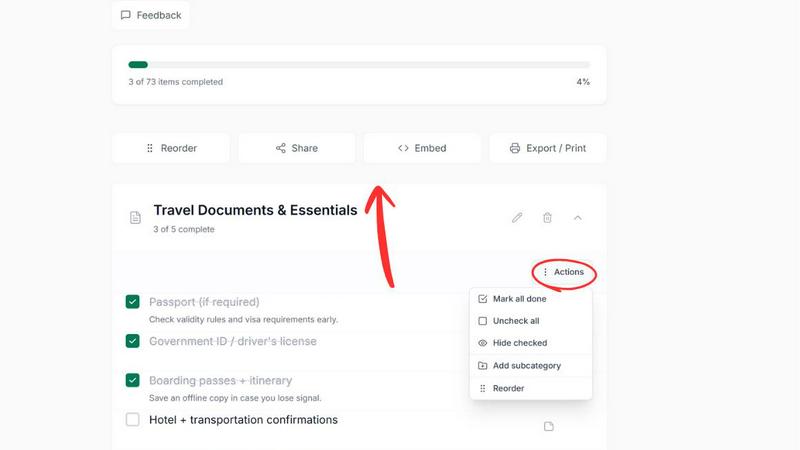
With guided setup options for specific categories like Road Trip and Car Maintenance, users can easily generate tailored checklists by answering a few simple questions. This feature simplifies the checklist creation process and ensures that users do not miss any essential items.
Customization Options
Users can customize their checklists by adding personal notes and modifying item lists according to their unique needs. This level of personalization ensures that every checklist is relevant and serves its intended purpose effectively.
Easy Sharing via Link or QR Code
PrepMyList makes it easy to share your checklists with others. Users can generate a link or QR code for their checklists, allowing anyone with access to view and edit the list collaboratively, promoting teamwork and organization.
Use Cases
FilexHost
Sharing Client Reports
Professionals can leverage FileXHost to share client reports effortlessly. By uploading documents and generating a secure link, they can provide clients with instant access to important files without the hassle of email attachments or file size limits. This creates a smoother communication process and enhances client satisfaction.
Hosting Development Projects
Developers can utilize FileXHost to host landing pages or mock APIs quickly. With the ability to upload entire websites in ZIP format and get instant links, developers can share their work with stakeholders or test their projects without the need for complex server setups or configurations.
Distributing Digital Products
Creators looking to distribute digital products, such as eBooks or software, can benefit from FileXHost's straightforward file hosting. By uploading their products and sharing the generated links, they can reach their audience without facing the common challenges associated with file distribution, such as attachment limits or access requests.
Managing Team Collaboration
FileXHost serves as an excellent tool for team collaboration, enabling team members to share files and resources quickly. Whether it is project documents, spreadsheets, or multimedia content, users can efficiently manage and distribute files among team members, fostering better collaboration and productivity.
PrepMyList
Vacation Packing List
When preparing for a vacation, users can create a comprehensive packing checklist to ensure they do not forget essential items. By customizing the list based on personal preferences and trip specifics, travelers can enjoy peace of mind while packing.
Event Planning
For individuals or teams planning events, PrepMyList can be utilized to create detailed checklists that cover tasks such as venue setup, catering needs, and guest management. This ensures that every aspect of the event is accounted for and executed smoothly.
Daily Chores Management
Families can use PrepMyList to manage daily chores effectively. By creating a customizable checklist for household tasks, everyone can stay on the same page and ensure that responsibilities are shared equitably.
Car Maintenance Check
Car owners can benefit from a dedicated car maintenance checklist that helps them track routine checks and essential safety items. This proactive approach ensures that vehicles remain in optimal condition and legal requirements are met.
Overview
About FilexHost
FileXHost is a cutting-edge file hosting and sharing service that simplifies the process of sharing files of all types, from documents and media to spreadsheets and entire websites. Designed for professionals, developers, and creators, FileXHost allows users to quickly upload their files using a straightforward drag-and-drop interface, generating an instant secure URL for sharing. This eliminates the typical complexities associated with file sharing, such as server management or DNS configurations, and does not require recipients to log in. With an emphasis on user experience, FileXHost ensures that shared files are presented beautifully, whether they are PDFs, images, or interactive spreadsheets, without requiring additional downloads or plugins. Its value proposition lies in providing a universal platform for swift and secure file hosting, catering to anyone who needs hassle-free file delivery or web hosting solutions.
About PrepMyList
PrepMyList is an innovative online checklist generator that empowers users to organize their tasks seamlessly without the need for an account. This free tool caters to everyone, from busy professionals to families planning outings, by providing a straightforward way to create, customize, and manage interactive checklists on-the-fly. With a diverse range of ready-made templates tailored for various needs, users can quickly start their planning process or create a checklist from scratch. The platform's mobile-first design ensures that checklists are accessible and editable from any device, making it easy to stay organized while on the move. The main value proposition of PrepMyList lies in its simplicity—users can focus on completing their tasks without the burdens of complex setups or sign-up requirements, allowing for a smooth and efficient planning experience.
Frequently Asked Questions
FilexHost FAQ
What is FileXHost?
FileXHost is a file hosting and sharing service that allows users to upload files of various types and generate instant secure links for sharing. It is designed for simplicity and ease of use, eliminating the complexities often associated with file sharing.
Is it really free?
Yes, FileXHost offers a free plan that allows users to host up to 1,000 files with a maximum size of 25MB per file. However, this plan is ad-supported and has a 7-day expiry on file links.
What file types are supported?
FileXHost supports a wide range of file types including PDFs, Excel sheets, images, audio files, video content, ZIP archives, and HTML projects, ensuring users can upload and share almost any type of digital asset.
How do I update my site?
To update your site or the files you have hosted on FileXHost, simply upload the new version of the file or project as you initially did. The platform will generate a new link for the updated file, making it easy to share the latest version with your audience.
PrepMyList FAQ
Is PrepMyList free to use?
Yes. PrepMyList is completely free and does not require any signup or payment, making it accessible to everyone.
Do I need to create an account?
No. Users can create, customize, and share checklists without the hassle of creating an account. Checklists are saved locally in the browser unless shared.
Can I print my checklist?
Absolutely. Users can export their checklists as PDF or CSV files, allowing for easy printing and offline use.
How do I share a checklist?
Sharing a checklist is simple. Users can generate a link or QR code, enabling anyone with access to view and edit the checklist collaboratively.
Alternatives
FilexHost Alternatives
FilexHost is a streamlined file hosting and sharing service designed to simplify the process of file delivery. By allowing users to drag and drop files and instantly generate a shareable URL, it falls into the productivity and management category. Despite its many advantages, users often seek alternatives due to various reasons such as pricing structures, specific feature needs, or compatibility with different platforms. When searching for an alternative, consider factors like storage limits, security features, ease of use, and the ability to share files without cumbersome access requests. It's important to identify what matters most to you—whether it's cost-effectiveness, enhanced functionality, or user experience—to find a solution that meets your requirements effectively.
PrepMyList Alternatives
PrepMyList is a versatile online checklist generator that allows users to create, customize, and share checklists without the need for an account. This user-friendly tool fits into the productivity and management category, catering to anyone looking to streamline their planning processes for various tasks. Users often seek alternatives due to considerations such as pricing structures, feature sets, or specific platform needs that may not be fully addressed by PrepMyList. When choosing an alternative to PrepMyList, it’s essential to look for similar features that enhance usability, such as customization options, ease of sharing, and accessibility across different devices. Additionally, consider whether the alternative offers printable checklists and the overall user experience to ensure it meets your specific organizational requirements.