FlashSlides vs LessonPlanGenerator
Side-by-side comparison to help you choose the right tool.

FlashSlides instantly creates polished presentations from your topic, link, or document.
Last updated: February 28, 2026

LessonPlanGenerator
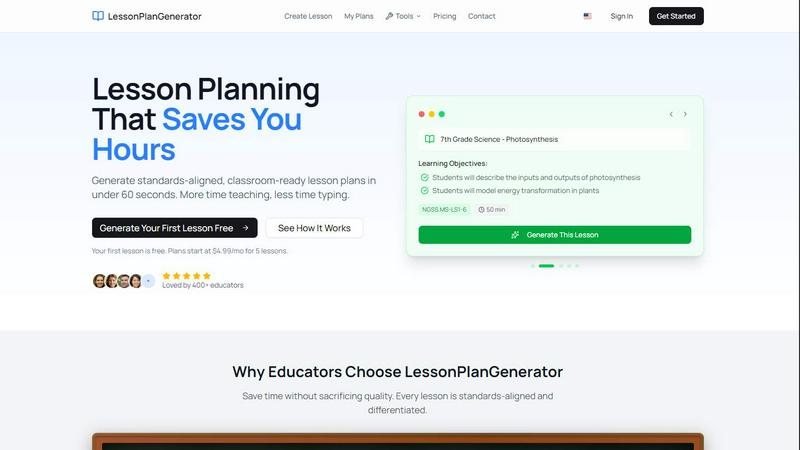
LessonPlanGenerator creates standards-aligned lesson plans in under 60 seconds, giving teachers more time to teach.
Last updated: February 27, 2026
Visual Comparison
FlashSlides

LessonPlanGenerator
Feature Comparison
FlashSlides
Multi-Format Input Flexibility
FlashSlides removes the barrier of starting from a blank page by accepting information from virtually any source. You are not limited to typing a topic. You can paste a YouTube video link, drop a website URL, or upload existing documents like PDFs or Word files. The AI intelligently analyzes this input to extract key themes and data, forming the foundation of your presentation. This feature solves the problem of information gathering and initial structuring, allowing you to leverage research you've already done and transform it into a polished deck instantly.
Customizable Slide Deck Length
Every presentation has different depth requirements. A quick team update needs fewer slides than a comprehensive investor pitch. FlashSlides gives you complete control by allowing you to choose any number of slides from 1 to 50 before generation. This ensures the final deck is perfectly tailored to your time constraints and content needs. You solve the problem of creating presentations that are either too vague or overly dense, achieving the ideal balance of information and pacing for your specific audience and objective.
Integrated AI Image Generation
A major hurdle in presentation design is finding high-quality, relevant, and copyright-free visuals. FlashSlides solves this seamlessly. For every slide it creates, the advanced AI also generates a unique, matching image based on the slide's specific content. This eliminates hours spent searching stock photo sites and ensures a consistent, professional, and visually engaging aesthetic throughout your entire presentation, strengthening your narrative without any extra effort.
One-Click Export & Sharing
Once your presentation is generated, getting it into the right format and to the right people should be effortless. FlashSlides provides instant download as a fully editable PowerPoint (.pptx) file, compatible with all major presentation software. Additionally, you can share your presentation via a unique, secure URL, perfect for quick reviews or remote collaboration. This feature solves the final logistical challenges of distribution and formatting, making the transition from creation to delivery completely seamless.
LessonPlanGenerator
60-Second Generation
Generate complete lesson plans in under 60 seconds. Simply input your topic, grade, and subject, and watch as the AI crafts a ready-to-use lesson plan, allowing you to spend less time on paperwork and more time engaging with your students.
Standards Aligned
LessonPlanGenerator incorporates built-in standards alignment, including CCSS, NGSS, and state-specific standards. Visual alignment checks help educators identify any gaps in compliance before administrative reviews, ensuring that every lesson meets necessary educational benchmarks.
Differentiation Built In
The platform automatically includes differentiation features for English Language Learners (ELL), Individualized Education Program (IEP) accommodations, and advanced extensions for gifted students. This ensures that every lesson is tailored to meet the diverse needs of all learners in the classroom.
Export Anywhere
With a simple click, you can export your lesson plans to Google Docs or download them as PDFs. This convenient feature allows for easy sharing and organization, whether for personal use, substitute teachers, or administrative observations.
Use Cases
FlashSlides
Last-Minute Academic Presentations
Students often face the challenge of balancing multiple assignments and deadlines, leaving little time to create detailed project presentations. FlashSlides turns this stressful scenario into a simple task. By inputting their essay or research topic, a student can generate a complete, well-structured slide deck with relevant images in under a minute. This allows them to meet tight deadlines with confidence, transforming what would be a late-night struggle into an opportunity to submit a polished, impressive presentation that stands out in class.
Rapid Business Proposal Development
For business professionals and consultants, speed and professionalism are critical when responding to client opportunities or internal initiatives. Manually crafting proposal decks from scratch delays response times. FlashSlides solves this by enabling professionals to quickly turn a project brief or website link into a compelling first draft. They can then refine the AI-generated content, saving hours on layout and visual design. This accelerates the sales cycle and ensures every proposal maintains a high standard of quality and visual appeal.
Dynamic Educational Content Creation
Educators and trainers constantly need to create engaging materials to capture their students' attention. Developing these resources from scratch is time-consuming. FlashSlides empowers teachers to generate fresh, visually stimulating lesson slides on any topic in seconds. By inputting a lesson plan or key concepts, they receive a ready-made deck that can be customized, providing a dynamic foundation for lectures and discussions and freeing up more time for direct student interaction and lesson planning.
Efficient Startup Pitch Deck Drafting
Founders and entrepreneurs need to communicate their vision quickly and persuasively to potential investors, but crafting the perfect pitch deck is a daunting, iterative process. FlashSlides acts as a powerful starting point. By describing their startup idea, market, and solution, founders can instantly generate a structured pitch deck outline. This initial draft provides a solid framework to build upon, iterate, and polish, significantly reducing the initial barrier to creating a professional and impactful narrative for their business.
LessonPlanGenerator
Classroom Teachers
Educators can streamline their lesson planning process, generating high-quality, standards-aligned lesson plans in seconds. This efficiency allows teachers to focus on teaching rather than being bogged down by preparation time.
Homeschool Families
Homeschool educators benefit from the platform’s flexible pacing and multi-grade support, enabling them to create customized lesson plans that fit their family's unique learning schedule without being locked into a specific curriculum.
Substitute Teachers
Substitute educators can quickly access ready-to-use lesson plans that maintain continuity in the classroom. This helps ensure that students receive quality instruction even in the absence of their regular teacher.
Instructional Coaches
Instructional coaches can utilize LessonPlanGenerator to develop tailored professional development sessions for teachers. By creating specific lesson plans aligned with educational standards, coaches can provide effective support to their colleagues.
Overview
About FlashSlides
Creating a compelling presentation is a universal challenge that consumes valuable time and energy. Whether you're a student facing a tight deadline, a professional preparing for a critical client meeting, or an educator designing engaging lesson materials, the process of researching, writing, and designing slides can take hours, if not days. This often leads to stress, rushed work, and presentations that fail to fully capture your intended message or brand. FlashSlides is the definitive solution to this problem. It is a powerful AI-driven presentation generator designed to transform any idea into a professional, visually cohesive slide deck in under a minute. By simply describing a topic, pasting a URL, or uploading a document, users can bypass the tedious manual work. The AI instantly generates structured content and creates custom, relevant images for each slide. This makes FlashSlides an indispensable tool for students, business professionals, educators, and entrepreneurs. Its core value proposition is profound time savings and the elimination of creative block, empowering anyone to deliver impactful presentations without the traditional burden and time constraints, reshaping how effective communication is prepared.
About LessonPlanGenerator
LessonPlanGenerator is an innovative AI-powered Software as a Service (SaaS) solution tailored specifically for educators seeking to craft high-quality, standards-aligned lesson plans swiftly and efficiently. This platform diverges from typical AI chatbots by adopting a curriculum-first workflow, enabling teachers to select key parameters such as grade level, subject matter, state standards, time constraints, and classroom context. As a result, LessonPlanGenerator produces structured lesson plans that are ready for immediate classroom application. Beyond just lesson plans, the platform also creates assessments, rubrics, worksheets, and supplementary materials, all aligned with the same educational standards. This comprehensive approach not only streamlines planning processes but also ensures compliance with administrative and district requirements. Designed for a wide array of users—including K–12 teachers, substitute instructors, instructional coaches, and homeschool educators—LessonPlanGenerator empowers educators to dedicate more time to teaching and less to planning, ultimately enhancing the educational experience for both teachers and students.
Frequently Asked Questions
FlashSlides FAQ
How does FlashSlides work?
The process is designed for maximum simplicity and speed. You start by providing your content through one of several flexible methods: typing a topic, pasting a URL, or uploading a document. Then, you select your desired number of slides. FlashSlides' AI then analyzes your input, structures the key information into a coherent narrative, writes the slide content, and generates a unique AI image for each slide. The entire process is completed and your presentation is ready for download or sharing in approximately 30 seconds.
Is FlashSlides really free to use?
Yes, FlashSlides offers a generous free tier to get anyone started. Every registered user receives 1 free presentation generation per day without needing to provide any credit card information. This allows you to fully test the tool's capabilities and integrate it into your workflow. For users who require more frequent generations, there is an option to purchase additional credits, providing flexibility based on your individual or organizational needs.
Can I edit the presentations after they are generated?
Absolutely. FlashSlides is designed to be a powerful starting point, not a rigid final product. When you download your presentation, it is exported as a standard Microsoft PowerPoint (.pptx) file. This file can be opened and freely edited in PowerPoint, Google Slides, Apple Keynote, or any other compatible presentation software. You have full control to modify text, adjust layouts, add your branding, or incorporate additional slides as needed.
Are the presentations and images created private?
By default, presentations created on FlashSlides are public and may appear in the public archive, which showcases community creations. However, you have control over your privacy settings. You can make any of your generated presentations private directly from your user dashboard. When set to private, your presentation will not be visible in the public archive and will only be accessible to you via your unique shareable link.
LessonPlanGenerator FAQ
Is there a free option?
Yes, LessonPlanGenerator offers a free trial where you can generate your first lesson without any cost. This allows you to explore the platform’s capabilities before committing to a subscription.
How does pricing work?
The platform offers several subscription plans starting at $4.99 per month for a limited number of lessons. You can choose a plan that best fits your lesson planning needs, with options for more lessons at a lower per-lesson cost.
What subjects and grades do you support?
LessonPlanGenerator supports a wide range of subjects across K–12 education. The platform is designed to accommodate various grade levels, ensuring that educators can find relevant content for their specific teaching needs.
Which standards are supported?
The platform includes a comprehensive database of educational standards, including Common Core State Standards (CCSS), Next Generation Science Standards (NGSS), and state-specific standards, ensuring that all lesson plans are compliant and aligned.
Alternatives
FlashSlides Alternatives
FlashSlides is a leading AI-powered presentation generator in the productivity software category. It transforms ideas into polished slides in minutes, saving users significant time and effort in the creation process. Users often seek alternatives for various reasons. These can include budget constraints, the need for more advanced design control, specific integration requirements with other platforms, or a preference for a different workflow style that may involve more manual input or collaboration features. When evaluating other tools, consider your core needs. Key factors include the balance between AI automation and creative control, export format compatibility, real-time collaboration capabilities, and the overall value relative to the cost. Identifying what you value most will guide you to the best solution for your projects.
LessonPlanGenerator Alternatives
LessonPlanGenerator is an AI-powered lesson planning tool designed for educators, allowing them to create high-quality, standards-aligned lesson plans quickly and efficiently. As a Software as a Service (SaaS) product, it caters specifically to K–12 teachers, substitute teachers, instructional coaches, and homeschool educators, addressing their unique planning needs in a structured and compliant manner. Users often seek alternatives to LessonPlanGenerator for various reasons, including pricing, specific features, or different platform capabilities that better fit their individual teaching contexts. When choosing an alternative, it’s essential to consider factors such as the ease of use, the breadth of features offered, compatibility with existing curriculum standards, and overall cost-effectiveness to ensure that the selected tool aligns with educational goals and enhances teaching effectiveness.