Gleem.AI Studio vs Image3D AI
Side-by-side comparison to help you choose the right tool.

Gleem.AI Studio
Gleem.AI Studio simplifies visual creation by combining image generation, editing, and avatar design in one intuitive.
Last updated: February 27, 2026

Image3D AI
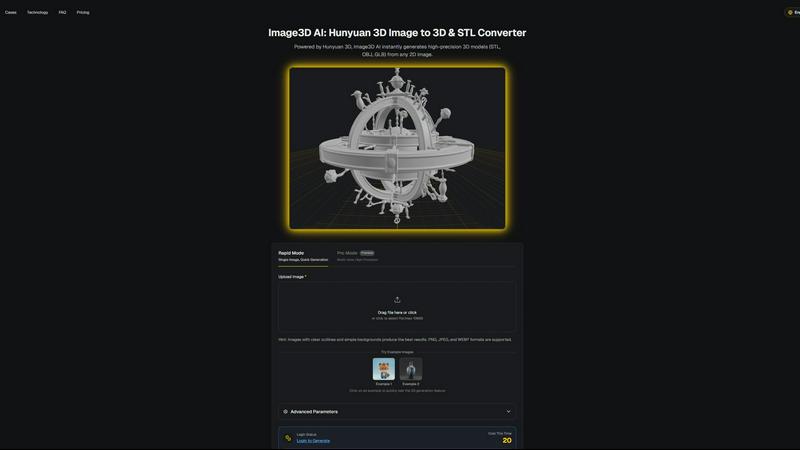
Effortlessly convert any 2D image into stunning 3D models for printing and gaming in just minutes with Image3D AI.
Last updated: March 1, 2026
Visual Comparison
Gleem.AI Studio

Image3D AI
Feature Comparison
Gleem.AI Studio
Text-to-Image Generator
Transform your concepts into stunning visuals with the advanced text-to-image generator. Simply input your ideas, choose the desired size, and let Gleem's Prompt Enhance feature refine your words into professional-grade images, facilitating an effortless creative process.
AI Image Editing
Edit images directly within Gleem.AI Studio using simple and natural prompts. The intuitive AI editor allows you to add or remove objects, adjust poses, apply filters, and restore old images—all within a single environment, streamlining your editing tasks.
AI Avatars
Create, personalize, and integrate your own AI avatars into any scene effortlessly. Adjust poses, try on different outfits, or place your avatar in various settings, eliminating the need for cumbersome photoshoots and enhancing your visual storytelling capabilities.
Seamless Workflow Management
Organize your creative projects effectively with dedicated spaces for each idea. Each project retains its own set of prompts, edits, and version histories, making it easy to iterate and reuse content without losing track of your creative journey.
Image3D AI
Rapid Mode
Rapid Mode allows users to generate 3D models from a single image quickly. Ideal for urgent projects, this feature provides speedy results without compromising quality, making it perfect for users who require fast asset creation.
Pro Mode
Pro Mode enables users to upload multiple views of an object for high-precision 3D model generation. This feature is particularly beneficial for complex items, ensuring accurate and detailed representations for professional use.
Advanced Parameter Controls
Users have access to advanced parameters that let them customize the generation process. This includes options for different output formats and model intricacies, enabling tailored results that meet specific project requirements.
User-Friendly Interface
Image3D AI boasts an intuitive interface that makes the 3D modeling process accessible to everyone, regardless of their technical expertise. Users can easily navigate the platform, upload images, and generate models with just a few clicks.
Use Cases
Gleem.AI Studio
Marketing Asset Creation
Marketers can leverage Gleem.AI Studio to generate eye-catching visuals for campaigns, social media posts, and advertisements. The platform’s intuitive features allow for quick adjustments, ensuring that marketing materials remain fresh and relevant.
Social Media Visuals
Creators can use Gleem.AI Studio to design compelling visuals tailored for various social media platforms. With the ability to generate and edit images in one place, users can rapidly produce content that aligns with current trends and audience preferences.
Product Image Development
For small businesses and e-commerce, Gleem.AI Studio simplifies the process of creating professional product images. Users can generate high-quality visuals that showcase their products effectively, enhancing online presence and sales potential.
Creative Variations Testing
Gleem.AI Studio allows teams to experiment with different creative variations quickly. By generating multiple images and effortlessly iterating on them, users can test which visual elements resonate best with their audience, leading to more effective campaigns.
Image3D AI
Game Development
Game developers can leverage Image3D AI to swiftly produce 3D assets for their projects. With PBR material support, the generated models can be seamlessly integrated into popular engines like Unity or Unreal Engine, enhancing gameplay experiences.
E-commerce
For online retailers, Image3D AI transforms product images into interactive 3D models, allowing customers to engage with products in augmented reality previews. This immersive experience can significantly boost sales conversions.
3D Printing
The platform provides high-precision STL files suitable for 3D printing. Users can quickly convert their designs into print-ready models, streamlining the production process and ensuring high-quality outputs.
Architectural Visualization
Architects can utilize Image3D AI to create architectural models from sketches or images, saving significant time in the design phase. This capability enhances project visualization and communication with clients.
Overview
About Gleem.AI Studio
Gleem.AI Studio is a cutting-edge AI image workspace tailored for creators who prioritize ease of use over complex configurations. Designed for marketers, small teams, and creative professionals, it eliminates the hassle of switching between multiple tools for image generation, editing, and revisions. With everything integrated into one streamlined workflow, users can efficiently iterate on their visual projects without losing context. This platform empowers users to focus on their creative vision and decision-making rather than drowning in technical complexities. Whether you're crafting social media visuals, marketing assets, or product images, Gleem.AI Studio provides a fast, intuitive, and cohesive environment that enhances the creative process, allowing for rapid iteration and consistent visual quality. By offering a unified space for generating and editing images, Gleem.AI Studio ensures that creators can stay in their flow and produce outstanding visuals seamlessly.
About Image3D AI
Image3D AI is a groundbreaking tool that revolutionizes the way users create 3D models from static 2D images. Designed for various users, including designers, game developers, 3D printing enthusiasts, and architects, it leverages Tencent's advanced Hunyuan 3D engine to tackle the complexities of 3D modeling. The platform allows users to generate high-quality, production-ready 3D models in seconds, making it exceptionally user-friendly. Whether you're looking to convert a logo, product image, or sketch into a detailed 3D asset, Image3D AI simplifies the process. Its main value proposition lies in its ability to help users focus on their creativity rather than the technical challenges associated with traditional 3D software. With Image3D AI, anyone can transform their ideas into stunning 3D models without needing extensive 3D modeling skills.
Frequently Asked Questions
Gleem.AI Studio FAQ
What makes Gleem.AI Studio different from traditional design tools?
Gleem.AI Studio integrates both image generation and editing within a single platform. This eliminates the need to switch between various tools, enhancing workflow efficiency and keeping users focused on creativity rather than technical details.
Is Gleem.AI Studio suitable for beginners?
Absolutely! Gleem.AI Studio is designed with simplicity in mind, making it accessible for beginners. The natural language prompts and intuitive interface allow users to achieve professional outcomes without extensive training or experience.
Can I collaborate with my team using Gleem.AI Studio?
Yes, Gleem.AI Studio supports collaborative work by providing dedicated project spaces where team members can share ideas, prompts, and edits. This fosters a cohesive environment for teamwork and creative brainstorming.
How do I join the beta for Gleem.AI Studio?
To gain early access to Gleem.AI Studio, interested users can join the waitlist on the Gleem website. This allows you to be among the first to experience the platform's innovative features during its private beta phase.
Image3D AI FAQ
How does Image3D AI convert images to 3D models?
Image3D AI uses advanced algorithms powered by the Hunyuan 3D engine to analyze 2D images and accurately reconstruct them into detailed 3D models. Users simply upload an image, and the AI handles the rest.
What types of image formats are supported?
Image3D AI supports several image formats, including PNG, JPEG, and WEBP. Users are encouraged to use images with clear outlines and simple backgrounds for optimal results.
Are there different modes for generating 3D models?
Yes, Image3D AI offers several modes, including Rapid Mode for quick generation from a single image and Pro Mode for high-precision outputs using multiple views. Each mode is designed to cater to different user needs.
Can I use Image3D AI for commercial purposes?
Absolutely. The models generated by Image3D AI can be used for various commercial applications, including product design, game development, and architectural projects, making it a versatile tool for professionals.
Alternatives
Gleem.AI Studio Alternatives
Gleem.AI Studio is an innovative all-in-one AI image workspace that simplifies the process of creating and editing visuals. It caters to marketers, creators, and small teams by allowing them to generate and refine images in a single, user-friendly environment. Users often seek alternatives to Gleem.AI Studio for various reasons, including pricing concerns, specific feature requirements, or platform compatibility. When exploring alternatives, it’s essential to consider factors such as ease of use, the ability to iterate on designs, and whether the tool meets the specific needs of your creative projects without unnecessary complexity.
Image3D AI Alternatives
Image3D AI is an innovative tool that belongs to the design tools category, enabling users to convert static 2D images into high-quality 3D models quickly and efficiently. This technology is particularly valuable for 3D printing enthusiasts, game developers, and architects, as it simplifies the complex process of 3D modeling, allowing for greater creativity and productivity. Users often seek alternatives to Image3D AI for various reasons, including pricing concerns, specific feature requirements, or compatibility with different platforms. When choosing an alternative, it's essential to consider the tool's ease of use, the quality of the output, the range of export formats available, and any additional features that may enhance the modeling experience.