
Image3D AI
Effortlessly convert any 2D image into stunning 3D models for printing and gaming in just minutes with Image3D AI.
Visit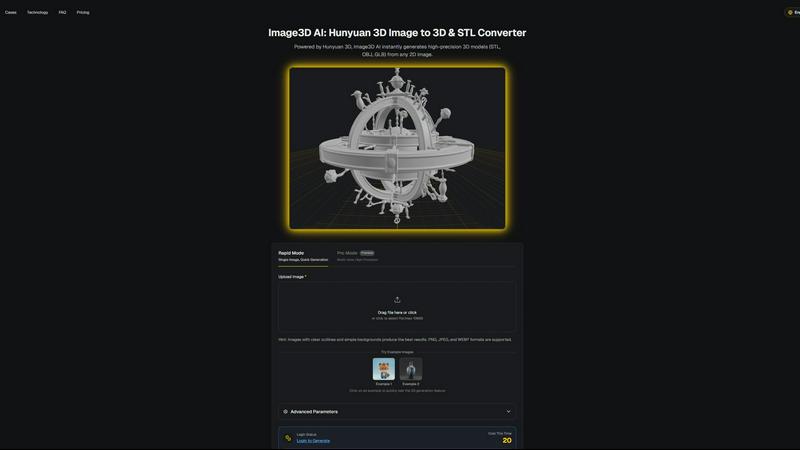
About Image3D AI
Image3D AI is a groundbreaking tool that revolutionizes the way users create 3D models from static 2D images. Designed for various users, including designers, game developers, 3D printing enthusiasts, and architects, it leverages Tencent's advanced Hunyuan 3D engine to tackle the complexities of 3D modeling. The platform allows users to generate high-quality, production-ready 3D models in seconds, making it exceptionally user-friendly. Whether you're looking to convert a logo, product image, or sketch into a detailed 3D asset, Image3D AI simplifies the process. Its main value proposition lies in its ability to help users focus on their creativity rather than the technical challenges associated with traditional 3D software. With Image3D AI, anyone can transform their ideas into stunning 3D models without needing extensive 3D modeling skills.
Features of Image3D AI
Rapid Mode
Rapid Mode allows users to generate 3D models from a single image quickly. Ideal for urgent projects, this feature provides speedy results without compromising quality, making it perfect for users who require fast asset creation.
Pro Mode
Pro Mode enables users to upload multiple views of an object for high-precision 3D model generation. This feature is particularly beneficial for complex items, ensuring accurate and detailed representations for professional use.
Advanced Parameter Controls
Users have access to advanced parameters that let them customize the generation process. This includes options for different output formats and model intricacies, enabling tailored results that meet specific project requirements.
User-Friendly Interface
Image3D AI boasts an intuitive interface that makes the 3D modeling process accessible to everyone, regardless of their technical expertise. Users can easily navigate the platform, upload images, and generate models with just a few clicks.
Use Cases of Image3D AI
Game Development
Game developers can leverage Image3D AI to swiftly produce 3D assets for their projects. With PBR material support, the generated models can be seamlessly integrated into popular engines like Unity or Unreal Engine, enhancing gameplay experiences.
E-commerce
For online retailers, Image3D AI transforms product images into interactive 3D models, allowing customers to engage with products in augmented reality previews. This immersive experience can significantly boost sales conversions.
3D Printing
The platform provides high-precision STL files suitable for 3D printing. Users can quickly convert their designs into print-ready models, streamlining the production process and ensuring high-quality outputs.
Architectural Visualization
Architects can utilize Image3D AI to create architectural models from sketches or images, saving significant time in the design phase. This capability enhances project visualization and communication with clients.
Frequently Asked Questions
How does Image3D AI convert images to 3D models?
Image3D AI uses advanced algorithms powered by the Hunyuan 3D engine to analyze 2D images and accurately reconstruct them into detailed 3D models. Users simply upload an image, and the AI handles the rest.
What types of image formats are supported?
Image3D AI supports several image formats, including PNG, JPEG, and WEBP. Users are encouraged to use images with clear outlines and simple backgrounds for optimal results.
Are there different modes for generating 3D models?
Yes, Image3D AI offers several modes, including Rapid Mode for quick generation from a single image and Pro Mode for high-precision outputs using multiple views. Each mode is designed to cater to different user needs.
Can I use Image3D AI for commercial purposes?
Absolutely. The models generated by Image3D AI can be used for various commercial applications, including product design, game development, and architectural projects, making it a versatile tool for professionals.
Similar to Image3D AI
Seedance 2.5 Free
Create polished AI videos from text or images online with Seedance 2.5 Free.

Presentation Intelligence
AI-native presentation and visual content platform that turns prompts, documents, images, videos, and data into polished, shareable decks.

PNG to SVG
Free, private image conversion tools that run entirely in your browser.


StopScroll
AI YouTube thumbnail maker that generates multiple thumbnail concepts from a URL, title, or prompt.
HubVanta AI
HubVanta AI helps creators generate images and videos with advanced AI tools for visual content workflows.
IsThisAIImage
Free online AI image and deepfake checker. Upload a photo for AI-generated and deepfake scores, a clear verdict, and optional generator hints.