
Image3D AI vs vaethat
Side-by-side comparison to help you choose the right tool.

Image3D AI
Effortlessly convert any 2D image into stunning 3D models for printing and gaming in just minutes with Image3D AI.
Last updated: March 1, 2026

vaethat
Vaethat is an AI tool that effortlessly enhances architectural renders, improving clarity and detail while preserving.
Last updated: February 27, 2026
Visual Comparison
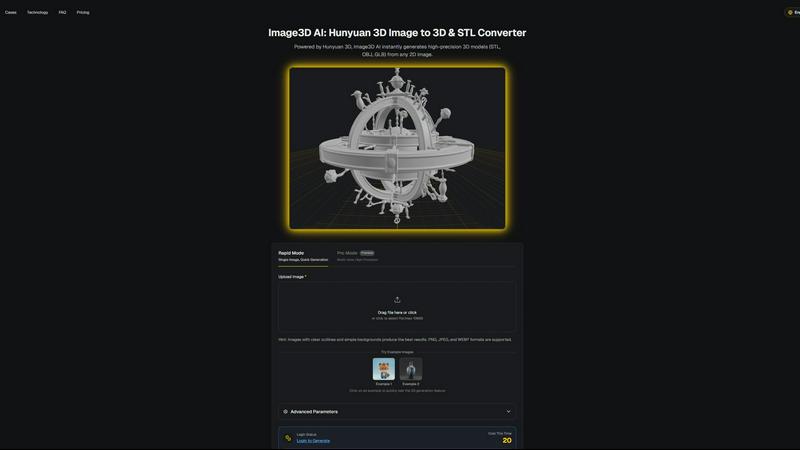
Image3D AI
vaethat

Feature Comparison
Image3D AI
Rapid Mode
Rapid Mode allows users to generate 3D models from a single image quickly. Ideal for urgent projects, this feature provides speedy results without compromising quality, making it perfect for users who require fast asset creation.
Pro Mode
Pro Mode enables users to upload multiple views of an object for high-precision 3D model generation. This feature is particularly beneficial for complex items, ensuring accurate and detailed representations for professional use.
Advanced Parameter Controls
Users have access to advanced parameters that let them customize the generation process. This includes options for different output formats and model intricacies, enabling tailored results that meet specific project requirements.
User-Friendly Interface
Image3D AI boasts an intuitive interface that makes the 3D modeling process accessible to everyone, regardless of their technical expertise. Users can easily navigate the platform, upload images, and generate models with just a few clicks.
vaethat
AI Render Upscaling
Vaethat’s AI render upscaling feature allows users to increase the resolution and sharpness of their 3D architectural renders. This ensures that the geometry remains clean and consistent, making the final output suitable for presentation and client approvals.
Detail Refinement
With detail refinement capabilities, Vaethat enhances fine textures, edges, and small architectural elements. This results in a crisper and more polished look, ensuring that every detail of your architectural design is visually appealing and accurately represented.
Material and Lighting Enhancement
Vaethat improves the perceived realism of renders by enhancing material definition, contrast, and lighting balance. This feature helps to create images that not only showcase the design but also evoke the right mood and atmosphere, crucial for architectural visualization.
Noise and Artifact Cleanup
The noise and artifact cleanup feature significantly reduces rendering noise and common artifacts that can detract from the quality of an image. This ensures that the final output is cleaner, making it presentation-ready without the need for extensive post-processing.
Use Cases
Image3D AI
Game Development
Game developers can leverage Image3D AI to swiftly produce 3D assets for their projects. With PBR material support, the generated models can be seamlessly integrated into popular engines like Unity or Unreal Engine, enhancing gameplay experiences.
E-commerce
For online retailers, Image3D AI transforms product images into interactive 3D models, allowing customers to engage with products in augmented reality previews. This immersive experience can significantly boost sales conversions.
3D Printing
The platform provides high-precision STL files suitable for 3D printing. Users can quickly convert their designs into print-ready models, streamlining the production process and ensuring high-quality outputs.
Architectural Visualization
Architects can utilize Image3D AI to create architectural models from sketches or images, saving significant time in the design phase. This capability enhances project visualization and communication with clients.
vaethat
Architectural Presentations
Vaethat is ideal for creating impressive architectural presentations. By enhancing 3D renders, professionals can showcase their designs in a way that captivates clients and stakeholders, highlighting the beauty and functionality of their projects.
Portfolio Development
Architects and visualizers can use Vaethat to enhance their portfolios. The tool allows them to present their best work with high-quality, polished images that reflect their skills and creativity, making a strong impression on potential clients.
Marketing Materials
For marketing purposes, Vaethat helps in producing eye-catching visuals that can be used in brochures, websites, and social media. Enhanced images attract more attention and can effectively communicate the essence of a project to a broader audience.
Design Reviews
During design reviews, having high-quality renders is essential for constructive feedback. Vaethat ensures that the details are clear and the overall composition is preserved, facilitating better discussions and informed decision-making among team members and clients.
Overview
About Image3D AI
Image3D AI is a groundbreaking tool that revolutionizes the way users create 3D models from static 2D images. Designed for various users, including designers, game developers, 3D printing enthusiasts, and architects, it leverages Tencent's advanced Hunyuan 3D engine to tackle the complexities of 3D modeling. The platform allows users to generate high-quality, production-ready 3D models in seconds, making it exceptionally user-friendly. Whether you're looking to convert a logo, product image, or sketch into a detailed 3D asset, Image3D AI simplifies the process. Its main value proposition lies in its ability to help users focus on their creativity rather than the technical challenges associated with traditional 3D software. With Image3D AI, anyone can transform their ideas into stunning 3D models without needing extensive 3D modeling skills.
About vaethat
Vaethat is an innovative AI-powered tool designed specifically for architectural visualization (archviz) professionals. It streamlines the process of enhancing and upscaling 3D renders, enabling architects, designers, and visualizers to produce stunningly realistic images with enhanced clarity and detail. By utilizing specialized AI technology, Vaethat addresses common challenges faced in architectural rendering, such as maintaining the integrity of design intent while improving visual quality. This tool is not just about increasing resolution; it focuses on enhancing fine textures, refining materials, and cleaning up noise and artifacts. The main value proposition of Vaethat lies in its user-friendly interface that eliminates the complexity of traditional enhancement tools, allowing users to focus on their creative vision without the hassle of adjusting multiple settings.
Frequently Asked Questions
Image3D AI FAQ
How does Image3D AI convert images to 3D models?
Image3D AI uses advanced algorithms powered by the Hunyuan 3D engine to analyze 2D images and accurately reconstruct them into detailed 3D models. Users simply upload an image, and the AI handles the rest.
What types of image formats are supported?
Image3D AI supports several image formats, including PNG, JPEG, and WEBP. Users are encouraged to use images with clear outlines and simple backgrounds for optimal results.
Are there different modes for generating 3D models?
Yes, Image3D AI offers several modes, including Rapid Mode for quick generation from a single image and Pro Mode for high-precision outputs using multiple views. Each mode is designed to cater to different user needs.
Can I use Image3D AI for commercial purposes?
Absolutely. The models generated by Image3D AI can be used for various commercial applications, including product design, game development, and architectural projects, making it a versatile tool for professionals.
vaethat FAQ
How does the AI render enhancer calculate credits?
Vaethat calculates credits based on the number of images processed and the complexity of enhancements applied. Users can monitor their credit usage through their account dashboard, ensuring they manage their resources effectively.
Can I use the archviz AI upscaler with V-Ray, Lumion, Enscape, 3ds Max, and SketchUp?
Yes, Vaethat is compatible with various architectural rendering software, including V-Ray, Lumion, Enscape, 3ds Max, and SketchUp. This flexibility allows users to integrate it seamlessly into their existing workflows.
What makes this AI post-production tool different from manual editing?
Unlike manual editing, which can be time-consuming and requires extensive skill, Vaethat offers a streamlined process that is both efficient and effective. Users can achieve high-quality results without the need for complex adjustments or extensive editing knowledge.
Can I upgrade or downgrade my AI enhancement plan anytime?
Yes, Vaethat offers flexible subscription plans that allow users to upgrade or downgrade their enhancement plans at any time. This flexibility ensures that users can adjust their usage according to their needs and project requirements.
Alternatives
Image3D AI Alternatives
Image3D AI is an innovative tool that belongs to the design tools category, enabling users to convert static 2D images into high-quality 3D models quickly and efficiently. This technology is particularly valuable for 3D printing enthusiasts, game developers, and architects, as it simplifies the complex process of 3D modeling, allowing for greater creativity and productivity. Users often seek alternatives to Image3D AI for various reasons, including pricing concerns, specific feature requirements, or compatibility with different platforms. When choosing an alternative, it's essential to consider the tool's ease of use, the quality of the output, the range of export formats available, and any additional features that may enhance the modeling experience.
vaethat Alternatives
Vaethat is an AI-powered tool designed specifically for architectural visualization (archviz) professionals. It focuses on enhancing 3D renders by upscaling images, refining details, and improving clarity while ensuring that the original design intent is preserved. As the need for high-quality visual presentations grows, users often seek alternatives due to various reasons such as pricing, specific feature requirements, or compatibility with different platforms and workflows. When searching for an alternative, it's essential to consider key factors such as the quality of enhancement features, ease of use, and the ability to maintain design integrity. Users should also evaluate pricing structures and any potential limitations that might affect their work. Ultimately, the best choice will depend on individual workflow needs and the specific capabilities that enhance their architectural visualization projects.