
Hush Touch | Voice-to-Text for MacOS vs ToolZack
Side-by-side comparison to help you choose the right tool.

Hush Touch | Voice-to-Text for MacOS
Hush Touch is an offline voice-to-text app for Mac that learns your vocabulary, ensuring accurate, real-time dictation.
Last updated: February 27, 2026
ToolZack
ToolZack solves all your text problems instantly with 120 fast, secure, and free utilities.
Last updated: February 28, 2026
Visual Comparison
Hush Touch | Voice-to-Text for MacOS

ToolZack
Feature Comparison
Hush Touch | Voice-to-Text for MacOS
Dual-Engine Recognition
Hush Touch leverages two advanced Apple dictation engines: DictationTranscriber for natural flow and punctuation, and SFSpeechRecognizer for custom vocabulary enhancement. This dual-engine approach ensures that your dictation is both accurate and context-aware, producing cleaner text in real time.
Custom Vocabulary
The app allows you to store up to 500 unique terms and phrases, learning from corrections to adapt to your specific language needs. Whether it is technical jargon, brand names, or medical terminology, Hush Touch recognizes and processes your unique vocabulary to enhance dictation accuracy.
Smart Text Processing
Hush Touch features intelligent text processing capabilities, including filler word removal and auto-correction. This means that common distractions in speech are minimized, allowing you to focus on delivering clear and concise messages, while unnecessary words are automatically filtered out.
Context Modes & Hands-Free Operation
Users can switch between different context modes—General, Email, Code, and Notes—tailoring the dictation experience to their specific needs. Additionally, hands-free operation is enabled via Siri, allowing you to start dictation and send messages with simple voice commands, enhancing overall productivity.
ToolZack
Comprehensive Tool Library
ToolZack boasts an extensive collection of over 120 specialized text tools, all accessible from a single, organized platform. This eliminates the need to search for and bookmark dozens of separate websites. The library is categorized for easy navigation, covering essential functions like Base64 encoding/decoding, creative outlets like ASCII art generation, and practical utilities like text case conversion and duplicate word finders. This consolidation is the cornerstone of its problem-solving approach, turning a fragmented process into a streamlined workflow.
Browser-Side Processing & Privacy
A major challenge with online tools is data security and privacy. ToolZack directly addresses this concern by ensuring all text processing occurs entirely within your web browser. Your data never leaves your device or is sent to any external server. This 100% private operation guarantees that sensitive information, such as code snippets or unpublished writing, remains completely secure, giving users peace of mind alongside powerful functionality.
Optimized for Lightning Speed
Built with performance as a priority, ToolZack utilizes optimized algorithms to deliver results in milliseconds, even for large blocks of text. This solves the common frustration of waiting for slow web applications to respond. Whether you're converting the case of a document or generating complex ASCII art, the platform's speed ensures your workflow remains uninterrupted, allowing for rapid iteration and saving significant time on daily tasks.
Intuitive & Accessible Design
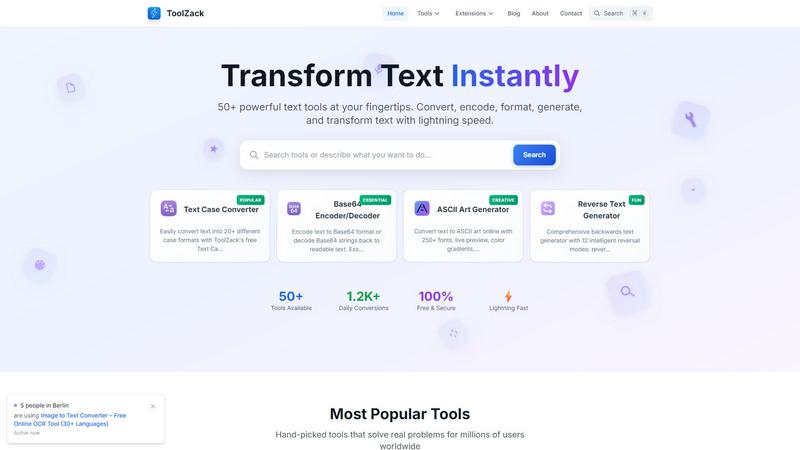
ToolZack is designed for users of all skill levels, from beginners to power users. The interface is clean, modern, and fully responsive, working perfectly on desktops, tablets, and mobile phones. Features like smart auto-detection, live previews (as seen in the ASCII Art Generator), and an intelligent search function (⌘K) make tools easy to find and use. This user-centric design removes the learning curve, allowing anyone to start transforming text effectively immediately.
Use Cases
Hush Touch | Voice-to-Text for MacOS
Drafting Emails
Professionals can use Hush Touch to compose emails quickly and efficiently. By dictating their thoughts, users can save time and maintain focus on the content rather than typing, making it an ideal tool for busy work environments.
Creating Medical Notes
Healthcare providers can benefit from Hush Touch's ability to accurately capture medical terminology. The app's custom vocabulary feature allows physicians to dictate notes seamlessly, ensuring that critical information is recorded correctly without the hassle of manual entry.
Writing Code Documentation
Software developers can utilize Hush Touch to document their code verbally. With its context-specific modes and dual-engine transcription, developers can dictate complex technical instructions accurately, streamlining their workflow.
Taking Meeting Notes
During meetings or brainstorming sessions, Hush Touch allows users to capture ideas and notes hands-free. This eliminates the distraction of typing, enabling participants to engage fully in discussions while ensuring that important points are recorded effortlessly.
ToolZack
Streamlining Development Workflows
Developers frequently need to encode data for transmission, format JSON, or convert text cases within their code. Manually performing these tasks or using slow, separate tools interrupts the coding flow. ToolZack solves this by providing instant access to tools like the Base64 Encoder/Decoder and text formatters right in the browser. This allows developers to quickly test, convert, and manipulate strings without leaving their development environment, significantly accelerating debugging and data handling processes.
Enhancing Content Creation & Editing
Writers, editors, and content marketers often struggle with text formatting, consistency, and finding creative elements for their work. Manually changing text case, removing duplicates, or sourcing special characters is tedious. ToolZack's suite, including the Text Case Converter with 20+ formats and the extensive Emoji collection, empowers creators to polish and enhance their content efficiently. This ensures professional formatting and engaging material without switching between multiple applications.
Aiding Academic & Learning Projects
Students working on coding assignments, research papers, or digital presentations need reliable tools for data conversion and text manipulation. Finding free, trustworthy tools can be a challenge. ToolZack offers a secure, always-free resource for tasks like encoding data for computer science projects or generating ASCII art for presentations. Its simplicity and reliability make it an ideal companion for academic work, helping students complete projects accurately and on time.
Powering Quick Digital Marketing Tasks
Digital marketing specialists require agility for tasks like generating meta tags, checking website code, or creating visually appealing text for social media. ToolZack provides essential utilities like the Robots.txt Generator and the highly creative ASCII Art Generator with 250+ fonts and color gradients. These tools enable marketers to quickly produce professional technical files and eye-catching graphical text, enhancing their campaigns' effectiveness without needing complex design software.
Overview
About Hush Touch | Voice-to-Text for MacOS
Hush Touch is an innovative voice-to-text application developed specifically for macOS users who seek a fast, natural, and private dictation experience. Unlike many dictation tools that rely on cloud processing, Hush Touch operates entirely on-device, ensuring that your voice data remains secure and confidential. The app utilizes a combination of two advanced Apple transcription engines, enhanced by an Apple Intelligence final pass, to deliver accurate and contextually relevant text output. With a lightweight footprint of just 5.5 MB, Hush Touch offers seamless integration into your daily writing tasks, whether you are drafting emails, notes, or lengthy documents. Ideal for professionals across various fields, including writers, medical practitioners, and software developers, Hush Touch eliminates the need for cloud dependency while improving your dictation efficiency. With a one-time purchase of $20 for a lifetime license, users can enjoy a powerful dictation tool without any ongoing subscription fees.
About ToolZack
In today's fast-paced digital environment, professionals and creators are constantly bogged down by inefficient workflows. Scattered tools, slow-loading websites, and complex interfaces turn simple text manipulation tasks into frustrating time-sinks. This fragmentation kills productivity, forcing users to juggle multiple bookmarks and waste precious minutes on what should be instantaneous actions. ToolZack was created to solve this pervasive problem. It is a comprehensive, lightning-fast suite of over 120 free text tools consolidated into one clean, user-friendly platform. Designed for developers, writers, students, marketers, and anyone who works with text, ToolZack eliminates the clutter and delay. Its core value proposition is delivering powerful text transformation capabilities—from encoding and decoding to formatting and generating—with unmatched speed and a commitment to privacy, as all processing happens securely in your browser. By offering a reliable, always-free, and instantly accessible toolkit, ToolZack empowers users to streamline their work, enhance their creativity, and accomplish more in less time, making it the definitive go-to resource for efficient text solutions.
Frequently Asked Questions
Hush Touch | Voice-to-Text for MacOS FAQ
Is Hush Touch compatible with all macOS versions?
Yes, Hush Touch is designed to work seamlessly with macOS, providing a smooth dictation experience on supported versions. Always check for the latest system requirements on our website.
How does Hush Touch ensure my privacy?
Hush Touch processes all voice data on-device, meaning that no information is sent to the cloud. This guarantees that your dictation remains private and secure, with zero data collection involved.
Can I customize commands in Hush Touch?
Yes, Hush Touch allows users to create customizable command phrases for sending messages, making it easier to communicate effectively and hands-free.
What happens if I need help using Hush Touch?
Hush Touch offers comprehensive user support, including a detailed FAQ section on our website and a dedicated customer service team ready to assist with any questions or technical issues you may encounter.
ToolZack FAQ
Is ToolZack really free to use?
Yes, ToolZack is completely free to use with no hidden fees, subscriptions, or usage limits. All 120+ tools are available at no cost, forever. The platform is committed to providing accessible and powerful text utilities without any financial barrier, ensuring that everyone from students to professionals can benefit from its features.
How does ToolZack ensure my data is private?
ToolZack ensures maximum privacy by performing all text processing locally within your web browser. This means the text you input is never uploaded to any external server or stored on ToolZack's systems. Your data stays on your device from the moment you paste it until you receive the transformed result, making it a secure choice for sensitive information.
What makes ToolZack different from other text tool websites?
ToolZack differentiates itself through its combination of a massive, organized tool library, exceptional processing speed, and a strong commitment to user privacy and experience. Unlike many cluttered or ad-heavy sites, ToolZack offers a clean, fast, and intuitive interface where all tools are reliably available in one place, processed instantly in your browser, and completely free.
Can I use ToolZack on my mobile phone?
Absolutely. ToolZack features a fully responsive design that works perfectly on all devices, including smartphones and tablets. The interface automatically adjusts to your screen size, ensuring all tools are just as accessible and easy to use on mobile as they are on a desktop computer, allowing you to transform text on the go.
Alternatives
Hush Touch | Voice-to-Text for MacOS Alternatives
Hush Touch | Voice-to-Text for MacOS is a powerful dictation application designed specifically for Mac users. As part of the AI Assistants category, it allows for seamless offline voice-to-text transcription, ensuring that your dictation is fast, accurate, and private. Users often seek alternatives due to various reasons, including pricing concerns, the need for additional features, or compatibility with different platforms. Identifying a suitable alternative involves looking for key aspects such as on-device processing, transcription accuracy, ease of integration into existing workflows, and overall user experience to ensure that it meets your unique dictation needs.
ToolZack Alternatives
ToolZack is a comprehensive online platform offering over 120 fast and secure text utilities, falling into the category of AI-powered text manipulation and conversion tools. It consolidates tasks like encoding, case conversion, and formatting into one clean, user-friendly interface designed for speed and efficiency. Users often explore alternatives for various reasons. Some may require a tool with a specific, niche function not covered in a general suite, while others might prioritize a different user interface or need offline capabilities. Platform compatibility, advanced feature sets for professional use, or simply a preference for a different workflow can also drive the search for other options. When evaluating alternatives, consider your core needs. Look for a solution that not only matches the breadth of tools but also excels in the specific utilities you use most frequently. Prioritize platforms that offer reliability, speed, and a clean user experience without unnecessary clutter or distractions, ensuring your text tasks remain effortless.