
Blur Image Online vs Imgezy
Side-by-side comparison to help you choose the right tool.

Blur Image Online
Easily blur sensitive details in your images online with powerful, precise tools—all for free and without uploads.
Last updated: February 28, 2026

Imgezy
Imgezy is an AI photo editor that effortlessly removes objects and changes backgrounds for stunning, professional.
Last updated: March 1, 2026
Visual Comparison
Blur Image Online
Imgezy
Feature Comparison
Blur Image Online
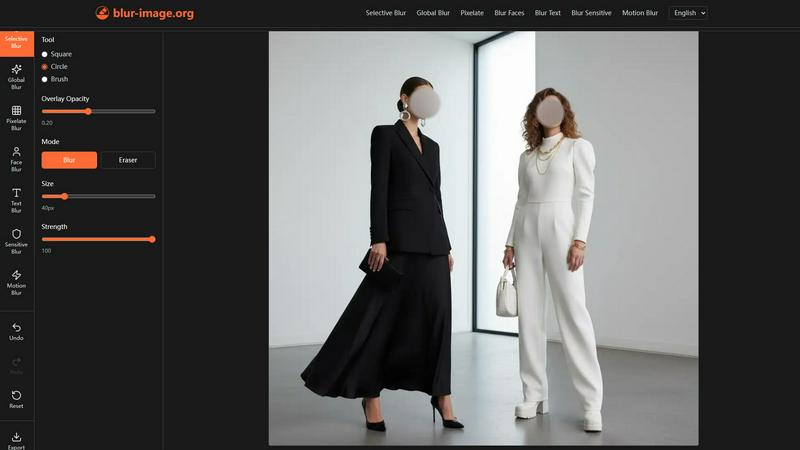
Selective Blur
The Selective Blur tool provides complete control over which parts of your image remain clear and which are blurred. This functionality allows users to hide sensitive details, emphasize key subjects, or create professional-quality depth-of-field effects with precision.
Global Blur
With the Global Blur tool, users can apply a uniform blur to an entire image with just one click. This tool allows for further customization through adjustable shape, strength, and hardness, enabling selective clarity restoration and secondary blurring to meet specific artistic needs.
Blur Faces
The Blur Faces tool utilizes advanced AI to automatically detect faces within the image and apply a blur effect instantly. This feature is complemented by a Manual Drawing Mode, allowing users to refine the effect by adding or erasing blur precisely where needed for optimal privacy.
Blur Sensitive Info
Designed to protect personal data, the Blur Sensitive Info tool employs intelligent AI to identify and obscure private content, such as credit card numbers or addresses. Users can select from various blur styles and refine results manually, ensuring maximum confidentiality.
Imgezy
Object Removal
Imgezy's object removal feature allows users to seamlessly eliminate unwanted elements from their photos. Whether it is a photobomber, power lines, or other distractions, the AI intelligently identifies and removes these objects, reconstructing the background with pixel-perfect accuracy.
Background Replacement
This feature enables users to change the background of their images instantly. From simple solid colors to breathtaking landscapes, Imgezy makes it easy to create the perfect backdrop for any photo, enhancing its overall appeal and professionalism.
Photo Enhancement
Imgezy automatically enhances photos by adjusting colors, lighting, and sharpness. This ensures that every image pops with vibrancy and clarity, making them stand out on social media or in marketing materials, all without any manual adjustments required.
Batch Processing
Imgezy supports batch processing, allowing users to edit multiple images simultaneously. This feature is ideal for projects that involve numerous photos, significantly saving time and streamlining the workflow for creators and businesses alike.
Use Cases
Blur Image Online
Protecting Personal Privacy
Social media users can utilize Blur Image Online to obscure faces and sensitive information in their photos, ensuring that personal data remains private before sharing images online.
Editing Professional Documents
Businesses can benefit by blurring confidential information in documents or presentations. This ensures that sensitive data is not exposed when sharing visuals with clients or stakeholders.
Creating Artistic Effects
Photographers and graphic designers can leverage the Selective Blur and Motion Blur tools to create stunning artistic effects. By applying depth-of-field or motion blur, they can add a professional touch to their images.
Enhancing Security in Visual Content
Content creators, bloggers, and marketers can enhance the security of their visuals by using the Blur Text and Blur Sensitive Info tools. This allows them to share engaging content without compromising sensitive information.
Imgezy
Social Media Influencers
Social media influencers can leverage Imgezy to create eye-catching posts with minimal effort. By using the object removal and background replacement features, they can enhance their images to attract more followers and engagement.
E-commerce Businesses
E-commerce businesses can benefit from Imgezy by showcasing their products in the best light. With the ability to remove distractions and enhance product images, businesses can improve their online presence and drive sales more effectively.
Casual Photographers
Casual photographers looking to elevate their personal photos can use Imgezy to transform ordinary snapshots into stunning visuals. The tool’s user-friendly interface allows anyone to create professional-looking edits without prior experience.
Marketing Professionals
Marketing professionals can utilize Imgezy to produce high-quality images for campaigns and promotional materials. The instant results and batch processing capabilities make it a valuable asset for creating consistent and polished marketing content.
Overview
About Blur Image Online
In today's digital landscape, sharing images often comes with the risk of exposing sensitive information such as personal identities, license plates, and confidential documents. Navigating the challenge of preserving privacy while ensuring high-quality image editing can be daunting. Blur Image Online emerges as the definitive solution for anyone needing to safeguard their information without sacrificing convenience or quality. This 100% free, browser-based suite of AI-powered tools caters to a wide audience—from social media enthusiasts and content creators to professionals and businesses—offering complete control over image privacy and focus. Its core value proposition lies in delivering pixel-perfect blurring effects through seven specialized tools while guaranteeing that your data remains on your device. With features like one-click AI detection for faces and text, along with non-destructive manual editing, achieving secure and high-quality results has never been easier. Whether your goal is to protect identities, obscure sensitive data, or create artistic depth-of-field effects, Blur Image Online ensures your privacy remains uncompromised, providing an efficient solution for all your image blurring needs.
About Imgezy
Imgezy is a cutting-edge AI-driven photo editing tool that revolutionizes how users engage with their images. Designed for everyone, from casual photographers to e-commerce businesses, Imgezy simplifies the photo editing process through advanced artificial intelligence capabilities. It empowers users to achieve professional-quality results without requiring any design experience. Whether you need to remove distracting objects, change backgrounds, or enhance image quality, Imgezy enables you to do so with just a few simple commands. The tool's intuitive interface streamlines the editing process, allowing users to unleash their creativity and produce striking images in seconds. With Imgezy, you no longer need to struggle with complex editing software or spend hours perfecting your visuals. Instead, you can focus on what truly matters—your creative vision.
Frequently Asked Questions
Blur Image Online FAQ
How does Blur Image Online ensure my privacy?
Blur Image Online guarantees privacy by ensuring that no images are uploaded to remote servers. All processing occurs locally on your device, and EXIF data is automatically removed.
Can I customize the level of blur applied to my images?
Yes, Blur Image Online offers various tools that allow you to adjust the intensity, shape, and hardness of the blur, ensuring you can achieve the desired effect with precision.
Is there a limit to the size of images I can upload?
While there is no explicit limit mentioned, performance may vary based on the complexity and size of the image. It is advisable to use images optimized for web use for the best experience.
Do I need to create an account to use Blur Image Online?
No, Blur Image Online is completely free to use without requiring any account creation. You can access all features directly from your browser, ensuring a hassle-free user experience.
Imgezy FAQ
How does Imgezy work?
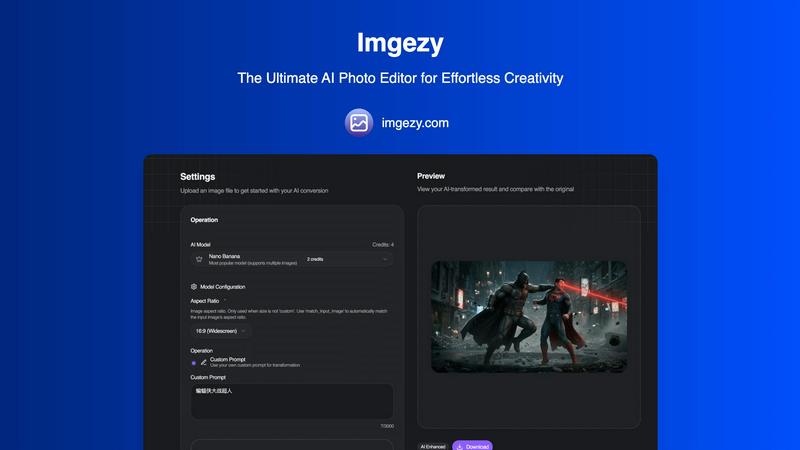
Imgezy uses advanced artificial intelligence algorithms to analyze images and make intelligent edits based on user instructions. Simply upload your image and describe the changes you want, and the AI will process the edits in seconds.
What types of images can I edit with Imgezy?
Imgezy supports all major image formats, including JPG, PNG, and WebP. This versatility allows users to edit a wide range of photos, whether they are for personal use or professional projects.
Is there a limit to how many images I can edit?
The number of images you can edit depends on the plan you choose. Imgezy offers various credit options that correspond to the number of images you can edit each month, making it suitable for both casual and professional users.
Can I download images in high resolution?
Yes, Imgezy allows users to download edited images in full resolution without any loss of quality. This ensures that your final images are suitable for both online and print use.
Alternatives
Blur Image Online Alternatives
In today's image-driven landscape, Blur Image Online stands out as a browser-based tool designed for users needing to blur sensitive details in their photos. As a part of the Design Tools and Photography categories, it empowers individuals to maintain privacy while enhancing their images. However, users often seek alternatives due to factors like pricing, specific feature sets, or compatibility with their preferred platforms. When searching for a suitable alternative, it's essential to consider the tool's ease of use, the quality of its output, and whether it offers sufficient privacy safeguards. Finding the right image blurring tool can be a challenge, especially when balancing functionality with security. Users should look for alternatives that provide similar capabilities to Blur Image Online, such as AI-assisted features, selective editing options, and a commitment to data security. Ensuring that an alternative meets these criteria will help maintain the quality and privacy of the images being edited.
Imgezy Alternatives
Imgezy is an AI-driven photo editing tool designed to simplify the image editing process for users of all skill levels. It allows users to effortlessly remove unwanted objects, change backgrounds, and enhance image quality with just a few simple commands. As a member of the image and photo category, Imgezy caters to a diverse audience, including casual photographers, social media influencers, and e-commerce businesses. However, many users seek alternatives to Imgezy due to various reasons such as pricing, feature sets, or specific platform compatibility. When looking for an alternative, it is essential to consider factors like user-friendliness, the range of editing capabilities, and the overall value offered. By evaluating these aspects, users can find a suitable option that meets their unique editing needs.