Magic Hour vs Sovideo
Side-by-side comparison to help you choose the right tool.

Magic Hour
Magic Hour empowers creators to effortlessly produce stunning videos and images in seconds using powerful AI tools.
Last updated: March 4, 2026

Sovideo
Sovideo solves creative block by generating stunning AI images and videos in one powerful workspace.
Last updated: February 28, 2026
Visual Comparison
Magic Hour

Sovideo
Feature Comparison
Magic Hour
AI Video Generation
Magic Hour's AI Video Generation tools enable users to create engaging videos from text prompts or existing footage. With features like Text-to-Video and Video-to-Video, you can easily generate videos that suit your specific needs. Whether you want to create a promotional video or a dynamic social media post, these tools help you produce quality content quickly.
AI Image Editing
The AI Image Editor allows you to modify images efficiently using simple text commands. This feature provides a user-friendly interface for editing photos without requiring advanced graphic design skills. You can enhance your images, apply filters, and make adjustments to ensure they align with your project’s vision.
Face Swap Technology
Magic Hour's Face Swap feature is designed to easily swap faces in photos and videos. This innovative tool can be particularly useful for creating fun content, marketing campaigns, or even personal projects. With just a few clicks, you can generate unique and entertaining visuals that capture attention and engage viewers.
AI Headshot Generator
The AI Headshot Generator creates professional-quality headshots in moments. This feature is especially beneficial for professionals in need of updated images for their online profiles. By simply uploading a photo, users can generate polished headshots that enhance their professional presence without the need for a photographer.
Sovideo
Unified AI Model Hub
Sovideo consolidates the industry's leading AI generation models into one platform, ending the need to juggle multiple subscriptions and interfaces. Users can seamlessly switch between Sora 2 for cinematic videos, Veo 3 for high-quality motion, Nano Banana Pro for detailed images, and Seedream 4.5 for artistic creations. This hub approach allows for direct comparison of outputs from different models using the same prompt, ensuring you always get the best possible result for your specific project without ever leaving the Sovideo workspace.
Professional-Grade Video Customization
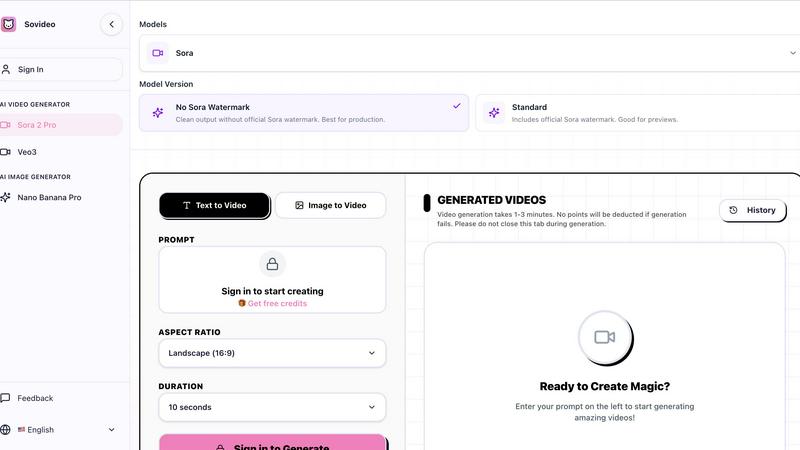
The platform provides granular control over video generation to meet professional standards. Users can select specific model versions, choose aspect ratios like Landscape (16:9), and set durations (e.g., 10 or 15 seconds). A key professional feature is the "No Sora Watermark" option, which delivers clean output ready for public production, unlike the standard version with watermarks meant for previews. This level of control ensures the final video aligns perfectly with branding and distribution requirements.
Browser-Based, Zero-Installation Workspace
Sovideo operates entirely in your web browser, requiring no software downloads, complex setups, or powerful local hardware. This cloud-native approach means you can create, manage, and iterate on projects from any device, anywhere in the world. The clean, user-friendly interface lowers the barrier to entry, making advanced AI generation accessible to everyone regardless of their technical skill or computer specifications, while also simplifying team collaboration.
Reliable Generation with Fail-Safe
Sovideo is built for a dependable creative workflow. The platform transparently communicates that video generation typically takes 1-3 minutes and provides a dedicated history section to track all creations. Crucially, it employs a fail-safe system where no user credits are deducted if a generation attempt fails. This policy removes the fear of wasting resources on experimental prompts and encourages users to freely explore and refine their ideas without financial penalty.
Use Cases
Magic Hour
Social Media Content Creation
Magic Hour is ideal for social media managers looking to produce eye-catching posts quickly. With the ability to create videos and images in various styles, users can maintain a consistent brand image while catering to different audience preferences. The platform's rapid iteration capabilities allow for the quick generation of multiple content variations.
Marketing Campaigns
Marketers can leverage Magic Hour to create compelling visuals for their campaigns. The AI tools enable the generation of promotional videos, advertisements, and engaging images that resonate with target audiences. The ability to personalize content at scale ensures that marketing messages are impactful and relevant.
Educational and Training Materials
Magic Hour can be a valuable resource for educators and trainers who need to produce instructional videos or materials. With features like Text-to-Video and the AI Image Editor, users can create informative content that enhances learning experiences. The easy-to-use interface allows educators to focus on content quality rather than technical challenges.
Personal Projects and Creative Exploration
Individual creators can use Magic Hour to explore their creativity without the constraints of traditional media production. Whether it’s crafting a short film, producing a fun video for friends, or experimenting with artistic styles, the platform offers the tools needed to bring creative visions to life effortlessly.
Sovideo
Viral Social Media Content Creation
Creators and influencers can rapidly produce engaging, trend-aligned content for platforms like TikTok and Instagram. By using prompts to generate unique ASMR videos, captivating short clips, or eye-catching visuals, users can maintain a consistent posting schedule. The quick turnaround—some videos taking as little as 15 minutes from idea to output—allows creators to capitalize on trends in real-time and build audiences with professionally styled AI-generated content.
Efficient Marketing & Advertising Material Production
Marketing teams and small businesses can generate high-quality video ads, product demos, and promotional images without the budget for full-scale production shoots. Sovideo enables the creation of compelling visual narratives for email campaigns, social ads, and website content directly from text descriptions of the product or campaign theme, slashing production timelines and costs while maintaining a polished, brand-appropriate aesthetic.
Concept Visualization & Storyboarding
Filmmakers, game developers, and designers can use Sovideo to visualize concepts and iterate on storyboards rapidly. Instead of relying solely on sketches or lengthy descriptions, teams can generate dynamic video sequences or detailed concept art from narrative prompts. This accelerates the pre-production process, facilitates clearer communication of creative visions, and allows for exploring multiple visual directions before committing to final production.
Educational & Explainer Content
Educators, trainers, and content creators can transform complex topics into easy-to-understand visual explanations. By generating illustrative videos and images that depict historical events, scientific concepts, or step-by-step processes, they can produce more engaging learning materials. This use case makes abstract ideas tangible and enhances knowledge retention without requiring animation or video editing expertise.
Overview
About Magic Hour
Magic Hour is a revolutionary, browser-based AI studio that simplifies the process of creating professional-quality videos and images. Designed for a wide range of users including solo creators, marketers, and teams, Magic Hour consolidates over 100 powerful AI tools into a single, intuitive platform. This makes video and image creation not only fast and easy but also accessible for everyone, regardless of their technical expertise. The platform eliminates the need for expensive equipment and complex software, allowing users to focus on their creative vision. Whether you begin with a text prompt, an image, or a video clip, Magic Hour empowers you to transform ideas into stunning content within seconds. Its features, such as AI Face Swap, Lip Sync, and various image and video editing tools, streamline the creative workflow, making it ideal for social media, marketing campaigns, and personal projects. With Magic Hour, you can iterate quickly, maintain brand consistency, and produce share-ready outputs that captivate your audience.
About Sovideo
Sovideo is a revolutionary AI-powered platform that solves a critical problem for modern creators: fragmented and complex visual content creation. Traditionally, bringing an idea to life required mastering multiple, separate tools for images and videos, each with steep learning curves and disjointed workflows. This process was time-consuming, costly, and created significant barriers for non-experts. Sovideo eliminates this friction by integrating the world's most advanced AI image and video generation models into a single, intuitive, browser-based workspace. It is specifically designed for creators, marketers, social media managers, and teams who need to produce high-quality visual content—from social media clips and ads to concept art and cinematic scenes—quickly and without technical hassle. By providing unified access to top-tier models like Sora 2, Veo 3, Nano Banana Pro, and Seedream 4.5, Sovideo empowers users to transform simple text prompts or images into stunning visuals in minutes. The platform's core value proposition is profound simplicity and efficiency: it dramatically reduces production time and costs, democratizes high-end visual creation, and allows users to focus purely on creativity and iteration, all from any web browser without any installation.
Frequently Asked Questions
Magic Hour FAQ
What types of media can I create with Magic Hour?
Magic Hour allows you to create both videos and images. You can generate content from text prompts, existing images, or video clips, giving you a versatile toolkit for various creative projects.
Is Magic Hour suitable for beginners?
Yes, Magic Hour is designed to be user-friendly, making it accessible for beginners as well as experienced creators. The intuitive interface and straightforward tools enable users of all skill levels to produce professional-quality content.
Can I use Magic Hour for commercial projects?
Absolutely. Magic Hour is equipped with features that cater to commercial needs, such as marketing campaigns or promotional content. You can create share-ready outputs for various platforms, ensuring your projects meet professional standards.
Is there a cost associated with using Magic Hour?
Magic Hour offers a free plan that provides access to over 100 AI tools, allowing you to start creating without any upfront costs. There are also options for teams and agencies that require additional features and scalability.
Sovideo FAQ
What AI models are available on Sovideo?
Sovideo provides integrated access to several top-tier AI models. For video generation, it offers OpenAI's Sora 2 and Google's Veo 3. For image generation, it includes models like Nano Banana Pro and Seedream 4.5. This curated selection ensures users have access to some of the most powerful and capable public models for different types of visual creation, all within a single platform.
How long does it take to generate a video?
Video generation time on Sovideo typically ranges from 1 to 3 minutes per prompt. The platform advises users not to close their browser tab during this generation process. The exact time can vary based on the complexity of the prompt, the selected model, and current server load, but the process is designed to be significantly faster than traditional video production methods.
What happens if my video generation fails?
Sovideo has a user-friendly policy for failed generations. If a video generation attempt fails to produce a result, no credits or points will be deducted from your account. This fail-safe mechanism ensures you only pay for successful outputs, allowing you to experiment with different prompts and settings risk-free and encouraging creative exploration.
Do the generated videos have watermarks?
This depends on the model and settings you choose. Specifically for Sora 2, Sovideo offers two versions: a "Standard" version that includes the official Sora watermark (suitable for previews) and a "No Sora Watermark" version designed for clean, production-ready output. The availability of watermark-free options is essential for professional use cases where branded content is required.
Alternatives
Magic Hour Alternatives
Magic Hour is an innovative AI studio designed for rapid video and image creation, making it possible for anyone to produce professional-grade content in mere seconds. As a browser-based platform, it consolidates over 100 powerful AI tools, offering a seamless experience for creators, marketers, and teams alike. Users are often drawn to its capabilities, but many find themselves searching for alternatives due to various reasons including pricing, specific feature sets, or platform compatibility with their existing workflows. When looking for an alternative, prospective users should consider several key factors. Firstly, determine the range of features offered and whether they meet your specific content creation needs. Additionally, assess the pricing structure to ensure it aligns with your budget. Lastly, evaluate the ease of use and whether the platform integrates well with your current tools and processes, as a streamlined workflow can significantly enhance productivity and creativity.
Sovideo Alternatives
Sovideo is a comprehensive AI-powered platform that specializes in generating high-quality images and videos from text prompts. It falls into the category of all-in-one AI visual content creation tools, designed to streamline the workflow for creators and teams. Users often explore alternatives for various reasons. Budget constraints, specific feature requirements like certain AI models or editing capabilities, and the need for platform-specific integrations can all lead to a search for other options. Some may prioritize different aspects, such as offline functionality or a particular user interface style. When evaluating alternatives, it's crucial to consider your primary use case. Assess whether you need both image and video generation, the importance of generation speed and output quality, and how the tool fits into your existing workflow. The ideal platform should align with your creative goals, technical requirements, and budget, ensuring a smooth and efficient content creation process.