
Decode This Text vs MeetingMind
Side-by-side comparison to help you choose the right tool.

Decode This Text
Decode This Text delivers quick, human-like insights to clarify confusing conversations in just 30 seconds.
Last updated: February 28, 2026

MeetingMind
MeetingMind captures and summarizes your Zoom meetings automatically, ensuring you never miss important details again.
Last updated: March 1, 2026
Visual Comparison
Decode This Text

MeetingMind
Feature Comparison
Decode This Text
Easy Message Input
Users can easily input their messages by pasting text directly or uploading screenshots. This feature removes the hassle of typing out long conversations, making it quick to get the insights needed.
Emotional Tone Analysis
Decode This Text evaluates the emotional tone behind messages, helping users understand whether the sender is feeling positive, negative, or neutral. This function ensures that users do not misinterpret the intent behind a message, leading to more informed responses.
Contextual Insights
The tool looks at context, including the timing and nature of the conversation, to provide deeper insights. This helps users grasp underlying meanings and nuances that might otherwise be overlooked, fostering better communication strategies.
Response Suggestions
Not sure how to reply? Decode This Text generates tailored response options based on the analysis. Users can choose from calm, direct, or firm responses, allowing them to reply with confidence and clarity, regardless of the situation.
MeetingMind
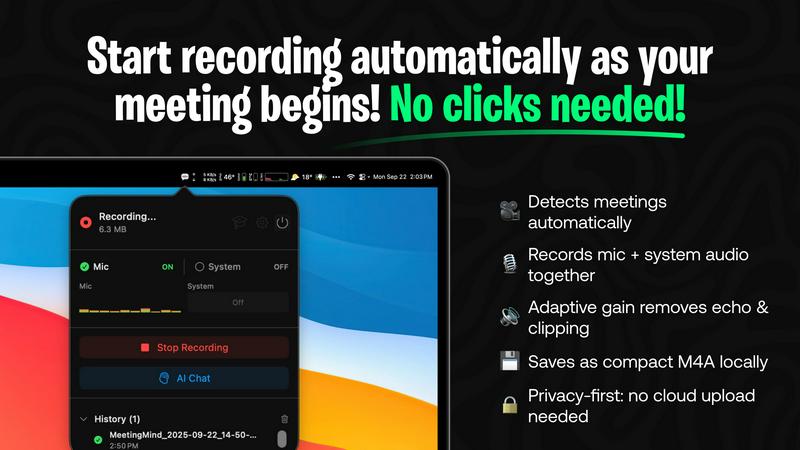
Automatic Detection
MeetingMind automatically detects when you join a Zoom meeting, eliminating the need for manual clicks or setup. This seamless integration allows you to focus entirely on the discussion without worrying about starting the recording.
AI Assistant
With MeetingMind's integrated AI assistant, you can choose between local processing with Ollama or cloud processing with OpenRouter. This feature provides you with intelligent summaries and insights, helping you quickly grasp the essence of the meeting.
Markdown Export
After each meeting, MeetingMind generates AI-powered summaries and transcripts that can be easily exported as formatted markdown files. This functionality ensures that your meeting notes are organized, easily accessible, and ready for sharing.
100% Private
MeetingMind prioritizes your privacy by ensuring that all processing occurs locally on your Mac. This means that sensitive discussions and meeting content never leave your device, allowing you to engage in conversations with peace of mind.
Use Cases
Decode This Text
Decoding Mixed Signals
When faced with ambiguous texts from friends or romantic interests, users can paste the conversation into Decode This Text to receive a clear understanding of the other person's feelings, helping them make informed decisions about their next moves.
Clarifying Professional Communication
Professionals can benefit from Decode This Text when receiving brief or vague emails from colleagues or superiors. The tool breaks down the implications of these communications, enabling users to respond appropriately and maintain professionalism.
Understanding Family Dynamics
Family conversations can sometimes be fraught with emotion and misunderstanding. By using Decode This Text, users can clarify the intentions behind family messages, fostering a more harmonious family environment.
Enhancing Social Interactions
Social interactions can often lead to confusion, especially in group chats. Decode This Text allows users to analyze group conversations to understand dynamics and respond in ways that maintain friendships and social connections.
MeetingMind
Professional Meetings
In a corporate setting, professionals can use MeetingMind to capture essential details from team meetings, strategy sessions, or client calls. The automated transcription and summarization features ensure that all critical points are documented without distracting from the conversation.
Remote Team Collaboration
For remote teams who rely on Zoom for communication, MeetingMind serves as an invaluable tool for maintaining clarity and accountability. Team members can refer back to meeting transcripts and action items, fostering a culture of transparency and follow-through.
Academic Settings
Students participating in online classes or study groups can leverage MeetingMind to document discussions, lectures, and group projects. By transforming verbal exchanges into written records, students can enhance their learning and retention of material.
Project Management
Project managers can utilize MeetingMind during project update meetings to track progress and decisions made. The AI-powered summaries help ensure that all stakeholders are aligned on next steps, minimizing miscommunication and enhancing project efficiency.
Overview
About Decode This Text
Decode This Text is an innovative communication tool crafted to demystify confusing messages and clarify intentions behind them. In a world where digital communication often leads to misunderstandings, this tool stands out by providing users with the insights they need to navigate complex conversations. Whether you're deciphering a cryptic email from your boss, a vague text from a friend, or an ambiguous message from a client, Decode This Text offers a quick and comprehensive analysis. Users can simply paste their conversation or describe the context, and within 30 seconds, they receive an analysis that feels personal and human. This tool is perfect for anyone looking to enhance their communication skills, improve relationships, and eliminate the stress of misinterpretations. With its user-friendly interface and fast response time, Decode This Text empowers users to engage confidently in their conversations, ensuring clarity and understanding without the burden of overanalyzing every word.
About MeetingMind
MeetingMind is an innovative meeting assistant specifically designed for macOS users who want to enhance their productivity during Zoom meetings. This intelligent tool addresses the common challenge of effective meeting documentation, where participants often struggle to balance note-taking with active engagement in discussions. MeetingMind automates the capture and analysis of meeting content, ensuring that users never miss crucial details, action items, or key takeaways. Ideal for professionals, managers, remote teams, and students, MeetingMind seamlessly integrates with Zoom to record audio and generate real-time, speaker-attributed transcripts. By processing everything locally on your Apple Silicon Mac, it guarantees privacy and security, allowing you to focus on the conversation rather than worrying about missed notes. With MeetingMind, every meeting transforms into a searchable and actionable asset, empowering users to reclaim their focus and enhance their productivity.
Frequently Asked Questions
Decode This Text FAQ
How does Decode This Text ensure privacy?
Decode This Text maintains a strict privacy policy, ensuring that no human reads your texts. All analyses are conducted anonymously, allowing users to feel secure while seeking clarity.
Can I use Decode This Text for professional emails?
Absolutely! Decode This Text is designed to assist with any form of communication, including professional emails. It helps users decipher intentions and respond appropriately to maintain a professional demeanor.
How quickly can I expect a response?
Users can receive a comprehensive analysis within 30 seconds of inputting their message. This quick turnaround ensures that you can address communication issues promptly.
Is there a limit to how much text I can analyze?
Currently, there is no specified limit to the amount of text you can input. Users can analyze entire conversations by pasting them or uploading screenshots for a complete analysis.
MeetingMind FAQ
How does MeetingMind ensure privacy during recordings?
MeetingMind processes all meeting content locally on your Mac, ensuring that no sensitive information leaves your device. This privacy-first architecture safeguards your conversations and complies with data protection standards.
Can I use MeetingMind for meetings other than Zoom?
Currently, MeetingMind is designed specifically for Zoom meetings. However, future updates may expand compatibility with other conferencing tools, enhancing its versatility for users.
What happens if I run out of my free recording limit?
If you reach your limit of 60 minutes per day with the free version, you can either wait until the next day for your limit to reset or upgrade to the unlimited version for continuous recording capabilities.
Is there a trial period for the unlimited version?
Yes, users can try MeetingMind for free with a limit of 60 minutes per day. The option to upgrade to unlimited recording is available as a one-time purchase without any subscription fees, providing flexibility for users.
Alternatives
Decode This Text Alternatives
Decode This Text is a cutting-edge tool designed to help users make sense of confusing conversations, fitting comfortably within the Productivity & Management category. It offers quick, human-like analyses of messages that may otherwise lead to misunderstandings, providing clarity in just 30 seconds. Given the diversity of communication needs, users may seek alternatives due to factors like pricing, specific feature sets, or the compatibility of the platform with their devices or workflows. When searching for an alternative, it's essential to consider the key features that will meet your needs, such as user-friendliness, response time, and the depth of analysis offered. Additionally, understanding the pricing structure and whether it aligns with your budget can help narrow down your options. Ultimately, the goal is to find a solution that enhances your communication skills while providing the clarity that Decode This Text offers.
MeetingMind Alternatives
MeetingMind is an innovative productivity tool specifically designed for macOS users, functioning as a smart assistant that automates the recording and summarization of Zoom meetings. By capturing audio from both the user's microphone and the system, it creates detailed, searchable transcripts that enhance meeting efficiency and documentation. Users often seek alternatives to MeetingMind due to various reasons, including pricing, feature sets, or specific platform compatibility needs. When considering alternatives, it is important to evaluate the ease of use, audio quality, data privacy measures, and the ability to integrate seamlessly with existing workflows to ensure a comprehensive solution that meets your unique requirements.