Nano Banana vs TinyFast
Side-by-side comparison to help you choose the right tool.

Nano Banana
Stop struggling with complex editing software and create stunning images simply by chatting with Nano Banana's powerful AI.
Last updated: March 19, 2026

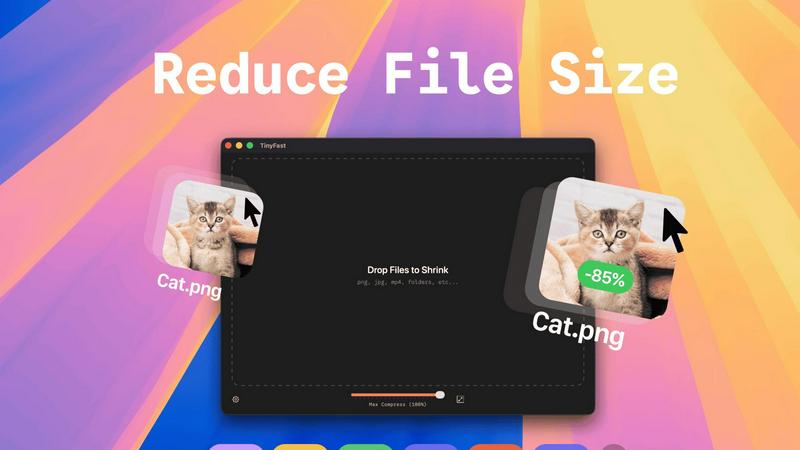
Compress images, videos, and PDFs instantly on your Mac with TinyFast for fast, local, and private file shrinking.
Last updated: February 28, 2026
Visual Comparison
Nano Banana

TinyFast
Feature Comparison
Nano Banana
Text-to-Image & Advanced Prompting
Describe any scene, concept, or style in natural language, and Nano Banana's AI will generate it from scratch. The platform supports detailed prompts up to 5000 characters, allowing for intricate descriptions of subjects, compositions, lighting, and artistic styles. This feature leverages advanced models, including the Pro model with real-world knowledge from Gemini, to interpret complex requests and produce precise, rich image results, from photorealistic portraits to abstract art.
AI-Powered Image Editing
Go beyond generation to manipulate existing images with AI. Simply instruct the AI using text to replace backgrounds, alter clothing, change facial expressions, or adjust the time of day and lighting in a photo. This eliminates the need for manual selection and masking tools, making complex edits like object removal or scene alterations accessible to users without any technical design skills.
Nano Banana Pro Model
The advanced tier model offers professional-grade capabilities for demanding projects. It excels at consistent character editing, ensuring a subject maintains their appearance across multiple generated images. It delivers crystal-clear 4K ultra-resolution output suitable for large-scale printing and supports perfect style transfer to replicate specific art mediums. Most notably, it features clear text generation, allowing users to create images with legible fonts, logos, and handwritten text directly within the visual.
Integrated Creative Tools Suite
Nano Banana is more than a generator; it's a complete workspace. It includes specialized, one-click tools like the AI Image Upscaler to enhance resolution without quality loss and the AI Background Remover for instant, clean cutouts. The platform also offers a library for managing assets, a browser extension for quick access, and "Banana Prompts" – a community-driven inspiration hub where users can discover and copy effective prompts to jumpstart their creations.
TinyFast
Batch & Drag-Drop Shrink
With TinyFast, users can easily drop entire folders for compression, significantly optimizing their time and output. This feature allows for quick and efficient processing, enabling users to manage large quantities of files seamlessly, all with a simple drag-and-drop action.
Blazing-Fast Compression
TinyFast harnesses optimized native engines built for speed, allowing users to shrink large files in mere seconds. This means no more waiting for uploads or downloads, making it perfect for those who need immediate results without sacrificing quality.
Resize Resolution
This feature enables users to set automatic resizing options for images and videos. Whether you need to downscale your media for web usage or simply want to save space, TinyFast offers customizable resolution settings to fit every requirement.
100% Local & Private
TinyFast guarantees that all files remain on your device during the compression process. This commitment to privacy means no uploads to external servers, ensuring total confidentiality of sensitive data, which is crucial for professionals handling proprietary information.
Use Cases
Nano Banana
Social Media & Marketing Content Creation
Marketers and social media managers face the constant challenge of producing fresh, engaging visuals. Nano Banana solves this by enabling the rapid generation of unique banners, promotional graphics, and Instagram-style post mockups complete with UI elements. You can create cohesive branded imagery, visualize ad concepts, and produce high-quality content for campaigns in minutes instead of hours, keeping up with fast-paced content calendars.
Concept Visualization & Storyboarding
Designers, writers, and product developers often struggle to communicate abstract ideas. Nano Banana acts as a powerful brainstorming partner, transforming written concepts into visual drafts. Whether it's visualizing a character for a story, sketching a product idea before prototyping, or creating mood boards and storyboard frames for a video project, the AI provides immediate visual references that accelerate the creative development process.
Professional Photo Enhancement & Editing
Photographers, e-commerce sellers, and individuals can professionally enhance their images without expensive software. The challenge of tedious manual editing is solved by using text prompts to retouch photos, replace dull skies, improve lighting, or remove unwanted objects. The AI Upscaler can also breathe new life into low-resolution images, making them suitable for professional portfolios or product listings.
Commercial Design & Mockups
Small businesses and entrepreneurs need professional designs for packaging, merchandise, and posters but may lack the budget for a designer. Nano Banana Pro directly addresses this with its sharp text rendering and 4K output, allowing users to create detailed product mockups, logo concepts, poster designs, and intricate diagrams. The style transfer feature can apply specific artistic looks to create unique, commercially viable artwork on demand.
TinyFast
Creative Professionals
Designers and photographers can leverage TinyFast to compress high-resolution images for web use without losing quality. This allows them to maintain a fast workflow while ensuring their visual assets are easily shared online.
Software Developers
Developers can use TinyFast to minimize the size of code files and documentation, streamlining their projects. By compressing files locally, they can enhance their application's performance without exposing sensitive code to online tools.
Content Creators
Videographers and content creators can quickly compress large video files for easier sharing on platforms like YouTube and Vimeo. TinyFast helps in reducing upload times while keeping the quality intact, making it an essential tool for timely content delivery.
Personal Use
Individuals looking to save space on their Mac can utilize TinyFast to compress photos, videos, and documents. Whether it's for personal archives or decluttering, users can efficiently manage their digital assets without sacrificing privacy.
Overview
About Nano Banana
Nano Banana is a revolutionary AI-powered creative suite designed to democratize professional-grade image generation and editing. The core challenge it solves is the steep learning curve and time investment required by traditional design software like Photoshop. For marketers, content creators, small business owners, and even hobbyists, creating high-quality visuals often means hiring a designer or struggling with complex tools. Nano Banana provides the solution: an intuitive platform where you describe your vision in simple text prompts, and the advanced AI handles the intricate technical execution. It transforms text into stunning images, edits existing photos by altering elements like lighting or backgrounds, and upscales resolution with a single click. With its advanced Pro model, Nano Banana delivers capabilities like flawless 4K output, consistent character editing across scenes, and sharp text generation that rivals dedicated design tools. This makes it a versatile asset for everything from quick social media graphics and ad mockups to detailed product visualizations and commercial artwork, all achieved with unprecedented speed and simplicity.
About TinyFast
TinyFast is an innovative macOS application meticulously crafted for users who seek efficient, secure, and local file compression. With the ability to compress a diverse array of file types, including images, videos, documents, and more, TinyFast caters to the needs of developers, designers, and content creators who prioritize both speed and privacy. Unlike online compression tools that require uploads to external servers, TinyFast allows users to drag and drop files directly onto their Mac, instantly reducing file sizes while preserving quality. This unique approach ensures that sensitive assets remain confidential, safeguarding them from potential risks associated with cloud-based solutions. TinyFast's intuitive interface and rapid performance make it an indispensable tool for anyone looking to enhance their workflow without compromising on security or efficiency. By keeping all processes local, TinyFast not only streamlines file management but also provides peace of mind in an increasingly digital world.
Frequently Asked Questions
Nano Banana FAQ
What is the difference between Nano Banana and Nano Banana Pro?
Nano Banana Pro is the advanced AI model within the platform, formerly known as Nano Banana 2. It offers superior capabilities compared to the standard model, including consistent character editing for multi-image projects, flawless 4K ultra-resolution output, and highly accurate text generation within images. The Pro model is designed for professional and commercial work where detail, consistency, and print-quality resolution are critical.
Do I need design skills to use Nano Banana?
No, that is the core value proposition of Nano Banana. It is specifically designed for users with no prior design or technical experience. The platform is built around simple text prompts—you describe what you want to see or change in plain language, and the AI handles all the complex execution. An intuitive interface and pre-made prompt inspirations further simplify the creative process.
How do I get started, and is there a free trial?
Yes, you can start creating for free. New users receive 20 free credits to experiment with the platform, including trying the Nano Banana Pro model, without requiring a credit card. Simply sign up on the website to access the AI Creation Workbench and begin generating images from text prompts immediately.
Can I use images created with Nano Banana for commercial purposes?
Yes, images generated using Nano Banana, including those created with the Pro model, are typically available for commercial use. This makes the platform a valuable tool for creating marketing materials, product designs, and other business-related visuals. It is always recommended to review the specific Terms of Service for the latest details on usage rights and licensing.
TinyFast FAQ
How does TinyFast ensure my files remain private?
TinyFast processes all files locally on your device, meaning nothing is uploaded to external servers. This design prioritizes your privacy and ensures that sensitive information stays secure.
What file types can I compress with TinyFast?
TinyFast supports a wide range of file formats, including images (PNG, JPG, TIFF, HEIC, WEBP, GIF, BMP, SVG), videos (MP4, MOV, M4V), documents (PDF, DOCX), code files (JS, CSS, JSON), and audio files (MP3).
Is there a limit to how many files I can compress?
With the free version, users can compress up to 5 files per day. For those seeking unlimited compression, TinyFast offers a lifetime plan as well as a monthly subscription option.
How easy is it to use TinyFast?
TinyFast is designed with user-friendliness in mind. The simple drag-and-drop interface enables users to compress files effortlessly, making it accessible for anyone, regardless of technical expertise.
Alternatives
Nano Banana Alternatives
Nano Banana is an AI image generation and editing platform that falls into the rapidly growing category of text-to-image and AI photo editing tools. It allows users to create and modify professional-looking visuals simply by describing what they want in natural language, bypassing the need for complex design software. Users often explore alternatives for several practical reasons. Budget constraints can lead to searches for free or lower-cost options with similar core features. Others may need specific capabilities Nano Banana lacks, like integration with certain workflows, different artistic styles, or support for particular file formats. Platform preference, such as needing a mobile app or a desktop version, also drives the search for different solutions. When evaluating other tools, consider your primary use case. Are you generating original art, editing existing photos, or both? Assess the quality and style of the AI's output, the intuitiveness of the interface, and the transparency of the pricing model. Also, check for any limitations on usage, commercial rights, and the availability of specialized features you require, such as high-resolution exports or consistent character generation.
TinyFast Alternatives
TinyFast is an innovative application designed for macOS users, specializing in the compression of images, videos, and PDFs. As a tool that prioritizes speed and privacy, it allows users to efficiently reduce file sizes locally on their devices without the need for internet connections. This makes it particularly appealing to developers, designers, and creators who require secure and fast solutions for managing their digital assets. However, users often seek alternatives to TinyFast for various reasons, such as differing pricing models, additional features, or compatibility with other operating systems. When evaluating alternatives, consider aspects such as user interface, batch processing capabilities, and whether the tool maintains local file handling to ensure privacy. Assessing these factors will help you find a suitable replacement that meets your specific needs.