
Never Drop vs Updaytr
Side-by-side comparison to help you choose the right tool.

Never Drop
NeverDrop instantly captures event leads and drafts personalized follow-ups to close deals faster.
Last updated: February 28, 2026
Updaytr
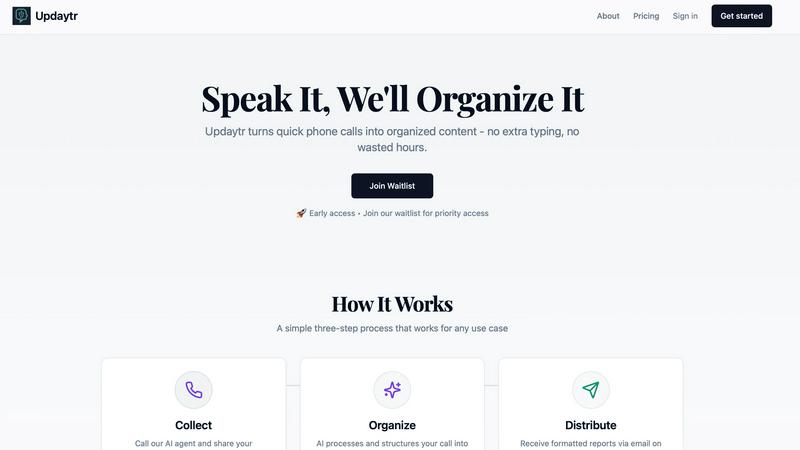
Updaytr turns team calls into organized updates, delivering automatic reports without the need for tedious meetings.
Last updated: March 1, 2026
Visual Comparison
Never Drop

Updaytr
Feature Comparison
Never Drop
Instant AI-Powered Card Scanning
Never Drop eliminates manual data entry with its advanced AI-powered Optical Character Recognition (OCR). Simply snap a photo of any business card with your smartphone. Within seconds, the AI accurately extracts every critical detail—including name, company, title, phone number, and email—directly into a digital contact profile. This feature saves immense time, prevents errors from squinting at cards or mistyping, and ensures you never physically lose a lead again.
Smart Contact Enrichment & Email Finding
Business cards often lack direct contact information or contain generic front-desk emails. Never Drop solves this by automatically finding and appending verified work emails to the contact profile using just the extracted name and company details. This eliminates the need for tedious manual LinkedIn searches or guesswork, delivering a complete, enriched contact profile that is ready for immediate action and seamless integration into your sales pipeline.
Context-Aware AI Follow-Up Drafts
This core feature turns conversations into conversions. After scanning a card, you can add rich context by recording a quick voice note or typing key points from your discussion. Never Drop's AI then analyzes this context to generate a personalized, human-sounding follow-up email draft in under two minutes. The draft reflects the specifics of your conversation, moving far beyond generic templates to create a message that feels genuinely personal and relevant to the recipient.
Team Workspace & CRM Integration
Never Drop is built for team scalability and workflow efficiency. Organize all captured leads by event, reassign contacts between team members, and track collective activity from a unified dashboard. Furthermore, it integrates directly with popular CRMs like HubSpot, automatically pushing enriched contact data and context to keep your entire sales pipeline clean, organized, and synchronized without any manual exporting or uploading.
Updaytr
Voice-to-Report Conversion
Updaytr transforms phone calls into beautifully formatted reports instantly. This feature eliminates the need for manual documentation, allowing team members to focus on their tasks while ensuring that important updates are captured efficiently.
Automated Report Distribution
With Updaytr, stakeholders receive organized reports automatically at their preferred times. This feature ensures that everyone stays informed without the need for constant follow-ups, thereby simplifying the communication process within teams.
Smart Organization with AI Tagging
The AI tagging feature intelligently categorizes updates based on projects, clients, or teams. This meticulous organization helps managers quickly locate relevant information, promoting clarity and efficiency in communication.
Flexible Team Integration
Updaytr allows easy setup for team members by adding their phone numbers and managing their access. This flexibility ensures that all necessary personnel can contribute updates seamlessly, enhancing overall team connectivity.
Use Cases
Never Drop
High-Volume Trade Show Lead Capture
For sales teams attending bustling trade shows, speed and memory are critical. Never Drop allows reps to capture a lead's information and the conversation context in under a minute right at the booth. This ensures that even after dozens of interactions, each lead receives a personalized, timely follow-up based on the actual discussion, dramatically increasing the chance of converting event traffic into qualified sales opportunities.
Conference & Networking Event Follow-Up
Conferences involve back-to-back meetings and quick chats. Instead of juggling notes and cards, users can discreetly scan a card and dictate a voice memo immediately after a conversation. Never Drop's AI then crafts a perfect follow-up email that references specific talking points, helping to solidify the connection and schedule a next-step meeting before the competitor does.
Streamlining Team-Based Event Strategy
When a company sends multiple representatives to an event, lead management can become disjointed. Never Drop's team workspace allows managers to assign leads, track which contacts have been followed up with, and ensure uniform messaging. All captured data flows into the shared CRM, providing full visibility and preventing leads from being overlooked or contacted by multiple reps inconsistently.
Accelerating Sales Onboarding for New Hires
New sales representatives can struggle with the pace and process of effective lead capture at events. Never Drop serves as an invaluable training tool, providing a structured, foolproof process: scan, contextualize, and follow up. This ensures new team members contribute immediately, maintain professional communication standards, and build a strong habit of timely lead engagement from day one.
Updaytr
Construction Project Updates
Construction crews can use Updaytr to provide real-time project status updates directly from the field. This keeps supervisors informed of progress, challenges, and milestones, facilitating timely decision-making.
Sales Team Client Interactions
Sales representatives can call in to report on client visits and interactions. Updaytr organizes this information into reports, allowing managers to track sales activities and client relationships more effectively.
Service Technician Job Reporting
Service technicians can utilize Updaytr to report job completions and equipment statuses. This ensures that management is aware of service levels and can respond to issues promptly, enhancing customer satisfaction.
Personal Productivity Tracking
Individuals can leverage Updaytr for personal project tracking and daily journaling. By calling in updates, users can maintain organized records of their activities and goals, improving personal accountability and productivity.
Overview
About Never Drop
In the high-stakes world of sales, the most promising leads are often lost in the chaos of events. You return from a trade show with a stack of business cards, but the crucial context from your conversations fades by the time you sit down to follow up. The result? Generic, ineffective emails sent too late, or worse, leads that are forgotten entirely, costing your team valuable deals and revenue. Never Drop is the definitive solution to this age-old problem. It is an innovative lead-capture application engineered specifically for sales professionals who operate in fast-paced environments like conferences, trade shows, and networking events. The platform transforms the cumbersome process of lead management into a seamless, three-step workflow: scan a business card, enrich it with voice notes about your conversation, and instantly generate a personalized, AI-drafted follow-up email. By automating data entry and leveraging conversation context, Never Drop ensures no detail is lost and empowers sales teams to send relevant, timely follow-ups while the interaction is still fresh. This dramatically increases conversion rates, keeps your CRM pipeline organized, and turns every handshake into a tangible opportunity.
About Updaytr
Updaytr is an innovative communication tool that revolutionizes how teams share updates and documentation, particularly for those working in dynamic field environments. Designed with efficiency in mind, Updaytr allows users to convert their phone calls into structured, well-formatted reports without the need for additional applications or extensive typing. This tool is especially advantageous for businesses that require real-time updates from team members, helping them stay connected and informed. Updaytr features three specialized AI agents: Updaytr for daily updates, Ideatr for brainstorming sessions, and Biografr for recording life stories. By automating the reporting process, Updaytr enhances productivity, saves time, and streamlines communication, making it an essential tool for construction supervisors, healthcare providers, sales representatives, and other professionals who need to maintain effective communication without the hassle of traditional reporting methods.
Frequently Asked Questions
Never Drop FAQ
How does business card scanning work with Never Drop?
You use the Never Drop mobile app to take a photo of any business card. Our advanced AI-powered OCR technology instantly analyzes the image and accurately extracts the contact's name, company, title, phone number, and email address. This data is automatically populated into a digital profile within the app, eliminating all manual typing and data entry errors.
What types of events is Never Drop designed for?
Never Drop is built for any in-person professional gathering where lead capture and quick follow-up are essential. This includes trade shows, industry conferences, networking mixers, client dinners, and team offsites. The app allows you to organize your scans by event, making it easy to track and manage leads from specific occasions.
Do I need both the mobile app and the web dashboard?
Yes, they work together seamlessly. The mobile app (for iOS and Android) is used for the core action: scanning business cards, adding voice/text context, and sending follow-up emails on the go. The web dashboard is your management hub for reviewing all captured leads, organizing your team, configuring settings (like CRM sync), and handling billing.
Is my data secure with Never Drop?
Absolutely. Never Drop is developed by SCOPEO, a French company, and prioritizes data security. All user data is hosted in the European Union in compliance with strict GDPR regulations. Data is encrypted both in transit and at rest. Business card images are processed solely for contact extraction and are not shared with or sold to any third parties.
Updaytr FAQ
How does Updaytr ensure data accuracy?
Updaytr uses advanced AI algorithms to transcribe and organize updates from phone calls, minimizing errors and ensuring that information is accurately captured and reported.
Can Updaytr be used for industries beyond construction and sales?
Yes, Updaytr is versatile and can be utilized by various industries, including healthcare, logistics, and personal productivity, making it suitable for any team requiring organized communication.
Is Updaytr compliant with privacy regulations?
While Updaytr is designed with privacy in mind, it is important to note that it is not currently HIPAA compliant, and users should avoid storing or transmitting protected health information.
What kind of support does Updaytr offer to users?
Updaytr provides user support through various channels, including help documentation, FAQs, and customer service, ensuring that users can effectively navigate and utilize the tool.
Alternatives
Never Drop Alternatives
Never Drop is a lead capture and follow-up automation tool in the productivity and management category. It helps sales professionals instantly digitize business cards and generate AI-powered follow-up emails to secure more deals from networking events. Users often explore alternatives for various reasons. These can include budget constraints, the need for different feature sets like more advanced CRM integrations or team collaboration tools, or simply a preference for a platform that aligns with a different existing software ecosystem. When evaluating other options, key considerations should be core functionality like card scanning accuracy, the quality and customizability of automated follow-ups, and seamless integration with your current sales stack. The goal is to find a solution that effectively bridges the gap between capturing a lead and initiating a meaningful sales conversation.
Updaytr Alternatives
Updaytr is a cutting-edge productivity tool that simplifies team communication by transforming team calls into organized updates and reports. It is particularly suited for businesses that need real-time information from field teams without the inefficiencies of traditional meetings. Users often seek alternatives to Updaytr due to factors such as pricing variations, specific feature sets that may not align with their needs, or compatibility with preferred platforms and workflows. When exploring alternatives, it’s essential to consider the usability, the range of features offered, integration capabilities, and the overall value in terms of productivity enhancement. Choosing the right alternative can make a significant difference in maintaining efficient communication and documentation practices. Look for solutions that offer intuitive interfaces, robust functionality tailored to your team's needs, and reliable support options. Additionally, consider how well the alternative can adapt to your specific industry requirements, whether it’s for daily updates, brainstorming sessions, or preserving narratives, to ensure a seamless transition and continued productivity.