
Seedream 4.0 vs Shrinkpad
Side-by-side comparison to help you choose the right tool.

Seedream 4.0
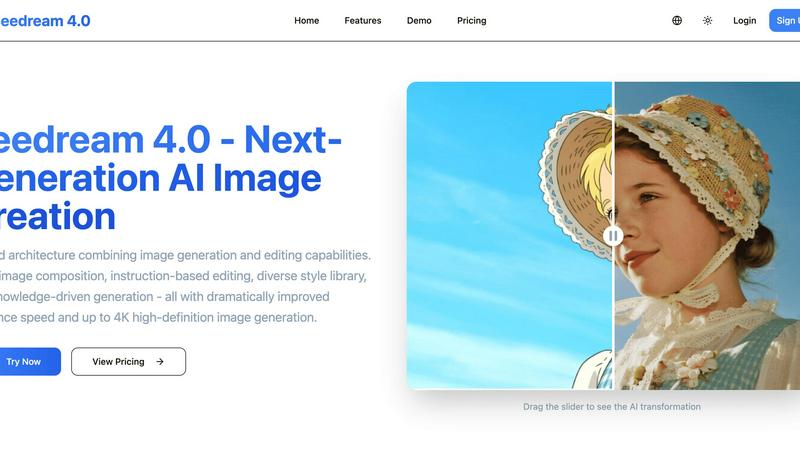
Seedream 4.0 instantly creates and edits stunning images with just a sentence.
Last updated: March 1, 2026

Shrinkpad
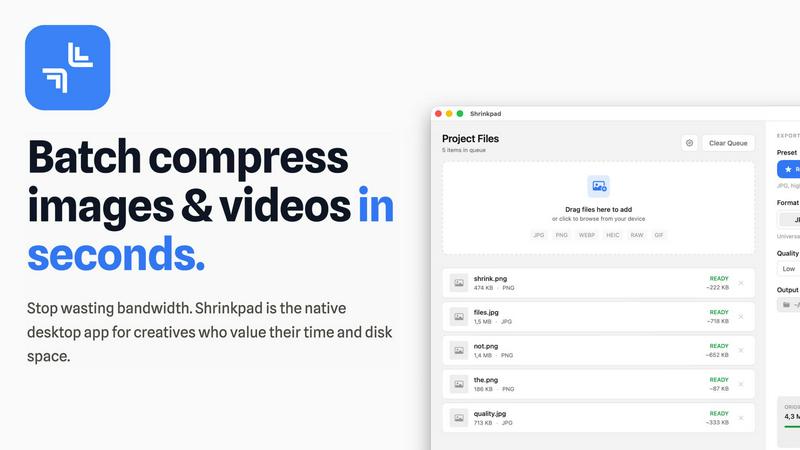
Shrinkpad compresses images and videos on Mac effortlessly, saving space and time for creatives with automatic.
Last updated: February 28, 2026
Visual Comparison
Seedream 4.0
Shrinkpad
Feature Comparison
Seedream 4.0
Multi-Image Composition
Tackle the challenge of creating complex scenes or consistent brand visuals from disparate sources. This feature allows you to input multiple reference images and achieve a cohesive, new composition with just a single sentence instruction. It supports batch output, solving the problem of tedious, one-by-one creation and enabling efficient workflows for visual storytelling, mood boards, and unified marketing asset creation.
Instruction-Based Editing
Overcome the frustration of complex editing software with steep learning curves. Seedream 4.0 makes image manipulation as simple as having a conversation. The core challenge of precise control is solved by allowing you to generate or edit any image by simply describing what you want. Truly embodying "what you say is what you get," this feature removes technical barriers and puts creative intent directly into action.
Diverse Style Library
Address the difficulty of developing a unique or professional visual aesthetic without years of design experience. Seedream 4.0 comes equipped with an extensive library of pre-defined styles, from watercolor and cyberpunk to cinematic and illustrative. This solves the style-application problem, allowing you to instantly generate new images in a chosen style or stylize your own uploaded photos, effortlessly establishing a consistent and compelling visual language.
Knowledge-Driven Generation
Solve the problem of AI generating visually appealing but factually inaccurate or nonsensical content for professional or educational use. Seedream 4.0 leverages enhanced knowledge and reasoning capabilities to produce beautiful and accurate illustrations, detailed charts, and technically precise images. This ensures that generated content is not only visually stunning but also contextually correct and reliable.
Shrinkpad
Batch Compression
Shrinkpad enables users to compress images and videos in bulk, saving time and bandwidth. The one-drop import functionality allows users to effortlessly drag and drop entire folders, which the app then processes instantly, handling thousands of files without crashing.
Intelligent Compression Settings
Shrinkpad automatically analyzes the visual complexity of files to apply optimal compression ratios without introducing artifacts. This ensures that users receive high-quality results while significantly reducing file sizes, making their assets more efficient and manageable.
Format Compatibility
The application supports a wide range of image and video formats, including JPG, PNG, WEBP, AVIF, MP4, and MOV, among others. This extensive compatibility allows users to process various media types seamlessly, ensuring that every file is optimized according to its unique requirements.
Privacy and Security
All processing occurs locally on the user's machine, meaning that sensitive assets never leave the device. This privacy-first approach eliminates concerns associated with cloud-based tools, providing users with peace of mind while managing their valuable media files.
Use Cases
Seedream 4.0
Marketing & Advertising Asset Creation
Marketing teams face tight deadlines and the need for high-volume, on-brand visual content. Seedream 4.0 solves this by enabling rapid generation of product mockups, social media graphics, and ad banners. Using multi-image composition and the style library, teams can maintain brand consistency across all assets while iterating on designs in minutes, not days, significantly accelerating campaign launch times.
Concept Art & Visual Storyboarding
Artists and filmmakers struggle to quickly visualize concepts and storyboard sequences. The challenge of translating abstract ideas into coherent visuals is solved by Seedream's instruction-based editing. Creators can describe a scene, generate a base image, and then iteratively refine characters, settings, and moods through simple text commands, streamlining the pre-production and brainstorming phase.
Educational Material & Illustration Development
Educators and textbook publishers need accurate, engaging illustrations to explain complex subjects. The problem of sourcing or creating correct diagrams is addressed by Seedream's knowledge-driven generation. It can produce detailed, factually correct illustrations of scientific concepts, historical events, or anatomical charts, enhancing learning materials with precision-crafted visuals.
Personal Content Creation & Photo Enhancement
Individual content creators and social media users often lack advanced photo editing skills. Seedream 4.0 democratizes professional editing by allowing anyone to upload a photo and solve common issues. Describe changes like "change the background to a beach," "make it a watercolor painting," or "enhance the resolution to 4K" to instantly transform personal photos into stunning, share-worthy content.
Shrinkpad
Photographer's Asset Management
Photographers can utilize Shrinkpad to efficiently compress large batches of high-resolution images before exporting them to clients or uploading them to websites. This not only saves storage space but also ensures that their online portfolios load quickly and efficiently.
Video Content Creation
For video creators, Shrinkpad offers an ideal solution for compressing large video files without compromising quality. This is particularly beneficial when preparing content for web platforms where file size can significantly impact loading times and viewer experience.
Design Workflow Optimization
Designers can streamline their workflow by exporting entire asset folders from tools like Figma or Photoshop and using Shrinkpad to handle the optimization and renaming in bulk. This saves hours of manual work, allowing designers to focus on creativity rather than file management.
Web Development Efficiency
Web developers can benefit from Shrinkpad by reducing app bundle sizes and improving website performance. With faster load times and optimized media files, developers can enhance user experience and boost site rankings, making Shrinkpad an invaluable asset in their toolkit.
Overview
About Seedream 4.0
Seedream 4.0 is a revolutionary AI image creation platform designed to solve the fragmented creative workflow. The challenge for creators, from marketers to designers, has been the constant switching between separate tools for generating images and then editing them, leading to lost time and creative momentum. Seedream 4.0 provides the solution with its unified architecture, seamlessly integrating powerful AI generation with intuitive, instruction-based editing into a single, cohesive platform. This next-generation tool empowers a wide audience—including graphic designers, content creators, educators, and businesses—to bring their visions to life with unprecedented speed and precision. Its core value proposition lies in dramatically improved inference speed and the ability to generate stunning, high-fidelity images up to 4K resolution. By combining multi-image composition, a vast style library, and knowledge-driven generation, Seedream 4.0 transforms complex creative tasks into simple, conversational commands, making professional-grade visual creation accessible and efficient for everyone.
About Shrinkpad
Shrinkpad is a robust, native macOS application engineered to address the storage and workflow challenges faced by today's digital creators. In an era where high-resolution media files, such as 4K videos, intricate design exports, and high-quality photographs can easily consume precious disk space, Shrinkpad emerges as an essential solution. It mitigates the common frustrations of managing bloated files that not only occupy significant storage but also hinder website performance and application speed. Unlike slow online tools that often compromise your privacy or the tedious process of compressing files individually, Shrinkpad offers a seamless experience with its lightning-fast batch compression—all processed locally on your Mac. Tailored for photographers, designers, developers, and content creators, its main value proposition lies in achieving substantial file size reductions—up to 90%—without sacrificing visual quality. Users can effortlessly drag and drop entire folders, configure their preferences, and watch as Shrinkpad swiftly optimizes their media, reclaiming gigabytes of storage while maintaining a private, offline environment.
Frequently Asked Questions
Seedream 4.0 FAQ
Can I try Seedream 4.0 for free?
Yes, you can experience Seedream 4.0's capabilities by using the demo tool available on the website. This allows you to upload an image and test the instruction-based editing process. For full access to all features, style libraries, and higher-resolution generation, you will need to choose one of the subscription plans, which start with the affordable Basic tier.
How does Seedream 4.0 work?
Seedream 4.0 operates on a unified AI architecture. You provide input through text instructions and/or uploaded images. The platform's advanced AI models interpret your request, leveraging its knowledge base and style libraries. It then performs the generation or editing task, utilizing its dramatically improved inference speed to deliver high-quality results, up to 4K resolution, directly to you in a matter of moments.
What makes Seedream 4.0 different from other AI image tools?
The key differentiator is its unified architecture for generation and editing. While many tools specialize in one or the other, forcing users to switch platforms, Seedream 4.0 combines both seamlessly in one workflow. Additionally, features like multi-image composition for complex scenes and knowledge-driven generation for accurate content solve specific professional challenges that other generators often overlook.
Can I use the images I generate commercially?
Based on the provided context, you should refer to Seedream 4.0's official Terms of Service for the definitive policy on commercial usage rights. Typically, such platforms grant users a license to use generated images, but specific terms, restrictions, and requirements for attribution can vary. Always check the legal policies on their website for the most accurate and binding information.
Shrinkpad FAQ
Can I use Shrinkpad for free?
Yes, Shrinkpad offers a free starter version that includes essential tools for casual use, allowing users to explore its functionality with limited features.
What file formats does Shrinkpad support?
Shrinkpad supports over 30 image formats, including RAW, JPG, PNG, WEBP, and HEIC, as well as major video formats like MP4 and MOV, ensuring versatility in handling various media types.
Does Shrinkpad support video compression?
Absolutely! Shrinkpad provides robust video compression capabilities, allowing users to reduce the size of their video files significantly while maintaining high visual quality.
How many files can I process at once?
Shrinkpad allows unlimited batch processing, enabling users to handle thousands of files simultaneously without crashing, making it a powerful tool for creators with extensive media libraries.
Alternatives
Seedream 4.0 Alternatives
Seedream 4.0 is a powerful AI image generation and editing platform designed to create and modify visuals through intuitive text instructions. It belongs to the rapidly evolving category of AI-powered creative tools, which help users generate artwork, marketing materials, and complex compositions from simple prompts. Users often explore alternatives for several practical reasons. Budget constraints or specific pricing models can be a primary driver, as needs vary from casual hobbyists to large professional teams. Others may seek a different balance of features, such as more specialized editing controls, integration with existing software, or platform compatibility that better suits their operating system or workflow. When evaluating other options, it's crucial to identify your core requirements. Consider the importance of generation speed, output resolution, and the quality of the AI model itself. Also, assess whether the tool's user interface aligns with your skill level and if its style library or editing capabilities match your creative goals. Ultimately, the right choice effectively bridges the gap between your vision and the final visual product.
Shrinkpad Alternatives
Shrinkpad is a native macOS application that specializes in compressing images and videos to optimize storage and streamline workflows for creators. It addresses the common problem of managing large media files which can bog down both devices and applications. Users often seek alternatives to Shrinkpad due to various reasons, including pricing, specific feature requirements, or compatibility with different platforms. When exploring options, it's crucial to consider factors such as privacy, batch processing capabilities, and overall ease of use to ensure that the alternative meets your unique needs. As the demand for efficient media management continues to grow, finding the right compression tool is vital for photographers, designers, and content creators. Look for alternatives that not only offer similar compression rates but also prioritize user privacy and provide a seamless, intuitive interface. Ultimately, the best choice will align with your workflow requirements while guaranteeing the preservation of visual quality in your media files.