
Hush Touch | Voice-to-Text for MacOS vs StudyPal
Side-by-side comparison to help you choose the right tool.

Hush Touch | Voice-to-Text for MacOS
Hush Touch is an offline voice-to-text app for Mac that learns your vocabulary, ensuring accurate, real-time dictation.
Last updated: February 27, 2026

StudyPal
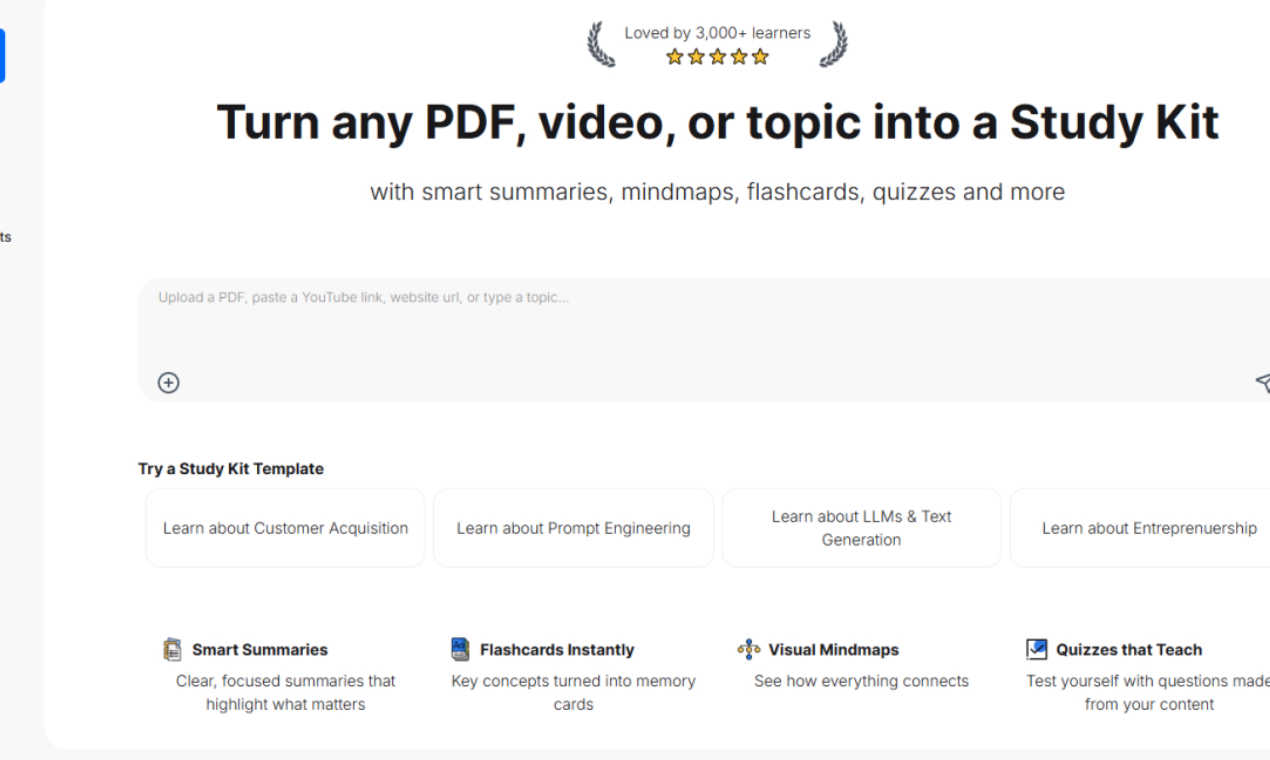
Transform any PDF or video into personalized study kits with summaries, flashcards, quizzes, and mindmaps for effective.
Last updated: March 1, 2026
Visual Comparison
Hush Touch | Voice-to-Text for MacOS

StudyPal
Feature Comparison
Hush Touch | Voice-to-Text for MacOS
Dual-Engine Recognition
Hush Touch leverages two advanced Apple dictation engines: DictationTranscriber for natural flow and punctuation, and SFSpeechRecognizer for custom vocabulary enhancement. This dual-engine approach ensures that your dictation is both accurate and context-aware, producing cleaner text in real time.
Custom Vocabulary
The app allows you to store up to 500 unique terms and phrases, learning from corrections to adapt to your specific language needs. Whether it is technical jargon, brand names, or medical terminology, Hush Touch recognizes and processes your unique vocabulary to enhance dictation accuracy.
Smart Text Processing
Hush Touch features intelligent text processing capabilities, including filler word removal and auto-correction. This means that common distractions in speech are minimized, allowing you to focus on delivering clear and concise messages, while unnecessary words are automatically filtered out.
Context Modes & Hands-Free Operation
Users can switch between different context modes—General, Email, Code, and Notes—tailoring the dictation experience to their specific needs. Additionally, hands-free operation is enabled via Siri, allowing you to start dictation and send messages with simple voice commands, enhancing overall productivity.
StudyPal
Smart Summaries
StudyPal provides clear, focused summaries that distill essential information from extensive source materials, allowing learners to grasp key concepts quickly and efficiently. This feature streamlines the study process, saving users time and enhancing understanding.
Instant Flashcards
Key concepts are transformed into memory cards instantly. StudyPal's flashcard feature allows learners to reinforce knowledge through spaced repetition, making it easier to memorize and recall critical information when needed.
Visual Mindmaps
With StudyPal, users can create visual mind maps that illustrate how different concepts connect and interact. This feature enhances comprehension and retention by enabling learners to visualize relationships between ideas, making the learning process more intuitive.
Interactive Quizzes
StudyPal generates quizzes based on the content being studied, allowing users to test their understanding and reinforce learning in a fun and engaging way. These quizzes are tailored to the material, providing immediate feedback and helping to identify areas that need further review.
Use Cases
Hush Touch | Voice-to-Text for MacOS
Drafting Emails
Professionals can use Hush Touch to compose emails quickly and efficiently. By dictating their thoughts, users can save time and maintain focus on the content rather than typing, making it an ideal tool for busy work environments.
Creating Medical Notes
Healthcare providers can benefit from Hush Touch's ability to accurately capture medical terminology. The app's custom vocabulary feature allows physicians to dictate notes seamlessly, ensuring that critical information is recorded correctly without the hassle of manual entry.
Writing Code Documentation
Software developers can utilize Hush Touch to document their code verbally. With its context-specific modes and dual-engine transcription, developers can dictate complex technical instructions accurately, streamlining their workflow.
Taking Meeting Notes
During meetings or brainstorming sessions, Hush Touch allows users to capture ideas and notes hands-free. This eliminates the distraction of typing, enabling participants to engage fully in discussions while ensuring that important points are recorded effortlessly.
StudyPal
Exam Preparation
Students preparing for exams can leverage StudyPal to convert their course materials into study kits, complete with summaries, flashcards, and quizzes tailored to their specific subjects, ensuring efficient and effective revision.
Professional Development
Professionals looking to upskill or learn new topics can use StudyPal to create personalized study kits from industry articles, webinars, or training videos, allowing for targeted learning that fits their busy schedules.
Lifelong Learning
Curious individuals who enjoy exploring new subjects can utilize StudyPal to gather information from various sources into a cohesive study kit, making it easier to learn about topics of interest at their own pace.
Group Study Sessions
StudyPal can enhance group study sessions by allowing multiple users to collaborate on creating and sharing study kits. This feature fosters teamwork and collective learning experiences, making studying more interactive and social.
Overview
About Hush Touch | Voice-to-Text for MacOS
Hush Touch is an innovative voice-to-text application developed specifically for macOS users who seek a fast, natural, and private dictation experience. Unlike many dictation tools that rely on cloud processing, Hush Touch operates entirely on-device, ensuring that your voice data remains secure and confidential. The app utilizes a combination of two advanced Apple transcription engines, enhanced by an Apple Intelligence final pass, to deliver accurate and contextually relevant text output. With a lightweight footprint of just 5.5 MB, Hush Touch offers seamless integration into your daily writing tasks, whether you are drafting emails, notes, or lengthy documents. Ideal for professionals across various fields, including writers, medical practitioners, and software developers, Hush Touch eliminates the need for cloud dependency while improving your dictation efficiency. With a one-time purchase of $20 for a lifetime license, users can enjoy a powerful dictation tool without any ongoing subscription fees.
About StudyPal
StudyPal is a revolutionary AI-powered study companion designed to streamline and enhance the learning process for students, professionals, and lifelong learners alike. Traditional study methods often leave learners feeling overwhelmed and disorganized, struggling to synthesize information from dense textbooks, lengthy lectures, or scattered online resources. StudyPal addresses these challenges head-on by transforming any source material—whether it's a PDF document, a YouTube video, or a simple typed topic—into a comprehensive and interactive study kit. By automating the most time-consuming aspects of studying such as note-taking, summarization, and resource organization, StudyPal empowers users to engage actively with dynamic content. This includes clear summaries, visual mind maps, self-testing flashcards, and auto-generated quizzes. Additionally, a built-in AI tutor is available 24/7 to provide instant answers and clarify complex concepts, ensuring learners can tackle their studies with confidence. Designed for those preparing for critical exams, professionals upskilling for career advancement, and curious minds eager to learn, StudyPal adapts to individual needs and learning styles, consolidating the entire study workflow into one intelligent platform. By doing so, it not only saves countless hours of study time but also significantly boosts comprehension and long-term retention.
Frequently Asked Questions
Hush Touch | Voice-to-Text for MacOS FAQ
Is Hush Touch compatible with all macOS versions?
Yes, Hush Touch is designed to work seamlessly with macOS, providing a smooth dictation experience on supported versions. Always check for the latest system requirements on our website.
How does Hush Touch ensure my privacy?
Hush Touch processes all voice data on-device, meaning that no information is sent to the cloud. This guarantees that your dictation remains private and secure, with zero data collection involved.
Can I customize commands in Hush Touch?
Yes, Hush Touch allows users to create customizable command phrases for sending messages, making it easier to communicate effectively and hands-free.
What happens if I need help using Hush Touch?
Hush Touch offers comprehensive user support, including a detailed FAQ section on our website and a dedicated customer service team ready to assist with any questions or technical issues you may encounter.
StudyPal FAQ
How does StudyPal convert materials into study kits?
StudyPal uses advanced AI algorithms to analyze source materials, extracting key information and organizing it into structured study kits that include summaries, flashcards, mind maps, and quizzes.
Can I use StudyPal for subjects outside of traditional academics?
Absolutely! StudyPal is versatile and can be used for any subject matter, including professional development, hobbies, and personal interests, making it suitable for learners of all backgrounds.
Is the AI tutor always available to answer questions?
Yes, the built-in AI tutor is available 24/7, providing instant assistance and clarification on complex concepts, ensuring learners have support whenever they need it.
How does StudyPal enhance long-term retention of information?
By integrating various learning modalities such as visual aids, interactive quizzes, and spaced repetition through flashcards, StudyPal reinforces knowledge retention and comprehension, making study sessions more effective.
Alternatives
Hush Touch | Voice-to-Text for MacOS Alternatives
Hush Touch | Voice-to-Text for MacOS is a powerful dictation application designed specifically for Mac users. As part of the AI Assistants category, it allows for seamless offline voice-to-text transcription, ensuring that your dictation is fast, accurate, and private. Users often seek alternatives due to various reasons, including pricing concerns, the need for additional features, or compatibility with different platforms. Identifying a suitable alternative involves looking for key aspects such as on-device processing, transcription accuracy, ease of integration into existing workflows, and overall user experience to ensure that it meets your unique dictation needs.
StudyPal Alternatives
StudyPal is an AI-powered study companion designed to transform various source materials, such as PDFs and videos, into interactive study tools like summaries, flashcards, and quizzes. This innovative platform falls under the category of AI Assistants, specifically catering to students, professionals, and lifelong learners looking to enhance their study efficiency and retention. As users seek to optimize their learning experience, they often look for alternatives to StudyPal due to factors such as pricing, specific features, or compatibility with different platforms. When choosing an alternative, it's essential to consider aspects like ease of use, customization options, the breadth of features offered, and how well the solution aligns with your unique learning style and study objectives.