TemplateFox vs Yardyly
Side-by-side comparison to help you choose the right tool.

TemplateFox
TemplateFox designs professional PDFs visually and generates thousands automatically from your data.
Last updated: February 28, 2026

Yardyly streamlines your landscaping business to manage projects and grow with ease.
Last updated: March 4, 2026
Visual Comparison
TemplateFox

Yardyly
Feature Comparison
TemplateFox
Visual Drag-and-Drop Editor
TemplateFox's core feature is an intuitive, no-code visual editor that allows anyone to design professional PDF templates. You can drag and drop components like text, images, tables, and barcodes onto a canvas, positioning them exactly where you need them. Each element has a detailed properties panel for fine-tuning content, borders, colors, sizes, and alignment. This eliminates the traditional pain of wrestling with HTML and CSS, giving you pixel-perfect control over your document's layout and branding without writing a single line of code.
Dynamic Data Binding & Expressions
Go beyond simple text replacement. TemplateFox allows you to inject any dynamic data into your templates using placeholders like {{customer_name}}. Furthermore, you can use powerful expressions and over 100 built-in functions to format dates, calculate totals (like subtotals and taxes), round numbers, and conditionally control content. System variables like {{sys.page_number}} and {{sys.current_date}} are automatically available, enabling fully automated, context-aware document generation.
Smart Tables & Automatic Layouts
Creating documents with variable-length data, like invoices or packing slips, is seamless. TemplateFox's table components are designed to grow dynamically with your data. Whether you have 3 line items or 300, the table will expand, and rows will automatically flow onto new pages if necessary. This ensures your documents always look professional and structured, regardless of the data volume, removing the manual effort of adjusting layouts for different content lengths.
Built-in Barcodes, QR Codes & Headers/Footers
TemplateFox includes specialized components for real-world business needs. You can generate scanner-ready barcodes (Code128, EAN-13) and QR codes on the fly directly from your data. Headers and footers are effortlessly managed—define them once with your logo, page numbers, or legal disclaimers, and they will automatically repeat on every page of your generated PDF. This guarantees brand consistency and professional polish across all documents.
Yardyly
Centralized Operations Hub
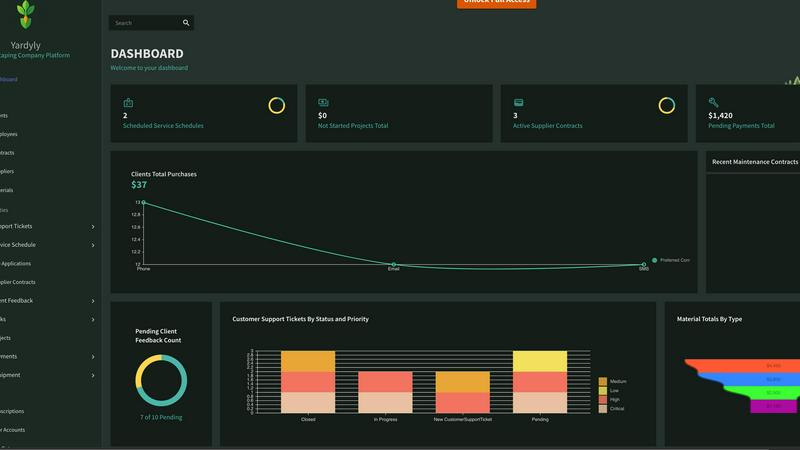
Yardyly eliminates the need for multiple disconnected tools by providing a single, cloud-based platform for all your business needs. This hub integrates scheduling, customer information, job details, team communication, and financial tracking into one easy-to-use interface. The drag-and-drop functionality makes managing daily workflows intuitive, giving you a complete, real-time view of your business from the office or the field, ensuring nothing falls through the cracks.
Automated Scheduling & Dispatching
Manually planning routes and assigning jobs is time-consuming and inefficient. Yardyly’s intelligent scheduling tools allow you to optimize your crew's time with simple drag-and-drop planning. You can easily assign jobs, manage resources, and adjust schedules on the fly. This feature ensures optimal resource allocation, reduces drive time between jobs, and keeps your entire team synchronized, leading to more jobs completed per day and happier customers.
Integrated CRM & Client Portal
Managing client relationships with scattered notes and emails leads to missed details and poor service. Yardyly’s built-in Customer Relationship Management (CRM) system keeps all client information, communication history, and service preferences organized in one place. The platform facilitates better communication through automated notifications and provides a professional experience, helping you build stronger, long-lasting client relationships.
Financial Tracking & Invoicing
Chasing payments and manually tracking income and expenses is a major administrative burden. Yardyly simplifies finances with integrated invoicing and precise transaction tracking. You can create and send professional invoices directly from a job, track supplier contracts, monitor payments, and gain clear insights into your profitability. This ensures accurate billing, improves cash flow, and provides peace of mind with precise fiscal control.
Use Cases
TemplateFox
Ecommerce Order Fulfillment
Automate the entire post-purchase documentation process. Generate personalized packing slips, shipping labels with tracking barcodes, and commercial invoices directly from your order data. Connect TemplateFox to platforms like Shopify via Zapier to create and attach PDFs to emails or print batches automatically, speeding up fulfillment and reducing manual errors for businesses of any size.
Automated Invoicing & Billing
Streamline your accounts receivable workflow. Design a branded invoice template once, then automatically generate and send personalized invoices by integrating TemplateFox with your CRM, accounting software, or a simple database. Dynamic tables calculate totals, and data binding populates client details, due dates, and line items, ensuring accuracy and saving countless hours each month.
Certificate & Document Generation
Easily produce personalized certificates for events, courses, or achievements. Educational institutions, training providers, and event organizers can use TemplateFox to design a master certificate template and then generate hundreds of unique, named certificates in seconds by feeding a list of participants. This scales what is typically a manual, time-consuming task into an efficient, automated process.
Business Reporting & Compliance
Create consistent, branded reports for internal or client use. Agencies, consultants, and startups can automate the generation of monthly performance reports, legal agreements, audit documents, or compliance certificates. By pulling data from analytics platforms or databases, TemplateFox ensures every report is perfectly formatted, professionally presented, and generated without manual copy-pasting or layout adjustments.
Yardyly
Scaling a Solo Landscaping Operation
A solo entrepreneur spends excessive time on admin, limiting their capacity for new clients. By implementing Yardyly, they automate online booking, scheduling, and invoicing. This reduces manual work by hours each week, allowing them to focus on delivering more services, taking on additional clients, and systematically growing their business without becoming overwhelmed by paperwork.
Managing a Multi-Crew Lawn Care Business
A growing business with several crews struggles with miscommunication, scheduling conflicts, and inefficient routing. Using Yardyly’s centralized dispatch and mobile app, the manager can assign jobs, update schedules in real-time, and communicate directly with crews in the field. This streamlines operations, ensures everyone is on the same page, and optimizes daily routes for maximum efficiency and fuel savings.
Improving Client Communication and Retention
A company receives complaints about missed updates and billing confusion, hurting its reputation. By leveraging Yardyly’s CRM and client portal, they provide automatic job status notifications, easy online payment options, and a direct channel for feedback. This proactive, professional communication enhances the customer experience, builds trust, and significantly increases client retention rates.
Streamlining Project and Job Management
Managing complex landscaping projects involves tracking multiple tasks, budgets, and materials. Yardyly’s project coordination tools allow managers to oversee job status, track budgets against estimates, and manage team collaboration from a single dashboard. This ensures projects stay on schedule and within budget, resources are properly allocated, and profitability is maintained on every job.
Overview
About TemplateFox
Creating professional, branded documents is a universal business need, yet it remains a persistent bottleneck. Developers often struggle with complex HTML/CSS layouts and unreliable PDF libraries, while business teams waste hours manually editing templates in clunky software. This process drains valuable time, introduces errors, and makes automation at scale seem impossible. TemplateFox directly solves this challenge by providing a complete, no-code-to-full-code platform for PDF generation. It empowers indie hackers, developers, and businesses of all sizes to visually design perfect templates using an intuitive drag-and-drop editor, eliminating the need for HTML or CSS skills. Once a template is designed, users can generate thousands of personalized, print-ready PDFs in seconds through a simple, reliable API call or via no-code automation tools like Zapier and Make. The core value proposition is clear: eliminate the friction of document creation. You design once with absolute control over layout and branding, then automate forever by injecting dynamic data. This turns a tedious, error-prone task into a seamless, scalable workflow component for any use case, from invoices and packing slips to complex legal agreements and certificates.
About Yardyly
Running a landscaping, lawn care, or outdoor service business is a constant juggling act. You're caught between managing chaotic schedules on paper, chasing payments, coordinating crews on the road, and trying to provide excellent customer service—all while keeping the actual fieldwork on track. This administrative chaos steals precious time from what you do best: creating beautiful outdoor spaces and growing your business. Yardyly is the definitive solution to this challenge. It is an all-in-one, cloud-based management platform built from the ground up for the unique demands of the green industry. Yardyly replaces a jumble of spreadsheets, separate apps, and paper notes with a single, intuitive hub that brings clarity and control to your entire operation. It combines essential tools like online booking, drag-and-drop job scheduling, customer management (CRM), invoicing, and team coordination into one seamless system. Designed for solo operators and growing teams alike, Yardyly automates repetitive tasks, reduces manual admin work, and improves communication with both your crew and your clients. Its mobile-friendly design ensures you can manage routes, update job statuses, and track revenue from anywhere. Ultimately, Yardyly helps you cultivate success by streamlining your operations, letting you spend less time on logistics and more time on profitable, satisfying work.
Frequently Asked Questions
TemplateFox FAQ
Do I need coding skills to use TemplateFox?
No, you do not need any coding skills to start creating templates. The primary method of designing PDFs is through the visual, drag-and-drop editor, which is built for no-code users. You can create complex, dynamic templates using the graphical interface. Coding skills are only beneficial if you wish to use the advanced API directly for integration into custom software.
How do I get my data into the PDF templates?
You can populate your templates with data in two main ways. For no-code users, direct integrations with platforms like Zapier, Make, Airtable, and Bubble allow you to trigger PDF generation from those apps. For developers, you can send data directly to the TemplateFox API via a simple POST request in JSON format. The platform binds the data to the placeholders you defined in your template.
Can I reuse elements like headers on every page?
Yes, absolutely. TemplateFox provides dedicated header and footer sections for your templates. Any content you place in these areas—such as your company logo, document title, page numbers, or legal text—will automatically appear on every page of the generated PDF. You define them once in the editor, and the system handles the rest.
What kind of support do you offer?
TemplateFox provides comprehensive support through multiple channels. We offer complete API documentation and guides for developers. For all users, there is a library of ready-to-use sample templates to get started quickly. You can also contact the support team for help, and there are detailed guides for common workflows, such as setting up automation with Zapier.
Yardyly FAQ
Is Yardyly suitable for a one-person landscaping business?
Absolutely. Yardyly is designed to scale with you. For a solo operator, it acts as a powerful digital assistant, automating time-consuming tasks like scheduling, invoicing, and client reminders. This frees you up to focus on the hands-on work and client acquisition, providing the tools to operate efficiently and professionally from day one, without the complexity of systems meant for larger teams.
How does Yardyly handle scheduling for multiple teams and jobs?
Yardyly features an intuitive, drag-and-drop scheduling interface that provides a visual calendar of all jobs and crew assignments. You can easily assign jobs to specific teams, adjust timelines on the fly, and account for travel time and resource availability. The mobile app ensures field crews receive instant updates, and managers have a real-time view of all operations, preventing double-booking and scheduling conflicts.
Can clients book and pay for services online with Yardyly?
Yes. Yardyly includes online booking capabilities that allow potential and existing clients to request services or schedule appointments directly through a link or your website. Furthermore, the integrated invoicing system lets you create and send professional digital invoices. Clients can then securely pay online, which speeds up your cash flow and provides a convenient, modern payment experience.
Is my business data secure on the Yardyly platform?
Security is a top priority. Yardyly employs robust security measures, including SSL encryption to protect data in transit. Your business and client information is stored securely in the cloud with reliable infrastructure. The platform is designed to be highly trusted and risk-free, meeting industry standards to ensure your operational and financial data remains confidential and safe.
Alternatives
TemplateFox Alternatives
TemplateFox is a specialized PDF generation and automation platform in the productivity software category. It allows users to visually design professional document templates and then generate thousands of personalized PDFs automatically via API or no-code integrations. This solves the common bottleneck of manually creating or coding branded invoices, reports, and certificates. Users often explore alternatives for various reasons. These can include budget constraints, the need for different feature sets like advanced e-signatures, specific platform integrations, or a preference for a different user experience. Some may seek simpler tools for occasional use, while others require more developer-centric control or enterprise-level compliance features. When evaluating an alternative, consider your primary need: is it ease of design, automation power, or developer control? Look for a solution that balances a user-friendly template editor with reliable, high-volume generation capabilities. Ensure it supports your data formats and integrates seamlessly with your existing tech stack, whether through API, SDKs, or no-code connectors, to create a truly scalable document workflow.
Yardyly Alternatives
Yardyly is a comprehensive business management software designed specifically for landscaping, lawn care, and outdoor service companies. It falls into the productivity and management software category, aiming to consolidate tools like scheduling, CRM, and invoicing into one unified platform. Business owners often explore alternatives for various reasons. These can include budget constraints, the need for different or more specialized features, a preference for a different platform (like desktop vs. mobile-first), or simply a desire to compare options before making a commitment. When evaluating other solutions, it's crucial to assess how well they address the unique workflows of field service businesses. Key considerations should include core functionality for job management, ease of use for you and your team, scalability as you grow, and the quality of customer support. The right fit should streamline your operations, not complicate them.