AI Formatter vs CleanPaste.org
Side-by-side comparison to help you choose the right tool.
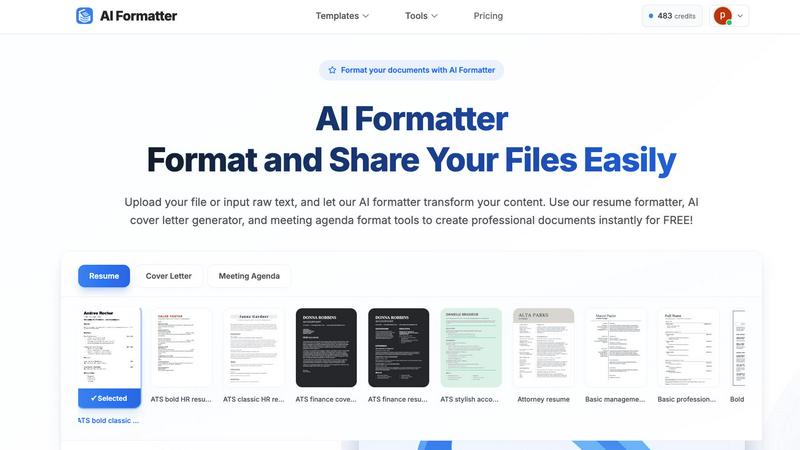
Instantly transform raw text into polished documents with professional AI templates for resumes, cover letters, and.
Last updated: March 1, 2026

CleanPaste.org
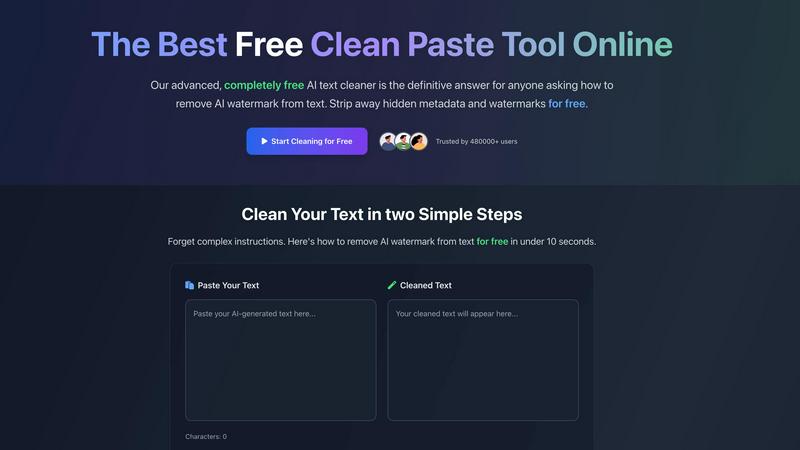
CleanPaste.org instantly removes invisible characters and AI watermarks from your text for free, ensuring clean content.
Last updated: March 2, 2026
Visual Comparison
AI Formatter
CleanPaste.org
Feature Comparison
AI Formatter
Extensive Template Library
AI Formatter offers an extensive library of over 162 professional templates, including ATS-optimized resumes, cover letters, and meeting agendas. This diverse selection ensures that users can find the perfect design to match their professional needs and impress potential employers or stakeholders.
AI-Powered Formatting
With AI Formatter, users can upload their existing documents or input raw text. The AI processes the content and applies professional formatting automatically, ensuring that every document is structured and visually appealing, saving time and effort in manual formatting.
User-Friendly Editing Tools
The platform includes an intuitive editor that allows users to review and customize their formatted documents easily. Users can make adjustments to content, ensuring that their documents not only look professional but also convey the right message and tone.
Multi-Format Download Options
After editing, AI Formatter enables users to download their documents in various formats, including Word and PDF. This flexibility allows users to share their polished documents seamlessly, catering to different application requirements and preferences.
CleanPaste.org
Instant Processing
CleanPaste.org provides instant results by allowing users to paste their content and click clean. The tool quickly detects and removes invisible characters and hidden formatting from AI-generated text, ensuring a seamless user experience.
Watermark Removal Mode
The watermark removal mode is designed to strip AI watermarks from text while preserving the original content's integrity. This feature is essential for content creators who wish to maintain their work's authenticity and avoid detection.
Deep-Scan Algorithm
CleanPaste.org employs a sophisticated deep-scan algorithm that thoroughly scans text for invisible characters, zero-width spaces, and hidden metadata. This ensures a comprehensive cleaning process without leaving any traces behind.
100% Free Service
One of the standout features of CleanPaste.org is that it is entirely free to use. There are no paywalls, usage limits, or sign-up requirements, making it accessible to everyone who needs to clean their text.
Use Cases
AI Formatter
Streamlined Job Applications
Job seekers can utilize AI Formatter to create ATS-friendly resumes and cover letters quickly. By transforming their raw text into professionally formatted documents, users enhance their chances of standing out in the competitive job market.
Professional Business Proposals
Businesses can use AI Formatter to generate polished proposals and reports. The platform’s templates help ensure that business documents are not only visually appealing but also structured to effectively communicate key ideas and strategies.
Academic Document Preparation
Academics and students can benefit from AI Formatter by formatting research papers, presentations, and thesis documents. The user-friendly tools simplify the process of adhering to strict formatting guidelines, allowing users to maintain focus on their research and writing.
Meeting Agenda Organization
AI Formatter can also be employed to create structured meeting agendas from raw notes. This ensures that meetings are organized and focused, improving productivity and communication within teams.
CleanPaste.org
For Students
Students can benefit from CleanPaste.org by using it to remove hidden characters from their essays and assignments. By ensuring their work is clean from AI-related artifacts, they can submit their drafts with confidence and academic integrity.
For Content Creators & Bloggers
Content creators and bloggers can utilize CleanPaste.org to ensure their text is free from invisible characters and AI watermarks. This helps maintain a natural tone that resonates with their audience, preserving their brand's voice.
For Professionals
Professionals, such as project managers and marketers, can use CleanPaste.org to refine their communication. By cleaning AI-assisted drafts, they can present polished and professional content in emails, reports, and presentations.
For Non-Native English Speakers
Non-native English speakers can rely on CleanPaste.org to enhance the quality of their AI-generated content. The tool makes it easy to remove elements that may make the text sound unnatural, helping users communicate more effectively.
Overview
About AI Formatter
AI Formatter is an innovative AI-driven, cloud-based platform designed to revolutionize document preparation for professionals across various sectors. Whether you are a job seeker, a business professional, or an academic, the task of formatting resumes, cover letters, and other critical documents can often feel overwhelming and tedious. With AI Formatter, you can effortlessly transform raw text or uploaded files into visually stunning documents that adhere to industry standards. The platform's main value proposition lies in its ability to save users over 2 hours per document, ensuring that every piece is not only polished but also optimized for Applicant Tracking Systems (ATS), boasting a 95%+ pass rate. AI Formatter features over 100 professional templates and a user-friendly real-time editor, granting users complete creative control to tailor their documents to best reflect their professional brand. By automating the formatting process, AI Formatter alleviates the stress associated with document preparation, allowing users to focus on their core tasks and opportunities.
About CleanPaste.org
CleanPaste.org is an innovative online tool specifically designed to assist users in removing AI watermarks, hidden metadata, and invisible characters from their text with ease. This free service caters to a diverse audience, including students, content creators, and professionals who frequently rely on AI-generated content. The primary value proposition of CleanPaste.org lies in its ability to deliver quick and efficient results; within seconds, users can ensure their written work is free from traces of AI detection, thus maintaining originality and authenticity. The platform features a user-friendly interface that allows anyone to simply paste their text and receive cleaned content that resembles human writing. With over 480,000 satisfied users, CleanPaste.org stands as the ultimate solution for anyone looking to enhance their text’s quality by eliminating unwanted elements, all without requiring sign-ups or incurring hidden fees.
Frequently Asked Questions
AI Formatter FAQ
How does AI Formatter improve document formatting?
AI Formatter uses advanced AI technology to automatically format uploaded documents or raw text into professional layouts, ensuring they meet industry standards and ATS requirements.
What types of documents can I create with AI Formatter?
Users can create a variety of documents, including resumes, cover letters, meeting agendas, business proposals, invoices, and academic papers, all tailored to their specific needs.
Is there a limit to the file size I can upload?
Yes, AI Formatter supports file uploads up to a maximum size of 10MB, accommodating various document types such as PDF, DOC, DOCX, and TXT formats.
Can I edit my documents after formatting?
Absolutely! AI Formatter features an intuitive editing tool that allows you to review and customize your formatted documents before downloading them in your preferred format.
CleanPaste.org FAQ
How does CleanPaste.org remove invisible characters?
CleanPaste.org utilizes advanced algorithms to detect and strip invisible characters, zero-width spaces, hidden metadata, and AI watermarks from your text. Users simply paste their content and click clean, with all processing happening instantly.
Is CleanPaste.org truly free? What's the catch?
Yes, CleanPaste.org is 100% free with no hidden fees or catches. There are no usage limits, premium features, or sign-up requirements, allowing everyone to access the tool without any barriers.
What types of hidden characters does CleanPaste.org remove?
The tool effectively removes all types of invisible characters, including zero-width spaces, hidden metadata, AI watermarks, and formatting artifacts. Every feature is available to all users at no cost.
How quickly can I clean my text with CleanPaste.org?
Users can clean their text in under 10 seconds. Once the text is pasted into the tool, the cleaning process is initiated instantly, providing immediate results for users who need quick turnaround times.
Alternatives
AI Formatter Alternatives
AI Formatter is an innovative cloud-based platform designed to transform raw text into professional documents instantly using its AI-powered templates. It falls under the productivity and management category, offering users a seamless solution to the often tedious task of document preparation. Many users seek alternatives to AI Formatter due to various factors such as pricing, specific feature sets, or compatibility with their preferred platforms. When selecting an alternative, consider factors such as the range of templates offered, the quality of the formatting engine, user interface, and the level of customer support available. It’s essential to choose a solution that not only meets your formatting needs but also enhances your overall productivity and aligns with your professional branding goals.
CleanPaste.org Alternatives
CleanPaste.org is a cutting-edge online tool designed to help users remove invisible characters and AI watermarks from their text. As part of the AI Assistants category, it caters to a broad audience, including students, content creators, and professionals who frequently work with AI-generated content. Users often seek alternatives to CleanPaste.org for various reasons, such as pricing, specific feature sets, or compatibility with certain platforms. When choosing an alternative, it is essential to consider factors like the ease of use, speed of processing, additional functionalities such as plagiarism checking, and the overall value offered without hidden fees. A solution that prioritizes user experience and maintains content integrity is crucial for those looking to enhance their writing while avoiding AI detection.