AI Formatter vs Outbid
Side-by-side comparison to help you choose the right tool.
Instantly transform raw text into polished documents with professional AI templates for resumes, cover letters, and.
Last updated: March 1, 2026

OutBid instantly alerts freelancers to new Upwork jobs and provides AI-generated proposals, enabling faster applications and more wins.
Last updated: March 19, 2026
Visual Comparison
AI Formatter
Outbid

Feature Comparison
AI Formatter
Extensive Template Library
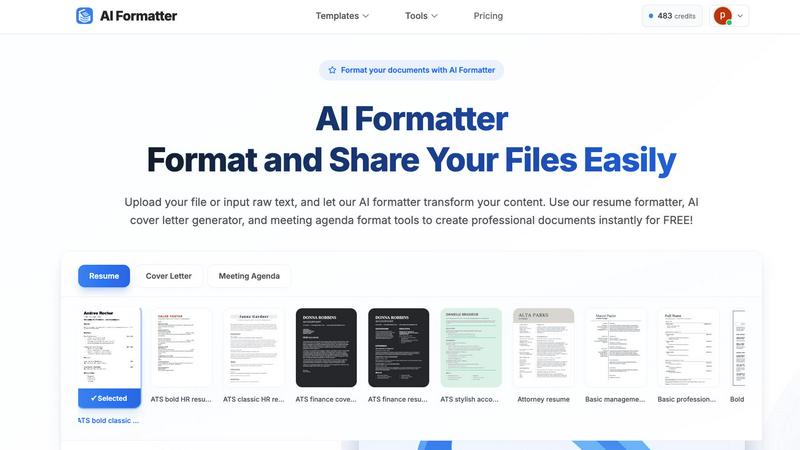
AI Formatter offers an extensive library of over 162 professional templates, including ATS-optimized resumes, cover letters, and meeting agendas. This diverse selection ensures that users can find the perfect design to match their professional needs and impress potential employers or stakeholders.
AI-Powered Formatting
With AI Formatter, users can upload their existing documents or input raw text. The AI processes the content and applies professional formatting automatically, ensuring that every document is structured and visually appealing, saving time and effort in manual formatting.
User-Friendly Editing Tools
The platform includes an intuitive editor that allows users to review and customize their formatted documents easily. Users can make adjustments to content, ensuring that their documents not only look professional but also convey the right message and tone.
Multi-Format Download Options
After editing, AI Formatter enables users to download their documents in various formats, including Word and PDF. This flexibility allows users to share their polished documents seamlessly, catering to different application requirements and preferences.
Outbid
Instant Alerts
OutBid provides real-time notifications for new job postings on Upwork within seconds of their release. This ensures that freelancers who use the tool can apply immediately, often before the competition even sees the listing.
AI Proposals
The tool generates personalized proposal drafts tailored to each job posting. Freelancers can simply copy, tweak, and submit these proposals, significantly reducing the time spent on proposal writing and increasing application success.
Smart Filtering
With OutBid's smart filtering system, users can customize their job alerts. They can filter job listings by skills, budgets, experience levels, and even set quiet hours, ensuring they only see the most relevant opportunities.
War Room Strategy Mode
When competition is fierce, OutBid helps freelancers stand out with its War Room strategy mode. This feature allows users to add custom instructions and regenerate proposals, enhancing their chances in crowded job markets.
Use Cases
AI Formatter
Streamlined Job Applications
Job seekers can utilize AI Formatter to create ATS-friendly resumes and cover letters quickly. By transforming their raw text into professionally formatted documents, users enhance their chances of standing out in the competitive job market.
Professional Business Proposals
Businesses can use AI Formatter to generate polished proposals and reports. The platform’s templates help ensure that business documents are not only visually appealing but also structured to effectively communicate key ideas and strategies.
Academic Document Preparation
Academics and students can benefit from AI Formatter by formatting research papers, presentations, and thesis documents. The user-friendly tools simplify the process of adhering to strict formatting guidelines, allowing users to maintain focus on their research and writing.
Meeting Agenda Organization
AI Formatter can also be employed to create structured meeting agendas from raw notes. This ensures that meetings are organized and focused, improving productivity and communication within teams.
Outbid
Speedy Applications for Busy Freelancers
Freelancers with tight schedules can benefit from OutBid's instant alerts and AI proposals. By receiving job notifications instantly, they can apply to relevant postings without having to spend hours searching Upwork.
New Freelancers Finding Their Footing
For newcomers to freelancing, crafting the perfect proposal can be challenging. OutBid simplifies this process by providing tailored proposal drafts, helping them gain confidence and secure their first jobs more easily.
Experienced Freelancers Seeking Efficiency
Veteran freelancers looking to save time will appreciate OutBid's streamlined application process. The tool allows them to focus on high-priority jobs while ensuring their applications are competitive and well-crafted.
Strategic Job Applications
Freelancers who face intense competition can utilize the War Room strategy mode to enhance their applications. This feature empowers them to customize submissions and improve their chances of being noticed by clients.
Overview
About AI Formatter
AI Formatter is an innovative AI-driven, cloud-based platform designed to revolutionize document preparation for professionals across various sectors. Whether you are a job seeker, a business professional, or an academic, the task of formatting resumes, cover letters, and other critical documents can often feel overwhelming and tedious. With AI Formatter, you can effortlessly transform raw text or uploaded files into visually stunning documents that adhere to industry standards. The platform's main value proposition lies in its ability to save users over 2 hours per document, ensuring that every piece is not only polished but also optimized for Applicant Tracking Systems (ATS), boasting a 95%+ pass rate. AI Formatter features over 100 professional templates and a user-friendly real-time editor, granting users complete creative control to tailor their documents to best reflect their professional brand. By automating the formatting process, AI Formatter alleviates the stress associated with document preparation, allowing users to focus on their core tasks and opportunities.
About Outbid
OutBid is a revolutionary tool tailored for freelancers eager to thrive in the competitive Upwork marketplace. Designed to continuously monitor job postings around the clock, OutBid sends immediate alerts via Telegram, ensuring users can be among the first to respond to new opportunities. This proactive approach enhances the chances of being noticed by potential clients by allowing freelancers to apply within 60 seconds of a job being posted. Each alert comes with a personalized, AI-generated proposal draft that aligns with both the job description and the user's unique skills, simplifying the application process. OutBid is perfect for freelancers at any stage of their career—whether you're a busy professional who can't constantly check job listings or a newcomer who struggles with proposal writing. By streamlining the application process and providing real-time insights, OutBid empowers freelancers to secure more jobs and maximize their earning potential.
Frequently Asked Questions
AI Formatter FAQ
How does AI Formatter improve document formatting?
AI Formatter uses advanced AI technology to automatically format uploaded documents or raw text into professional layouts, ensuring they meet industry standards and ATS requirements.
What types of documents can I create with AI Formatter?
Users can create a variety of documents, including resumes, cover letters, meeting agendas, business proposals, invoices, and academic papers, all tailored to their specific needs.
Is there a limit to the file size I can upload?
Yes, AI Formatter supports file uploads up to a maximum size of 10MB, accommodating various document types such as PDF, DOC, DOCX, and TXT formats.
Can I edit my documents after formatting?
Absolutely! AI Formatter features an intuitive editing tool that allows you to review and customize your formatted documents before downloading them in your preferred format.
Outbid FAQ
How fast are the alerts?
OutBid sends alerts within seconds of a job being posted on Upwork. This rapid notification system ensures that freelancers can act quickly and be among the first to apply.
Do I need to be tech-savvy?
No, OutBid is designed to be user-friendly and requires no technical expertise. Simply message the bot on Telegram to get started, and the setup process is quick and straightforward.
Can I customize the proposals?
Yes, each AI-generated proposal draft can be easily customized. Freelancers can tweak the content to better reflect their personal style and expertise before submitting.
Is this affiliated with Upwork?
OutBid operates independently of Upwork, providing a unique tool to enhance the freelance application experience. It does not have any official affiliation with Upwork itself.
Alternatives
AI Formatter Alternatives
AI Formatter is an innovative cloud-based platform designed to transform raw text into professional documents instantly using its AI-powered templates. It falls under the productivity and management category, offering users a seamless solution to the often tedious task of document preparation. Many users seek alternatives to AI Formatter due to various factors such as pricing, specific feature sets, or compatibility with their preferred platforms. When selecting an alternative, consider factors such as the range of templates offered, the quality of the formatting engine, user interface, and the level of customer support available. It’s essential to choose a solution that not only meets your formatting needs but also enhances your overall productivity and aligns with your professional branding goals.
Outbid Alternatives
OutBid is a cutting-edge tool designed for freelancers in the productivity and management category, specifically aimed at enhancing their experience on the Upwork platform. By providing instant job alerts and AI-generated proposals via Telegram, OutBid helps users apply quickly and effectively, increasing their chances of securing jobs in a competitive marketplace. Users often seek alternatives to OutBid due to various factors such as pricing, feature sets, or specific platform compatibility. When evaluating potential alternatives, it’s essential to consider aspects like real-time job alerts, ease of proposal customization, user support, and overall effectiveness in streamlining the application process. The right alternative should align with your unique needs as a freelancer and help you maximize your earning potential.