AI Formatter vs QuoteCraft AI
Side-by-side comparison to help you choose the right tool.
Instantly transform raw text into polished documents with professional AI templates for resumes, cover letters, and.
Last updated: March 1, 2026

QuoteCraft AI
QuoteCraft AI creates winning proposals for freelancers by fixing unclear scope and bad pricing.
Last updated: March 4, 2026
Visual Comparison
AI Formatter
QuoteCraft AI

Feature Comparison
AI Formatter
Extensive Template Library
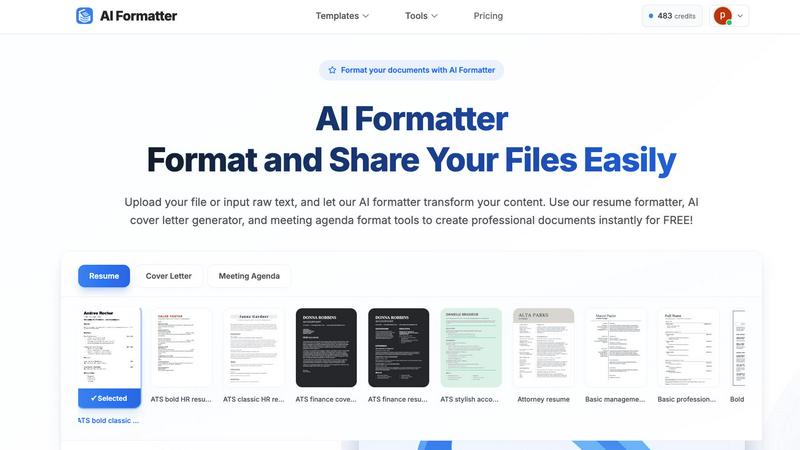
AI Formatter offers an extensive library of over 162 professional templates, including ATS-optimized resumes, cover letters, and meeting agendas. This diverse selection ensures that users can find the perfect design to match their professional needs and impress potential employers or stakeholders.
AI-Powered Formatting
With AI Formatter, users can upload their existing documents or input raw text. The AI processes the content and applies professional formatting automatically, ensuring that every document is structured and visually appealing, saving time and effort in manual formatting.
User-Friendly Editing Tools
The platform includes an intuitive editor that allows users to review and customize their formatted documents easily. Users can make adjustments to content, ensuring that their documents not only look professional but also convey the right message and tone.
Multi-Format Download Options
After editing, AI Formatter enables users to download their documents in various formats, including Word and PDF. This flexibility allows users to share their polished documents seamlessly, catering to different application requirements and preferences.
QuoteCraft AI
Voice-to-Proposal
Describe your project out loud, and QuoteCraft AI's advanced transcription instantly converts your spoken words into a structured proposal draft. This feature is perfect for capturing ideas on the go, allowing you to walk out of a client meeting, record a quick summary, and have a professional proposal framework ready before you even get back to your desk, ensuring no detail is forgotten.
Interactive Proposals
Send proposals that allow clients to customize their package in real-time. Clients can toggle specific line items or services on or off, and the total price updates automatically. This interactive experience reduces back-and-forth negotiations and client rejections by giving them control and flexibility, leading to higher acceptance rates and clearer project agreements.
Context Engine & Import Learning
The AI doesn't just generate generic text; it learns to sound like you. By importing your past winning proposals, QuoteCraft AI's Context Engine analyzes your pricing strategies, writing style, and standard deliverables. This means your very first AI-generated proposal is already tailored to your business's unique approach, saving you hours of customization.
Smart Follow-Ups & Tracking
Never wonder if a client has seen your proposal again. QuoteCraft AI provides view tracking, notifying you the exact moment a proposal is opened. You can also set up automated, gentle reminder emails to nudge clients after 3, 5, or 7 days, helping you stay on top of follow-ups without being pushy and increasing your response rates.
Use Cases
AI Formatter
Streamlined Job Applications
Job seekers can utilize AI Formatter to create ATS-friendly resumes and cover letters quickly. By transforming their raw text into professionally formatted documents, users enhance their chances of standing out in the competitive job market.
Professional Business Proposals
Businesses can use AI Formatter to generate polished proposals and reports. The platform’s templates help ensure that business documents are not only visually appealing but also structured to effectively communicate key ideas and strategies.
Academic Document Preparation
Academics and students can benefit from AI Formatter by formatting research papers, presentations, and thesis documents. The user-friendly tools simplify the process of adhering to strict formatting guidelines, allowing users to maintain focus on their research and writing.
Meeting Agenda Organization
AI Formatter can also be employed to create structured meeting agendas from raw notes. This ensures that meetings are organized and focused, improving productivity and communication within teams.
QuoteCraft AI
For Web Designers & Developers
Quickly turn vague client requests for a "modern website" into a detailed proposal outlining specific pages, functionalities (e.g., e-commerce integration, CMS), responsive design requirements, testing phases, and a clear launch timeline. This prevents scope creep and sets professional expectations from the very first interaction.
For Marketing Agencies & Consultants
Streamline the process of proposing complex campaigns. Describe a client's goal, such as increasing lead generation, and generate a proposal with defined service line items like SEO audit, content creation, PPC management, and monthly reporting, complete with performance metrics and a tiered pricing structure.
For Creative Studios & Freelancers
After a creative briefing, use Voice-to-Proposal to capture all nuanced feedback and ideas. Generate a proposal that clearly outlines project phases (concept, revision rounds, final delivery), asset deliverables, usage rights, and a payment schedule tied to milestones, protecting your creative work and time.
For Independent Consultants
Leverage the Import Learning feature to ensure every proposal maintains a consistent, professional brand voice. Quickly generate personalized proposals for new clients that reference industry-specific challenges and solutions, while the Smart Pricing feature suggests optimal rates based on your history of accepted deals.
Overview
About AI Formatter
AI Formatter is an innovative AI-driven, cloud-based platform designed to revolutionize document preparation for professionals across various sectors. Whether you are a job seeker, a business professional, or an academic, the task of formatting resumes, cover letters, and other critical documents can often feel overwhelming and tedious. With AI Formatter, you can effortlessly transform raw text or uploaded files into visually stunning documents that adhere to industry standards. The platform's main value proposition lies in its ability to save users over 2 hours per document, ensuring that every piece is not only polished but also optimized for Applicant Tracking Systems (ATS), boasting a 95%+ pass rate. AI Formatter features over 100 professional templates and a user-friendly real-time editor, granting users complete creative control to tailor their documents to best reflect their professional brand. By automating the formatting process, AI Formatter alleviates the stress associated with document preparation, allowing users to focus on their core tasks and opportunities.
About QuoteCraft AI
QuoteCraft AI is a revolutionary AI-powered platform designed to solve the two biggest challenges that cost freelancers and small agencies valuable deals: unclear project scope and ineffective pricing. For web designers, marketing agencies, creative studios, and consultants, crafting a compelling, professional proposal is a time-consuming bottleneck that often leads to scope creep, client disputes, or lost opportunities due to pricing missteps. QuoteCraft AI eliminates this friction by transforming a simple project description into a comprehensive, client-ready proposal in seconds. By leveraging advanced artificial intelligence, the tool automatically generates all critical elements, including a detailed scope of work, itemized pricing, clear deliverables, and a project timeline. Its unique Context Engine learns from your past successful proposals and feedback, ensuring each new document reflects your unique voice, style, and business logic. Currently free during its beta phase, QuoteCraft AI empowers service providers to close more deals with confidence and efficiency, turning the tedious proposal process into a strategic advantage.
Frequently Asked Questions
AI Formatter FAQ
How does AI Formatter improve document formatting?
AI Formatter uses advanced AI technology to automatically format uploaded documents or raw text into professional layouts, ensuring they meet industry standards and ATS requirements.
What types of documents can I create with AI Formatter?
Users can create a variety of documents, including resumes, cover letters, meeting agendas, business proposals, invoices, and academic papers, all tailored to their specific needs.
Is there a limit to the file size I can upload?
Yes, AI Formatter supports file uploads up to a maximum size of 10MB, accommodating various document types such as PDF, DOC, DOCX, and TXT formats.
Can I edit my documents after formatting?
Absolutely! AI Formatter features an intuitive editing tool that allows you to review and customize your formatted documents before downloading them in your preferred format.
QuoteCraft AI FAQ
How does the AI generate proposals?
The AI analyzes your project description, selected services, and client type. It cross-references this with industry-standard structures and, if available, the patterns learned from your past proposals imported into the Context Engine. It then assembles a complete document with logically organized sections for scope, pricing, timeline, and terms.
Will my proposals look generic?
No. This is the core strength of the Context Engine. By learning from your past successful proposals, the AI adapts to your specific wording, tone, pricing models, and common deliverables. You can also fully edit and customize any generated proposal before sending to ensure it perfectly matches your brand.
How does the Context Engine work?
When you import past proposal documents or provide feedback on AI-generated drafts, the Context Engine identifies your unique patterns. It learns your preferred terminology, how you structure pricing (e.g., hourly vs. project-based), your common deliverables, and your professional style to make future proposals sound authentically like you.
Is my data and client information secure?
Yes. QuoteCraft AI employs industry-standard security measures to protect your data. Client proposals are sent via secure links, and e-signatures are recorded with IP addresses and timestamps for legal validity. You retain ownership of your data and client information at all times.
Alternatives
AI Formatter Alternatives
AI Formatter is an innovative cloud-based platform designed to transform raw text into professional documents instantly using its AI-powered templates. It falls under the productivity and management category, offering users a seamless solution to the often tedious task of document preparation. Many users seek alternatives to AI Formatter due to various factors such as pricing, specific feature sets, or compatibility with their preferred platforms. When selecting an alternative, consider factors such as the range of templates offered, the quality of the formatting engine, user interface, and the level of customer support available. It’s essential to choose a solution that not only meets your formatting needs but also enhances your overall productivity and aligns with your professional branding goals.
QuoteCraft AI Alternatives
QuoteCraft AI is a specialized tool in the business and productivity software category, designed to help freelancers generate professional project proposals with clear scope and pricing in seconds. It addresses the common freelance challenges of scope creep and underquoting by using AI to structure proposals quickly. Users often explore alternatives for various reasons. Some may seek different pricing models beyond a free beta, require integrations with specific project management or CRM platforms, or need more advanced features for complex, recurring client work. The search for the right tool is highly personal to one's business workflow. When evaluating any alternative, focus on how it solves your core proposal pain points. Key considerations include the speed and quality of output, flexibility in customization, the ability to accurately reflect your brand, and how well it integrates with your existing tools to create a seamless client onboarding process.