AI Formatter vs WA Reminders
Side-by-side comparison to help you choose the right tool.
Instantly transform raw text into polished documents with professional AI templates for resumes, cover letters, and.
Last updated: March 1, 2026

WA Reminders
WA Reminders saves you time by scheduling WhatsApp messages for later from your own phone number.
Last updated: April 4, 2026
Visual Comparison
AI Formatter
WA Reminders

Feature Comparison
AI Formatter
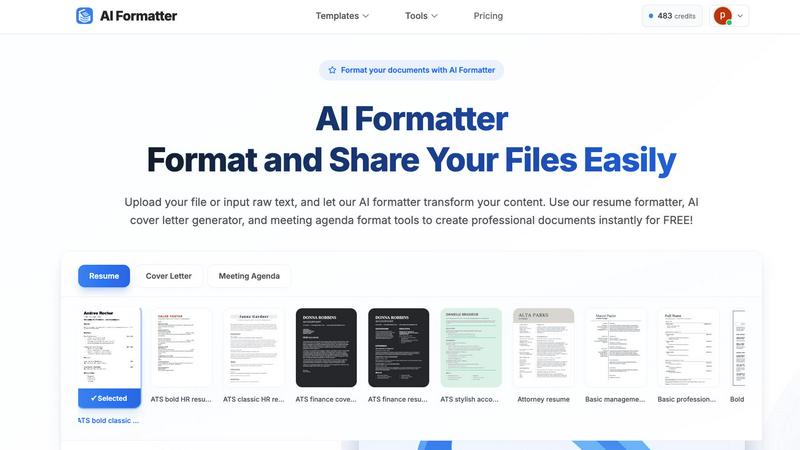
Extensive Template Library
AI Formatter offers an extensive library of over 162 professional templates, including ATS-optimized resumes, cover letters, and meeting agendas. This diverse selection ensures that users can find the perfect design to match their professional needs and impress potential employers or stakeholders.
AI-Powered Formatting
With AI Formatter, users can upload their existing documents or input raw text. The AI processes the content and applies professional formatting automatically, ensuring that every document is structured and visually appealing, saving time and effort in manual formatting.
User-Friendly Editing Tools
The platform includes an intuitive editor that allows users to review and customize their formatted documents easily. Users can make adjustments to content, ensuring that their documents not only look professional but also convey the right message and tone.
Multi-Format Download Options
After editing, AI Formatter enables users to download their documents in various formats, including Word and PDF. This flexibility allows users to share their polished documents seamlessly, catering to different application requirements and preferences.
WA Reminders
Seamless WhatsApp Integration
WA Reminders works by linking to your WhatsApp account—either Business or personal—via a secure QR code scan, similar to WhatsApp Web. This foundational feature ensures all scheduled messages are sent directly from your own verified phone number. Your clients receive reminders in a familiar, trusted chat thread, allowing for a natural continuation of the conversation. You maintain full control and context of all communications within your primary WhatsApp interface, eliminating the need to manage a separate, impersonal broadcast system.
Dual Scheduling Methods: App & Google Calendar
This feature offers unparalleled flexibility in how you manage reminders. You can schedule messages directly within the intuitive WA Reminders app, which automatically imports your full phone contact list for easy selection. Alternatively, for those who live by their calendar, you can schedule by simply adding an internationally formatted phone number to any Google Calendar event title or description. This dual approach adapts to your workflow, whether you prefer a dedicated tool or a hands-off, calendar-centric automation.
Automatic Contact List Sync
Eliminate the tedious and error-prone process of manually entering client phone numbers. When scheduling from the WA Reminders app, your device's full contact list is automatically imported and synced. This saves significant administrative time and prevents missed reminders due to typos or outdated numbers. It ensures your entire client database is readily available, making the scheduling process quick, efficient, and comprehensive.
Support for Recurring Events & Reminders
For businesses with repeating appointments, classes, or subscription services, this feature is a game-changer. WA Reminders allows you to set up recurring message schedules directly from the app. When integrated with Google Calendar, recurring calendar events automatically generate corresponding WhatsApp reminders. This "set it and forget it" functionality ensures consistent, reliable communication for ongoing client engagements without requiring manual intervention for each instance.
Use Cases
AI Formatter
Streamlined Job Applications
Job seekers can utilize AI Formatter to create ATS-friendly resumes and cover letters quickly. By transforming their raw text into professionally formatted documents, users enhance their chances of standing out in the competitive job market.
Professional Business Proposals
Businesses can use AI Formatter to generate polished proposals and reports. The platform’s templates help ensure that business documents are not only visually appealing but also structured to effectively communicate key ideas and strategies.
Academic Document Preparation
Academics and students can benefit from AI Formatter by formatting research papers, presentations, and thesis documents. The user-friendly tools simplify the process of adhering to strict formatting guidelines, allowing users to maintain focus on their research and writing.
Meeting Agenda Organization
AI Formatter can also be employed to create structured meeting agendas from raw notes. This ensures that meetings are organized and focused, improving productivity and communication within teams.
WA Reminders
Reducing Patient No-Shows for Medical Clinics
Physiotherapy clinics, dental practices, and therapy centers face significant revenue loss from missed appointments. WA Reminders solves this by automating appointment confirmations and reminders 24-48 hours in advance. Staff can manage everything from Google Calendar, sending gentle nudges directly to the patient's WhatsApp. This reduces administrative burden, decreases no-shows, and optimizes the practitioner's valuable schedule, leading to a more efficient and profitable practice.
Streamlining Appointment Management for Solo Professionals
Independent consultants, personal trainers, and beauty therapists often juggle client communication single-handedly. Manually texting reminders eats into their billable hours. WA Reminders automates this process, allowing them to schedule all reminders for the week in one sitting. Clients receive professional, timely messages, improving punctuality and satisfaction. The professional gets to focus on delivering their service rather than administrative follow-up.
Improving Payment Reminders for Small Businesses
Small shops, freelancers, and service providers frequently struggle with late payments. WA Reminders can be used to schedule polite payment follow-ups or invoice notifications via WhatsApp. By automating these sensitive reminders, businesses ensure consistent communication without the awkwardness of manual chasing. This leads to improved cash flow and maintains positive client relationships through professional, automated touchpoints.
Coordinating Team Schedules for Service Centers
For businesses like repair centers or tutoring services with multiple staff, coordinating client reminders can be chaotic. Using the Google Calendar integration, each team member's schedule can feed into a centralized reminder system. Managers or administrators can oversee all outgoing communications, ensuring every client receives a uniform reminder from the company's main WhatsApp number, improving brand consistency and operational coordination.
Overview
About AI Formatter
AI Formatter is an innovative AI-driven, cloud-based platform designed to revolutionize document preparation for professionals across various sectors. Whether you are a job seeker, a business professional, or an academic, the task of formatting resumes, cover letters, and other critical documents can often feel overwhelming and tedious. With AI Formatter, you can effortlessly transform raw text or uploaded files into visually stunning documents that adhere to industry standards. The platform's main value proposition lies in its ability to save users over 2 hours per document, ensuring that every piece is not only polished but also optimized for Applicant Tracking Systems (ATS), boasting a 95%+ pass rate. AI Formatter features over 100 professional templates and a user-friendly real-time editor, granting users complete creative control to tailor their documents to best reflect their professional brand. By automating the formatting process, AI Formatter alleviates the stress associated with document preparation, allowing users to focus on their core tasks and opportunities.
About WA Reminders
WA Reminders is a powerful scheduling app designed to solve the critical communication challenges faced by appointment-driven businesses. The core problem is simple yet costly: missed appointments. No-shows and last-minute cancellations drain revenue, waste valuable professional time, and disrupt daily operations. Manually sending reminder texts or calls is tedious, unreliable, and doesn't scale. WA Reminders provides the elegant solution by automating WhatsApp reminders, directly from your own number. It seamlessly integrates with the world's most popular messaging platform, allowing clinics, independent professionals, and small shops to schedule messages for later delivery. You can schedule directly within the WA Reminders app or, for ultimate convenience, sync with Google Calendar to trigger reminders from your existing events. This ensures clients receive timely, personal reminders on the channel they use daily, dramatically reducing no-show rates. The value proposition is clear: reclaim lost hours, increase operational efficiency, and improve client reliability—all by automating a fundamental but time-consuming business task.
Frequently Asked Questions
AI Formatter FAQ
How does AI Formatter improve document formatting?
AI Formatter uses advanced AI technology to automatically format uploaded documents or raw text into professional layouts, ensuring they meet industry standards and ATS requirements.
What types of documents can I create with AI Formatter?
Users can create a variety of documents, including resumes, cover letters, meeting agendas, business proposals, invoices, and academic papers, all tailored to their specific needs.
Is there a limit to the file size I can upload?
Yes, AI Formatter supports file uploads up to a maximum size of 10MB, accommodating various document types such as PDF, DOC, DOCX, and TXT formats.
Can I edit my documents after formatting?
Absolutely! AI Formatter features an intuitive editing tool that allows you to review and customize your formatted documents before downloading them in your preferred format.
WA Reminders FAQ
How will my WhatsApp reminder messages look?
Your reminders will appear in your client's WhatsApp chat list exactly as a standard message from you. They are sent from your linked phone number, so the client sees your name/profile picture. The message content is what you schedule—it could be a simple appointment time reminder, a confirmation request, or a personalized note. The client can then reply directly to that message thread, and the conversation will continue in your main WhatsApp inbox as normal.
Can I send reminders directly from Google Calendar?
Yes, absolutely. This is a core feature of WA Reminders. Once integrated, you can schedule a WhatsApp reminder by simply adding an internationally formatted phone number (e.g., +1234567890) to the title or description of any Google Calendar event. The system will detect the number and automatically send a reminder at the time of the event. This is perfect for users who already manage their appointments within Google Calendar.
Do you have a Calendly integration?
WA Reminders integrates with Calendly through Google Calendar. When a client books an appointment via your Calendly link, the event (with the client's details) is automatically added to your connected Google Calendar. WA Reminders will then read that calendar event and send the WhatsApp reminder based on the event time and the phone number pulled from the booking, creating a fully automated workflow from booking to reminder.
Which countries do you support sending messages from?
WA Reminders is designed to work with WhatsApp globally. As long as you have a valid WhatsApp account and phone number, you can use the service to send reminders. The app itself is accessible worldwide. The key requirement is that your recipient's phone number must be in an internationally formatted style (with country code) for the scheduling to work correctly, regardless of their location.
Alternatives
AI Formatter Alternatives
AI Formatter is an innovative cloud-based platform designed to transform raw text into professional documents instantly using its AI-powered templates. It falls under the productivity and management category, offering users a seamless solution to the often tedious task of document preparation. Many users seek alternatives to AI Formatter due to various factors such as pricing, specific feature sets, or compatibility with their preferred platforms. When selecting an alternative, consider factors such as the range of templates offered, the quality of the formatting engine, user interface, and the level of customer support available. It’s essential to choose a solution that not only meets your formatting needs but also enhances your overall productivity and aligns with your professional branding goals.
WA Reminders Alternatives
WA Reminders is a productivity tool designed for businesses that rely on appointments. It specializes in scheduling WhatsApp messages to send automated reminders to clients, helping to reduce no-shows and manage communication from a single platform. This places it in the broader category of appointment management and customer engagement software. Users often explore alternatives for various reasons. Some may need features beyond basic WhatsApp scheduling, like multi-channel support or advanced CRM integration. Others might be evaluating cost structures, seeking different pricing tiers, or require a solution that works seamlessly with other platforms they use, such as specific calendar apps or booking systems. When considering other options, focus on your core business needs. Key factors include the primary communication channels your clients use, the level of automation required, integration with your existing calendar and workflow, and of course, the overall value relative to the cost. The right tool should save you more time and revenue than it costs.