Antigravity AI Directory vs Blueberry
Side-by-side comparison to help you choose the right tool.

Antigravity AI Directory
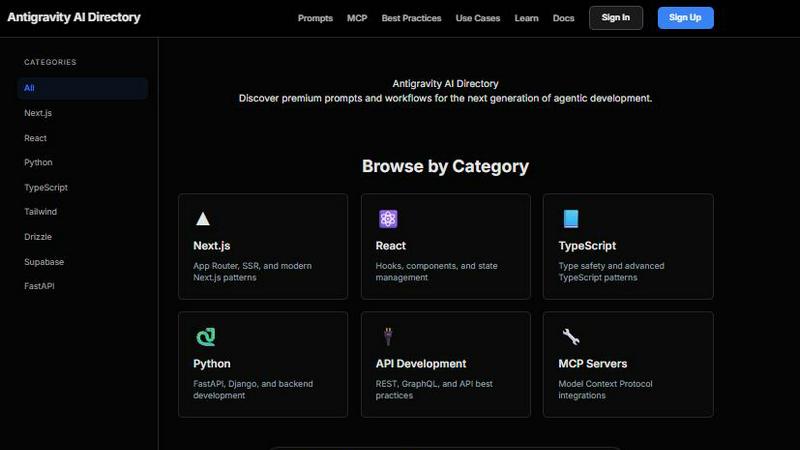
Unlock powerful AI workflows and prompts for developers with Antigravity AI Directory, enhancing your Next.js, React.
Last updated: March 1, 2026

Blueberry
Blueberry unifies your editor, terminal, and browser in one workspace to streamline web app development with AI.
Last updated: February 27, 2026
Visual Comparison
Antigravity AI Directory
Blueberry

Feature Comparison
Antigravity AI Directory
Comprehensive Prompt Library
The Antigravity AI Directory offers a vast library of over 125 prompts that guide developers through common challenges and best practices in AI development. These prompts are designed to inspire creativity and help users implement effective solutions quickly.
Extensive MCP Server Network
With more than 430 MCP servers available, the directory facilitates seamless integration with various platforms including Supabase, GitHub, and AWS. This extensive network allows developers to scale their applications efficiently while maintaining optimal performance.
Framework-Specific Integrations
The platform features integrations tailored for major frameworks like Next.js, React, and Python. This specificity ensures that developers can find the right tools and resources that align with their project needs, significantly reducing development time.
Community-Driven Contributions
The Antigravity AI Directory thrives on community engagement, with regularly updated prompts and resources contributed by users. This dynamic ecosystem fosters innovation and allows developers to share insights, challenges, and solutions, enhancing the overall user experience.
Blueberry
Integrated Workspace
Blueberry offers a unified workspace that combines a terminal, code editor, and browser preview seamlessly. This integration allows developers to work without the distraction of switching between multiple applications, enhancing focus and productivity.
Live Contextual AI
With Blueberry's MCP server, developers can run various AI models in the terminal with full access to their project files, browser previews, and terminal outputs. This constant context ensures that AI assistance is relevant and informed, reducing the need for repetitive explanations and context setup.
Pinned Apps
The platform allows users to dock essential applications like GitHub, Linear, Figma, and PostHog within their workspace. These pinned apps maintain live context with the projects, facilitating real-time collaboration and feedback without leaving the Blueberry environment.
Visual Context Tools
Blueberry includes features for capturing screenshots and selecting elements directly from the preview browser. This capability provides visual context to AI models, enabling them to understand and assist with design elements and layout decisions effectively.
Use Cases
Antigravity AI Directory
Accelerated Project Development
Developers can utilize the Antigravity AI Directory to access pre-defined prompts and MCP servers, leading to faster project turnaround times. By streamlining the coding process, teams can focus on creative aspects rather than getting bogged down by routine tasks.
Enhanced Collaboration
Teams can leverage the directory's resources to improve collaboration among members. With a shared library of tools and prompts, team members can easily align their efforts, share best practices, and tackle development challenges collectively.
Cutting-Edge AI Implementation
The directory enables developers to implement the latest AI technologies in their applications. By providing access to current tools and best practices, users can stay ahead of the curve in AI development, ensuring their applications are both innovative and competitive.
Efficient Learning and Skill Development
New developers can use the Antigravity AI Directory as a learning platform to gain insights into AI-driven development. The organized resources and community support make it an ideal starting point for those looking to enhance their skills and knowledge in this rapidly evolving field.
Blueberry
Streamlined Web App Development
Developers can utilize Blueberry to create and ship web applications with ease, as the integrated tools provide everything needed in one place. This reduces the friction often encountered when using separate tools for coding, testing, and deployment.
Enhanced Collaboration
Teams can leverage Blueberry’s pinned apps and live context features to collaborate more effectively. Designers and developers can work side by side, sharing insights and feedback instantly within the same workspace, ultimately speeding up the development cycle.
AI-Powered Code Assistance
With the ability to connect multiple AI models, developers can receive real-time code suggestions and error fixes directly in the terminal or editor. This feature helps in improving code quality while saving time on debugging and rewriting.
Responsive Design Testing
Blueberry’s built-in preview options allow developers to test their applications across different devices without leaving the platform. This ensures that the end product is optimized for various screen sizes and improves user experience.
Overview
About Antigravity AI Directory
Antigravity AI Directory is a groundbreaking platform tailored for software engineers and creators who aim to leverage AI agents in their development processes. The directory stands out with over 125 meticulously curated prompts and more than 430 Machine Code Processing (MCP) servers, making it the top resource for developers using the Google Antigravity IDE. This centralized hub empowers users to discover a diverse range of tools and integrations specifically designed for popular frameworks such as Next.js, React, and Python. By harnessing the capabilities of AI, developers can significantly boost their productivity, enabling them to deploy projects more swiftly, code more intelligently, and build superior applications. The Antigravity AI Directory is particularly advantageous for teams seeking to integrate AI into their workflows while remaining informed about the latest tools and industry best practices. The platform not only enhances individual productivity but also fosters collaboration, making it an essential resource for modern software development.
About Blueberry
Blueberry is an innovative macOS application designed specifically for modern product builders who seek to streamline their development process. By consolidating the essential tools required for web app development—editor, terminal, and browser—into a single focused workspace, Blueberry eliminates the inefficiencies of juggling multiple windows. This AI-native platform allows developers to connect various AI models, including Claude, Gemini, and Codex, through its built-in MCP server, ensuring they have live context from their code, terminal output, and browser at all times. This seamless integration enhances productivity, reduces context-switching, and empowers developers to build and ship delightful user experiences without the hassle of traditional development environments. With Blueberry, the development process becomes more intuitive and collaborative, making it an indispensable tool for anyone involved in building software products.
Frequently Asked Questions
Antigravity AI Directory FAQ
What types of developers can benefit from Antigravity AI Directory?
The directory is designed for software engineers, AI developers, and creators who are looking to streamline their development processes. It caters to both beginners and experienced professionals working with AI technologies.
How does the Antigravity AI Directory support project management?
The directory enhances project management by providing a centralized hub of resources, including prompts and MCP servers that help teams organize their workflows, track progress, and implement best practices efficiently.
Are there resources available for learning how to use the Antigravity AI Directory?
Yes, the directory includes a variety of learning materials and documentation that guide users on how to effectively utilize its features, making it easier for developers to get started and maximize their productivity.
Can the Antigravity AI Directory be used for collaborative projects?
Absolutely! The platform is designed to foster collaboration among teams, offering shared resources and community-contributed prompts, which can be beneficial for group projects and collective learning.
Blueberry FAQ
What is Blueberry and who is it for?
Blueberry is a macOS application designed for product builders, particularly web developers. It integrates essential development tools into a single workspace, making it easier to manage projects and collaborate efficiently.
How does Blueberry enhance productivity?
By consolidating the editor, terminal, and browser into one workspace, Blueberry minimizes context-switching and distractions. Developers can focus on coding, testing, and deploying without juggling multiple applications.
Can I use AI models with Blueberry?
Yes, Blueberry allows you to connect various AI models like Claude, Gemini, and Codex through its built-in MCP server. This enables real-time context sharing and enhances the assistance provided by the AI.
Is Blueberry free during its beta phase?
Yes, Blueberry is currently available for free during its beta phase, allowing users to explore its features and provide feedback to help shape the final product.
Alternatives
Antigravity AI Directory Alternatives
Antigravity AI Directory is an innovative platform in the development category, specifically designed to assist software engineers and creators by offering curated AI rules and workflows. It enables developers to explore a wide range of tools and integrations, particularly for frameworks like Next.js, React, and Python. As technology constantly evolves, users often seek alternatives to Antigravity AI Directory for various reasons, including pricing considerations, feature sets, and compatibility with specific platforms or project needs. When selecting an alternative, it is essential to evaluate factors such as the breadth of the prompt library, the quality of server integrations, collaborative features, and overall user experience. A suitable alternative should address the unique challenges developers face, providing robust solutions that enhance productivity and streamline workflows.
Blueberry Alternatives
Blueberry is a Mac application that integrates your editor, terminal, and browser into a single workspace, streamlining the development process. Users often seek alternatives due to various reasons such as pricing, feature limitations, or the need for compatibility with different platforms. When searching for an alternative, it’s essential to consider factors like user interface, the ability to support multiple coding models, performance efficiency, and how well it fits your specific workflow. Additionally, understanding the requirements of your development projects can help you identify alternatives that offer unique functionalities or enhancements that Blueberry may lack. Evaluating user reviews and trial versions can provide insights into how well an alternative may meet your needs and improve your productivity.