Avina vs Playwriter
Side-by-side comparison to help you choose the right tool.

Avina
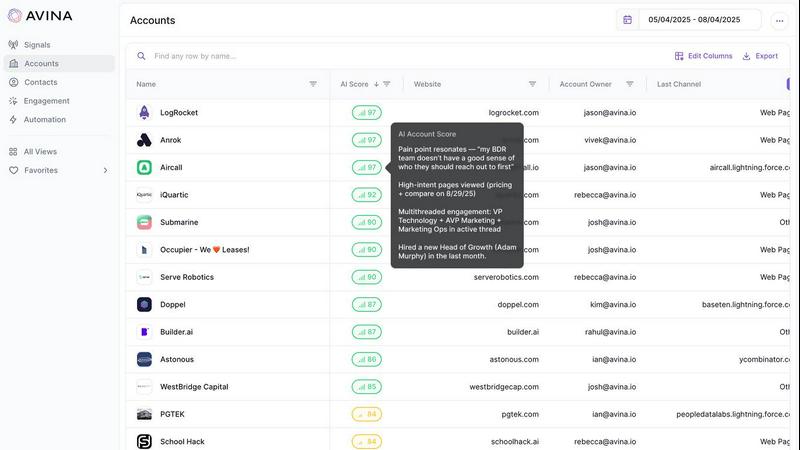
Avina uses AI to find and automate outreach to your hottest, ready-to-buy prospects.
Last updated: February 28, 2026

Playwriter
Playwriter lets AI agents control your real Chrome browser with all your logins and extensions intact.
Last updated: March 18, 2026
Visual Comparison
Avina
Playwriter

Feature Comparison
Avina
AI Signals Agent
This core feature allows you to describe complex buying behaviors in plain language, and Avina's AI builds a custom signal to track it. Unlike rigid platforms, it reads context to catch subtle buying moments—such as feature launches, tech stack changes, or strategic pivots—tailored specifically to how your ideal customers behave. This continuous scanning across first-party, third-party, and web data surfaces intent far beyond what fixed-signal tools can offer.
Web Visitor Identification (X-Ray Pixel)
Over 98% of website traffic typically leaves anonymously. Avina's X-Ray Pixel solves this by combining multiple data providers into a single solution to automatically identify anonymous visitors, enrich them with key contact and firmographic data, and route high-intent prospects to sales in real time. This turns invisible browsing activity into a prime source of warm, actionable leads.
AI-Powered Account Scoring & Prioritization
Raw signals are noisy. Avina uses AI to analyze signal strength, company fit, and historical engagement, scoring and ranking every account in real time. This ensures your sales reps have a dynamically updated, prioritized pipeline, so they always know exactly which accounts to focus on for maximum impact, eliminating manual guesswork and prioritization.
Automated Workflow Triggers
Upon detecting a high-intent signal, Avina doesn't just alert you—it acts. The platform can automatically trigger the next best action, such as enrolling a prospect into a personalized email sequence, updating CRM records, or notifying a rep via Slack. This automation ensures immediate engagement while the prospect's intent is hottest, with no manual handoffs or delays.
Playwriter
Your Actual Browser Session
Playwriter's cornerstone feature is its ability to let AI agents control your real, logged-in Chrome browser. Instead of launching a fresh, suspicious-looking headless instance, the agent operates directly in your existing window. All your cookies, active sessions on sites like Gmail or GitHub, and essential extensions (like password managers or ad blockers) are present and functional. This eliminates bot detection triggers that stem from "clean" browser fingerprints and removes the massive overhead of manually scripting login sequences for every automated task.
Full Playwright API via a Single Tool
Unlike other solutions that expose a limited, pre-defined set of tools (like "click" or "type"), Playwriter grants agents the full power of the Playwright automation library through one versatile execute command. The agent can write and run any Playwright code, enabling complex operations like performance profiling, setting JavaScript breakpoints, intercepting and modifying network requests, or taking efficient accessibility snapshots. This "one tool to rule them all" approach avoids the context window bloat of dozens of individual tool definitions and provides maximum flexibility.
Real-Time Human-in-the-Loop Collaboration
This feature transforms automation from a fire-and-forget script into an interactive partnership. You watch the agent perform actions live in your browser tab. If it encounters a captcha, a two-factor authentication prompt, or a quirky website dialog, you can simply solve it yourself. If the agent gets lost, you can temporarily disable control on that tab, manually navigate to the correct state, and re-enable the agent to continue. This collaborative debug loop makes complex, real-world automation feasible and reliable.
Advanced Debugging & Inspection Suite
Playwriter is built for development, not just execution. It includes a powerful suite of debugging tools: live code editing, breakpoints to pause execution, network request interception to mock APIs or analyze traffic, and built-in screen recording. Crucially, it uses compact accessibility snapshots (5-20KB) instead of bulky full-page screenshots, providing AI agents with a lightweight, semantic understanding of the page structure for reliable element selection and action planning.
Use Cases
Avina
Accelerating Pipeline Generation for Sales Teams
Sales development representatives (SDRs) often struggle with low-quality lead lists. Avina directly fuels their pipeline by delivering a live feed of scored, in-market accounts showing clear buying signals. Reps can stop cold outreach and instead engage with warm prospects who have recently visited pricing pages, interacted with ads, or shown hiring surges, dramatically increasing connection and conversion rates.
Maximizing Marketing ROI with Intent-Based Segmentation
Marketing teams can move beyond broad campaigns by using Avina to segment audiences based on real-time buying signals. They can create hyper-targeted campaigns for accounts showing intent for a specific product feature or trigger personalized nurture streams the moment an anonymous visitor from a target account is identified, ensuring marketing efforts are precisely timed and relevant.
Enhancing Account-Based Marketing (ABM) Execution
For teams running ABM programs, Avina provides continuous, multi-source monitoring of target accounts. It unifies signals from website visits, news, job changes, and social engagement into a single view. This allows marketers and sales to coordinate personalized, timely outreach based on specific trigger events, increasing engagement within their most valuable accounts.
Streamlining Revenue Operations and Lead Routing
Revenue operations professionals are tasked with efficient process management. Avina automates lead scoring and routing based on AI-driven intent and ICP fit. High-scoring leads can be automatically assigned to the correct sales rep or team via CRM, Slack, or email, ensuring optimal distribution and faster response times while filtering out unqualified noise.
Playwriter
Automated Data Aggregation & Research
For professionals who need to compile reports from multiple web sources, Playwriter is ideal. An AI agent can be instructed to log into your premium news portal, search for specific terms, navigate through paginated results, extract key information, and format it into a document—all while maintaining your subscription login state and bypassing paywalls that would block a fresh browser session.
Streamlined QA and Testing Workflows
Developers and QA engineers can use Playwriter to create and run complex, stateful test scenarios directly in a production-like browser environment. The agent can test multi-step user journeys that depend on being logged in, such as adding items to a cart, applying user-specific coupons, and proceeding to checkout, with the human tester observing and intervening only for non-automatable steps.
AI-Assisted Daily Administrative Tasks
Automate repetitive daily web tasks without security compromises. Instruct your AI to log into your company's HR portal and submit a timesheet, check specific metrics on a logged-in analytics dashboard, or moderate comments on a CMS where you are already authenticated. Since it uses your session, there's no need to share sensitive credentials with a third-party automation service.
Interactive Web Scraping and Monitoring
For projects that require scraping data from websites with complex authentication or anti-bot measures, Playwriter provides a robust solution. The AI can navigate these sites using your legitimate session, handle JavaScript-rendered content with ease using Playwright's full API, and set up monitoring scripts that alert you when specific page content changes, all while you maintain oversight.
Overview
About Avina
Avina is an AI-powered Go-To-Market (GTM) platform engineered to solve the fundamental challenge for modern revenue teams: identifying and acting on genuine buying intent before the competition does. In a landscape where sales teams waste countless hours chasing cold leads and manually sifting through data noise, Avina provides the solution by automating the detection, prioritization, and engagement of high-intent prospects. It is specifically designed for B2B sales, marketing, and revenue operations teams who need to move faster and smarter.
The platform unifies intent signals from a vast array of sources—including first-party data like website visits and CRM activity, third-party data like firmographics, and web signals from news, job changes, and social engagement. What sets Avina apart is its use of advanced AI agents and large language models (LLMs) that don't just track keywords but understand the context behind every interaction. This allows it to score and rank accounts with human-like judgment, delivering a live, prioritized list of warm opportunities directly to tools like Salesforce, Slack, or HubSpot. By transforming scattered signals into actionable insights and automated workflows, Avina ensures your team engages the right persona, with the right message, at the right time to win more business.
About Playwriter
Playwriter is a revolutionary open-source tool that solves the fundamental problem of web browsing for AI agents. Traditional methods force agents to work in isolated, "clean" browser environments devoid of personal data, leading to instant bot detection, broken workflows, and repetitive manual logins. Playwriter flips this model entirely. It gives AI agents direct, programmable access to your actual Chrome browser session through a simple extension and CLI. This means your agents can operate in a browser that already has all your cookies, active logins, installed extensions, and user-specific settings. The core value proposition is seamless human-AI collaboration: the AI handles the tedious, repetitive automation tasks, while you remain in control, able to oversee actions in real-time and intervene instantly for captchas, consent dialogs, or unexpected issues. Built on the robust Playwright API and adhering to the Model Context Protocol (MCP), it integrates with popular clients like Cursor, Claude Desktop, and VS Code, offering a powerful, low-context automation platform that works within your existing digital environment without spawning extra processes or consuming significant additional memory.
Frequently Asked Questions
Avina FAQ
What types of buying signals does Avina track?
Avina tracks a comprehensive range of buying signals across first-party, third-party, and web sources. This includes website visitor activity, CRM engagement (email/calls), ad interactions, intent data from the web, job postings and hiring surges, news mentions, SEC filings, and social media engagement. The AI Signals Agent can also create custom signals based on unique buyer behaviors you describe.
How does Avina's AI scoring work compared to traditional lead scoring?
Traditional lead scoring often relies on static, rule-based models (e.g., 10 points for a website visit). Avina's AI scoring uses large language models (LLMs) to understand the context and strength of interactions, similar to human judgment. It evaluates the combination, recency, and relevance of signals alongside company fit (ICP) to generate a dynamic, real-time priority score that adapts as new information comes in.
How quickly can we start seeing results after implementing Avina?
Avina is designed for rapid time-to-value. The platform includes out-of-the-box signals for common intent types (website visits, job changes, etc.) that start working immediately upon connecting your data sources (e.g., website pixel, CRM). You can begin capturing and routing identified intent signals within days, not months.
What integrations does Avina support?
Avina seamlessly integrates with the core tools modern revenue teams use. This includes major CRMs like Salesforce and HubSpot, communication platforms like Slack and Microsoft Teams, and enrichment/data providers. These integrations enable real-time signal delivery and automated workflow execution within your existing tech stack.
Playwriter FAQ
How does Playwriter handle security and privacy?
Playwriter is designed with a local-first architecture. The Chrome extension connects only to a WebSocket relay running on your own machine (localhost). No browser data, cookies, or session information is sent to any remote server. All automation commands and responses stay on your computer. You have complete visibility and control, as you watch every action the AI performs in real time in your browser window.
Can I use Playwriter with multiple browser tabs or agents?
Yes, the local relay multiplexes sessions. You can attach the Playwriter extension to multiple tabs in your browser (each tab turns green when attached). Multiple AI agents or CLI instances can then control different tabs simultaneously, or collaborate on the same tab, enabling complex multi-agent workflows or parallel task execution.
What happens if the AI gets stuck or makes a mistake?
This is where the human-in-the-loop model shines. You are watching the browser. If the agent clicks the wrong element or gets stuck in a loop, you can immediately click the extension icon to detach control (turning it gray), manually fix the issue, and then re-attach the agent. The agent continues from the new browser state, making debugging and recovery incredibly fast.
Is Playwriter free to use?
Yes. Playwriter is completely open-source software released under the permissive MIT license. You can download, use, modify, and distribute it for free, both personally and commercially. There are no subscription fees, tiered plans, or usage limits. The project is supported by its community and contributions on GitHub.
Alternatives
Avina Alternatives
Avina is an AI-powered sales intelligence platform that helps revenue teams identify and prioritize high-intent prospects. It falls into the category of sales acceleration and account prioritization software, unifying data from multiple sources to highlight which accounts are actively in-market. Users often explore alternatives for several common reasons. These can include budget constraints, a need for different feature sets, or specific integration requirements with their existing tech stack. Some teams may also seek a solution with a different user experience or a more specialized focus for their industry or sales motion. When evaluating other options, it's crucial to consider a few key factors. Look for a platform's ability to aggregate and analyze intent data from diverse sources, the sophistication of its AI for scoring and prioritization, and the depth of its workflow automation. The quality of integrations and the overall ease of use for your sales team are also vital to ensure adoption and a strong return on investment.
Playwriter Alternatives
Playwriter is an open-source automation tool that gives AI agents direct, authenticated control of your Chrome browser. It solves the core problem of agents working in isolated, "fresh" browser sessions that lack logins, extensions, and context, making real web interaction impossible. This places it in the browser automation and AI agent tooling category. Users explore alternatives for various reasons. Some may need features tailored to different platforms or browsers, require a specific pricing model like a managed cloud service, or seek a different technical approach, such as a standalone application versus a Chrome extension. Others might prioritize different aspects of the developer experience or integration capabilities. When evaluating options, consider the core value: does the tool provide authenticated, stateful browser access to AI? Key factors include whether it works with your existing logged-in sessions and extensions, its approach to providing browser context to the AI (like lightweight snapshots versus heavy screenshots), the depth of its debugging and control features, and its compatibility with your preferred AI client or framework via standards like MCP.