Disavow.ai vs documentorium
Side-by-side comparison to help you choose the right tool.

Disavow.ai
Disavow.ai automates toxic backlink detection and disavowal, protecting your rankings while streamlining SEO management effortlessly.
Last updated: April 4, 2026

documentorium
Stop wasting time formatting documents and create professional contractor PDFs in seconds with guided, trade-specific forms.
Last updated: March 26, 2026
Visual Comparison
Disavow.ai
documentorium

Feature Comparison
Disavow.ai
Automated Backlink Monitoring
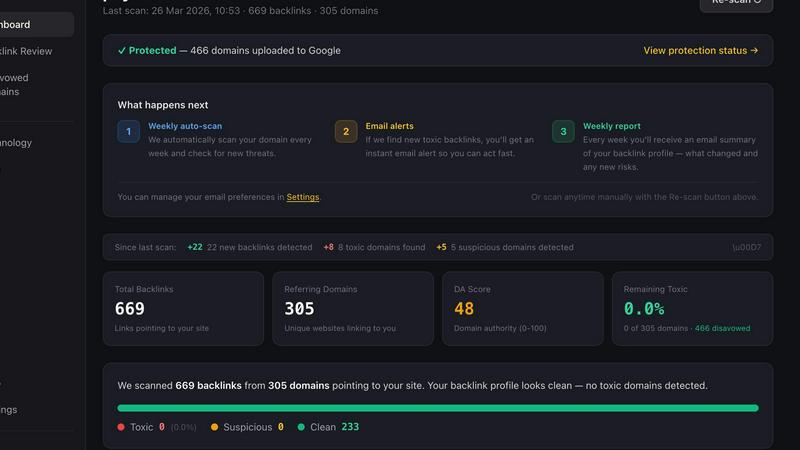
Disavow.ai offers automated backlink monitoring to continuously track your backlink profile. This feature includes spam detection, anchor text analysis, and notifications when new toxic links appear, ensuring you stay informed about your website's health.
Smart Risk Engine
The Smart Risk Engine is a unique four-layer analysis system that evaluates every backlink, providing a detailed classification. This feature minimizes false positives and ensures that no legitimate links are accidentally disavowed, giving users confidence in their decisions.
DA Score
Disavow.ai utilizes a proprietary Domain Authority (DA) Score, ranging from 0 to 100, to assess the quality of linking domains. This score helps users identify trustworthy websites and potential threats, allowing for better-informed disavowal strategies.
One-Click Disavow
With Disavow.ai, generating Google-ready disavow files is as simple as a single click. This feature streamlines the process of disavowing harmful backlinks, making it easy for users to maintain a clean backlink profile without technical complications.
documentorium
Trade-Specific Guided Templates
documentorium moves far beyond generic blanks. It offers a catalog of over 200 templates built for 26 different trades, including electrical, plumbing, HVAC, roofing, and solar. Each form, whether for a quote, service report, or warranty, contains fields and terminology specific to your profession. This means no more adapting irrelevant forms; you fill in details that actually matter for your job, ensuring accuracy and saving significant time from the very first use.
Instant, Professional PDF Generation
Once you complete the guided form, documentorium does all the heavy lifting. With a single click, it instantly generates a clean, well-formatted, and print-ready PDF document. This feature completely eliminates the tedious manual work of designing, aligning, and formatting documents in word processors. You get a polished final product in seconds, ready to email to a client or print for the job site, projecting a consistently professional image for your business.
Complete Document History & Prefill
Every document you create is automatically saved in your personal history within the platform. This serves as a full archive of your past work and client interactions. More importantly, it allows you to quickly prefill information for repeat clients or similar jobs. This powerful feature streamlines creating follow-up invoices, change orders, or service reports, turning what was a repetitive task into a matter of a few clicks.
Simple, All-Access Annual Pricing
documentorium believes in straightforward value. There are no confusing tiers or per-document fees. For one simple annual subscription, you get full, unrestricted access to the entire library of templates and all platform features. This predictable pricing model makes it easy to budget for and provides complete peace of mind, knowing you can create any document your business needs without ever hitting a paywall or limitation.
Use Cases
Disavow.ai
SEO Management
SEO professionals can leverage Disavow.ai to manage their clients' backlink profiles efficiently. By identifying and disavowing toxic links, they can protect their clients' search rankings and enhance their online visibility.
Website Recovery
If a website has experienced a Google penalty due to toxic backlinks, Disavow.ai can assist in the recovery process. By identifying harmful links and generating a disavow file, users can work toward regaining lost rankings and restoring their online reputation.
Competitor Analysis
Digital marketers can use Disavow.ai to analyze the backlink profiles of competitors. By understanding which backlinks may be harming their competitors, they can formulate strategies to outperform them in search rankings.
Ongoing Backlink Monitoring
Businesses that rely on their online presence can use Disavow.ai for continuous monitoring of their backlink profiles. This proactive approach helps them stay ahead of potential issues and maintain a healthy backlink profile over time.
documentorium
Creating a Detailed Service Proposal
A solar installer needs to present a comprehensive and persuasive proposal to a homeowner. Using documentorium, they select a solar-specific proposal template. The guided form prompts them for system specs, panel efficiency ratings, financing options, and projected energy savings—all relevant fields. Within minutes, they generate a professional PDF that clearly outlines the project's value, helping to win the job with confidence.
Issuing a Fast, Accurate Invoice
An HVAC technician completes a repair and needs to bill the client before leaving. On their mobile device, they open documentorium, choose an invoice template for HVAC service, and fill in the parts used (model numbers, costs), labor hours, and the service performed. The system calculates the total, and they instantly generate a clean invoice PDF to email or print on the spot, ensuring prompt payment.
Managing a Project with Change Orders
A general contractor encounters an unforeseen issue during a renovation that requires additional materials and labor. They use documentorium to create a formal change order. The template guides them to detail the original scope, the newly discovered requirement, the adjusted costs, and the client approval section. This creates a clear, professional record that protects both parties and keeps the project moving smoothly.
Documenting Work for Compliance and Warranty
An electrician finishes a major panel upgrade that requires inspection documentation and a warranty for the homeowner. They use documentorium to fill out a detailed inspection report template, listing all circuits, amperages, and safety checks performed. They then generate a separate warranty document specific to electrical work. This provides the client with vital records and demonstrates thorough, professional service.
Overview
About Disavow.ai
Disavow.ai is a powerful tool specifically designed to help website owners manage and clean their backlink profiles. In the world of SEO, backlinks play a crucial role in determining a website's authority and ranking on search engines. However, not all backlinks are beneficial. Many websites inadvertently accumulate backlinks from spam networks, link farms, and scraper sites that can harm their online reputation and lead to penalties from Google. Disavow.ai addresses this issue with its advanced Smart Risk Engine, which meticulously scans each backlink and classifies linking domains as clean, suspicious, or toxic. By generating disavow files in a format compatible with Google, Disavow.ai allows users to take swift action against harmful links, safeguarding their search rankings. This tool is ideal for SEO professionals, digital marketers, and business owners who want to maintain their online presence without the hassle of navigating complex SEO jargon or risking their website's credibility.
About documentorium
For electricians, plumbers, contractors, and all skilled tradespeople, the paperwork is a constant battle. You excel at your craft, but creating professional quotes, invoices, and reports often means wrestling with generic templates or starting from a frustrating blank page. This administrative drain steals time from the job site and can make your business look less polished than your work actually is. documentorium is built to solve this exact problem. It is a no-nonsense document engine designed specifically for service professionals. Instead of generic forms, it offers over 200 guided templates across 26 trade categories, with fields built for your specific trade. The process is simple: fill out a straightforward, guided form and get a clean, print-ready PDF in seconds. It eliminates guesswork, saves hours of formatting, and ensures every document you send to a client reflects the professionalism of your hands-on work. From a quick invoice to a detailed project proposal, documentorium handles the paperwork so you can focus on the project.
Frequently Asked Questions
Disavow.ai FAQ
What is a disavow file?
A disavow file is a text file that informs Google which backlinks you want them to ignore when evaluating your website. It is used to prevent harmful links from negatively impacting your site's search rankings.
How often should I audit my backlinks?
It is advisable to audit your backlinks regularly, ideally at least once every few months or after significant changes to your website. This helps ensure that harmful links are identified and disavowed promptly.
Will disavowing links hurt my rankings?
Disavowing links should not hurt your rankings as long as you only disavow toxic or low-quality links. In fact, it can help improve your rankings by cleaning up your backlink profile and making it more trustworthy.
What happens if I disavow a good link by mistake?
If you accidentally disavow a good link, it may take time for your rankings to recover. However, you can always remove the disavowal and request Google to consider the link again, which may help restore your site's standing.
documentorium FAQ
Can I cancel my subscription anytime?
Yes, you can cancel your subscription at any time directly from your account settings. Your access to documentorium will remain active until the end of your current billing period. There are no penalties or lock-in contracts, providing you with complete flexibility.
What happens to my documents when the free trial ends?
Your existing documents are never deleted. You retain access to view and download all documents you created during your trial. To create or edit new documents after the trial period, you will need to activate a paid subscription. The trial is a full-featured test of the platform with no data loss.
Do I lose my documents if I don't subscribe after the trial?
No, you do not lose your documents. All documents you create remain securely stored in your account history. You can log in and view or download them at any time. A subscription is required to create and edit new documents, but your past work is always accessible.
Does documentorium provide legal advice for contracts?
No. documentorium provides professional document tools and templates for generation, but it does not constitute legal advice. The templates are designed for common trade scenarios, but for complex legal matters or contracts, it is always recommended to consult with a qualified legal professional to ensure your specific needs are met.
Alternatives
Disavow.ai Alternatives
Disavow.ai is a user-friendly tool designed for website owners and SEO professionals to identify and disavow toxic backlinks that may harm their search engine rankings. It employs a sophisticated Smart Risk Engine to analyze backlink profiles and classify linking domains, making it easier for users to understand which links are detrimental to their website's health. As an affordable solution, it offers features that cater to a range of users, from beginners to experienced SEO practitioners. Users often seek alternatives to Disavow.ai for various reasons, including pricing, specific feature sets, or compatibility with their existing platforms. When looking for an alternative, it's essential to consider factors such as the ease of use, the depth of analysis provided, the ability to generate necessary disavow files, and the overall cost-effectiveness of the solution. Prioritizing these aspects can help you find a tool that meets your specific needs while effectively managing toxic backlinks.
documentorium Alternatives
documentorium is a specialized productivity and management tool designed for tradespeople. It provides a library of over 200 trade-specific templates to quickly generate professional documents like quotes, invoices, and work orders, eliminating the need to start from scratch. Users often explore alternatives for various reasons. Some may need a different pricing model, require more advanced features like inventory tracking or client portals, or prefer a solution that integrates with other business software they already use. The specific needs of a growing business can evolve beyond a core document-creation tool. When evaluating other options, key considerations include the depth of trade-specific content, the quality and customization of the final PDF outputs, ease of use on mobile devices in the field, and overall value for money. The right tool should save time on paperwork while maintaining a professional brand image.