Changeflow vs Phishly
Side-by-side comparison to help you choose the right tool.

Changeflow
Changeflow delivers AI-driven updates on critical web changes, ensuring you stay informed without the noise.
Last updated: March 4, 2026

Phishly
Phishly uses AI to instantly detect phishing emails, providing seamless security insights through a Chrome extension ...
Visual Comparison
Changeflow

Phishly
Feature Comparison
Changeflow
AI-Powered Intelligence
Changeflow's AI-driven technology filters out irrelevant changes, ensuring users receive only the updates that matter to them. This minimizes distractions from false positives and helps users stay focused on critical information.
Natural Language Setup
Users can easily set up monitoring without technical jargon or complex configurations. By simply describing what they want to track in plain English, Changeflow handles the backend processes, making it accessible for everyone.
Customized Summaries
Changeflow delivers AI-generated summaries that highlight what changed and why it is significant. This feature saves users from sifting through lengthy pages, providing concise insights that enhance decision-making.
Advanced Anti-Blocking Technology
Changeflow employs sophisticated anti-blocking mechanisms that ensure reliable monitoring, even on challenging sites. This feature significantly reduces the chances of being blocked while accessing important web pages.
Phishly
Instant Email Scanning
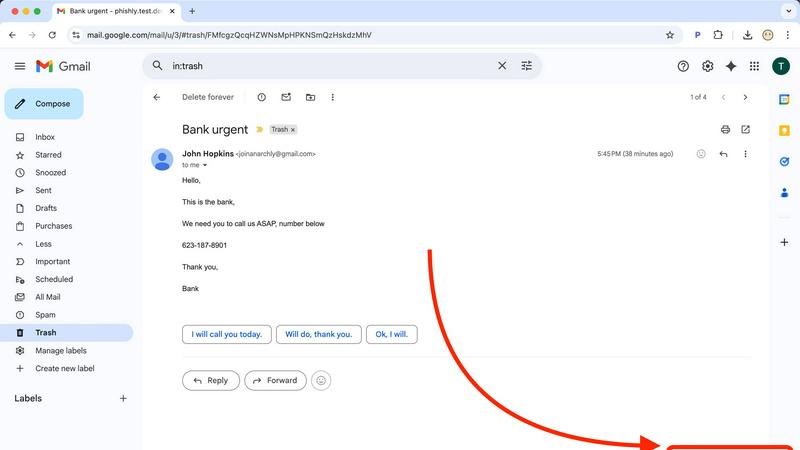
Phishly allows users to quickly scan any email in their Gmail account with just a click. By selecting "Scan with Phishly," users receive immediate feedback on the email's legitimacy, facilitating rapid decision-making in potentially risky situations.
Comprehensive Risk Assessment
The platform categorizes emails into three risk levels: Safe, Medium Risk, and High Risk. Each classification is accompanied by detailed explanations, helping users understand the specific phishing indicators that triggered the assessment.
User Privacy Protection
Phishly prioritizes user privacy by only analyzing emails that users explicitly opt to scan. This means that no unsolicited data is collected or processed, allowing users to feel secure about their personal information.
Easy-to-Use Interface
With a user-friendly design, Phishly requires no technical knowledge, making it accessible for everyone. Users can easily navigate the platform, scan emails, and interpret results without needing extensive training or experience.
Use Cases
Changeflow
Competitor Pricing Monitoring
Businesses can utilize Changeflow to keep a close eye on competitor pricing strategies. By monitoring specific pages, companies can adjust their pricing and marketing tactics in real time, ensuring they remain competitive.
Regulatory Change Tracking
Compliance teams can use Changeflow to stay updated on regulatory changes by monitoring relevant government and industry websites. This proactive approach helps organizations adapt swiftly to new regulations, minimizing potential compliance risks.
Legal Document Monitoring
Legal professionals, including librarians at Am Law 200 firms, can track court dockets and legal citations. Changeflow allows them to stay informed about essential updates, helping them provide timely and accurate information to their teams.
Market Movement Updates
Changeflow is ideal for financial analysts who need to monitor market movements and news mentions. With timely alerts and summaries, analysts can make informed decisions based on the latest market developments.
Phishly
Personal Email Safety
Individuals can use Phishly to protect their personal email accounts from phishing attacks. By scanning suspicious emails, users can ensure their sensitive information remains secure and avoid potential financial losses.
Small Business Security
Small business owners can integrate Phishly into their daily operations to safeguard company email communications. By scanning emails from clients and partners, they can protect against fraudulent schemes that could jeopardize their business.
Educational Institutions
Teachers and administrators can utilize Phishly to educate students about phishing threats. By demonstrating how to scan emails, they can instill safe email practices and raise awareness about online security.
Freelancers and Remote Workers
Freelancers and remote workers often deal with various clients and emails. Phishly helps them verify the legitimacy of incoming emails, ensuring they do not fall victim to scams that could disrupt their work or compromise sensitive information.
Overview
About Changeflow
Changeflow is an innovative web monitoring tool that revolutionizes how businesses track changes on websites. Designed for a diverse range of professionals, from business teams to legal librarians, Changeflow accurately identifies and summarizes critical updates on web pages. Unlike traditional monitoring tools that merely report that "something has changed," Changeflow's advanced AI scrutinizes the content, providing meaningful insights that matter most to users. Setting up Changeflow is incredibly simple: users describe their monitoring needs in plain English, specify the URLs they want to track, and the tool efficiently configures itself. With a 99.9% success rate in navigating complex websites, including those with login walls and JavaScript, Changeflow ensures that users never miss vital information, whether it's competitor pricing, regulatory changes, or market movements. By leveraging shared workspaces and API access, teams can seamlessly collaborate, while Site Version Control offers a historical archive of changes for in-depth analysis. With over 1 billion pages checked and a strong track record of saving customer time, Changeflow is the go-to solution for businesses needing reliable web monitoring.
About Phishly
Phishly is an innovative AI-powered phishing detection platform designed to safeguard users from the growing threat of phishing attacks. Available as a Chrome extension for Gmail and a user-friendly web tool, Phishly offers a simple yet effective solution for anyone concerned about email security. Users can effortlessly scan any email in their Gmail inbox by clicking "Scan with Phishly" or by pasting suspicious emails directly on the Phishly website for immediate analysis. The platform utilizes advanced artificial intelligence to identify critical phishing indicators, including suspicious domains, urgent language, spoofed sender addresses, and common social engineering tactics. Phishly is particularly tailored for individuals and small businesses who seek reliable phishing protection without the complexities often associated with enterprise-level solutions. The platform guarantees user privacy by only analyzing emails that users choose to scan, meaning no unsolicited data is collected. With no technical expertise required, Phishly provides instant risk assessments categorized as Safe, Medium Risk, or High Risk, along with detailed explanations of the findings. This empowers users to make informed decisions about email legitimacy, ensuring they remain protected against potential threats.
Frequently Asked Questions
Changeflow FAQ
How does Changeflow ensure that I only receive relevant updates?
Changeflow's AI technology intelligently analyzes web page content to filter out irrelevant changes. By understanding your specific monitoring needs, it ensures you only receive updates that matter.
Can I track multiple web pages at once?
Yes, Changeflow allows users to monitor multiple web pages simultaneously. Simply describe what you want to track, and the platform will handle the rest, making it efficient for users with diverse monitoring needs.
What happens if a website is blocked?
Changeflow employs advanced anti-blocking technology, which allows it to navigate around common barriers that may prevent access to certain websites. This ensures high reliability in monitoring even difficult sites.
Is there support available if I encounter issues?
Absolutely! Changeflow offers comprehensive support through email and chat. Their team is dedicated to providing expert assistance, ensuring that you can resolve any issues quickly and effectively.
Phishly FAQ
How does Phishly protect my privacy?
Phishly only analyzes emails that users explicitly choose to scan. This means that no unsolicited data is collected, ensuring user privacy is maintained throughout the scanning process.
Is Phishly free to use?
Yes, Phishly is free to use, making it accessible for everyone who wants to protect themselves from phishing attacks without incurring additional costs.
Do I need technical knowledge to use Phishly?
No, Phishly is designed to be user-friendly and requires no technical expertise. Anyone can easily scan emails and interpret the results without prior experience.
How quickly can I expect results from a scan?
Phishly provides instant results after scanning an email. Users receive immediate feedback on the legitimacy of the email, allowing them to act quickly if a potential threat is detected.