
Never Drop vs Refbox
Side-by-side comparison to help you choose the right tool.

Never Drop
NeverDrop instantly captures event leads and drafts personalized follow-ups to close deals faster.
Last updated: February 28, 2026

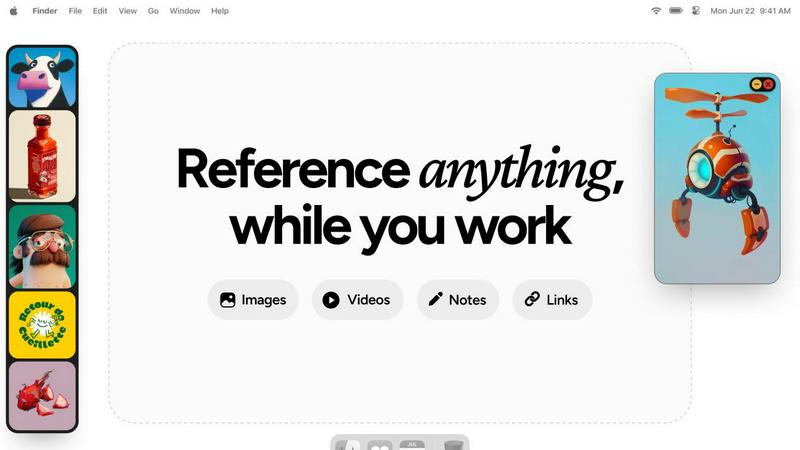
Effortlessly access all your references on your desktop, enhancing creativity and streamlining your workflow.
Last updated: February 28, 2026
Visual Comparison
Never Drop

Refbox
Feature Comparison
Never Drop
Instant AI-Powered Card Scanning
Never Drop eliminates manual data entry with its advanced AI-powered Optical Character Recognition (OCR). Simply snap a photo of any business card with your smartphone. Within seconds, the AI accurately extracts every critical detail—including name, company, title, phone number, and email—directly into a digital contact profile. This feature saves immense time, prevents errors from squinting at cards or mistyping, and ensures you never physically lose a lead again.
Smart Contact Enrichment & Email Finding
Business cards often lack direct contact information or contain generic front-desk emails. Never Drop solves this by automatically finding and appending verified work emails to the contact profile using just the extracted name and company details. This eliminates the need for tedious manual LinkedIn searches or guesswork, delivering a complete, enriched contact profile that is ready for immediate action and seamless integration into your sales pipeline.
Context-Aware AI Follow-Up Drafts
This core feature turns conversations into conversions. After scanning a card, you can add rich context by recording a quick voice note or typing key points from your discussion. Never Drop's AI then analyzes this context to generate a personalized, human-sounding follow-up email draft in under two minutes. The draft reflects the specifics of your conversation, moving far beyond generic templates to create a message that feels genuinely personal and relevant to the recipient.
Team Workspace & CRM Integration
Never Drop is built for team scalability and workflow efficiency. Organize all captured leads by event, reassign contacts between team members, and track collective activity from a unified dashboard. Furthermore, it integrates directly with popular CRMs like HubSpot, automatically pushing enriched contact data and context to keep your entire sales pipeline clean, organized, and synchronized without any manual exporting or uploading.
Refbox
Floating Reference Frames
The floating reference frames are a standout feature, allowing you to keep your inspiration visible while working on creative projects. These frames can be resized and moved freely, so you can position them strategically above any application you are using, ensuring that your references are always at hand.
Instant Media Access
Refbox provides instant access to your references without the hassle of digging through folders or switching tabs. You can gather media from the web, your computer, or directly from your clipboard into a central sidebar, making it incredibly easy to collect and view all your inspiration in one place.
Masonry Grid View
This feature allows you to view all your collected media in a visually appealing Masonry grid layout. You can drag individual items out as independent floating windows or use a full-screen gallery on a second monitor, giving you the flexibility to explore your references in a way that suits your workflow.
Efficient GIF Playback
Refbox includes frame-by-frame GIF scrubbing, which allows you to step through each frame of a GIF easily. This feature is particularly useful for animators and designers who need to analyze motion and timing in their work, reducing the need for external software.
Use Cases
Never Drop
High-Volume Trade Show Lead Capture
For sales teams attending bustling trade shows, speed and memory are critical. Never Drop allows reps to capture a lead's information and the conversation context in under a minute right at the booth. This ensures that even after dozens of interactions, each lead receives a personalized, timely follow-up based on the actual discussion, dramatically increasing the chance of converting event traffic into qualified sales opportunities.
Conference & Networking Event Follow-Up
Conferences involve back-to-back meetings and quick chats. Instead of juggling notes and cards, users can discreetly scan a card and dictate a voice memo immediately after a conversation. Never Drop's AI then crafts a perfect follow-up email that references specific talking points, helping to solidify the connection and schedule a next-step meeting before the competitor does.
Streamlining Team-Based Event Strategy
When a company sends multiple representatives to an event, lead management can become disjointed. Never Drop's team workspace allows managers to assign leads, track which contacts have been followed up with, and ensure uniform messaging. All captured data flows into the shared CRM, providing full visibility and preventing leads from being overlooked or contacted by multiple reps inconsistently.
Accelerating Sales Onboarding for New Hires
New sales representatives can struggle with the pace and process of effective lead capture at events. Never Drop serves as an invaluable training tool, providing a structured, foolproof process: scan, contextualize, and follow up. This ensures new team members contribute immediately, maintain professional communication standards, and build a strong habit of timely lead engagement from day one.
Refbox
3D Art Creation
For 3D artists, Refbox serves as a vital tool for keeping reference images and textures in view while working in software like Blender. This allows artists to maintain their creative flow without the distraction of constantly switching between applications.
UI/UX Design
UI/UX designers benefit from Refbox by pinning design inspirations, color palettes, and user interface elements directly on their desktop. This ensures that all necessary resources are readily available, making the design process smoother and more efficient.
Animation Workflow
Animators can utilize Refbox to keep reference frames and inspiration directly above their animation software. This feature allows for quick access to movement references and style guides, enhancing the accuracy and speed of the animation process.
Photography Projects
Photographers can use Refbox to organize and display mood boards, lighting references, and editing guides. By having all necessary materials accessible at a glance, photographers can focus on capturing the perfect shot without losing creative momentum.
Overview
About Never Drop
In the high-stakes world of sales, the most promising leads are often lost in the chaos of events. You return from a trade show with a stack of business cards, but the crucial context from your conversations fades by the time you sit down to follow up. The result? Generic, ineffective emails sent too late, or worse, leads that are forgotten entirely, costing your team valuable deals and revenue. Never Drop is the definitive solution to this age-old problem. It is an innovative lead-capture application engineered specifically for sales professionals who operate in fast-paced environments like conferences, trade shows, and networking events. The platform transforms the cumbersome process of lead management into a seamless, three-step workflow: scan a business card, enrich it with voice notes about your conversation, and instantly generate a personalized, AI-drafted follow-up email. By automating data entry and leveraging conversation context, Never Drop ensures no detail is lost and empowers sales teams to send relevant, timely follow-ups while the interaction is still fresh. This dramatically increases conversion rates, keeps your CRM pipeline organized, and turns every handshake into a tangible opportunity.
About Refbox
Refbox is a game-changing reference manager designed specifically for creative professionals who often find themselves juggling multiple applications and resources. In today's fast-paced digital landscape, context switching can disrupt workflow and hinder creativity. Refbox addresses this issue by providing a dynamic, floating platform that keeps all essential inspiration visible and accessible. Whether you are a 3D artist, illustrator, UI/UX designer, animator, or photographer, Refbox consolidates your references in one organized space. The app allows you to pin images, GIFs, videos, notes, and web links into resizable, always-on-top frames that float above any other application. This ensures that your references are always in your line of sight, allowing for uninterrupted creativity and seamless workflow. By transforming your desktop into an organized canvas, Refbox empowers you to focus on what truly matters—your creative work.
Frequently Asked Questions
Never Drop FAQ
How does business card scanning work with Never Drop?
You use the Never Drop mobile app to take a photo of any business card. Our advanced AI-powered OCR technology instantly analyzes the image and accurately extracts the contact's name, company, title, phone number, and email address. This data is automatically populated into a digital profile within the app, eliminating all manual typing and data entry errors.
What types of events is Never Drop designed for?
Never Drop is built for any in-person professional gathering where lead capture and quick follow-up are essential. This includes trade shows, industry conferences, networking mixers, client dinners, and team offsites. The app allows you to organize your scans by event, making it easy to track and manage leads from specific occasions.
Do I need both the mobile app and the web dashboard?
Yes, they work together seamlessly. The mobile app (for iOS and Android) is used for the core action: scanning business cards, adding voice/text context, and sending follow-up emails on the go. The web dashboard is your management hub for reviewing all captured leads, organizing your team, configuring settings (like CRM sync), and handling billing.
Is my data secure with Never Drop?
Absolutely. Never Drop is developed by SCOPEO, a French company, and prioritizes data security. All user data is hosted in the European Union in compliance with strict GDPR regulations. Data is encrypted both in transit and at rest. Business card images are processed solely for contact extraction and are not shared with or sold to any third parties.
Refbox FAQ
How does Refbox improve my productivity?
Refbox minimizes the need for constant context switching by allowing you to keep all your references visible on your desktop. This streamlined access helps maintain focus and enhances your creative output.
Can I use Refbox with multiple monitors?
Yes, Refbox is designed to work seamlessly with multiple monitors. You can use a full-screen gallery on a second monitor to view your references while keeping your primary workspace uncluttered.
Is Refbox compatible with all creative software?
Refbox is compatible with a wide range of creative software applications, including Photoshop, Blender, After Effects, Figma, and many others. It floats above any application, providing constant access to your references.
What types of media can I store in Refbox?
Refbox allows you to store a variety of media types, including images, GIFs, videos, notes, and web links. This versatility makes it an essential tool for any creative professional looking to keep their inspirations organized and accessible.
Alternatives
Never Drop Alternatives
Never Drop is a lead capture and follow-up automation tool in the productivity and management category. It helps sales professionals instantly digitize business cards and generate AI-powered follow-up emails to secure more deals from networking events. Users often explore alternatives for various reasons. These can include budget constraints, the need for different feature sets like more advanced CRM integrations or team collaboration tools, or simply a preference for a platform that aligns with a different existing software ecosystem. When evaluating other options, key considerations should be core functionality like card scanning accuracy, the quality and customizability of automated follow-ups, and seamless integration with your current sales stack. The goal is to find a solution that effectively bridges the gap between capturing a lead and initiating a meaningful sales conversation.
Refbox Alternatives
Refbox is a powerful reference management tool designed to enhance the productivity of creative professionals by keeping essential resources visible and accessible above any application. This innovative app addresses the common issue of context switching, allowing users to maintain focus and streamline their creative workflow. By pinning images, videos, and notes in always-on-top windows, Refbox transforms your workspace into an organized hub of inspiration. Users often seek alternatives to Refbox for a variety of reasons, including pricing, specific feature sets, or compatibility with different platforms. When exploring options, it’s crucial to consider factors such as ease of use, the ability to manage various types of media, and the flexibility to customize the workspace to suit individual needs. Finding a tool that aligns with your creative process can significantly enhance efficiency and focus, making it easier to bring your ideas to life.