
Refbox
Effortlessly access all your references on your desktop, enhancing creativity and streamlining your workflow.
Visit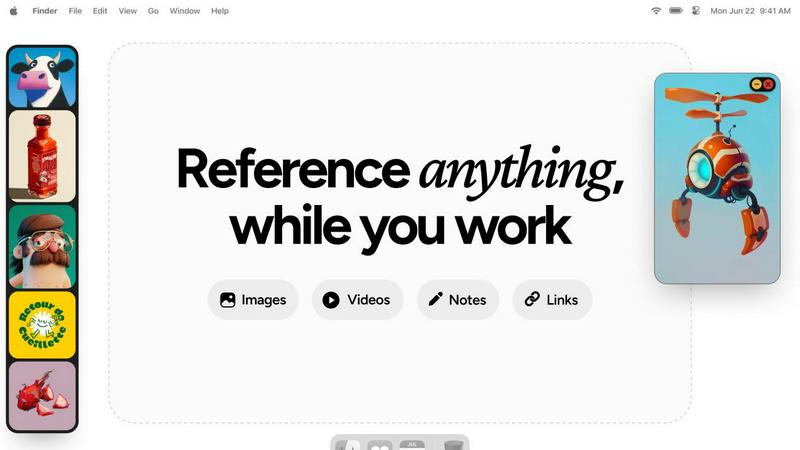
About Refbox
Refbox is a game-changing reference manager designed specifically for creative professionals who often find themselves juggling multiple applications and resources. In today's fast-paced digital landscape, context switching can disrupt workflow and hinder creativity. Refbox addresses this issue by providing a dynamic, floating platform that keeps all essential inspiration visible and accessible. Whether you are a 3D artist, illustrator, UI/UX designer, animator, or photographer, Refbox consolidates your references in one organized space. The app allows you to pin images, GIFs, videos, notes, and web links into resizable, always-on-top frames that float above any other application. This ensures that your references are always in your line of sight, allowing for uninterrupted creativity and seamless workflow. By transforming your desktop into an organized canvas, Refbox empowers you to focus on what truly matters—your creative work.
Features of Refbox
Floating Reference Frames
The floating reference frames are a standout feature, allowing you to keep your inspiration visible while working on creative projects. These frames can be resized and moved freely, so you can position them strategically above any application you are using, ensuring that your references are always at hand.
Instant Media Access
Refbox provides instant access to your references without the hassle of digging through folders or switching tabs. You can gather media from the web, your computer, or directly from your clipboard into a central sidebar, making it incredibly easy to collect and view all your inspiration in one place.
Masonry Grid View
This feature allows you to view all your collected media in a visually appealing Masonry grid layout. You can drag individual items out as independent floating windows or use a full-screen gallery on a second monitor, giving you the flexibility to explore your references in a way that suits your workflow.
Efficient GIF Playback
Refbox includes frame-by-frame GIF scrubbing, which allows you to step through each frame of a GIF easily. This feature is particularly useful for animators and designers who need to analyze motion and timing in their work, reducing the need for external software.
Use Cases of Refbox
3D Art Creation
For 3D artists, Refbox serves as a vital tool for keeping reference images and textures in view while working in software like Blender. This allows artists to maintain their creative flow without the distraction of constantly switching between applications.
UI/UX Design
UI/UX designers benefit from Refbox by pinning design inspirations, color palettes, and user interface elements directly on their desktop. This ensures that all necessary resources are readily available, making the design process smoother and more efficient.
Animation Workflow
Animators can utilize Refbox to keep reference frames and inspiration directly above their animation software. This feature allows for quick access to movement references and style guides, enhancing the accuracy and speed of the animation process.
Photography Projects
Photographers can use Refbox to organize and display mood boards, lighting references, and editing guides. By having all necessary materials accessible at a glance, photographers can focus on capturing the perfect shot without losing creative momentum.
Frequently Asked Questions
How does Refbox improve my productivity?
Refbox minimizes the need for constant context switching by allowing you to keep all your references visible on your desktop. This streamlined access helps maintain focus and enhances your creative output.
Can I use Refbox with multiple monitors?
Yes, Refbox is designed to work seamlessly with multiple monitors. You can use a full-screen gallery on a second monitor to view your references while keeping your primary workspace uncluttered.
Is Refbox compatible with all creative software?
Refbox is compatible with a wide range of creative software applications, including Photoshop, Blender, After Effects, Figma, and many others. It floats above any application, providing constant access to your references.
What types of media can I store in Refbox?
Refbox allows you to store a variety of media types, including images, GIFs, videos, notes, and web links. This versatility makes it an essential tool for any creative professional looking to keep their inspirations organized and accessible.
Explore more in this category:
Similar to Refbox

@fuck.it - email with attitude
Private email. Pure. Secure. Exclusive. No ads, no tracking, no data selling. GDPR compliant, EU-hosted.
ImageGenerator
Create and edit AI images online with multiple models, text-to-image, image-to-image, background removal, and upscaling.
Novastart
Apps and files on an infinite canvas where people and AI agents work together.

Image to Layers AI
Turn any image into editable transparent PNG/PSD layers with AI

Notes Calculator
A notepad calculator that reads plain text and gives instant answers as you type, free on Mac, iOS, Windows, Linux, Android and Web.

CubexSoft EML Converter
Convert EML Files to PST, PDF, EML, MBOX, CSV, Gmail, IMAP, Thunderbird, and more.
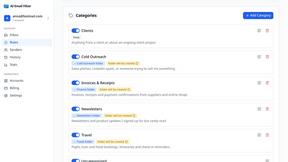
AI Email Filter
AI Email Filter sorts incoming mail into folders using plain-language prompts you write. Works with any IMAP mailbox; bring your own LLM if you want.