Refbox vs Supermachine
Side-by-side comparison to help you choose the right tool.

Effortlessly access all your references on your desktop, enhancing creativity and streamlining your workflow.
Last updated: February 28, 2026

Supermachine
Supermachine empowers creators to swiftly generate stunning, commercial-quality AI images and videos using over 60 innovative models.
Last updated: March 18, 2026
Visual Comparison
Refbox
Supermachine

Feature Comparison
Refbox
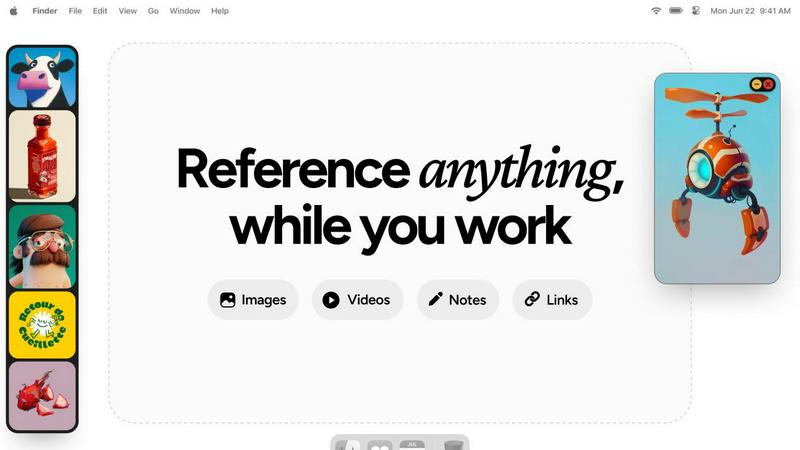
Floating Reference Frames
The floating reference frames are a standout feature, allowing you to keep your inspiration visible while working on creative projects. These frames can be resized and moved freely, so you can position them strategically above any application you are using, ensuring that your references are always at hand.
Instant Media Access
Refbox provides instant access to your references without the hassle of digging through folders or switching tabs. You can gather media from the web, your computer, or directly from your clipboard into a central sidebar, making it incredibly easy to collect and view all your inspiration in one place.
Masonry Grid View
This feature allows you to view all your collected media in a visually appealing Masonry grid layout. You can drag individual items out as independent floating windows or use a full-screen gallery on a second monitor, giving you the flexibility to explore your references in a way that suits your workflow.
Efficient GIF Playback
Refbox includes frame-by-frame GIF scrubbing, which allows you to step through each frame of a GIF easily. This feature is particularly useful for animators and designers who need to analyze motion and timing in their work, reducing the need for external software.
Supermachine
ControlNet
ControlNet provides users with enhanced capabilities to direct the AI's output, allowing for precise adjustments in image generation. This feature empowers creators to maintain control over stylistic elements and ensures that the generated content aligns closely with their vision and requirements.
Instruction Model
The Instruction Model is designed to interpret user commands effectively, making it easier for individuals to specify exactly what they want. By simplifying the interaction with AI, this feature lowers the barrier for entry, enabling even novice users to achieve remarkable results without extensive training.
API
The API feature offers seamless integration possibilities for developers and businesses looking to harness Supermachine's capabilities within their own applications. This functionality enables users to automate workflows and create custom solutions that cater to specific needs, enhancing productivity and efficiency.
Video Generation
Supermachine's video generation feature allows users to easily create short-form videos that are visually engaging and professionally polished. With just a few clicks, users can transform ideas into dynamic video content, perfect for marketing campaigns, social media posts, or personal projects.
Use Cases
Refbox
3D Art Creation
For 3D artists, Refbox serves as a vital tool for keeping reference images and textures in view while working in software like Blender. This allows artists to maintain their creative flow without the distraction of constantly switching between applications.
UI/UX Design
UI/UX designers benefit from Refbox by pinning design inspirations, color palettes, and user interface elements directly on their desktop. This ensures that all necessary resources are readily available, making the design process smoother and more efficient.
Animation Workflow
Animators can utilize Refbox to keep reference frames and inspiration directly above their animation software. This feature allows for quick access to movement references and style guides, enhancing the accuracy and speed of the animation process.
Photography Projects
Photographers can use Refbox to organize and display mood boards, lighting references, and editing guides. By having all necessary materials accessible at a glance, photographers can focus on capturing the perfect shot without losing creative momentum.
Supermachine
Social Media Management
Social media managers can leverage Supermachine to create eye-catching visuals that attract engagement and drive interaction. The platform's quick output ensures that they have a steady stream of content ready for daily posts, maintaining an active online presence.
Marketing Campaigns
Marketers can utilize Supermachine to craft compelling visual assets for their campaigns. Whether it is generating promotional graphics or designing ad visuals, the AI tools streamline the creative process, enabling marketers to focus on strategy and execution.
Digital Art Exploration
Artists looking to explore new digital mediums can benefit from Supermachine's diverse AI capabilities. The platform encourages creativity by allowing artists to experiment with various styles and techniques, pushing the boundaries of their artistic expression.
Small Business Advertising
Small business owners can harness Supermachine to create effective advertisements without needing advanced design skills. The platform simplifies ad creation, enabling businesses to produce professional-quality content that resonates with their target audience and drives sales.
Overview
About Refbox
Refbox is a game-changing reference manager designed specifically for creative professionals who often find themselves juggling multiple applications and resources. In today's fast-paced digital landscape, context switching can disrupt workflow and hinder creativity. Refbox addresses this issue by providing a dynamic, floating platform that keeps all essential inspiration visible and accessible. Whether you are a 3D artist, illustrator, UI/UX designer, animator, or photographer, Refbox consolidates your references in one organized space. The app allows you to pin images, GIFs, videos, notes, and web links into resizable, always-on-top frames that float above any other application. This ensures that your references are always in your line of sight, allowing for uninterrupted creativity and seamless workflow. By transforming your desktop into an organized canvas, Refbox empowers you to focus on what truly matters—your creative work.
About Supermachine
Supermachine is your all-in-one creative studio, revolutionizing the way creators generate professional-quality images and videos. Powered by advanced artificial intelligence, it simplifies the creative process and caters to users of all skill levels. Whether you are a social media manager looking for engaging daily content, a marketer designing captivating visuals for campaigns, an artist venturing into digital mediums, or a small business owner crafting effective advertisements, Supermachine equips you with powerful AI tools at your fingertips. The platform's core value proposition lies in its speed and simplicity; users can create stunning stock photos, illustrations, thumbnails, NFTs, and short-form videos in under 15 seconds, eliminating the need for expertise in complex prompt engineering. With over 100,000 creators relying on Supermachine to generate a million images weekly, the platform distinguishes itself by offering a curated selection of 60 high-performing AI models. Rather than continuously integrating every new release, Supermachine focuses on models that deliver genuine utility, ensuring top-tier results and reliability for every project.
Frequently Asked Questions
Refbox FAQ
How does Refbox improve my productivity?
Refbox minimizes the need for constant context switching by allowing you to keep all your references visible on your desktop. This streamlined access helps maintain focus and enhances your creative output.
Can I use Refbox with multiple monitors?
Yes, Refbox is designed to work seamlessly with multiple monitors. You can use a full-screen gallery on a second monitor to view your references while keeping your primary workspace uncluttered.
Is Refbox compatible with all creative software?
Refbox is compatible with a wide range of creative software applications, including Photoshop, Blender, After Effects, Figma, and many others. It floats above any application, providing constant access to your references.
What types of media can I store in Refbox?
Refbox allows you to store a variety of media types, including images, GIFs, videos, notes, and web links. This versatility makes it an essential tool for any creative professional looking to keep their inspirations organized and accessible.
Supermachine FAQ
How does Supermachine help non-expert users?
Supermachine is designed with user-friendliness in mind, allowing non-experts to create high-quality images and videos without needing extensive knowledge of prompt engineering. Its intuitive interface and powerful AI tools make creativity accessible to everyone.
What types of content can I create with Supermachine?
Users can create a wide range of content, including stock photos, illustrations, thumbnails, NFTs, and short-form videos. This versatility makes Supermachine a valuable tool for various creative projects, regardless of the industry.
Is there a trial option available for new users?
Yes, Supermachine offers a 5-day trial package starting at $5, allowing new users to explore the platform and its capabilities before committing to a subscription.
How many AI models does Supermachine offer?
Supermachine provides access to over 60 high-performing AI models, carefully curated to ensure that users can rely on them for producing top-tier results. This selective approach prioritizes quality and utility, enhancing the overall user experience.
Alternatives
Refbox Alternatives
Refbox is a powerful reference management tool designed to enhance the productivity of creative professionals by keeping essential resources visible and accessible above any application. This innovative app addresses the common issue of context switching, allowing users to maintain focus and streamline their creative workflow. By pinning images, videos, and notes in always-on-top windows, Refbox transforms your workspace into an organized hub of inspiration. Users often seek alternatives to Refbox for a variety of reasons, including pricing, specific feature sets, or compatibility with different platforms. When exploring options, it’s crucial to consider factors such as ease of use, the ability to manage various types of media, and the flexibility to customize the workspace to suit individual needs. Finding a tool that aligns with your creative process can significantly enhance efficiency and focus, making it easier to bring your ideas to life.
Supermachine Alternatives
Supermachine is an innovative design tool that leverages artificial intelligence to assist creators in generating high-quality images and videos efficiently. With over 60 models at its disposal, it caters to a wide range of users, from social media managers to small business owners, allowing them to produce professional content in mere seconds. However, as users explore their creative needs, they often seek alternatives to Supermachine due to factors such as pricing structures, specific feature sets, or compatibility with other platforms. When considering alternatives to Supermachine, it's essential to evaluate several key aspects. Look for options that offer comparable speed and simplicity, robust AI capabilities, and a user-friendly interface. Additionally, consider the breadth of models available and the platform's ability to meet your specific creative requirements, ensuring that the alternative can truly enhance your workflow and output quality.