
Dubvid vs SubtitlesFast
Side-by-side comparison to help you choose the right tool.

Dubvid
Dubvid quickly dubs your audio and video into multiple languages with natural voices and optional lip-sync for global.
Last updated: February 27, 2026

SubtitlesFast
Create engaging videos in minutes with SubtitlesFast's easy subtitle editing and auto-transcription features.
Last updated: March 1, 2026
Visual Comparison
Dubvid
SubtitlesFast
Feature Comparison
Dubvid
Seamless Video and Audio Dubbing
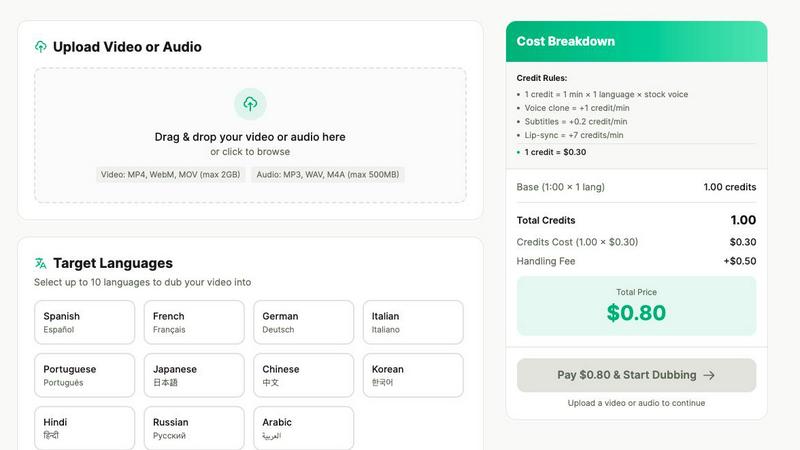
Dubvid enables users to dub audio and video files into multiple languages in a matter of minutes. With its user-friendly interface, creators can upload their content and select from various languages, making it easy to produce localized versions of their work without lengthy production processes.
Natural Voice Options
The platform offers a choice between stock AI voices and the ability to clone user’s own voice. This feature ensures that the dubbed content retains its original character and authenticity, which is essential for maintaining audience engagement and trust.
Lip-Sync Capability
Dubvid includes an optional lip-sync feature that enhances the realism of dubbed videos by matching the audio to the speakers’ mouth movements. This premium option is particularly beneficial for talking-head videos, providing a more immersive experience for viewers.
Flexible Pricing Model
Dubvid operates on a usage-based credits system rather than a subscription model, allowing users to pay only for the minutes they localize. This transparent pricing structure ensures that there are no hidden fees, making it an economical choice for creators and teams alike.
SubtitlesFast
Auto-Transcription
SubtitlesFast utilizes advanced AI technology to automatically transcribe video audio into text in over 50 languages. This feature eliminates the need for manual transcription, saving creators significant time and effort.
Customizable Animated Styles
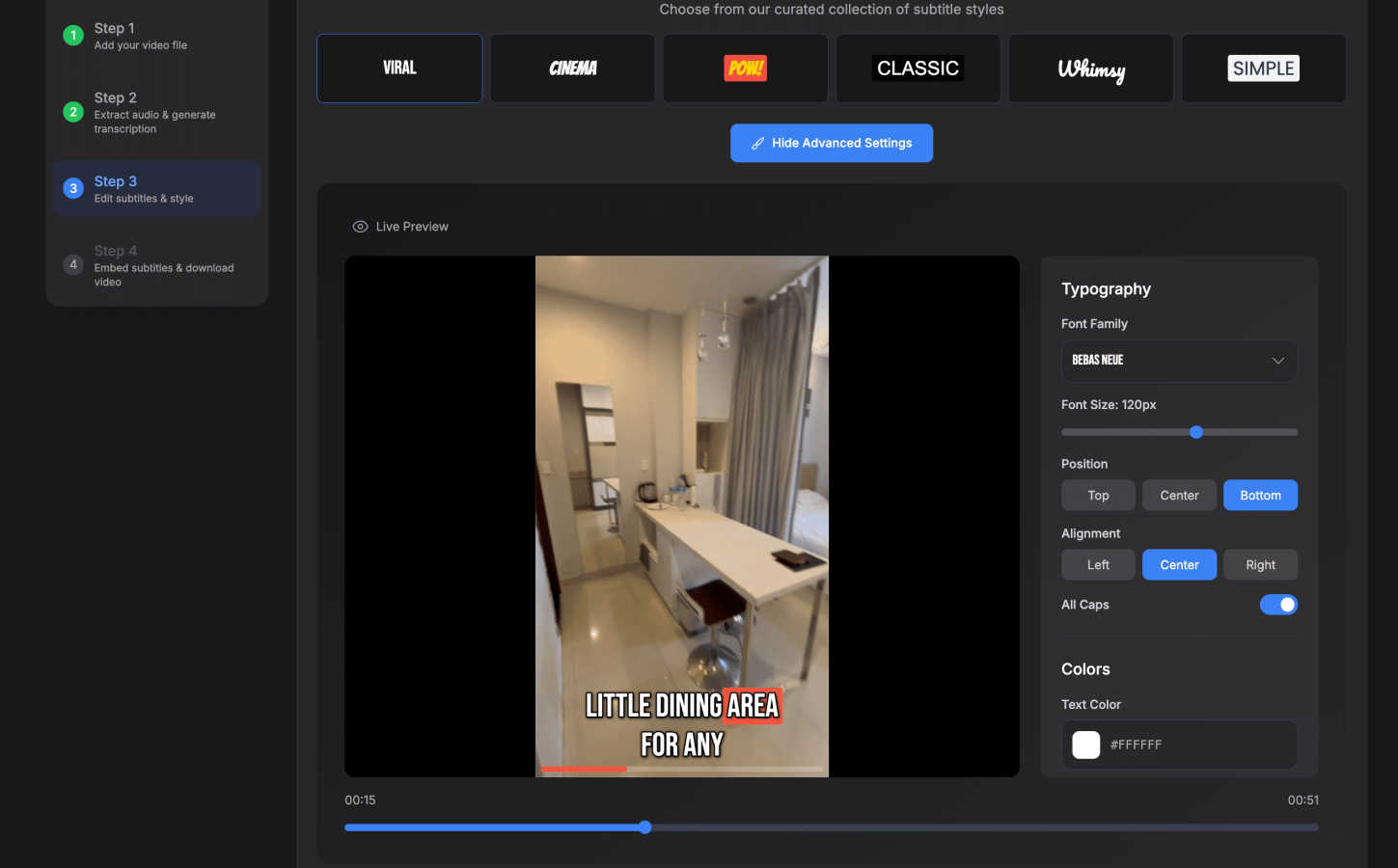
Users can select from 30+ animated subtitle styles to match their video's branding and aesthetic. This allows creators to enhance their videos visually, making subtitles not just informative but also engaging.
Simple Editor
The intuitive editing interface allows users to easily customize subtitles, add text, images, and music, and perform timeline editing. This feature ensures that there is no learning curve, making it accessible to creators of all skill levels.
One-Click Export
With a single click, users can export their videos with burned-in subtitles, ready for immediate posting on platforms like YouTube, TikTok, Instagram, and more. This streamlines the publishing process, ensuring content is shared quickly.
Use Cases
Dubvid
Expanding Reach for Creators
Content creators can leverage Dubvid to dub their videos into multiple languages, significantly increasing their potential audience. Whether creating YouTube Shorts or TikTok videos, they can effortlessly reach viewers globally, maximizing their impact and engagement.
Localization for Educators
Educators can use Dubvid to translate their lessons and tutorials for international students. By localizing educational content, they make learning accessible to a broader audience, enhancing the educational experience for learners around the world.
Enhancing Customer Support
Businesses can localize their help center videos and onboarding tutorials using Dubvid. This proactive approach reduces support tickets and improves user satisfaction by providing clear, localized guidance tailored to different regions.
Podcast Dubbing for Wider Distribution
Podcasters can utilize Dubvid to release episodes in various languages without the need for additional production time. This allows them to tap into new markets and broaden their listener base while maintaining the quality of their content.
SubtitlesFast
Daily Vloggers
For daily vloggers, SubtitlesFast provides a rapid solution to adding subtitles, enabling them to maintain a consistent posting schedule without sacrificing quality. This tool allows them to focus on content creation rather than editing.
Social Media Marketers
Social media marketers can utilize SubtitlesFast to create engaging, accessible content for various platforms. The ability to quickly add professional subtitles helps in boosting viewer engagement and retention rates.
Accessibility Advocates
SubtitlesFast is crucial for accessibility advocates who aim to make video content inclusive. By providing accurate subtitles in multiple languages, it ensures that content is accessible to a wider audience, including those with hearing impairments.
Content Creators
General content creators benefit from the efficiency of SubtitlesFast. Whether for educational videos, tutorials, or entertainment, the tool simplifies the subtitle process, allowing creators to produce polished videos faster than ever before.
Overview
About Dubvid
Dubvid is an innovative AI-powered platform that revolutionizes the way creators, businesses, and brands approach video and audio dubbing. This cutting-edge tool empowers users to effortlessly connect with a global audience by simply uploading their original video content. After selecting from a variety of target languages, Dubvid utilizes advanced algorithms to automatically translate and recreate the original voice, ensuring that natural tone, pacing, and emotion are preserved throughout the process. This eliminates the need for traditional voice actors, studios, or complicated editing workflows, making dubbing accessible to everyone. Whether you are a YouTuber looking to broaden your reach, an educator wishing to share lessons across borders, or a marketing team seeking to localize content swiftly, Dubvid allows users to scale their content internationally in just minutes, not weeks. Supporting over 10 languages, Dubvid is designed to break down language barriers and engage diverse audiences, opening up new opportunities for global interaction.
About SubtitlesFast
SubtitlesFast is an innovative, browser-based tool designed to help content creators effortlessly add professional subtitles to their videos. This solution is particularly tailored for individuals who post content regularly, such as vloggers, marketers, and accessibility advocates. The platform transforms what has traditionally been a labor-intensive process into a seamless experience with a simple three-step workflow: upload your video, customize the AI-generated subtitles, and download the final product. SubtitlesFast prioritizes speed and simplicity, allowing users to complete the subtitle process in under five minutes from any device without the need for software installation. With powerful AI transcription capabilities in over 50 languages and a variety of customizable animated styles, SubtitlesFast ensures that all content is engaging and accessible. By processing everything locally in the browser, it also guarantees user privacy. It is the essential tool for anyone looking to enhance viewer engagement and maintain brand consistency through effective subtitle integration.
Frequently Asked Questions
Dubvid FAQ
How does Dubvid ensure the quality of the dubbed audio?
Dubvid employs advanced AI algorithms to maintain the original tone, pacing, and emotion during the dubbing process. Users can also choose between stock voices or clone their own voice for added authenticity.
What types of files does Dubvid support?
Dubvid supports a variety of audio and video formats, including MP4, MOV, WebM, MP3, and WAV, with file sizes up to 500MB. This flexibility allows users to work with various media types seamlessly.
Is there a trial version available?
Yes, Dubvid offers a free trial that includes 2 credits, allowing users to dub up to 60 seconds of audio or video without requiring a credit card. This enables potential users to evaluate the quality of the dubbing before making a commitment.
Can I customize the voices used for dubbing?
Absolutely! Dubvid provides options for both stock AI voices and the ability to clone your own voice. This feature ensures that the dubbed content can closely align with your brand's identity and voice.
SubtitlesFast FAQ
How does SubtitlesFast ensure privacy?
SubtitlesFast processes all data locally in your browser, meaning that your video content and transcription are never uploaded to external servers, ensuring full privacy and security.
Is there a learning curve to using SubtitlesFast?
Not at all! SubtitlesFast is designed with a user-friendly interface that makes it easy for anyone, regardless of their technical skills, to add subtitles to their videos in just a few clicks.
Can I customize the subtitles after they are generated?
Yes, SubtitlesFast allows users to customize the automatically generated subtitles. You can edit text, choose from various animated styles, and adjust timing to fit your video perfectly.
What platforms can I publish my videos to after using SubtitlesFast?
SubtitlesFast supports one-click exports for popular platforms such as YouTube, TikTok, and Instagram, making it easy to share your content directly after adding your subtitles.
Alternatives
Dubvid Alternatives
Dubvid is an innovative AI-powered platform that specializes in audio and video dubbing, enabling users to convert their content into multiple languages with natural-sounding voices and optional lip-sync. This tool falls under the content creation category, specifically designed for creators, businesses, and brands that wish to engage with a global audience seamlessly. Users often seek alternatives to Dubvid for various reasons, including pricing concerns, specific feature requirements, or compatibility with certain platforms. When choosing an alternative, it's crucial to consider factors such as ease of use, language support, voice quality, and the ability to maintain emotional nuance in translations. Additionally, evaluating the turnaround time for projects can help ensure that your content reaches its audience quickly and effectively.
SubtitlesFast Alternatives
SubtitlesFast is an innovative, browser-based solution designed for content creators who need to add professional subtitles to their videos quickly and effortlessly. Classified under the marketing and productivity category, it streamlines the traditionally labor-intensive process of subtitle creation into a simple three-step workflow. This efficiency appeals to vloggers, social media marketers, and accessibility advocates who require timely, engaging content for their audiences. Users often seek alternatives to SubtitlesFast due to various reasons, such as pricing, feature sets, or specific platform compatibility. It’s essential to assess what an alternative offers in terms of auto-transcription accuracy, styling options, and user interface simplicity. Look for solutions that maintain the same level of efficiency and customization while aligning with your unique content creation needs.