
SocialCal
SocialCal simplifies social media management by allowing you to post simultaneously to ten platforms with one click.
Visit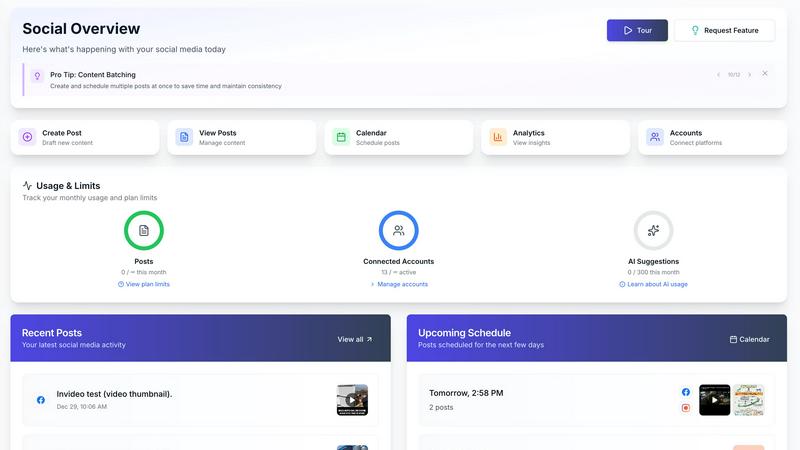
About SocialCal
SocialCal is the ultimate solution designed for modern social media managers, content creators, and small business owners who find themselves overwhelmed by the complexities of managing multiple social media accounts. The primary challenge that many face is the time wasted logging into various platforms, manually copying and pasting content, and attempting to determine the best times to post. SocialCal addresses these pain points by offering a unified workflow through a powerful and intuitive dashboard. It is tailored for solopreneurs and lean teams seeking enterprise-level capabilities without the associated complexity or high costs. The main value proposition of SocialCal lies in its ability to maximize online reach while minimizing the effort required. By allowing users to schedule posts to ten major platforms with just one click, including Instagram, X (Twitter), TikTok, LinkedIn, Facebook, YouTube, Threads, Bluesky, Pinterest, and Telegram, SocialCal helps reclaim an average of 15+ hours each week. Enhanced by advanced AI for caption generation and comprehensive analytics, it transforms social media management from a tedious task into a streamlined and strategic process.
Features of SocialCal
Multi-Platform Posting
With SocialCal, you can effortlessly post to ten different platforms simultaneously with just one click. This feature eliminates the need to log into multiple accounts or copy and paste content, saving you valuable time and reducing the chances of errors.
Smart Scheduling
SocialCal's Smart Scheduling feature allows you to plan your posts to go live at optimal engagement times. By analyzing audience activity patterns, it ensures your content reaches the maximum number of viewers, boosting interaction and engagement rates across all platforms.
AI Caption Writer
Generate creative and engaging captions tailored to different tones with SocialCal's AI Caption Writer. This feature streamlines the content creation process, allowing users to produce high-quality posts without the stress of writer's block or time constraints.
Analytics Dashboard
The Analytics Dashboard provides users with a comprehensive overview of their social media performance across all connected platforms. With insights and data analytics, you can track engagement metrics, audience growth, and overall performance, enabling informed decision-making for future content strategies.
Use Cases of SocialCal
Streamlined Content Management
For content creators juggling multiple social media accounts, SocialCal simplifies management by allowing them to post simultaneously to various platforms. This efficiency enables creators to focus more on developing engaging content rather than managing each platform individually.
Agency Client Management
SocialCal is ideal for social media agencies managing multiple clients. With the ability to create client profiles within a single dashboard, agencies can seamlessly schedule and analyze posts for different brands, providing efficient service while saving time.
Efficient Campaign Planning
Businesses launching marketing campaigns can utilize SocialCal to schedule their promotional content across all platforms ahead of time. This feature ensures that all posts align with the campaign timeline, creating a cohesive message and maximizing reach.
Performance Tracking and Optimization
Analysts and marketers can leverage the Analytics Dashboard to monitor their social media strategies. By understanding which posts perform best, they can refine their approach, ensuring continuous improvement and better engagement over time.
Frequently Asked Questions
How does SocialCal save time for social media managers?
SocialCal saves time by allowing users to schedule posts across multiple platforms simultaneously, eliminating the need for manual logins and repetitive tasks. This streamlined process can reclaim over 15 hours each week.
Can I manage multiple clients with SocialCal?
Yes, SocialCal is designed for agencies and individuals managing multiple clients. You can create separate profiles and manage all posts and analytics from a single dashboard.
What platforms does SocialCal support?
SocialCal supports ten major platforms, including Instagram, X (Twitter), TikTok, LinkedIn, Facebook, YouTube, Threads, Bluesky, Pinterest, and Telegram, making it a versatile tool for any social media manager.
Is there an AI feature to help with content creation?
Absolutely! SocialCal includes an AI Caption Writer that assists users in generating captions across various tones, making the content creation process faster and more efficient.
Similar to SocialCal

BuildingNow Podcast
BuildingNow shares founder conversations and practical lessons on building products, finding customers, and growing a business.

Leadeon
AI growth tool for X and LinkedIn: write posts in your voice, schedule at your best times, find leads on X and see what works.
Genjutsu AI
Genjutsu AI turns your ideas into cinematic videos, product ads, social shorts, and high-quality images in minutes.

TrackMedia
Publish to 20 social networks from one composer and track every click in real time. Built for humans and AI agents.
Motion Control AI
Reference-driven AI character motion video generation
UseWok
Done-for-You SaaS Visibility for Search & AI | UseWok

Postqued
Schedule and publish social content across 10 platforms with one dashboard, API, and MCP built for teams and AI agents.