
Customer Reach Map
Stop sifting through rows of WooCommerce data and instantly visualize where your customers actually come from with private and public heatmaps.
Visit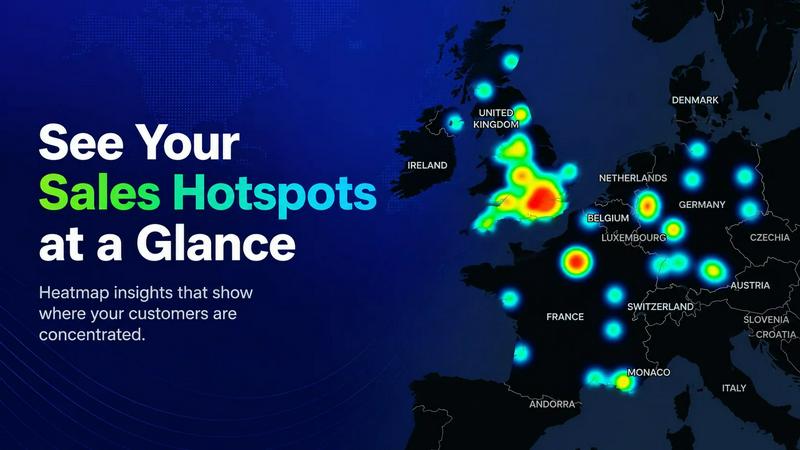
About Customer Reach Map
Customer Reach Map is a specialized WooCommerce extension designed to transform raw order data into actionable geographic insights. For any WooCommerce store owner who has ever felt overwhelmed by spreadsheets or struggled to understand where their customers are located, this tool offers a clear, visual solution. It connects directly to your existing WooCommerce store and uses your order history to generate interactive maps that display customer distribution. The primary audience is ecommerce merchants, marketers, and business owners who need to move beyond manual data analysis and gain a strategic understanding of their market reach. The core value proposition is twofold: it provides private, detailed heatmaps for internal business intelligence, and it offers an optional, fully anonymized public map that can be embedded on your website to build customer trust. By visualizing customer locations down to the city or region level, you can identify high-density areas, spot emerging regional trends, and make data-driven decisions about marketing campaigns, inventory distribution, or expansion strategies. The setup process is incredibly simple, requiring no coding skills and taking under five minutes to go from plugin activation to seeing your first map. Customer Reach Map prioritizes privacy by ensuring that all public-facing data is aggregated and anonymized, so you never expose sensitive customer information. This product solves the fundamental problem of "spreadsheet fatigue" by replacing static, outdated reports with a dynamic, visual flow that gives you instant clarity on who your customers are and where they come from.
Features of Customer Reach Map
Private Sales Heatmaps
This feature allows store owners to view a private, internal map of their customer locations with data aggregated down to the city or regional level. Instead of sifting through thousands of rows of data in a CSV file, you get an instant, color-coded visual representation of customer density. This helps you quickly identify your strongest markets and areas with untapped potential, all while keeping sensitive order data confidential within your admin dashboard.
Public Maps for Trust Building
Customer Reach Map includes an optional public-facing map that you can embed on your WooCommerce site. This map showcases your global customer reach in a beautiful, interactive format. Crucially, all data displayed on the public map is fully anonymized and aggregated. It shows the breadth of your customer base without exposing any personal information, building social proof and trust with potential buyers who can see that you serve a wide audience.
One-Click Historical Data Import
You do not need to wait for new orders to start using the tool. The plugin features a one-click import function that processes your entire existing order history. This means you can instantly populate your map with all your past customer data, providing immediate insights from day one. The import runs as a scheduled background task, ensuring it does not slow down your storefront or interfere with the customer shopping experience.
Privacy-First Data Handling
Every aspect of Customer Reach Map is built around protecting customer privacy. While the private heatmaps give you detailed insights, the public maps only display aggregated, non-identifiable information. The plugin is designed to never expose personal data like names, addresses, or specific order details. This allows you to leverage location data for business intelligence and marketing while maintaining full compliance with privacy standards and building trust with your customers.
Use Cases of Customer Reach Map
Identifying High-Density Sales Regions for Marketing
A store owner running targeted ad campaigns can use the private heatmap to pinpoint cities or states with the highest customer concentration. For example, if the map reveals a dense cluster of customers in Texas, the owner can allocate more ad budget to that region, run geo-targeted promotions, or tailor shipping options to that area. This turns vague intuition into a concrete, data-backed marketing strategy that maximizes return on ad spend.
Showcasing Global Reach to Build Customer Confidence
An online retailer selling niche products can embed the public map on their "About Us" or homepage. When a potential customer in Europe sees that the store has numerous customers in their region, it builds immediate trust and reduces purchase anxiety. This visual proof of a global or national customer base serves as powerful social proof, often more effective than text-based testimonials for demonstrating a brand's legitimacy and popularity.
Analyzing Regional Trends for Inventory Planning
A business that sells seasonal products can use the heatmap to spot emerging trends. If the map shows a sudden increase in orders from a colder northern region, the owner can proactively adjust inventory levels, stock more appropriate products, or create a dedicated landing page for that area. This proactive approach helps prevent stockouts and ensures that marketing efforts are aligned with actual demand in specific geographic locations.
Evaluating Expansion Opportunities for New Markets
Before investing in a new physical location or a major marketing push into a new country, a store owner can use the private heatmap to analyze existing order data. If the map shows a scattering of orders in a region but no high-density cluster, it might indicate untapped potential. Conversely, a region with zero orders might be deprioritized. This data-driven approach helps entrepreneurs make smarter decisions about where to focus their expansion efforts and resources.
Frequently Asked Questions
Will this slow down my site?
No. Processing happens during scheduled background tasks or on-demand in the admin dashboard. Your storefront performance remains entirely unaffected. The plugin is designed to run its data processing in the background so that your customers never experience any lag or slowdown while browsing or purchasing.
Do you store my customer data?
Customer Reach Map processes your WooCommerce order data to generate maps, but it does not store your customer data on external servers. The mapping and aggregation happen locally within your WordPress installation. For the optional public map, only anonymized and aggregated location counts are displayed, never individual customer details.
Can I import historical data?
Yes. You can import all of your existing WooCommerce orders with a single click. The plugin includes a one-click import feature that processes your entire order history. This data is then used to populate your private heatmap and public map immediately, giving you full insights from your entire business history, not just from the moment you install the plugin.
Is this a real-time analytics tool?
Customer Reach Map is not a real-time analytics tool in the sense of a live dashboard. Instead, it processes your order data during scheduled background tasks. This means your maps will be updated periodically based on new orders, but not instantly with every single transaction. This approach ensures that your storefront performance remains fast and unaffected.
Pricing of Customer Reach Map
The current pricing for Customer Reach Map is set at $89 per year for the Pro Release. This subscription grants you full access to all features, including private heatmaps, public maps, and one-click historical data import. You also receive regular updates and priority support. For additional savings, you can purchase a 2-year subscription, which gives you a 20% discount. A Beta Access phase was previously available for free testers but has now ended. You can purchase the plugin directly from the WooCommerce Marketplace.
Similar to Customer Reach Map

InsightAgent
An AI-powered Etsy market research and seller platform that connects product discovery, keyword validation, competitor analysis, listing creation
eSagu RePricing & more
Stop losing margins to price wars and manual support by automating repricing, FBA recovery, and helpdesk across Amazon, eBay, and more.

Melanin Art
Stop scrolling past generic Black art that doesn't look like your family and bring museum-quality prints that celebrate your culture to your walls.
Upsell.com
Stop losing post-purchase revenue by using Upsell.com to add one-click upsells and optimize thank you pages for effortless extra sales.

Remedora
Remedora eliminates the complexity of launching a telehealth brand by unifying patient intake, e-prescribing, and pharmacy fulfillment into one.

Premium Autos
Premium Autos offers a vast selection of quality used Teslas and vehicles in California, ensuring hassle-free financing and exceptional value.

Iphone Phone House
Control and scale your iPhone fleet with secure, low-latency access to dedicated physical devices.

Factory Direct Mattress of OP
Experience personalized mattress shopping with unbeatable prices and a no-pressure VIP experience at Factory Direct Mattress of Overland Park.