
DocuExtractor
DocuExtractor transforms messy receipts and invoices into organized, structured data, saving you time and eliminating.
Visit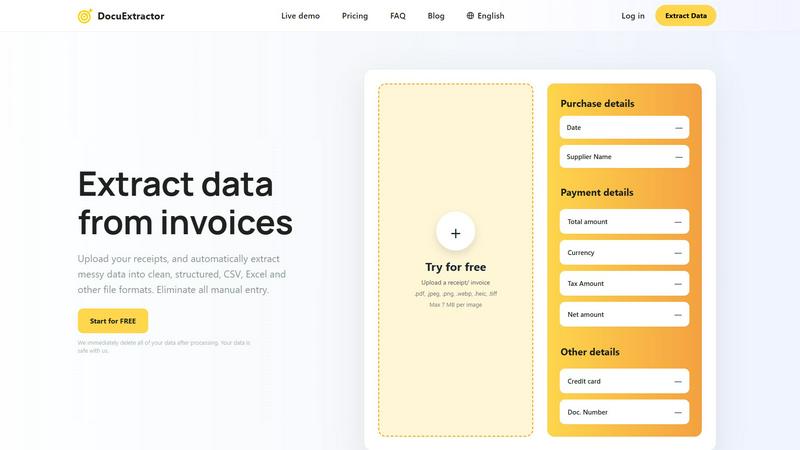
About DocuExtractor
DocuExtractor is a pioneering AI-driven document conversion software that addresses the common challenge of manual data entry in the finance sector. Designed specifically for accountants, bookkeepers, and finance teams, it seamlessly transforms unstructured financial documents—such as receipts, invoices, bank statements, and various PDF formats—into clean, structured data. This data can be exported into user-friendly formats like CSV and Excel, thereby eliminating the tedious, time-consuming process of manual transcription. With a remarkable accuracy rate of 99.6%, DocuExtractor employs advanced Optical Character Recognition (OCR) technology, deep learning algorithms, and Large Language Model (LLM) AI to extract critical information, including dates, supplier names, totals, taxes, and document numbers. Businesses benefit from significant time savings, reduced costs, and improved data consistency, allowing professionals to shift their focus to higher-value analytical tasks. With the capability to process over 500,000 documents monthly and support for over 45 languages, DocuExtractor is built with both security and scalability in mind, ensuring that user data is automatically deleted post-processing to maintain confidentiality.
Features of DocuExtractor
Advanced Data Extraction
DocuExtractor utilizes cutting-edge AI technology to automatically extract essential information from a variety of financial documents. This feature reduces the risk of human error and enhances overall efficiency, making it ideal for businesses that rely on accurate financial data.
Batch Processing Capability
With the ability to upload documents in batches, users can process multiple files simultaneously. This feature is particularly beneficial for businesses dealing with a high volume of transactions, allowing for quicker data extraction and management.
Multi-format Support
The software supports various file formats, including PDF, JPEG, PNG, and more, making it versatile for different document types. This ensures that users can easily upload their financial documents without worrying about compatibility issues.
User-friendly Interface
DocuExtractor boasts an intuitive interface that simplifies the document extraction process. Users can easily navigate through the software, upload documents, and download results with minimal training, enabling teams to achieve productivity quickly.
Use Cases of DocuExtractor
Streamlining Invoice Processing
Companies can use DocuExtractor to automate the extraction of data from invoices, significantly reducing the time spent on manual entry. This allows finance teams to focus on more strategic tasks, enhancing overall productivity.
Efficient Receipt Management
Businesses can streamline their expense tracking by uploading receipts directly to DocuExtractor. The software quickly extracts relevant data, enabling users to maintain accurate records without the hassle of manual data entry.
Simplifying Bank Statement Reconciliation
DocuExtractor can facilitate the reconciliation of bank statements by extracting key details with high accuracy. This helps finance teams ensure that their financial records match up with bank transactions, reducing discrepancies.
Enhancing Financial Reporting
By converting unstructured data into structured formats like CSV or Excel, DocuExtractor aids in the preparation of financial reports. This ensures that reports are based on accurate data, improving decision-making processes within organizations.
Frequently Asked Questions
How does DocuExtractor ensure data security?
DocuExtractor prioritizes user data security by automatically deleting all uploaded data immediately after processing. This ensures that sensitive financial information remains confidential and secure.
What types of documents can I upload to DocuExtractor?
You can upload a variety of financial documents, including receipts, invoices, bank statements, and PDF files. The software is designed to handle multiple formats, making it versatile for different document types.
How accurate is the data extraction process?
DocuExtractor boasts an impressive accuracy rate of 99.6%, thanks to its advanced OCR and AI technologies. This high level of accuracy minimizes the risk of errors commonly associated with manual data entry.
Is there a limit to the number of documents I can process?
DocuExtractor is equipped to handle high volumes of documents, processing over 500,000 documents monthly. Users can also upload documents in batches, allowing for efficient management of large quantities of financial data.
Explore more in this category:
Similar to DocuExtractor

Egmatic
No-code 2D game editor: visual node logic, drag-and-drop scenes, live preview. Exports to Windows, macOS, Linux, Android, iOS, Web.

Kody Tools
Free collection of online developer utilities, code formatters, and digital converters designed to streamline your daily workflow.
Hishab
All-in-One POS, Inventory & Accounting Software for Bangladeshi Businesses

Tally counter
Online tally counter for tracking attendance, workouts, inventory, sports scores, visitors, habits, and everyday counting tasks.
Forms Plugin
The #1 Native Form Builder Plugin for Framer - No Code, No Embeds, No External Platforms.


Product Launch Checklist
A free launch checklist for SaaS, apps, AI tools and more. Every step says why it matters and when you can skip it.
