
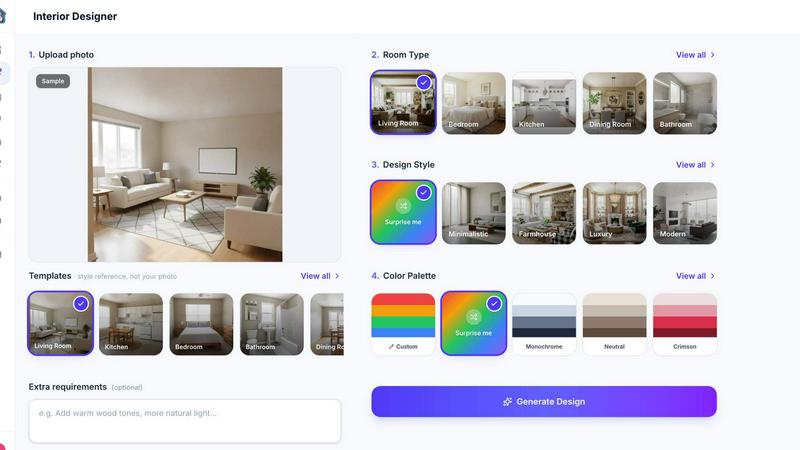
About My Room Design
My Room Design is an AI-powered interior design and room visualization tool that helps you redesign real spaces from a single photo. Upload an image of your living room, bedroom, kitchen, bathroom, home office, patio, or other space, choose a design style, and generate a photorealistic room makeover in seconds. Explore modern, minimalist, Scandinavian, boho, industrial, traditional, and other interior styles without using complex 3D software or hiring a designer. Compare before-and-after concepts, test different layouts, colors, furniture, and decor ideas, and share your favorite designs with family, roommates, or contractors. My Room Design makes home renovation planning faster, more accessible, and easier to visualize. It works online, requires no design experience, and is free to try, making it useful for homeowners, renters, interior design enthusiasts, real estate professionals, and anyone looking for AI room design inspiration.
Similar to My Room Design

AIVideoAgent
Turn text ideas or reference images into videos through conversation, with agent-assisted prompts and a choice of video models.

Easemic
Open-source Android comic & manga reader with encrypted cloud streaming and AI ad-page stripping.

LaunchIntel
Your AI agent picks relevant directories, submits your product in your browser and tracks every step. One-time purchase.

GenX
All-in-one AI workspace to generate images, videos, and audio with multiple leading AI models.

Bloom
An adaptive AI tutor that turns topics or your materials into courses, lessons, and answers tailored to how you learn.

FreeVideoGenerator
Turn text prompts and photos into AI video clips with Sora 2, Veo 3.1, and Wan. Free starter credits, no watermark downloads.

ChatterAPI
One API key and one credit balance for Reddit and X data. REST endpoints and a hosted MCP server, so your code and your agents call the same tools.

BacklinkBot
AI SEO agent that finds pages ranking for your keywords, pitches the people behind them from your inbox, and follows up. You approve every send.