
outfitswap
Stop struggling with unrealistic outfit previews when outfitswap preserves pose, lighting, and fabric texture for authentic virtual try-ons.
Visit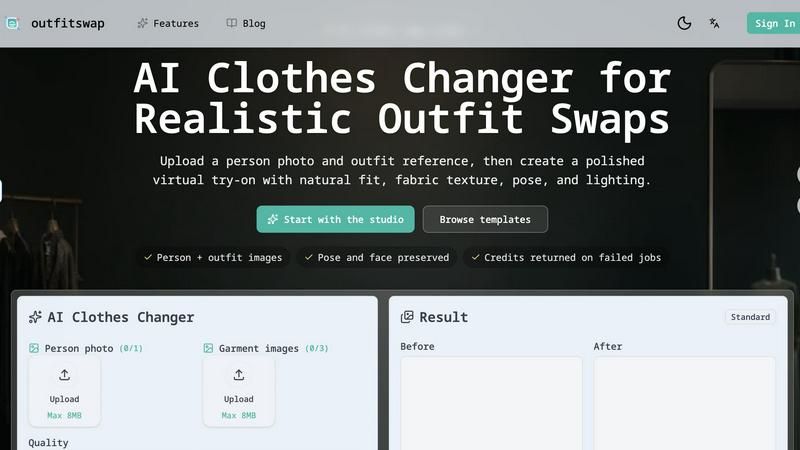
About outfitswap
outfitswap is an AI-powered clothes changer and virtual try-on tool designed to solve the persistent problem of visualizing how clothing will look on a real person without physical samples, reshoots, or manual editing. The core challenge it addresses is the gap between a garment's flat product photo and how it actually drapes, fits, and interacts with a specific body shape, pose, and lighting environment. Traditional methods require time-consuming masking, complex Photoshop skills, or costly photoshoots to swap outfits. outfitswap eliminates these bottlenecks by using advanced AI to map a garment image onto a person photo while preserving critical details like facial identity, body proportions, pose, shadows, fabric texture, and background context. The tool is built for fashion shoppers who want to preview clothes before buying, content creators and stylists planning lookbooks or social media posts, and ecommerce teams who need clean, realistic product images for listings, ads, and catalogs. By automating the outfit swap process, outfitswap reduces production time from hours to minutes, lowers the barrier for non-designers, and delivers polished results that maintain visual coherence across fabric folds, highlights, and lighting. It supports swapping tops, dresses, jackets, uniforms, streetwear, or full outfits, and accepts garment images from product photos, screenshots, or wardrobe references. The result is a realistic virtual try-on that helps users make faster decisions, reduce returns, and create compelling visual content without technical expertise.
Features of outfitswap
Natural Fit Mapping
This feature solves the challenge of garments looking like they are simply pasted onto a photo rather than naturally worn. outfitswap analyzes the person's body shape, pose, sleeve contours, hem lines, and visible body proportions to map the garment accurately onto the figure. The AI adjusts the fit to match the original photo's stance and anatomy, ensuring the swapped clothing follows natural curves, aligns with shoulders and waist, and does not distort when the person is in a dynamic pose. This prevents the common AI artifact where clothing appears floating or misaligned, delivering a believable result that mimics a real dressing room experience.
Fabric and Lighting Detail Preservation
A major pain point in AI outfit swaps is the loss of realistic fabric texture, folds, shadows, and highlights, resulting in flat or plastic-looking results. outfitswap addresses this by preserving the original image's lighting consistency and applying garment details such as wrinkles, sheen, and texture onto the swapped clothing. The AI ensures that shadows cast by the body or surrounding environment fall correctly on the new garment, and that fabric folds correspond to the person's pose and movement. This creates a coherent visual where the swapped outfit looks like it was always part of the original photo, not a separate element.
Product Image Try-On from Any Source
Users often struggle to preview clothing from online stores because they only have flat product photos or screenshots, not 3D models or multiple angles. outfitswap solves this by accepting garment images from any source: ecommerce screenshots, catalog photos, wardrobe pictures, or style references. The AI extracts the garment's shape, color, pattern, and texture, then applies it to the person photo while adapting to the body's contours. This feature is especially valuable for shoppers comparing multiple items from different retailers, or for ecommerce teams who need to visualize how a new product will look on an existing model photo without reshooting.
Pose and Face Preservation
One of the most frustrating problems in AI image generation is the alteration or distortion of the person's face, identity, and stance during outfit swaps. outfitswap is designed to keep the original person photo's facial features, expression, hair, and body pose completely stable. The AI focuses the transformation solely on the clothing region, leaving the background, shadows, and person's unique characteristics untouched. This ensures the final image remains a true virtual try-on where the person looks like themselves, not a generated avatar, which is critical for realistic ecommerce presentations and personal styling experiments.
Use Cases of outfitswap
Fashion Shopping and Virtual Try-On
Shoppers face the challenge of not knowing how a garment will fit or look on their specific body type before purchasing, leading to high return rates and dissatisfaction. outfitswap solves this by allowing users to upload a personal photo and any garment image from an online store, then instantly see a realistic preview of the outfit on themselves. They can compare different sizes, colors, and styles without ordering multiple items, making informed decisions that reduce returns and save time. The preserved face and pose ensure the preview feels personal and accurate, not generic.
Ecommerce Product Photography
Ecommerce teams often need to create multiple product images showing the same garment on different models or in various colors, which traditionally requires expensive reshoots and manual editing. outfitswap eliminates this bottleneck by letting teams upload one model photo and then swap in different garment images from their catalog. The AI produces clean, consistent images that maintain the same lighting, pose, and background, enabling rapid production of lookbooks, product pages, and ad creatives. This reduces production costs from thousands to pennies per image and speeds up time-to-market for new collections.
Content Creation and Lookbook Planning
Fashion content creators, stylists, and influencers need to generate outfit ideas, mood boards, and social media posts quickly, but physically trying on and photographing multiple looks is time-consuming. outfitswap solves this by allowing creators to upload a single base photo and then experiment with different tops, dresses, jackets, and accessories from screenshots or wardrobe photos. They can generate a series of outfit variations in minutes, test color combinations, and plan cohesive lookbooks without a full photoshoot. The realistic fabric detail and lighting preservation ensure the content looks professional and publish-ready.
Uniform and Costume Design Preview
Organizations needing to preview uniforms, costumes, or branded apparel on actual team members or actors face the challenge of ordering samples or conducting fittings before committing to production. outfitswap addresses this by letting users upload a person photo and a reference image of the uniform or costume design. The AI generates a realistic preview showing how the garment fits on that specific body shape and pose, allowing decision-makers to evaluate fit, color, and styling before placing bulk orders. This reduces sample costs and accelerates approval cycles for corporate uniforms, sports teams, or theatrical productions.
Frequently Asked Questions
How does the AI clothes changer work?
outfitswap uses a deep learning model trained on thousands of paired person and garment images to understand how clothing drapes, folds, and interacts with different body shapes and poses. When you upload a person photo and a garment image, the AI analyzes the person's pose, body contours, lighting, and background, then maps the garment onto the photo while preserving facial features, identity, and stance. It adjusts the garment's size, orientation, and texture to match the original photo's perspective, ensuring the result looks natural and coherent. The process takes seconds and requires no manual masking or editing skills.
What photo works best for an outfit swap?
For optimal results, upload a sharp, well-lit person photo where the clothing area is clearly visible. Half-body or full-body shots with a neutral background work best, as they give the AI clear outlines of the body and existing clothing. Avoid photos with extreme angles, heavy shadows obscuring the torso, or busy backgrounds that may confuse the model. The person should be standing or sitting in a natural pose, and the original clothing should be visible so the AI knows what region to replace. Photos with consistent lighting on both the person and garment reference yield the most realistic fabric and shadow preservation.
Can I upload clothes from an online store?
Yes, outfitswap accepts garment images from any source, including online store product photos, screenshots, catalog images, or personal wardrobe pictures. Simply upload the image of the clothing item you want to try on, and the AI will extract the garment's shape, color, pattern, and texture to apply to your person photo. For best results, use a clear, front-facing image of the garment on a plain background, with minimal folds or distortions. The AI can handle various garment types including tops, dresses, jackets, uniforms, and streetwear.
Will it keep my face and pose?
Yes, outfitswap is specifically designed to preserve your face, hair, body shape, pose, and background context exactly as they appear in the original photo. The AI focuses the transformation exclusively on the clothing region, leaving all other elements unchanged. This ensures the final image remains a true virtual try-on where you look like yourself, not a generated model. The pose preservation feature also maintains your stance, arm positions, and body contours, so the swapped clothing fits naturally without distorting your original silhouette.
Explore more in this category:
Similar to outfitswap

Leadeon
AI growth tool for X and LinkedIn: write posts in your voice, schedule at your best times, find leads on X and see what works.




LaunchBert
LaunchBert saves you hours launching to directories - with a curated roadmap, one-click badge integration, and a form auto-fill Chrome extension.

TrackMedia
Publish to 20 social networks from one composer and track every click in real time. Built for humans and AI agents.
CubexSoft EML Converter
Convert EML Files to PST, PDF, EML, MBOX, CSV, Gmail, IMAP, Thunderbird, and more.

Rankbox
Rankbox helps websites get discovered, mentioned, and cited by AI search engines like ChatGPT and Google AI.