
Picture Enhancer
Picture Enhancer instantly deblurs, upscales, and restores your photos free in your browser without any software install.
Visit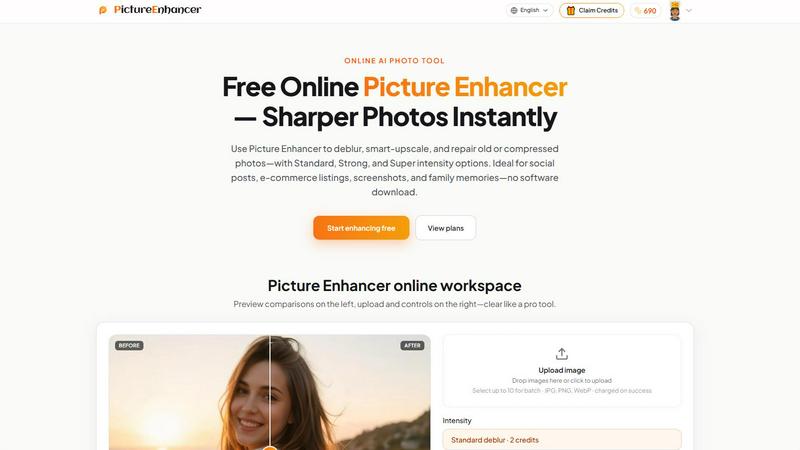
About Picture Enhancer
Picture Enhancer is a free online AI photo enhancement tool designed for creators, e-commerce sellers, and everyday users who need sharper, clearer images instantly. The core challenge this product solves is the frustration of dealing with blurry, low-resolution, or damaged photos when you lack professional editing skills or expensive software. Picture Enhancer addresses this by providing three powerful AI-driven modes: Deblur, Upscale, and Restore. Users simply upload a JPG, PNG, or WebP photo, select their desired mode and intensity level (Standard, Strong, or Super), and let the AI process the image. A live before/after comparison slider lets you inspect the quality improvement before downloading a watermark-free result. The value proposition is straightforward: get professional-grade photo enhancement without any software download, complex learning curve, or recurring subscription fees for basic use. Guests receive three free lifetime tries per IP address with no signup required, making it risk-free to test the quality. For regular users, a credit-based system activates after sign-in, with new accounts receiving starter credits. Credits are only charged on successful enhancements, ensuring you never pay for failed attempts. Paid subscribers unlock premium features like Super intensity tiers and batch processing of up to ten images. Picture Enhancer is ideal for social media posts, e-commerce product listings, screenshots, UI captures, and restoring old family photos. All processing is private and secure, used only to complete your enhancement request, with results delivered in seconds. The product effectively solves the common problem of subpar image quality across multiple contexts, removing the technical barrier to achieving crisp, professional-looking visuals.
Features of Picture Enhancer
AI Deblur Mode
The AI Deblur mode intelligently rebuilds edges and texture from common image issues like camera shake, soft focus, and mild motion blur. Users can choose from three intensity tiers: Standard, Strong, or Super deblur. Standard handles minor blur for quick fixes, Strong tackles moderate blur for clearer details, and Super addresses severe blur to restore sharpness in faces and text. This feature ensures that photos previously considered unusable become clear and readable again, making it invaluable for salvaging candid shots, event photos, or any image where the subject was moving.
Smart Upscale Mode
Smart Upscale mode enables 2x and 4x enlargement of images while intelligently adding detail to prevent the typical pixelation and blockiness of traditional upscaling. This feature is crucial when you need to use a small source file for a larger format, such as social media cover photos, product hero shots on e-commerce sites, or print previews. The AI analyzes the image content and generates realistic detail, making enlarged photos look natural and sharp rather than artificial or stretched.
Old Photo and Damage Restore Mode
The Restore mode is specifically engineered to reduce scratches, fade, compression artifacts, and other damage commonly found on scanned family prints and old photographs. Strong and Super restore intensity levels handle heavier damage, such as creases, stains, and significant color degradation. This feature breathes new life into cherished memories, allowing users to share or print restored versions of family history that were previously too damaged to use.
Flexible Credit and Billing System
Picture Enhancer operates on a credit-based billing model that is both fair and transparent. Guests get three free lifetime tries per IP address with no signup needed. Once signed in, users receive starter credits for new accounts. Credits are charged only on successful enhancement results: Standard intensity costs 2 credits, Strong costs 4 credits, and Super costs 6 credits. Paid users unlock Super tiers and batch enhancement of up to 10 images. Monthly plans grant fresh credits each cycle, while permanent credit packs never expire, offering flexibility for different usage patterns.
Use Cases of Picture Enhancer
Portraits and Everyday Photos
Reduce mild blur in portraits and everyday photos so faces and clothing look cleaner for social media feeds or personal portfolios. Whether it is a slightly out-of-focus selfie, a group shot with motion blur, or a candid photo from a family gathering, Picture Enhancer can recover sharpness and detail. This use case is ideal for anyone who wants to improve the quality of their personal photo library without needing professional retouching skills.
E-commerce and Product Shots
E-commerce sellers can upscale product detail and tame compression noise so their listings stand out and convert better. Small product images from manufacturers often lack the clarity needed for attractive online listings. Using the Smart Upscale and Deblur modes, sellers can enlarge these images while maintaining sharpness, making products look more appealing and professional. This directly impacts buyer trust and sales performance.
Screenshots and UI Captures
Sharpen text edges in screenshots and UI captures for tutorials, support threads, or documentation archives. Screenshots often suffer from compression artifacts and soft text, especially when resized. Picture Enhancer can clean up these images, making text crisp and interfaces clear. This is invaluable for technical writers, customer support teams, and anyone creating instructional content where readability is paramount.
Old Photo Memories
Repair fade, scratches, and compression artifacts in scanned old family photos so they are ready to share or print. The Restore mode specifically targets the damage that accumulates over decades on physical prints. Users can digitize and restore cherished memories, removing years of wear and tear to produce clean, vibrant images that can be shared with family or reproduced for albums.
Frequently Asked Questions
What is Picture Enhancer?
Picture Enhancer is a free online AI photo enhancement tool that allows users to deblur, smart-upscale, and restore old or compressed photos. It operates entirely in a web browser with no software download required. The tool supports JPG, PNG, and WebP formats and offers three intensity levels (Standard, Strong, Super) for each mode. Processing is private and secure, and results are delivered in seconds without watermarks.
Can I try Picture Enhancer without signing in?
Yes, guests can try Picture Enhancer for free without signing in. Each IP address receives three free lifetime tries. This allows users to test the quality of the enhancement on their own images before committing to any account or payment. After using the three guest tries, users must sign in to continue using credits.
How does billing work after sign-in?
After signing in, new accounts receive starter credits to begin enhancing. Billing is based on a credit system where credits are charged only on successful enhancement results. Standard intensity costs 2 credits, Strong costs 4 credits, and Super costs 6 credits. Paid subscribers unlock Super tiers and batch enhancement (up to 10 images). Monthly plans grant credits each cycle, while permanent credit packs never expire.
Which modes does Picture Enhancer support?
Picture Enhancer supports three main enhancement modes: Deblur, Upscale, and Restore. Deblur rebuilds edges and texture from camera shake and motion blur. Upscale provides 2x and 4x enlargement with intelligent detail addition. Restore reduces scratches, fade, and compression artifacts, especially on old photos. Each mode has Standard, Strong, and Super intensity levels.
Will downloads include a watermark?
No, all downloads from Picture Enhancer are watermark-free. When an enhancement job succeeds, users can download the original result without any branding or watermarks. This ensures the images are ready for immediate use in social posts, e-commerce listings, or family sharing.
What is the difference between subscription and permanent credit packs?
A subscription plan grants credits each billing cycle (monthly), providing a recurring allowance for regular users. Permanent credit packs are a one-time purchase where credits never expire, ideal for users who enhance photos infrequently. Both options unlock Super tiers and batch enhancement capabilities.
Are my photos safe?
Yes, all photos uploaded to Picture Enhancer are processed privately and securely. The AI processing is used only to complete your enhancement request. Images are not shared, stored beyond the processing time, or used for any other purpose. The service is committed to user privacy and data security.
Where do I check balance and history?
Signed-in users can check their credit balance and enhancement history in the My Assets section of the website. This area displays remaining credits, past enhancement jobs, and allows users to revisit and download previously processed results.
Similar to Picture Enhancer

ImageAgent
Create and edit AI images through conversation, using text or reference images and refining results in chat.

GenX
All-in-one AI workspace to generate images, videos, and audio with multiple leading AI models.

AppIconGenerator
Generate iOS and Android app icons from any image and export all platform sizes for free.

AiAgeFilter
Free AI age filter: upload an adult portrait, add 10-40 years, meet your older self. No app needed.


Nano AI
Create and edit AI images, generate videos, and compare models in one creative workbench.

RemoveObjectFromPhoto
Remove unwanted objects, people, and text from photos with AI for clean, natural-looking results in seconds.

ImageGenerator
Create and edit AI images online with multiple models, text-to-image, image-to-image, background removal, and upscaling.