

Alternatives to Cece AI
Cece AI is your smart email assistant that streamlines scheduling, invoicing, and follow-ups, letting you focus on what truly matters.
20 alternatives found

ButterShare
Realtime peer-to-peer file transfer in the browser. Send files directly between devices, no account and no upload to a server.

Emailyy
Free email tools for signatures, subject lines, HTML previews, word counts, and email headers. Browser-based, simple to use, and no signup required.
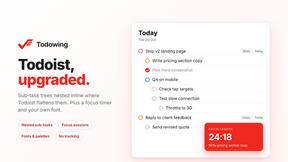
Todowing
Chrome extension that nests Todoist sub-tasks inline in Today, Upcoming, Filters and Labels, where Todoist shows them flat.

Uniclip
Clip pages, take full-page screenshots and batch-capture list data to Notion, Feishu, Obsidian, Markdown, CSV or JSON.

TroveKey
Search tabs, Chrome bookmarks and history, run browser commands, and save webpages and social posts locally—no account.
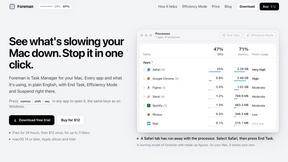
Foreman
See every app and what it's using in plain English, and end or slow down the one that's hogging your Mac.
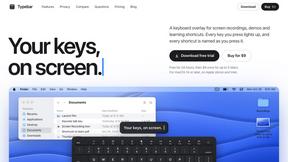
Typebar
Every key you press lights up on an on-screen keyboard, and each shortcut is named. For screen recordings, demos and learning shortcuts.

Notchpals
Little characters peek out of your Mac's notch to remind you to drink water, eat, sit up and get to bed. Quiet during calls. $4.99 once.

LightScreen
Free fullscreen light screen tool online. Turn any display into a flashlight, ambient light, or solid-color screen. No download or sign-up.


LevCharity
Fundraising platform for nonprofits combining donations, campaigns, donor CRM, events, communications, and reporting.

Kovnerov
Personal site of Vlad Kovnerov: analytics dashboards, web development, Telegram bots and browser tools for sellers and subscription tracking.

Everywhere
Fast file search for the Mac. Results as you type, files inside Mail and Photos, works with Wi-Fi off. $19 once.

Basalt
Eighteen PDF tools in one native Mac window: merge, split, compress, OCR, Bates numbering, forms, signing and redaction. Offline. $29 once.

Voice Keyboard Pro
Hold a key, say what you mean, let go. Clean, punctuated text lands at the cursor in any app on your Mac or iPhone.

Mainspring
Mainspring turns the settings macOS hides into 90+ one-click, fully reversible power-ups for Finder, Dock, screenshots and more. $29 once.

Inkling
Catch a thought without leaving what you are doing. Notes, checklists and a little companion in your Mac's notch. $12 once.

Context Board
Context Board brings your numbers, docs, clients, content and day into one workspace that Claude and Codex can read and update.

About Cece AI Alternatives
CeCe AI is an innovative AI executive assistant designed specifically for business owners who find themselves overwhelmed by a flood of emails, administrative tasks, and incomplete follow-ups. As a productivity and management tool, CeCe integrates seamlessly into the user's email system, transforming chaotic conversations into organized tasks, ensuring that vital business communications are managed efficiently without the need for additional hiring. This AI assistant allows users to set up their calendar, business profile, and preferences, streamlining workflow and enhancing productivity. However, many users seek alternatives to CeCe AI for various reasons, including pricing considerations, specific feature sets, or compatibility with their preferred platforms. When exploring alternatives, it is essential to evaluate how well the new solution meets your unique business needs, such as ease of integration, user experience, and the range of tasks it can handle. Additionally, consider the level of customer support and the scalability of the tool, as businesses often grow and may require more sophisticated functionalities down the line.
FAQs about Cece AI Alternatives
What is Cece AI?
CeCe AI is an AI-powered executive assistant designed to help business owners manage their email and administrative tasks more effectively. By integrating directly into the user's inbox, CeCe assists with scheduling meetings, responding to customer inquiries, creating quotes, sending invoices, and tracking follow-ups. This tool aims to reduce the burden of administrative work and improve communication speed.
Who is Cece AI for?
CeCe AI is primarily targeted at small business owners and entrepreneurs who struggle with time-consuming administrative tasks and email management. It is particularly beneficial for those looking to streamline operations without the additional expense of hiring full-time staff. By automating repetitive tasks, CeCe allows users to focus on core business activities.
Is Cece AI free?
CeCe AI is not a free service; it is offered through a subscription model tailored to the needs of businesses. Pricing may vary based on the features selected and the scale of usage. To get detailed pricing information, users should visit CeCe AI's official website or contact their customer service.
What are the main features of Cece AI?
CeCe AI boasts a range of features that enhance productivity for users. Key functionalities include scheduling meetings, managing reminders, responding to customer emails, creating and sending quotes and invoices, and tracking follow-ups. By consolidating these tasks within the email platform, CeCe helps ensure that important communications are addressed promptly and efficiently.