
Easymotion - AI Motion Graphic Generator
Stop wasting hours in After Effects; Easymotion lets you create professional motion graphics and map animations by simply chatting with AI.
Visit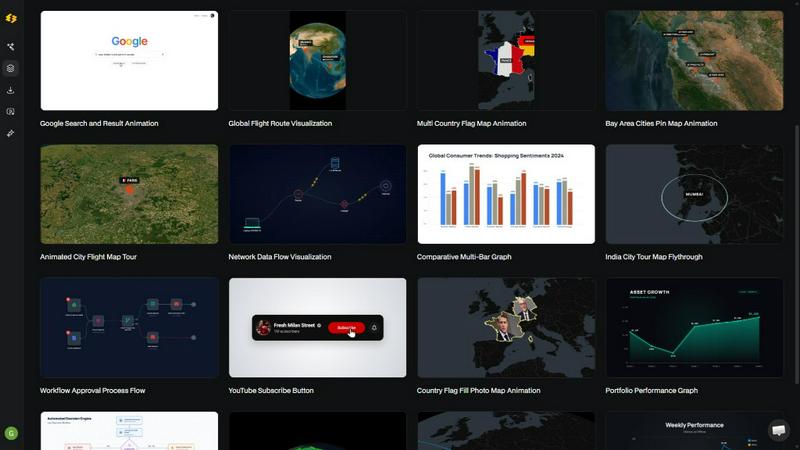
About Easymotion - AI Motion Graphic Generator
For creators, video editors, marketers, and founders, the challenge is clear: producing high-quality motion graphics and animated videos traditionally requires mastering complex, time-intensive software like Adobe After Effects, or relying on expensive freelancers. This bottleneck slows down content production, delays campaigns, and limits the ability to tell compelling visual stories. Easymotion is an AI-powered motion graphics generator and map animation platform built to solve this exact problem. It allows you to turn ideas, static images, spreadsheets, and PDFs into polished, professional animated videos directly in your browser, without any timeline editing or keyframe knowledge. Simply describe what you want in plain English, or upload your assets, and the AI handles the animation. The platform supports a vast range of motion graphics, from SaaS product promos and animated flowcharts to UI explainers and data visualizations. It also excels as a dedicated map animation maker for flight routes, location pins, and geographic storytelling. You can then refine your creation by chatting with the AI to adjust colors, pacing, labels, and layout. With a premium template library, support for all major social media aspect ratios (16:9, 9:16, 1:1, 4:5), and export options including MP4 and transparent MOV files, Easymotion empowers you to go from concept to final video in under five minutes. It is the definitive solution for anyone who needs a faster, smarter way to create reusable, high-impact video assets without the traditional pain.
Features of Easymotion - AI Motion Graphic Generator
Chat-Based Animation Creation
Stop wrestling with complex timelines and keyframes. Easymotion lets you create professional motion graphics simply by chatting with an AI. Describe your vision in plain English, like "a social media promo for my coffee shop," and the AI instantly generates a fully animated video. This feature dramatically reduces the barrier to entry, allowing anyone, regardless of technical skill, to produce stunning visuals. It transforms the creative process from a technical chore into a fluid, conversational experience, enabling rapid iteration and experimentation.
Image, Data, and Document to Animation
The platform breaks down the wall between static assets and dynamic video. You can upload a static image and let the AI bring it to life with intelligent motion. More powerfully, you can upload a CSV or XLSX file, and the AI will automatically parse your data to create beautiful, animated charts and graphs. Even PDFs can be converted into animation-ready scenes. This feature solves the core problem of repurposing existing work, turning boring spreadsheets and flat designs into engaging, scroll-stopping video content without manual re-creation.
Dedicated Map Animation Engine
Creating geographic visuals is a specialized challenge that Easymotion tackles head-on. The platform functions as a powerful map animation maker, capable of generating compelling visuals like flight routes, location pins, flag fill highlights, and globe fly-throughs. You can build multi-stop travel route maps or visualize global data with ease. This feature is a game-changer for travel content creators, data journalists, and logistics companies who need to communicate geographic stories in a visually captivating way, eliminating the need for complex GIS software or manual animation.
Smart Editing and Premium Template Library
Refining your animation is as easy as creating it. With the smart editing feature, you can continue to chat with the AI to adjust colors, pacing, labels, layout, and visual style until the video is perfect. This allows for granular control without technical complexity. Additionally, the premium template library provides a head start with proven motion graphics layouts for maps, charts, social media, and interfaces. You can remix these templates to fit your brand or campaign, ensuring a professional look while drastically cutting down production time from hours to minutes.
Use Cases of Easymotion - AI Motion Graphic Generator
Accelerated Social Media Content Production
Social media managers and content creators face constant pressure to produce a high volume of engaging video content. Easymotion solves this by enabling the rapid creation of platform-specific videos. A creator can type a prompt for a "Travel Reel" or "YouTube Milestone" video and get a finished animation in minutes. The ability to export in 9:16 for TikTok and Reels, 1:1 for Instagram, and 16:9 for YouTube means content is always optimized. This workflow allows creators to post more frequently, test different creative concepts quickly, and grow their audience without being bogged down by editing software.
Dynamic Data Storytelling for Marketers and Analysts
Static charts in reports and presentations often fail to capture audience attention. Easymotion allows data storytellers to transform boring spreadsheets into animated data visualizations that actually stop the scroll. A marketer can upload a CSV of quarterly sales data and generate an animated bar chart or line graph that explains the story behind the numbers. This capability is proven to increase engagement, as video posts get up to 5x more engagement than static images. It empowers teams to communicate insights more effectively in board meetings, social posts, and client pitches.
Streamlined Video Production for Video Editors
Professional video editors often waste hours building custom motion graphics for client projects, only to find that templates never quite fit the need. Easymotion acts as a powerful productivity multiplier, allowing editors to generate custom animations in minutes. An editor working on a corporate video can use the tool to create a polished workflow chart or a global flight visualization, then export it with a transparent background (alpha channel). This allows them to drop the animation directly into their existing editing timeline in Premiere Pro or Final Cut, working 3x faster and taking on more projects.
Independent Campaign Creation for Founders and Startups
Startups and founders often lack the budget for expensive freelancers and the time to learn complex editing software. Easymotion provides a DIY solution for creating professional product demos and social promos. A founder can use the "Interface" templates to create a UI explainer for their SaaS product or a promo video for a new feature. They can iterate on the video themselves, keeping it on brand, and ship campaigns the same day. This autonomy allows startups to build a strong social presence and drive growth without hiring a dedicated video team.
Frequently Asked Questions
What is Easymotion?
Easymotion is an AI-powered motion graphics generator that allows you to create professional animated videos simply by chatting. It is designed for creators, marketers, editors, and founders who need to produce map animations, social media videos, data visualizations, and other motion graphics quickly. The platform eliminates the need for complex software like After Effects by handling all keyframes and animation curves through AI, enabling you to go from idea to exportable video in minutes.
How does the AI motion graphics generation work?
The process is simple and conversational. First, you describe the animation you want in plain English, or you upload a static image, spreadsheet (CSV/XLSX), or PDF. The AI then generates the animation. Second, you can refine the result by using chat commands to adjust colors, timing, map styles, text, and assets. Finally, you export your completed video as an MP4 or as a video with a transparent background (alpha channel) for use in other editing software.
What types of videos can I create with Easymotion?
You can create a wide variety of motion graphics. This includes social media videos (for TikTok, Instagram, YouTube), map animations (flight routes, location pins, globe fly-throughs), data visualizations (animated bar charts, line graphs), explainer videos (UI demos, workflow charts), and promotional content (SaaS product promos, quizzes). The platform also offers a library of templates for maps, charts, social media, and interfaces that you can remix and customize.
Can I export videos for use in other editing software?
Yes. Easymotion supports exporting your finished animations as MP4 files for direct posting. For advanced workflows, you can also export videos with a transparent background (alpha channel) as MOV files. This feature is specifically designed for video editors who need to drop the generated motion graphics directly into their timeline in software like Adobe Premiere Pro or Final Cut Pro, allowing for seamless integration into larger projects.
Similar to Easymotion - AI Motion Graphic Generator
Adobe Alternatives
Explore open-source creative software by workflow, platform and development stage, with comparisons and official project links.
Angry Dance Filter
Upload one photo and get a 15-second angry dance video. Free watermarked preview, then optional one-time video packs.
AIVideoAgent
Turn text ideas or reference images into videos through conversation, with agent-assisted prompts and a choice of video models.

Easemic
Open-source Android comic & manga reader with encrypted cloud streaming and AI ad-page stripping.

LaunchIntel
Your AI agent picks relevant directories, submits your product in your browser and tracks every step. One-time purchase.

airapvideo
AI rap video generator that turns two portraits into a lip-synced vertical music video for TikTok, Reels, and Shorts.
ImageAgent
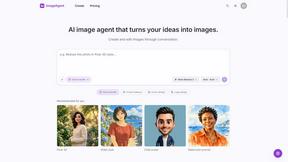
Create and edit AI images through conversation, using text or reference images and refining results in chat.

CloneWebsite
Clone any webpage pixel-perfect, export HTML/CSS/ZIP or React/Vue components.