
Open User Map
Stop struggling with complex mapping tools and let Open User Map turn your visitors into contributors with a simple, approval-based interactive.
Visit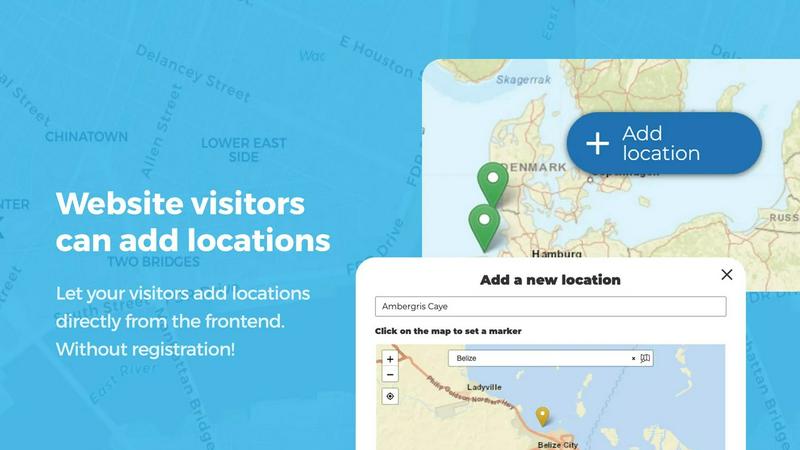
About Open User Map
Open User Map is a powerful WordPress plugin that transforms a static map into a dynamic, community-driven tool where your visitors can contribute locations, routes, and areas directly from the frontend. The core problem it solves is the tedious, time-consuming process of manually managing map data. Instead of you having to add every single point of interest, your users become contributors, enriching the map with their own knowledge and experiences. This is ideal for businesses, organizations, and community groups who want to build a collaborative, up-to-date resource without needing technical expertise. The main value proposition is simplicity: you can create an interactive, user-submitted map with absolutely no coding, no need for a Google Maps API key, and no complex setup. It is a complete, ready-to-use solution that includes frontend submissions, an approval workflow to maintain quality control, and extensive customization options. With over 15,000 active installs and a perfect 5-star rating, it is a trusted and highly regarded tool in the WordPress ecosystem. Whether you are building a local business directory, a community event map, a travel guide, or a campus navigation tool, Open User Map equips you with the features to create a robust, engaging, and accurate map that grows with your audience.
Features of Open User Map
Frontend Location Submissions and Editing
Enable your website visitors to add and edit locations directly on your map with a simple click. Users can place a marker, fill out a submission form, and submit their entry for your review. This feature solves the problem of keeping your map current and comprehensive without manual data entry. The editing capability allows users to update their own existing locations, ensuring the map always reflects the most current information, from business hours to new amenities.
Categories and Filtering with Custom Icons
Effortlessly organize your map by grouping locations into marker categories, each with its own unique icon. This solves the challenge of a cluttered, hard-to-navigate map. Visitors can filter the map to see only specific types of locations, such as restaurants, parks, or parking lots. For added flexibility, a single location can belong to multiple categories, ensuring that all relevant attributes are represented and easily discoverable by users.
Lines and Areas for Routes and Zones
Go beyond simple point markers by adding routes, paths, zones, and regions directly to your map. This feature solves the need to visualize non-point data like hiking trails, service areas, event grounds, or construction zones. Distances and area sizes are calculated automatically, so routes and polygons include helpful measurements right out of the box. This makes your map far more informative and useful for visitors trying to understand spatial relationships.
Custom Image as Map
Transform any uploaded image into a fully interactive map, solving the problem of mapping non-geographic spaces. Whether it is a floor plan, event layout, game map, product diagram, or seating chart, you can allow users to place markers directly on top of it. This feature retains all the powerful functionality of a traditional map, including location submissions, custom fields, and filtering, creating an engaging, clickable experience tailored exactly to your use case.
Use Cases of Open User Map
Local Business and Service Directories
Build a community-driven directory where residents can add their favorite local businesses, from coffee shops to mechanics. Visitors submit locations with details like hours, contact info, and categories. The approval workflow ensures only accurate, high-quality entries go live. This solves the problem of maintaining an up-to-date local business list, as the community itself keeps the map relevant and comprehensive.
Community Event and Festival Maps
Create an interactive map for a city-wide festival, farmers market, or neighborhood block party. Organizers and attendees can add vendor booths, stages, restrooms, and parking areas. Using the custom image feature, you can overlay markers directly on an event site plan. This solves the logistical challenge of helping thousands of visitors navigate a complex event space with ease.
Travel and Tourism Guides
Empower your travel blog or tourism site with a map where users can share hidden gems, scenic viewpoints, and recommended hiking trails. The Lines and Areas feature is perfect for highlighting popular walking routes or national park boundaries. This solves the problem of creating a comprehensive, ever-expanding travel guide that leverages the collective knowledge of your audience, making it a go-to resource for explorers.
Campus and Facility Navigation
For universities, hospitals, or large corporate campuses, create a map where students, patients, or employees can add and update points of interest like building entrances, department offices, parking lots, and dining halls. The custom fields allow you to collect specific information like room numbers or hours of operation. This solves the challenge of providing clear, user-maintained navigation in a complex physical environment.
Frequently Asked Questions
Do I need a Google Maps API key to use Open User Map?
No, you do not need a Google Maps API key. Open User Map is designed to work out of the box without any external API keys or complex setup. This eliminates a common point of friction and cost for website owners, allowing you to create an interactive map in minutes.
Can I approve or reject user-submitted locations before they appear on the map?
Yes, Open User Map includes a built-in approval workflow. When a visitor submits a new location, it is held in a moderation queue for your review. You can then approve, reject, or edit the submission before it goes live on the map, giving you full control over the quality and accuracy of the content.
Is the free version of Open User Map fully functional?
Yes, the free version available on WordPress.org is fully functional and allows you to create a user-submitted map with core features. It includes frontend submissions, approval workflows, and marker categories. For advanced features like Lines and Areas, Custom Image as Map, and Upvotes, you can try the PRO version with a free 7-day trial.
How can I customize the appearance of my map markers?
You can easily customize your map markers by creating different marker categories and assigning unique icons to each category. This allows you to visually distinguish between different types of locations, such as restaurants, parks, or hotels. Each location can also belong to multiple categories for flexible and accurate representation.
Pricing of Open User Map
Open User Map offers a free version available on WordPress.org and a PRO version with advanced features. You can try all PRO features free for 7 days with no credit card required. The trial does not turn into a paid subscription automatically. For specific pricing of the PRO version, please visit the Open User Map website.
Similar to Open User Map

Kovnerov
Personal site of Vlad Kovnerov: analytics dashboards, web development, Telegram bots and browser tools for sellers and subscription tracking.

Built2WinWeb AI Strength Scanner
Custom PHP websites, AI Indexing Pack ($599 one‑time), and WebAgentScan SaaS ($9/mo). MCP, A2A, llms.txt, full ownership.
Pterocos
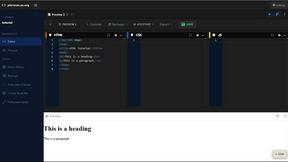
Pterocos is a free online HTML editor that lets you code in real-time with instant AI assistance, no installation required.

Webleadr
Webleadr effortlessly connects you to businesses without websites, enabling you to find and contact web design leads in just a few clicks.

Idearium
Idearium builds memorable websites that solve your visibility and growth challenges.

FilexHost
Effortlessly host and share any file in seconds with FilexHost's simple drag-and-drop interface and secure links.