
TaleHug AI Story Generator for Kids
Parents struggle to turn a child's messy ideas into stories, so TaleHug transforms voice, drawing, or text into a safe, illustrated 4-10 page AI.
Visit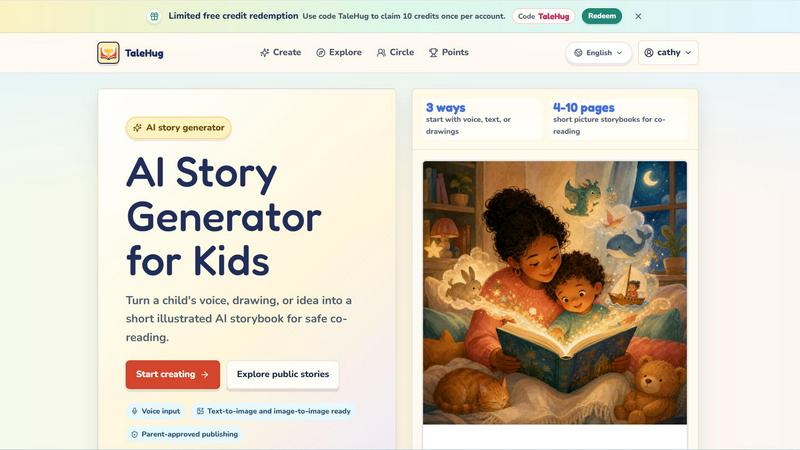
About TaleHug AI Story Generator for Kids
Every parent knows the struggle: a child brimming with imagination wants to tell a story, but translating that spark into a complete, illustrated book feels overwhelming. TaleHug AI Story Generator for Kids solves this exact challenge. It is an AI-powered storytelling platform designed specifically for children aged 3 to 6, turning a simple voice recording, a scribbled drawing, or a basic idea into a short, illustrated picture storybook in minutes. The core problem it addresses is the gap between a child's creative impulse and the technical or literacy skills needed to produce a finished story. TaleHug bridges this gap by acting as a creative co-pilot. A child can speak their idea into the tool, upload a drawing they made, or select a parent-approved prompt. The AI then generates a 4 to 10-page storybook, complete with vibrant, colorful illustrations and a single, simple sentence per page. This makes it perfect for co-reading with parents or for early readers to explore on their own. The platform is built with safety and privacy at its core. All drafts are private by default, and any publishing to a wider circle or the public gallery requires explicit adult approval. There are no public comments, no collection of full names, addresses, or school details, and safe display names are used. TaleHug is not just a toy; it is a tool for building literacy, confidence, and a love for storytelling, all within a secure, parent-guided environment. It transforms the challenge of "I don't know how to write" into the joy of "Look what I created."
Features of TaleHug AI Story Generator for Kids
Three Creative Starting Points: Voice, Text, or Drawing
The biggest barrier for young children is expressing a complex idea. TaleHug removes this barrier by offering three distinct ways to start a story. A child can simply speak their idea into the microphone, and the AI will transcribe and expand it into a narrative. Alternatively, they can type a short sentence or describe a character. Most uniquely, they can upload a drawing they made on paper or a digital device. The AI analyzes the drawing's shapes, colors, and subjects to generate a story around it. This flexibility ensures that no matter a child's preferred mode of expression, their creativity is captured and celebrated.
AI-Generated Picture Storybooks with Parent-Approved Publishing
Once an idea is submitted, the AI generates a complete 4 to 10-page picture storybook. Each page features a strong, colorful illustration generated from the child's prompt, paired with a single, short sentence that is easy for a young child to understand or for a parent to read aloud. The entire process is designed for "co-reading," where the adult and child share the experience. Crucially, every story begins as a private draft. Before a story can be shared with a trusted "Circle" of family and friends or published to the public gallery, a parent must review and approve it. This built-in safety layer ensures that sharing is always intentional and supervised.
Three Visibility Modes: Private, Circle, and Public
TaleHug gives families granular control over who sees their creations. The default setting is "Private," meaning only the child and the parent account can view the story. This is perfect for drafts or personal projects. The "Circle" mode allows a parent to share the story with a curated list of family members and close friends, creating a safe space for positive feedback and encouragement. The "Public" mode, which requires explicit parent approval, publishes the story to the TaleHug public gallery. This allows children to share their work with a wider, moderated community, but only after a parent has reviewed and confirmed the content is appropriate for public view.
Safety-First Design with No Public Comments and Minimal Data
TaleHug is built from the ground up for child safety and privacy. The platform does not allow public comments on any stories, eliminating the risk of negative or inappropriate feedback. It uses safe display names instead of real full names, and does not collect school names, addresses, or any other personal contact details from children. The public gallery features only approved examples. This approach solves the common parental anxiety about online interaction. Children can focus on creating and sharing their stories without exposure to harmful social dynamics, while parents have complete peace of mind knowing their child's personal information is protected by design.
Use Cases of TaleHug AI Story Generator for Kids
Bedtime Story Creation for Reluctant Readers
Many children resist traditional bedtime stories because they feel passive or the stories are not about what interests them. TaleHug turns this around by making the child the author. A parent can ask, "What kind of story do you want tonight?" The child can then speak a simple idea, like "a brave bunny and a lost star," and within moments, a personalized 4-page picture book is generated. This makes the child an active participant in the bedtime routine. They are more engaged because the story is uniquely theirs, and the simple sentences are perfect for early reading practice or for the parent to read aloud. It transforms a potential nightly struggle into a collaborative, creative bonding experience.
Kindergarten and Preschool Classroom Story Prompts
Teachers of young children often need quick, engaging, and visual story prompts to spark group discussions or individual writing exercises. TaleHug provides a perfect solution. A teacher can use a prompt like "First school morning" or "Sharing the red truck" to generate a storybook for the whole class to see. The colorful illustrations capture attention, and the simple text is accessible for emerging readers. Children can then be encouraged to create their own versions, starting with a drawing or a spoken idea. This use case solves the problem of finding developmentally appropriate, visually stimulating material that aligns with social-emotional learning goals, such as taking turns or managing first-day jitters.
Overcoming Writer's Block for Young Creatives
A common challenge for children aged 3 to 6 is the frustration of having a great idea but not knowing how to turn it into a full story. The blank page can be intimidating. TaleHug directly addresses this by providing a structured but flexible path to completion. A child might draw a picture of a "moon rabbit." Instead of feeling stuck, they upload the drawing to TaleHug. The AI analyzes the image and generates a gentle bedtime story about the rabbit's adventures. The child then has a finished product they can be proud of. This process builds confidence and demonstrates that their initial idea has value, encouraging them to keep creating and exploring their imagination.
Family Storytelling and Shared Creative Projects
TaleHug can become a central tool for family bonding. Instead of passive screen time, families can gather and create a story together. One child might provide the voice input for a character, while another describes the setting. A parent can help type a key sentence. The AI then weaves these inputs into a cohesive storybook that the whole family contributed to. This solves the challenge of finding interactive, multi-player activities that engage different ages and skill levels. The resulting story becomes a cherished keepsake, a digital artifact of a shared family moment. It encourages communication, collaboration, and a shared sense of accomplishment, turning story creation into a family tradition.
Frequently Asked Questions
How does TaleHug ensure my child's safety and privacy?
Safety is the core design principle of TaleHug. All story drafts are private by default. Before any story can be shared with a Circle or published publicly, a parent must review and approve it. The platform does not allow public comments on stories, eliminating the risk of negative social interaction. It uses safe display names instead of real full names, and it does not collect school names, addresses, or any other personal contact details from children. The public gallery only features pre-approved examples from the team. This layered approach ensures that children can create freely within a secure, parent-supervised environment.
Can my child use TaleHug if they cannot read or write yet?
Absolutely. TaleHug is designed specifically for children aged 3 to 6, many of whom are pre-literate or just beginning to read. The primary input method is voice. A child can simply speak their story idea into the microphone, and the AI will transcribe and expand it. They can also upload a drawing they made, and the AI will create a story based on the visual elements. The generated output uses only one short sentence per page, making it perfect for co-reading with a parent or for an early reader to sound out. No advanced reading or writing skills are required to start creating.
How many pages are in a typical TaleHug storybook?
Each storybook generated by TaleHug is designed to be a short, focused picture book, ideal for the attention span of a young child. The standard output ranges from 4 to 10 pages. This length is intentional. It is long enough to tell a complete, satisfying story with a beginning, middle, and end, but short enough to be read in a single sitting, typically during a bedtime routine or a short classroom activity. The concise format also makes the creation process feel quick and rewarding for the child, providing a finished product without overwhelming them.
How do I get started with TaleHug and redeem free credits?
Getting started is simple. First, visit the TaleHug website and log in or create an account. Once logged in, you can start creating immediately. To redeem the limited free credits, use the code "TaleHug" on the redemption page within your account. This code will claim 10 credits, which can be used to generate your first storybooks. Each credit typically allows you to create one story. After exploring the tool, you can choose to purchase additional credits to continue creating. The platform offers a clear "Start creating" button and a tutorial video to guide you through the first story from idea to finished book.
Explore more in this category:
Similar to TaleHug AI Story Generator for Kids

Dot & Dash
Learn Morse code by keying it on a machine you can press. Write messages, turn Morse into text and back, and key Morse in any app on your Mac.

Bloom
An adaptive AI tutor that turns topics or your materials into courses, lessons, and answers tailored to how you learn.
LiveGameShow
A game show board for the TV, with real buzzers on every player's phone

LivePartyGames
Most likely to, would you rather and more: the TV shows it, every phone votes

LivePoll
Create a free live poll, share a QR code, and watch the votes come in live.
PracticeNetworking
Master networking with interactive, hands-on practice directly in your browser. Solve real terminal challenges, debug routes, and build core IT skills

HookAds
Free ad creative hub: 1,750+ prompts behind viral AI ads, 118 hook frameworks, teardowns, swipe files and 27 free AI tools.

SaaSHunter
Compare social media scheduling, content creation and monetization tools with verified pricing and side-by-side comparisons.