


Emailyy
Free email tools for signatures, subject lines, HTML previews, word counts, and email headers. Browser-based, simple to use, and no signup required.

Todowing
Chrome extension that nests Todoist sub-tasks inline in Today, Upcoming, Filters and Labels, where Todoist shows them flat.

Uniclip
Clip pages, take full-page screenshots and batch-capture list data to Notion, Feishu, Obsidian, Markdown, CSV or JSON.

TroveKey
Search tabs, Chrome bookmarks and history, run browser commands, and save webpages and social posts locally—no account.

Foreman
See every app and what it's using in plain English, and end or slow down the one that's hogging your Mac.
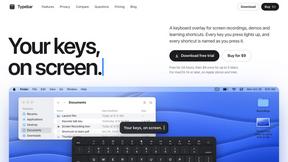
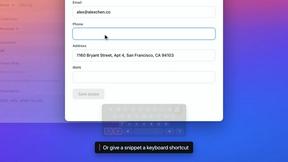
Typebar
Every key you press lights up on an on-screen keyboard, and each shortcut is named. For screen recordings, demos and learning shortcuts.

Notchpals
Little characters peek out of your Mac's notch to remind you to drink water, eat, sit up and get to bed. Quiet during calls. $4.99 once.

LightScreen
Free fullscreen light screen tool online. Turn any display into a flashlight, ambient light, or solid-color screen. No download or sign-up.



LevCharity
Fundraising platform for nonprofits combining donations, campaigns, donor CRM, events, communications, and reporting.

Kovnerov
Personal site of Vlad Kovnerov: analytics dashboards, web development, Telegram bots and browser tools for sellers and subscription tracking.

Everywhere
Fast file search for the Mac. Results as you type, files inside Mail and Photos, works with Wi-Fi off. $19 once.

Basalt
Eighteen PDF tools in one native Mac window: merge, split, compress, OCR, Bates numbering, forms, signing and redaction. Offline. $29 once.

Voice Keyboard Pro
Hold a key, say what you mean, let go. Clean, punctuated text lands at the cursor in any app on your Mac or iPhone.

Mainspring
Mainspring turns the settings macOS hides into 90+ one-click, fully reversible power-ups for Finder, Dock, screenshots and more. $29 once.

Inkling
Catch a thought without leaving what you are doing. Notes, checklists and a little companion in your Mac's notch. $12 once.

Context Board
Context Board brings your numbers, docs, clients, content and day into one workspace that Claude and Codex can read and update.
About Cosy Alternatives
Cosy is a Slack-native productivity tool designed to automate and enhance community management. It focuses on automating the member onboarding process, facilitating connections between members, and providing a searchable directory, all within Slack to save managers significant time and boost engagement. Users often explore alternatives to Cosy for several reasons. Budget constraints can lead to a search for more affordable or freemium options. Some communities may need features beyond Slack integration, like multi-platform support or advanced analytics. Others might seek simpler, more basic tools if Cosy's automation feels excessive for their smaller group's needs. When evaluating an alternative, consider your core needs. Prioritize tools that integrate seamlessly with your primary communication platform, whether it's Slack or another service. Assess the level of automation you truly require for onboarding and introductions, and ensure any potential solution scales appropriately with your community's size and growth trajectory.
FAQs about Cosy Alternatives
What is Cosy?
Cosy is a tool for Slack that automates member onboarding and introductions to save time and increase community engagement.
Who is Cosy for?
Cosy is designed for community managers, team leaders, and organizations that want to foster a vibrant and engaged community on Slack.
What are the main features of Cosy?
Its main features include automating welcome message sequences, connecting members via automated introductions, and providing a searchable member directory within Slack.
Why choose Cosy?
Choose Cosy to save hours of manual effort on community management tasks and to focus on nurturing relationships within your Slack community.